Solved Limited access on wireless network

shib

New member
Local time
6:32 PM
Messages
29
Hi,
My PC has crashed yesterday and since then i can't connect to any wireless netwrok.
i am sure it's my pc and not the network itself because i can connect from my phone.
when i open the troubleshoot manager it says:
"the dependency service or group failed to start"
i've googled it but i couldn't find a solution;
sfc /scannow - returns ok (as they said to do in the forum)
the wireless card detects the networks but when i try to connect i get Limited access and i'm not really connected to my router so its not really connected, so i think it's a software issue, maybe a driver fault, but the driver seems to be working well according to the drivers manager

any suggestions? thanks!
 

My Computer

Computer Manufacturer/Model Number
HP G62
OS
Windows 7 Home Premium x64
CPU
Intel Core i3
Motherboard
Intel
Goto command prompt and type
Code:
ipconfig>info.txt
route print>>info.txt

post file info.txt
 

My Computer

Computer type
Laptop
Computer Manufacturer/Model Number
ACER ASPIRE 5742G
OS
Microsoft Windows 7 Home Premium 64-bits 7601 Multiprocessor Free Service Pack 1
CPU
Intel(R) Core(TM) i3 CPU M 370 @ 2.40GHz
Motherboard
Acer Aspire 5742G
Memory
4,00 GB
Graphics Card(s)
ATI Mobility Radeon HD 5400 Series
Sound Card
(1) AMD High Definition Audio Device (2) Realtek High Defi
Screen Resolution
1366 x 768 x 32 bits (4294967296 colors) @ 60 Hz
Hard Drives
WDC WD5000BEVT-22ZAT0
Look in eventlog just after you established connection. You see any relevant errors to "the dependency service or group failed to start"? Or something alike? If so what service failed to start?
 

My Computer

Computer type
Laptop
Computer Manufacturer/Model Number
ACER ASPIRE 5742G
OS
Microsoft Windows 7 Home Premium 64-bits 7601 Multiprocessor Free Service Pack 1
CPU
Intel(R) Core(TM) i3 CPU M 370 @ 2.40GHz
Motherboard
Acer Aspire 5742G
Memory
4,00 GB
Graphics Card(s)
ATI Mobility Radeon HD 5400 Series
Sound Card
(1) AMD High Definition Audio Device (2) Realtek High Defi
Screen Resolution
1366 x 768 x 32 bits (4294967296 colors) @ 60 Hz
Hard Drives
WDC WD5000BEVT-22ZAT0
In command prompt:
Code:
ping 173.194.78.105
sent 4, received 4, lost 0?
 

My Computer

Computer type
Laptop
Computer Manufacturer/Model Number
ACER ASPIRE 5742G
OS
Microsoft Windows 7 Home Premium 64-bits 7601 Multiprocessor Free Service Pack 1
CPU
Intel(R) Core(TM) i3 CPU M 370 @ 2.40GHz
Motherboard
Acer Aspire 5742G
Memory
4,00 GB
Graphics Card(s)
ATI Mobility Radeon HD 5400 Series
Sound Card
(1) AMD High Definition Audio Device (2) Realtek High Defi
Screen Resolution
1366 x 768 x 32 bits (4294967296 colors) @ 60 Hz
Hard Drives
WDC WD5000BEVT-22ZAT0
ipconfig

Windows IP Configuration


Ethernet adapter Local Area Connection:

Media State . . . . . . . . . . . : Media disconnected
Connection-specific DNS Suffix . :

Wireless LAN adapter Wireless Network Connection:

Connection-specific DNS Suffix . :
Link-local IPv6 Address . . . . . : fe80::7c4f:28ed:4c75:e8e4%11
Autoconfiguration IPv4 Address. . : 169.254.232.228
Subnet Mask . . . . . . . . . . . : 255.255.0.0
Default Gateway . . . . . . . . . :

Wireless LAN adapter Wireless Network Connection 2:

Media State . . . . . . . . . . . : Media disconnected
Connection-specific DNS Suffix . :

Tunnel adapter Teredo Tunneling Pseudo-Interface:

Media State . . . . . . . . . . . : Media disconnected
Connection-specific DNS Suffix . :

Tunnel adapter Local Area Connection* 11:

Media State . . . . . . . . . . . : Media disconnected
Connection-specific DNS Suffix . :
 

My Computer

Computer Manufacturer/Model Number
HP G62
OS
Windows 7 Home Premium x64
CPU
Intel Core i3
Motherboard
Intel
route

===========================================================================
Interface List
10...c8 0a a9 0a 1b 5e ......Realtek PCIe FE Family Controller
1...........................Software Loopback Interface 1
11...c4 17 fe 9e 5e b7 ......Qualcomm Atheros AR9285 802.11b/g/n WiFi Adapter
18...26 17 fe 9e 5e b7 ......Microsoft Virtual WiFi Miniport Adapter
12...00 00 00 00 00 00 00 e0 Teredo Tunneling Pseudo-Interface
33...00 00 00 00 00 00 00 e0 Microsoft ISATAP Adapter #4
===========================================================================

IPv4 Route Table
===========================================================================
Active Routes:
Network Destination Netmask Gateway Interface Metric
127.0.0.0 255.0.0.0 On-link 127.0.0.1 306
127.0.0.1 255.255.255.255 On-link 127.0.0.1 306
127.255.255.255 255.255.255.255 On-link 127.0.0.1 306
169.254.0.0 255.255.0.0 On-link 169.254.232.228 281
169.254.232.228 255.255.255.255 On-link 169.254.232.228 281
169.254.255.255 255.255.255.255 On-link 169.254.232.228 281
224.0.0.0 240.0.0.0 On-link 127.0.0.1 306
224.0.0.0 240.0.0.0 On-link 169.254.232.228 281
255.255.255.255 255.255.255.255 On-link 127.0.0.1 306
255.255.255.255 255.255.255.255 On-link 169.254.232.228 281
===========================================================================
Persistent Routes:
None

IPv6 Route Table
===========================================================================
Active Routes:
If Metric Network Destination Gateway
1 306 ::1/128 On-link
11 281 fe80::/64 On-link
11 281 fe80::7c4f:28ed:4c75:e8e4/128
On-link
1 306 ff00::/8 On-link
11 281 ff00::/8 On-link
===========================================================================
Persistent Routes:
None
 

My Computer

Computer Manufacturer/Model Number
HP G62
OS
Windows 7 Home Premium x64
CPU
Intel Core i3
Motherboard
Intel
ping

Pinging 173.194.78.105 with 32 bytes of data:
PING: transmit failed. General failure.

Ping statistics for 173.194.78.105:
Packets: Sent = 4, Received = 0, Lost = 4 (100% loss),
 

My Computer

Computer Manufacturer/Model Number
HP G62
OS
Windows 7 Home Premium x64
CPU
Intel Core i3
Motherboard
Intel
Look in eventlog just after you established connection. You see any relevant errors to "the dependency service or group failed to start"? Or something alike? If so what service failed to start?

this is the only error i see.. no more information is supplied
I have no idea what service failed.. how can i find out?
 

My Computer

Computer Manufacturer/Model Number
HP G62
OS
Windows 7 Home Premium x64
CPU
Intel Core i3
Motherboard
Intel
Look in eventlog just after you established connection. You see any relevant errors to "the dependency service or group failed to start"? Or something alike? If so what service failed to start?

this is the only error i see.. no more information is supplied
I have no idea what service failed.. how can i find out?
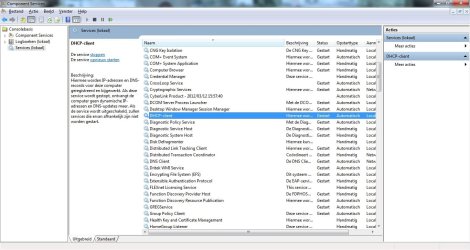
Driver is fine and tcp/ip stack as well. Only problem so far ... you get a 169.254 automatic address which means the dhcp server (is router) doesn't give you an ip address. Check DHCP-client service (see my screenshot). Is it started "automatically"? Is it stopped now? Try to start manually there
 

Attachments

  • dhcp.jpg
    dhcp.jpg
    278.7 KB · Views: 128

My Computer

Computer type
Laptop
Computer Manufacturer/Model Number
ACER ASPIRE 5742G
OS
Microsoft Windows 7 Home Premium 64-bits 7601 Multiprocessor Free Service Pack 1
CPU
Intel(R) Core(TM) i3 CPU M 370 @ 2.40GHz
Motherboard
Acer Aspire 5742G
Memory
4,00 GB
Graphics Card(s)
ATI Mobility Radeon HD 5400 Series
Sound Card
(1) AMD High Definition Audio Device (2) Realtek High Defi
Screen Resolution
1366 x 768 x 32 bits (4294967296 colors) @ 60 Hz
Hard Drives
WDC WD5000BEVT-22ZAT0
Look in eventlog just after you established connection. You see any relevant errors to "the dependency service or group failed to start"? Or something alike? If so what service failed to start?

this is the only error i see.. no more information is supplied
I have no idea what service failed.. how can i find out?
Driver is fine and tcp/ip stack as well. Only problem so far ... you get a 169.254 automatic address which means the dhcp server (is router) doesn't give you an ip address. Check DHCP-client service (see my screenshot). Is it started "automatically"? Is it stopped now? Try to start manually there
If DHCP-client service can't be started... is "Network Store Interface Service" started? If not try to start it. Is it set to startup type "automatic"?
 

My Computer

Computer type
Laptop
Computer Manufacturer/Model Number
ACER ASPIRE 5742G
OS
Microsoft Windows 7 Home Premium 64-bits 7601 Multiprocessor Free Service Pack 1
CPU
Intel(R) Core(TM) i3 CPU M 370 @ 2.40GHz
Motherboard
Acer Aspire 5742G
Memory
4,00 GB
Graphics Card(s)
ATI Mobility Radeon HD 5400 Series
Sound Card
(1) AMD High Definition Audio Device (2) Realtek High Defi
Screen Resolution
1366 x 768 x 32 bits (4294967296 colors) @ 60 Hz
Hard Drives
WDC WD5000BEVT-22ZAT0
DHCP Client

thanks for your quick response!

The DHCP client appears to be stopped, when i try to start it
it gives me an error:
Windows could not start the DHCP Client service on Local Computer

Error 5: Access is denied


I should mention i have administrator rights in my computer
i've also tried to open another admin account and start it from there but no luck
any ideas? thanks
 

My Computer

Computer Manufacturer/Model Number
HP G62
OS
Windows 7 Home Premium x64
CPU
Intel Core i3
Motherboard
Intel
DHCP Client

thanks for your quick response,

DHCP client cannot be started i get error:
"Error 5: Access is denied"
even though i have admin rights on my pc and i am logged on admin user

And network store is started, didnt have to start it.
 

My Computer

Computer Manufacturer/Model Number
HP G62
OS
Windows 7 Home Premium x64
CPU
Intel Core i3
Motherboard
Intel
is "Network Store Interface Service" started? If not try to start it. Is it set to startup type "automatic"?
is "DNS server" service started? Can you stop/start that service?
 

My Computer

Computer type
Laptop
Computer Manufacturer/Model Number
ACER ASPIRE 5742G
OS
Microsoft Windows 7 Home Premium 64-bits 7601 Multiprocessor Free Service Pack 1
CPU
Intel(R) Core(TM) i3 CPU M 370 @ 2.40GHz
Motherboard
Acer Aspire 5742G
Memory
4,00 GB
Graphics Card(s)
ATI Mobility Radeon HD 5400 Series
Sound Card
(1) AMD High Definition Audio Device (2) Realtek High Defi
Screen Resolution
1366 x 768 x 32 bits (4294967296 colors) @ 60 Hz
Hard Drives
WDC WD5000BEVT-22ZAT0
Can you stop/start service "Windows update"? Just to know if you can start any service at all
 

My Computer

Computer type
Laptop
Computer Manufacturer/Model Number
ACER ASPIRE 5742G
OS
Microsoft Windows 7 Home Premium 64-bits 7601 Multiprocessor Free Service Pack 1
CPU
Intel(R) Core(TM) i3 CPU M 370 @ 2.40GHz
Motherboard
Acer Aspire 5742G
Memory
4,00 GB
Graphics Card(s)
ATI Mobility Radeon HD 5400 Series
Sound Card
(1) AMD High Definition Audio Device (2) Realtek High Defi
Screen Resolution
1366 x 768 x 32 bits (4294967296 colors) @ 60 Hz
Hard Drives
WDC WD5000BEVT-22ZAT0
windows update service

i did stop and restart the windows update service it works fine
 

My Computer

Computer Manufacturer/Model Number
HP G62
OS
Windows 7 Home Premium x64
CPU
Intel Core i3
Motherboard
Intel
is "Network Store Interface Service" started? If not try to start it. Is it set to startup type "automatic"?
is "DNS server" service started? Can you stop/start that service?
Try those as well
 

My Computer

Computer type
Laptop
Computer Manufacturer/Model Number
ACER ASPIRE 5742G
OS
Microsoft Windows 7 Home Premium 64-bits 7601 Multiprocessor Free Service Pack 1
CPU
Intel(R) Core(TM) i3 CPU M 370 @ 2.40GHz
Motherboard
Acer Aspire 5742G
Memory
4,00 GB
Graphics Card(s)
ATI Mobility Radeon HD 5400 Series
Sound Card
(1) AMD High Definition Audio Device (2) Realtek High Defi
Screen Resolution
1366 x 768 x 32 bits (4294967296 colors) @ 60 Hz
Hard Drives
WDC WD5000BEVT-22ZAT0
  1. Click Start, click Run, type regedit and click OK
  2. Navigate to the following key: HKEY_LOCAL_MACHINE\SYSTEM\CurrentControlSet\Services\Dhcp
  3. Right click the key DHCP and click Permissions.
  4. Is Network Service listed, maybe you have to scroll? If so click Advanced
  5. Double click on Network Service. Now you see its permissions.
Post that screenshot

Do the same for key HKEY_LOCAL_MACHINE\SYSTEM\CurrentControlSet\Services\TcpIp
post screenshot
 

My Computer

Computer type
Laptop
Computer Manufacturer/Model Number
ACER ASPIRE 5742G
OS
Microsoft Windows 7 Home Premium 64-bits 7601 Multiprocessor Free Service Pack 1
CPU
Intel(R) Core(TM) i3 CPU M 370 @ 2.40GHz
Motherboard
Acer Aspire 5742G
Memory
4,00 GB
Graphics Card(s)
ATI Mobility Radeon HD 5400 Series
Sound Card
(1) AMD High Definition Audio Device (2) Realtek High Defi
Screen Resolution
1366 x 768 x 32 bits (4294967296 colors) @ 60 Hz
Hard Drives
WDC WD5000BEVT-22ZAT0
services

network store was restarted without a problem, thought i had to close Network connections manually to restart it, now both are Started again

DNS Client was restarted without a problem,

Still i can't start DHCP client service

i have no idea what to do :o
 

My Computer

Computer Manufacturer/Model Number
HP G62
OS
Windows 7 Home Premium x64
CPU
Intel Core i3
Motherboard
Intel
  1. Click Start, click Run, type regedit and click OK
  2. Navigate to the following key: HKEY_LOCAL_MACHINE\SYSTEM\CurrentControlSet\Services\Dhcp
  3. Right click the key DHCP and click Permissions.
  4. Is Network Service listed, maybe you have to scroll? If so click Advanced
  5. Double click on Network Service. Now you see its permissions.
Post that screenshot

Do the same for key HKEY_LOCAL_MACHINE\SYSTEM\CurrentControlSet\Services\TcpIp
post screenshot
These registry keys have most likely wrong permissions! Post the permissions
 

My Computer

Computer type
Laptop
Computer Manufacturer/Model Number
ACER ASPIRE 5742G
OS
Microsoft Windows 7 Home Premium 64-bits 7601 Multiprocessor Free Service Pack 1
CPU
Intel(R) Core(TM) i3 CPU M 370 @ 2.40GHz
Motherboard
Acer Aspire 5742G
Memory
4,00 GB
Graphics Card(s)
ATI Mobility Radeon HD 5400 Series
Sound Card
(1) AMD High Definition Audio Device (2) Realtek High Defi
Screen Resolution
1366 x 768 x 32 bits (4294967296 colors) @ 60 Hz
Hard Drives
WDC WD5000BEVT-22ZAT0
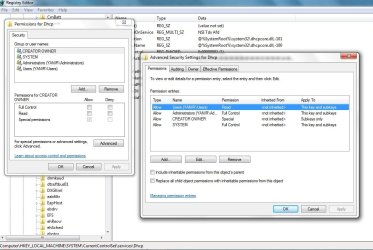
here's the screen shot for ...\dhcp in regedit
i couldn't find the network service you were referring to
 

Attachments

  • regedit.jpg
    regedit.jpg
    209.3 KB · Views: 100

My Computer

Computer Manufacturer/Model Number
HP G62
OS
Windows 7 Home Premium x64
CPU
Intel Core i3
Motherboard
Intel
Back
Top