
Limited access to home wifi

Piratice

New member
Local time
4:52 PM
Messages
8
Hi,

so I came home from college for break and my laptop connected fine to my house WiFi on Thursday but starting last night (I didn't use it on Friday or Saturday) my laptop has "limited access" to my house WiFi. No internet access at all.

I went to Starbuck's earlier and it connected without any issues. My brother claims that it's my college's (unprotected) WiFi that changed my settings so it won't let me connect to the protected house WiFi but it worked fine with the house WiFi on Thursday night.

Any help at all would be greatly appreciated :)
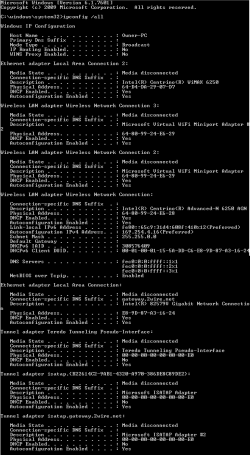
ipconfig.png
 

My Computer My Computer

At a glance

Windows 7 Home Premium 64bit
OS
Windows 7 Home Premium 64bit
Try removing that Wi-Fi connection, reboot, then let PC try to reestablish the connection.
 

My Computer My Computer

At a glance

Windows 7 Ultimate 64 bitAMD Phenom II X4 965 Black EditionGSkill 4 X 2 GB PC 8500XFX Radeon HD 6790 D
Computer Manufacturer/Model Number
Custom built
OS
Windows 7 Ultimate 64 bit
CPU
AMD Phenom II X4 965 Black Edition
Motherboard
Gigabyte GA-MA790X-DS4
Memory
GSkill 4 X 2 GB PC 8500
Graphics Card(s)
XFX Radeon HD 6790 D
Sound Card
On board RealTek HD
Monitor(s) Displays
Dual monitors:Samsung SyncMaster S20B300
Screen Resolution
1600 X 900
Hard Drives
Seagate Barracuda 1TB (primary)
Seagate Barracuda 2 X 320 GB
PSU
Ultra X4 750 watt fully modular
Case
Thermaltake Overseer RX 1 full tower
Cooling
Core-Contact 92 mm CPU Cooler
Keyboard
Logitech G510
Mouse
Razor DeathAdder
Internet Speed
50/5 Mbps UL/DL
Other Info
Optical: Super Muliti DVD burner w/lightscribe, Hauppauge WinTV HVR-1800
That didn't work, sorry.

Any other ideas, please? :o
 

My Computer My Computer

At a glance

Windows 7 Home Premium 64bit
OS
Windows 7 Home Premium 64bit
Can any other pcs get on to your home wifi? If not, I would reset your wireless router, then reset it up... Also reboot your modem... If its just you that can't get on to the wifi, try removing the wireless profile to your home wifi and reset it up.... If that doesn't work I would still try and reset your wifi at home and set it up again.... Just some ideas to try...

Good luck...
 

My Computer My Computer

At a glance

Win7 64bit Pro
OS
Win7 64bit Pro
No its only my laptop and iPhone having trouble accessing the WiFi.
 

My Computer My Computer

At a glance

Windows 7 Home Premium 64bit
OS
Windows 7 Home Premium 64bit
Run the wifi trouble shooter by right clicking internet connection in the notification area...icon in bottom right of taskbar.
 

My Computer My Computer

At a glance

Windows 7 Ultimate 64 bitAMD Phenom II X4 965 Black EditionGSkill 4 X 2 GB PC 8500XFX Radeon HD 6790 D
Computer Manufacturer/Model Number
Custom built
OS
Windows 7 Ultimate 64 bit
CPU
AMD Phenom II X4 965 Black Edition
Motherboard
Gigabyte GA-MA790X-DS4
Memory
GSkill 4 X 2 GB PC 8500
Graphics Card(s)
XFX Radeon HD 6790 D
Sound Card
On board RealTek HD
Monitor(s) Displays
Dual monitors:Samsung SyncMaster S20B300
Screen Resolution
1600 X 900
Hard Drives
Seagate Barracuda 1TB (primary)
Seagate Barracuda 2 X 320 GB
PSU
Ultra X4 750 watt fully modular
Case
Thermaltake Overseer RX 1 full tower
Cooling
Core-Contact 92 mm CPU Cooler
Keyboard
Logitech G510
Mouse
Razor DeathAdder
Internet Speed
50/5 Mbps UL/DL
Other Info
Optical: Super Muliti DVD burner w/lightscribe, Hauppauge WinTV HVR-1800
I've run it several times with the same result: Wireless Network Connection doesn't have a valid IP configuration.
 

My Computer My Computer

At a glance

Windows 7 Home Premium 64bit
OS
Windows 7 Home Premium 64bit
Hello,

Pls try these recommendations:

Disable your Security or Firewall Software for now then try to connect to your home's SSID.

Check for any Mac filtering in your router, disable it for now.

Verify that there's more than enough DHCP IP scope setup in your router. My Linksys router has 50 IPs reserved.

We'll appreciate an update.
 

My Computer My Computer

At a glance

Win7 & Win8 64bitIntel i5
Computer Manufacturer/Model Number
Lenovo Desktop/Samsung Laptop
OS
Win7 & Win8 64bit
CPU
Intel i5
Internet Speed
Charter-20 Mbps
Antivirus
Avast
Browser
FF, IE9 and Chrome
Well my laptop can now connect to my home WiFi. It seems it came back after my brother fiddled with the router. I'm not sure exactly what he did since he was actually testing something else out instead of trying to help my issue. I do know that he turned it off for a time.

Thank you for all your help :D
 

My Computer My Computer

At a glance

Windows 7 Home Premium 64bit
OS
Windows 7 Home Premium 64bit
Glad to hear that all is sorted. Thanks for giving us an update.
Well my laptop can now connect to my home WiFi. It seems it came back after my brother fiddled with the router. I'm not sure exactly what he did since he was actually testing something else out instead of trying to help my issue. I do know that he turned it off for a time.

Thank you for all your help :D
 

My Computer My Computer

At a glance

Win7 & Win8 64bitIntel i5
Computer Manufacturer/Model Number
Lenovo Desktop/Samsung Laptop
OS
Win7 & Win8 64bit
CPU
Intel i5
Internet Speed
Charter-20 Mbps
Antivirus
Avast
Browser
FF, IE9 and Chrome
Hi there.

Just thought I'd mention this. I figured out why I got kicked out of my WiFi (it happened again 3 days ago and I fixed it the same way). Anyway. The WiFi switched me to limited access after I downloaded something from the Internet. And I just accidentally clicked a download link (I thought it was a link to a webpage, lame Google search result) so I fear once I shut down then turn it on tomorrow, I'll be back to limited access until I reboot my router.

Does anyone know how to change this so I don't get booted out after a download?
 

My Computer My Computer

At a glance

Windows 7 Home Premium 64bit
OS
Windows 7 Home Premium 64bit
Sorry, wrong Thread.....it happens :D
 
Last edited:

My Computer My Computer

At a glance

Win7 & Win8 64bitIntel i5
Computer Manufacturer/Model Number
Lenovo Desktop/Samsung Laptop
OS
Win7 & Win8 64bit
CPU
Intel i5
Internet Speed
Charter-20 Mbps
Antivirus
Avast
Browser
FF, IE9 and Chrome
That's not an answer applicable to my issue. Did you even read my post?
 

My Computer My Computer

At a glance

Windows 7 Home Premium 64bit
OS
Windows 7 Home Premium 64bit
May I ask what were you accidentally trying to download? Is it a huge file?
You may get disconnected if others in your home network are utilizing the bandwidth.

A strange behavior why it switches you back to limited access.

Id try assigning Static IP to the affected connection instead of DHCP and see if it helps.
In your case you will be modifying the Wireless setting. See if you can get a solid connection after.
http://portforward.com/networking/static-win7.htm
 

My Computer My Computer

At a glance

Win7 & Win8 64bitIntel i5
Computer Manufacturer/Model Number
Lenovo Desktop/Samsung Laptop
OS
Win7 & Win8 64bit
CPU
Intel i5
Internet Speed
Charter-20 Mbps
Antivirus
Avast
Browser
FF, IE9 and Chrome
Well the first time I got kicked out after downloading two WinRARs and the second time I downloaded 16 songs to burn onto a CD for a relative.
 

My Computer My Computer

At a glance

Windows 7 Home Premium 64bit
OS
Windows 7 Home Premium 64bit
Back
Top