Limited access wifi

pooly

New member
Local time
6:38 PM
Messages
14
Location
Sigulda LATVIA
Perodicaly (1-10 mins) i lose my inetrnet conncetion, it comes back (30 seconds-3 minutes, sometimes i even need to troubleshooting it or restart my PC) but it is very very annoing. I have updated my Wifi driver (but it still is from 2009.07.07. isn`t there newer driver? :O). I use dell studio 1555! Can someone please help?!?

There information from my last troubleshooting:
Code:
Issues found 
Your DNS server might be unavailableYour DNS server might be unavailable
Windows can’t find the well-known host "www.microsoft.com" using DNS. Detected
BUT ON MY WIN XP PC EVERYTHING IS OKEY!!!


PS Even now i need to wait for posting this theard, cause of limited access. Waiting waiting waiting about 20 minutes now :mad: Wow internet conncetion. Nope, lose it again
 

My Computer

Computer Manufacturer/Model Number
Dell Studio 1555
OS
Windows 7 Home Premium (build 7600), 64-bit
CPU
Pentium Dual-Core CPU T4300 @ 3.135 GHz
Memory
3.0 GB
Graphics Card(s)
ATI display adapter (0x9553) 1.7 GB
Other Info
From "Can You Run It?"
Perodicaly (1-10 mins) i lose my inetrnet conncetion, it comes back (30 seconds-3 minutes, sometimes i even need to troubleshooting it or restart my PC) but it is very very annoing. I have updated my Wifi driver (but it still is from 2009.07.07. isn`t there newer driver? :O). I use dell studio 1555! Can someone please help?!?

There information from my last troubleshooting:
Code:
Issues found 
Your DNS server might be unavailableYour DNS server might be unavailable
Windows can’t find the well-known host "www.microsoft.com" using DNS. Detected
BUT ON MY WIN XP PC EVERYTHING IS OKEY!!!


PS Even now i need to wait for posting this theard, cause of limited access. Waiting waiting waiting about 20 minutes now :mad: Wow internet conncetion. Nope, lose it again

there cold be several reasons.

first try ipconfig /flushdns, then ipconfig /renew if that helps it is a dns issue

if that doesnt help and you are using "homegroup" it may well be that for homegroup has connectivity issues on some mixed OS networks. you can verify it by making a new network connection using "workgroup". If that works you can then kill IPv6, and homegroup

ken9
 

My Computer

Computer Manufacturer/Model Number
HP Pavillion dv-7 1005 Tx
OS
Win 8 Release candidate 8400
CPU
[email protected]
Memory
4 gigs
Graphics Card(s)
Nvidia 9600M
Sound Card
HD built-in
Monitor(s) Displays
17" Wxga
Screen Resolution
1440x900
Cooling
none
Internet Speed
45Mb down 5Mb up
ipconfig /flushdns was suscesful, but when ipconfig /renew

Code:
An error occurred while renewing interface Wireless
to contact your DHCP server. Request has timed out.

And i have no homegroup

EDIT: I think it was sucess on 4th try
Code:
Wireless LAN adapter Wireless Network Connection:

   Connection-specific DNS Suffix  . :
   Link-local IPv6 Address . . . . . : fe80::f885:355c:8a9b:c8de%12
   IPv4 Address. . . . . . . . . . . : 192.168.1.3
   Subnet Mask . . . . . . . . . . . : 255.255.255.0
   Default Gateway . . . . . . . . . : 192.168.1.1

Nope it haven`t solved cause connection broke when i wanted to post this :@
 
Last edited:

My Computer

Computer Manufacturer/Model Number
Dell Studio 1555
OS
Windows 7 Home Premium (build 7600), 64-bit
CPU
Pentium Dual-Core CPU T4300 @ 3.135 GHz
Memory
3.0 GB
Graphics Card(s)
ATI display adapter (0x9553) 1.7 GB
Other Info
From "Can You Run It?"
Let's just try and clarify your problem a little. Are you saying that the same PC, when rebooted into Windows XP does not have the problem, or do you have another PC, on WiFi, running XP that does not have the same problem?

That will help narrow it down a little. Thank you.
 

My Computer

Computer Manufacturer/Model Number
DELL SXPS 1640
OS
Windows 7 x64 Professional SP1
CPU
Intel C2D T9550 2.66 GHz @ 2.793 GHz (Thanks ThrottleStop!!)
Motherboard
Intel PM45
Memory
8 GB DDR3
Graphics Card(s)
ATI MOBILITY RADEON 4670
Sound Card
CREATIVE XFI AUDIO NOTEBOOK
Monitor(s) Displays
16.1 WLED
Screen Resolution
1920x1080
Hard Drives
Seagate ST9500420AS 500GB (465GiBi) 7200 RPM Drive

External Drives:-
2 TB WD Essentials x 3
1 TB WD Mybook Gen 1
1 TB WD Mybook Gen 2
1 TB Seagate
1 TB Seagate
320 GB WD Scorpio Black (enclosed)
PSU
90W Dell Power Brick
Case
Dell Chassis
Cooling
Coolermaster Cooling Pad
Keyboard
Built-in backlighted Keyboard
Mouse
Logitech Wireless Mini Mouse
Internet Speed
4/0.5
I have 2 another PC with XP in the same network :)

And before ~1month there wasn`t any problems with my laptop :(
 

My Computer

Computer Manufacturer/Model Number
Dell Studio 1555
OS
Windows 7 Home Premium (build 7600), 64-bit
CPU
Pentium Dual-Core CPU T4300 @ 3.135 GHz
Memory
3.0 GB
Graphics Card(s)
ATI display adapter (0x9553) 1.7 GB
Other Info
From "Can You Run It?"
It seems to me that you're suffering from intermittent signal loss from your WiFi router. Do you still get the same problems when your laptop is next to the Router or close to it? Does distance make the problem worse/better?
 

My Computer

Computer Manufacturer/Model Number
DELL SXPS 1640
OS
Windows 7 x64 Professional SP1
CPU
Intel C2D T9550 2.66 GHz @ 2.793 GHz (Thanks ThrottleStop!!)
Motherboard
Intel PM45
Memory
8 GB DDR3
Graphics Card(s)
ATI MOBILITY RADEON 4670
Sound Card
CREATIVE XFI AUDIO NOTEBOOK
Monitor(s) Displays
16.1 WLED
Screen Resolution
1920x1080
Hard Drives
Seagate ST9500420AS 500GB (465GiBi) 7200 RPM Drive

External Drives:-
2 TB WD Essentials x 3
1 TB WD Mybook Gen 1
1 TB WD Mybook Gen 2
1 TB Seagate
1 TB Seagate
320 GB WD Scorpio Black (enclosed)
PSU
90W Dell Power Brick
Case
Dell Chassis
Cooling
Coolermaster Cooling Pad
Keyboard
Built-in backlighted Keyboard
Mouse
Logitech Wireless Mini Mouse
Internet Speed
4/0.5
distance don`t change anything

(signal is full)
 

My Computer

Computer Manufacturer/Model Number
Dell Studio 1555
OS
Windows 7 Home Premium (build 7600), 64-bit
CPU
Pentium Dual-Core CPU T4300 @ 3.135 GHz
Memory
3.0 GB
Graphics Card(s)
ATI display adapter (0x9553) 1.7 GB
Other Info
From "Can You Run It?"
Hi pooly,

It seems that your Win7 machine is either loosing contact with the router, or loosing the DNS details. Next time it occurs please open a CMD prompt and type in IPCONFIG /ALL and post it. This will show what details are missing and we can trouble shoot from there. I saw that you posted an IPCONFIG; but please put /ALL on the end and post that.

Your issue could be caused by (this is only a quick brainstorm; I'll know more when I see the results of your CMD query ):
  • A driver issue: - So update your Wifi driver from the manufacturers website
  • Interferance from another Wi-Fi network using the same Channel - As different Wi-fi adapters have different strengths perhaps only one machine is effected. So Change your Wi-fi Chanel on your Wireless router.
  • DNS dropping from your Modem or DNS provider - The easiest solution is to add your ISP's DNS address statically to your configuration (I can show you how to do this). However, if your computer is a laptop and you take it away from your house, you'll need to change this back, so lets just keep this in mind if required.
  • Modem DNS configuration - Ensure that your ISP's DNS details are issued from your modem. Some (ISP's) including mine in Singapore will issue this to you if you don;t configure it. This is just double handling, slows things down and can cause dropouts if their servers are busy.

-Timo
 

My Computer

Computer Manufacturer/Model Number
Custom Hack job
OS
Windows 7 Ultimate 64 bit
CPU
Intel(R) Core(TM)2 Quad CPU Q8200 @ 2.33GHz
Motherboard
GigaByte EP45-UD3
Memory
8 GB Kingston
Graphics Card(s)
Nvidia GeForce 9600GT
Sound Card
Soundblaster Audigy
Monitor(s) Displays
AOC x2 22"
Hard Drives
2 x Samsung 500GB (RAID)
2 x Samsung 2TB
1 x WD Green 2TB
1 x Seagate 1TB
1 x Samsung 500GB
PSU
Thermaltake QFan 750W
Case
CM Scout Gaming
Cooling
Coolermaster V10
Keyboard
Microsoft Wireless Keyboard 1000
Mouse
Microsoft Wireless Optical 2000
Internet Speed
320
Other Info
Winfast PVR2000CP
LG DVD-RAM DVD/RW/DL Super Multi
Linksys WMP300Nx2 Wireless Adapter
Here you are but i already said that ir changes
Code:
Windows IP Configuration

   Host Name . . . . . . . . . . . . : Ogas-PC
   Primary Dns Suffix  . . . . . . . :
   Node Type . . . . . . . . . . . . : Hybrid
   IP Routing Enabled. . . . . . . . : No
   WINS Proxy Enabled. . . . . . . . : No

Ethernet adapter Bluetooth Network Connection:

   Media State . . . . . . . . . . . : Media disconnected
   Connection-specific DNS Suffix  . :
   Description . . . . . . . . . . . : Bluetooth Device (Personal Are
   Physical Address. . . . . . . . . : 00-25-56-D8-6C-AB
   DHCP Enabled. . . . . . . . . . . : Yes
   Autoconfiguration Enabled . . . . : Yes

Wireless LAN adapter Wireless Network Connection 2:

   Media State . . . . . . . . . . . : Media disconnected
   Connection-specific DNS Suffix  . :
   Description . . . . . . . . . . . : Microsoft Virtual WiFi Minipor
   Physical Address. . . . . . . . . : 90-4C-E5-6D-C6-44
   DHCP Enabled. . . . . . . . . . . : Yes
   Autoconfiguration Enabled . . . . : Yes

Wireless LAN adapter Wireless Network Connection:

   Connection-specific DNS Suffix  . :
   Description . . . . . . . . . . . : Dell Wireless 1510 Wireless-N
ard
   Physical Address. . . . . . . . . : 90-4C-E5-6D-C6-44
   DHCP Enabled. . . . . . . . . . . : Yes
   Autoconfiguration Enabled . . . . : Yes
   Link-local IPv6 Address . . . . . : fe80::f885:355c:8a9b:c8de%12(P
   IPv4 Address. . . . . . . . . . . : 192.168.1.3(Preferred)
   Subnet Mask . . . . . . . . . . . : 255.255.255.0
   Lease Obtained. . . . . . . . . . : svētdiena, 2010. gada 11. jūli

   Lease Expires . . . . . . . . . . : trešdiena, 2010. gada 21. jūli

   Default Gateway . . . . . . . . . : 192.168.1.1
   DHCPv6 IAID . . . . . . . . . . . : 227560677
   DHCPv6 Client DUID. . . . . . . . : 00-01-00-01-13-33-F3-F5-00-26-

   DNS Servers . . . . . . . . . . . : 159.148.60.20
   NetBIOS over Tcpip. . . . . . . . : Enabled

Ethernet adapter Local Area Connection:

   Media State . . . . . . . . . . . : Media disconnected
   Connection-specific DNS Suffix  . :
   Description . . . . . . . . . . . : Broadcom NetLink (TM) Gigabit
   Physical Address. . . . . . . . . : 00-26-B9-12-A4-29
   DHCP Enabled. . . . . . . . . . . : Yes
   Autoconfiguration Enabled . . . . : Yes

Tunnel adapter isatap.{E998B338-9590-4EA9-A667-8E849C0E3ED3}:

   Media State . . . . . . . . . . . : Media disconnected
   Connection-specific DNS Suffix  . :
   Description . . . . . . . . . . . : Microsoft ISATAP Adapter
   Physical Address. . . . . . . . . : 00-00-00-00-00-00-00-E0
   DHCP Enabled. . . . . . . . . . . : No
   Autoconfiguration Enabled . . . . : Yes

Tunnel adapter Teredo Tunneling Pseudo-Interface:

   Connection-specific DNS Suffix  . :
   Description . . . . . . . . . . . : Teredo Tunneling Pseudo-Interf
   Physical Address. . . . . . . . . : 00-00-00-00-00-00-00-E0
   DHCP Enabled. . . . . . . . . . . : No
   Autoconfiguration Enabled . . . . : Yes
   IPv6 Address. . . . . . . . . . . : 2001:0:4137:9e74:4bf:2b0e:2a4b
rred)
   Link-local IPv6 Address . . . . . : fe80::4bf:2b0e:2a4b:91a7%13(Pr
   Default Gateway . . . . . . . . . : ::
   NetBIOS over Tcpip. . . . . . . . : Disabled

Tunnel adapter isatap.{BD874272-000C-4813-8367-A0BA39062B6E}:

   Media State . . . . . . . . . . . : Media disconnected
   Connection-specific DNS Suffix  . :
   Description . . . . . . . . . . . : Microsoft ISATAP Adapter #2
   Physical Address. . . . . . . . . : 00-00-00-00-00-00-00-E0
   DHCP Enabled. . . . . . . . . . . : No
   Autoconfiguration Enabled . . . . : Yes

Tunnel adapter isatap.{F4CF3D63-4A27-4387-8A84-CCA76F56799C}:

   Media State . . . . . . . . . . . : Media disconnected
   Connection-specific DNS Suffix  . :
   Description . . . . . . . . . . . : Microsoft ISATAP Adapter #4
   Physical Address. . . . . . . . . : 00-00-00-00-00-00-00-E0
   DHCP Enabled. . . . . . . . . . . : No
   Autoconfiguration Enabled . . . . : Yes

Tunnel adapter isatap.{E3A3B577-FE03-4FFD-9974-13F2A27AC636}:

   Media State . . . . . . . . . . . : Media disconnected
   Connection-specific DNS Suffix  . :
   Description . . . . . . . . . . . : Microsoft ISATAP Adapter #5
   Physical Address. . . . . . . . . : 00-00-00-00-00-00-00-E0
   DHCP Enabled. . . . . . . . . . . : No
   Autoconfiguration Enabled . . . . : Yes

Tunnel adapter 6TO4 Adapter:

   Media State . . . . . . . . . . . : Media disconnected
   Connection-specific DNS Suffix  . :
   Description . . . . . . . . . . . : Microsoft 6to4 Adapter
   Physical Address. . . . . . . . . : 00-00-00-00-00-00-00-E0
   DHCP Enabled. . . . . . . . . . . : No
   Autoconfiguration Enabled . . . . : Yes
 

My Computer

Computer Manufacturer/Model Number
Dell Studio 1555
OS
Windows 7 Home Premium (build 7600), 64-bit
CPU
Pentium Dual-Core CPU T4300 @ 3.135 GHz
Memory
3.0 GB
Graphics Card(s)
ATI display adapter (0x9553) 1.7 GB
Other Info
From "Can You Run It?"
Thanks Pooly,

If this data is taken during a "down time" i.e. when your network has crashed then I can see that your DNS server is still there.
Since you are already aware of ipconfig, I'll presume that you have some understanding of networking. I'm going to give you a check list of things to rule out. If you require elaboration on any terms that I've used or actions that I've asked you to take then please ask me and I'll go into more detail. :)

A check list
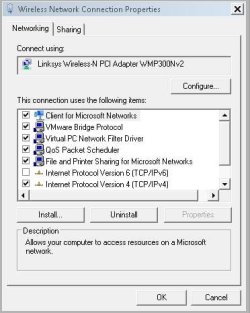
  1. Do you have an IPv6 network enabled router on your network? If you're not using IPv6 then please untick the Internet Protocol Version 6 (TCP/IPv6) box on ALL of your network adapters. There's no need to waste system resources on it and it will confuse troubleshooting. Especially since by default windows XP doesn;t have this and your WinXp box is fine. If you are using it and have the hardware to support it then that's great and I'll take it into consideration.
    Capture.JPG
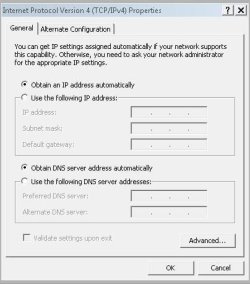
  2. Do you have a Static or dynamic IP? A static Ip you would have added manually and you'd need to add this for both IPv4 and IPv6. If it's dynamic then your properties screen will be greyed out like in my IPv4 picture below.
    Capture2.JPG
  3. If you have static, is another device on your network issued the same IPaddress? - Although you should receive a pop up that tells you that another device also has your ipaddress, sometimes this doesn't happen so lets rule it out. Also you may be thinking "Hey, but windows XP box works fine, why are we doing this?", because some routers give preference to device's that they know first (my father-in-laws crappy cheap and nasty Singtel router is a good example of this). You can also use QOS to give a device network preference. I'm not aware of your network set-up, so I want to cover everything.
  4. Do you have more than one device on your network issuing ipaddresses to the same range? - this can cause conflicting network information and periodic drop-outs.
  5. Are any other static devices (e.g. network printer?) issued ipaddresses inside the issued range? - All ststic devices should not hold ipaddresses within the issued pool. e.g. If your modem issues ipaddresses to your network in the range 192.168.1.5 - 192.168.1.50 all devices that don't need an ipaddress issued (with a static ip) should be given a static one outside of that range.
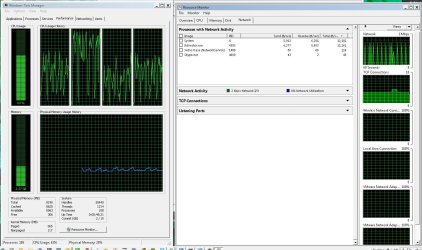
  6. Is there any process that runs periodically on your PC that causes it to loose network connectivity? It may be an idea to open up task manager or the windows resource monitor (in system tools) and leave them running for a while, if the issue occurs then take a look and see if any process is hogging resources, peaks on the graphs or fails.
    monitor.JPG
  7. Change your wireless broadcast channel - Most routers broadcast on the same channel in Singapore where I am, 7 seems very common. When doing this be aware that not all adapters will find every Channel, my XP laptop can't find any past 9. If you need help with this, then please post your wireless router make and model.
  8. Ping your DNS and router as soon as it crashes - As soon as you have the next drop-out, open to CMD prompts and PING [YOUR ROUTER IPADDRESS] -t on one and PING 159.148.60.20 -t (which is your DNS) on the other. Do the same on your XP machine. (note: press Ctrl+C to stop the test). Look for any any long delays that or connection errors that occur on both machines or just the Win7 machine.
  9. Is the DNS dynamic or static on the modem? Check your modem's configuration page if you have manually typed in 159.148.60.20 for DNS then ok, if not please do it and contact your ISP about their secondary DNS server and add this address also.

Good luck, from past experience, I think that the wireless channel and the disabling of Ipv6 (if you're not using it) is the best place for you to start.
 

My Computer

Computer Manufacturer/Model Number
Custom Hack job
OS
Windows 7 Ultimate 64 bit
CPU
Intel(R) Core(TM)2 Quad CPU Q8200 @ 2.33GHz
Motherboard
GigaByte EP45-UD3
Memory
8 GB Kingston
Graphics Card(s)
Nvidia GeForce 9600GT
Sound Card
Soundblaster Audigy
Monitor(s) Displays
AOC x2 22"
Hard Drives
2 x Samsung 500GB (RAID)
2 x Samsung 2TB
1 x WD Green 2TB
1 x Seagate 1TB
1 x Samsung 500GB
PSU
Thermaltake QFan 750W
Case
CM Scout Gaming
Cooling
Coolermaster V10
Keyboard
Microsoft Wireless Keyboard 1000
Mouse
Microsoft Wireless Optical 2000
Internet Speed
320
Other Info
Winfast PVR2000CP
LG DVD-RAM DVD/RW/DL Super Multi
Linksys WMP300Nx2 Wireless Adapter
ok thanks for help :) but why before 2(?) months everything was okey?
 

My Computer

Computer Manufacturer/Model Number
Dell Studio 1555
OS
Windows 7 Home Premium (build 7600), 64-bit
CPU
Pentium Dual-Core CPU T4300 @ 3.135 GHz
Memory
3.0 GB
Graphics Card(s)
ATI display adapter (0x9553) 1.7 GB
Other Info
From "Can You Run It?"
ok thanks for help :) but why before 2(?) months everything was okey?

The answer to that question lies with finding the problem :). It could be that someone close by set up another network on the same channel, you've corrupted your driver, or perhaps a windows update or a new virus definition is causing it. Outside of isolation testing (which is accurate but tedious) there's not much to go on.
 

My Computer

Computer Manufacturer/Model Number
Custom Hack job
OS
Windows 7 Ultimate 64 bit
CPU
Intel(R) Core(TM)2 Quad CPU Q8200 @ 2.33GHz
Motherboard
GigaByte EP45-UD3
Memory
8 GB Kingston
Graphics Card(s)
Nvidia GeForce 9600GT
Sound Card
Soundblaster Audigy
Monitor(s) Displays
AOC x2 22"
Hard Drives
2 x Samsung 500GB (RAID)
2 x Samsung 2TB
1 x WD Green 2TB
1 x Seagate 1TB
1 x Samsung 500GB
PSU
Thermaltake QFan 750W
Case
CM Scout Gaming
Cooling
Coolermaster V10
Keyboard
Microsoft Wireless Keyboard 1000
Mouse
Microsoft Wireless Optical 2000
Internet Speed
320
Other Info
Winfast PVR2000CP
LG DVD-RAM DVD/RW/DL Super Multi
Linksys WMP300Nx2 Wireless Adapter
ok thanks for help :) but why before 2(?) months everything was okey?

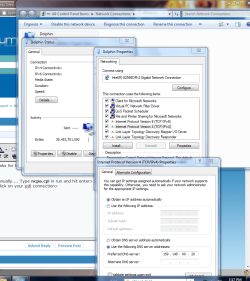
Try to specify dns address manually.... Type ncpa.cpl in run and hit enter> In the network connections double click on your wifi connection> Properties>Internet protocol version 4>Select Use the following dnd address > and type your dns address as 159.148.60.20 and give ok.

Capture.PNG

Let us know the result :)
 

My Computer

Computer Manufacturer/Model Number
wipro
OS
windows 7
CPU
wipro
Motherboard
intel
Memory
8 gb
Hard Drives
580 gb
it`s okey :) thank you all :)
 

My Computer

Computer Manufacturer/Model Number
Dell Studio 1555
OS
Windows 7 Home Premium (build 7600), 64-bit
CPU
Pentium Dual-Core CPU T4300 @ 3.135 GHz
Memory
3.0 GB
Graphics Card(s)
ATI display adapter (0x9553) 1.7 GB
Other Info
From "Can You Run It?"

My Computer

Computer Manufacturer/Model Number
Custom Hack job
OS
Windows 7 Ultimate 64 bit
CPU
Intel(R) Core(TM)2 Quad CPU Q8200 @ 2.33GHz
Motherboard
GigaByte EP45-UD3
Memory
8 GB Kingston
Graphics Card(s)
Nvidia GeForce 9600GT
Sound Card
Soundblaster Audigy
Monitor(s) Displays
AOC x2 22"
Hard Drives
2 x Samsung 500GB (RAID)
2 x Samsung 2TB
1 x WD Green 2TB
1 x Seagate 1TB
1 x Samsung 500GB
PSU
Thermaltake QFan 750W
Case
CM Scout Gaming
Cooling
Coolermaster V10
Keyboard
Microsoft Wireless Keyboard 1000
Mouse
Microsoft Wireless Optical 2000
Internet Speed
320
Other Info
Winfast PVR2000CP
LG DVD-RAM DVD/RW/DL Super Multi
Linksys WMP300Nx2 Wireless Adapter
Microsoft Windows [Version 6.1.7601]
Copyright (c) 2009 Microsoft Corporation. All rights reserved.

C:\Users\Cody>ipconfig/all

Windows IP Configuration

Host Name . . . . . . . . . . . . : Cody-HP
Primary Dns Suffix . . . . . . . :
Node Type . . . . . . . . . . . . : Hybrid
IP Routing Enabled. . . . . . . . : No
WINS Proxy Enabled. . . . . . . . : No

Wireless LAN adapter Wireless Network Connection 3:

Media State . . . . . . . . . . . : Media disconnected
Connection-specific DNS Suffix . :
Description . . . . . . . . . . . : Microsoft Virtual WiFi Miniport Adapter #
2
Physical Address. . . . . . . . . : 00-26-C7-E8-EC-93
DHCP Enabled. . . . . . . . . . . : Yes
Autoconfiguration Enabled . . . . : Yes

Wireless LAN adapter Wireless Network Connection 2:

Media State . . . . . . . . . . . : Media disconnected
Connection-specific DNS Suffix . :
Description . . . . . . . . . . . : Microsoft Virtual WiFi Miniport Adapter
Physical Address. . . . . . . . . : 00-26-C7-E8-EC-93
DHCP Enabled. . . . . . . . . . . : Yes
Autoconfiguration Enabled . . . . : Yes

Wireless LAN adapter Wireless Network Connection:

Connection-specific DNS Suffix . :
Description . . . . . . . . . . . : Intel(R) WiFi Link 1000 BGN
Physical Address. . . . . . . . . : 00-26-C7-E8-EC-92
DHCP Enabled. . . . . . . . . . . : Yes
Autoconfiguration Enabled . . . . : Yes
Link-local IPv6 Address . . . . . : fe80::a9e9:5e96:5b37:74e7%12(Preferred)
IPv4 Address. . . . . . . . . . . : 192.168.0.101(Preferred)
Subnet Mask . . . . . . . . . . . : 255.255.255.0
Lease Obtained. . . . . . . . . . : Sunday, July 27, 2014 10:56:48 PM
Lease Expires . . . . . . . . . . : Sunday, August 03, 2014 10:56:48 PM
Default Gateway . . . . . . . . . : 192.168.0.1
DHCP Server . . . . . . . . . . . : 192.168.0.1
DHCPv6 IAID . . . . . . . . . . . : 318777031
DHCPv6 Client DUID. . . . . . . . : 00-01-00-01-14-23-91-4F-78-AC-C0-5B-27-2F

DNS Servers . . . . . . . . . . . : 192.168.0.1
NetBIOS over Tcpip. . . . . . . . : Enabled

Tunnel adapter isatap.{51A54EC4-5C08-4EC2-B8B8-34D0335B0659}:

Media State . . . . . . . . . . . : Media disconnected
Connection-specific DNS Suffix . :
Description . . . . . . . . . . . : Microsoft ISATAP Adapter
Physical Address. . . . . . . . . : 00-00-00-00-00-00-00-E0
DHCP Enabled. . . . . . . . . . . : No
Autoconfiguration Enabled . . . . : Yes

Tunnel adapter Local Area Connection* 12:

Media State . . . . . . . . . . . : Media disconnected
Connection-specific DNS Suffix . :
Description . . . . . . . . . . . : Microsoft 6to4 Adapter
Physical Address. . . . . . . . . : 00-00-00-00-00-00-00-E0
DHCP Enabled. . . . . . . . . . . : No
Autoconfiguration Enabled . . . . : Yes

Tunnel adapter Teredo Tunneling Pseudo-Interface:

Media State . . . . . . . . . . . : Media disconnected
Connection-specific DNS Suffix . :
Description . . . . . . . . . . . : Teredo Tunneling Pseudo-Interface
Physical Address. . . . . . . . . : 00-00-00-00-00-00-00-E0
DHCP Enabled. . . . . . . . . . . : No
Autoconfiguration Enabled . . . . : Yes

C:\Users\Cody>
C:\Users\Cody>
C:\Users\Cody>
C:\Users\Cody> im having this problem can anyone help me? i did the whole ipconfig to flush dns server and restarted my modem and wireless modem. and eventhou it says connected to my internet i still am not connnected on my browser.
 

My Computer

Computer type
PC/Desktop
OS
Illinois
Back
Top