Limited access wireless internet on certain devices

immings

New member
Local time
8:04 PM
Messages
2
Hi, I've been having a problem for a week or so, where my internet will drop and become "limited" on certain devices, I own two laptops 1 on W7 and 1 on W8 and a Blackberry (this will never drop connection unless the router gets reset) The two laptops experience "limited" it is not linked to doing one specific thing when it stops working. if I click disconnect and then connect it USUALLY will come back instantly sometimes have to do it about 2 or 3 times, this is extremely irritating while watching shows or downloading because if I don't disconnect and re connect it will stay on "limited" for however long until I dis&re connect. This doesn't happen to my laptops at the same time, meaning that isn't likely a router problem (BB is always connected) I'm actually surprised that it has actually stayed connected this long.

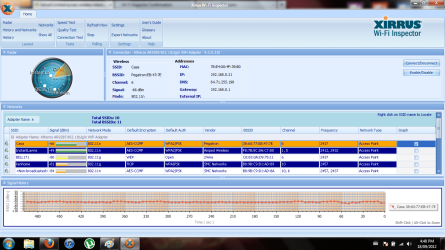
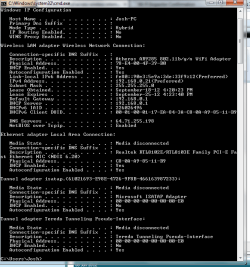
I was reading a similar thread, and it didn't solve my problem but I did attach the cmd and xirrus.

noted: Casa is the personal internet for us and "instantlawns" is for my roommates' business. also my other roommates' internet does a similar thing where it goes limited but nowhere nearly as often as mine.
 

Attachments
  • cmd.png
    cmd.png
    21.6 KB · Views: 16
  • xirrus.png
    xirrus.png
    79.8 KB · Views: 17

My Computer My Computer

OS
7 home premium 32bit
Have you contacted Rogers to discuss this?

Also I would try using a public DNS instead of Rogers...They have had issues in the past

Free Public DNS Server

=> Service provider: Google
Google public dns server IP address:

8.8.8.8
8.8.4.4

=> Service provider:Dnsadvantage
Dnsadvantage free dns server list:

156.154.70.1
156.154.71.1

=> Service provider:OpenDNS
OpenDNS free dns server list / IP address:

208.67.222.222
208.67.220.220

=> Service provider:Norton
Norton free dns server list / IP address:

198.153.192.1
198.153.194.1

=> Service provider: GTEI DNS (now Verizon)
Public Name server IP address:

4.2.2.1
4.2.2.2
4.2.2.3
4.2.2.4
4.2.2.5
4.2.2.6
 

My Computer My Computer

Computer Manufacturer/Model Number
Unforgiven!!
OS
Windows 7 Ultimate x64
CPU
AMD X6 1090T
Motherboard
ASUS m4a79xtd evo
Memory
16 Gig Kingston HyperX
Graphics Card(s)
Saphire Radeon 6700
Sound Card
O/B
Monitor(s) Displays
23" Acer 19"Acer
Screen Resolution
1920x1080 Native
Hard Drives
M4 64 Gig SSD
W/D Cav Black 1 T/B
W/D Scorpio Blue 500 Gig X2
PSU
OCZ 650 watt 80+ Modular
Case
Cooler Master 690 Basic
Cooling
Cooler Master Hyper 212+ Push/Pull
Keyboard
Razer Black Widow Ultimate
Mouse
Razer D/A 3500dpi
Internet Speed
Meh...it's okay
Hello,

In addition....
Thanks for the Xirrus capture, it's helpful. I see that no one is using Channel 11, you may change it and see if your connection improves. Updating your Wi-Fi adapter's driver might also help. If the disconnection is happening to more than 1 wireless device, updating the router's firmware might also help if you have not done this router yet.

An update will be appreciated.
 

My Computer My Computer

Computer Manufacturer/Model Number
Lenovo Desktop/Samsung Laptop
OS
Win7 & Win8 64bit
CPU
Intel i5
Internet Speed
Charter-20 Mbps
Antivirus
Avast
Browser
FF, IE9 and Chrome
Hi,
@Mrhiab No I didn't contact Rogers.
@2xg I've updated wireless drivers (my computer) but not the router itself. I've never had this problem until about a week ago.
Also I don't know how to "change channels"
 

My Computer My Computer

OS
7 home premium 32bit
You'll have to log on to your wireless setting to change the wireless channel. If you need a detail guide on how to do this please provide the make and model of your router.
 

My Computer My Computer

Computer Manufacturer/Model Number
Lenovo Desktop/Samsung Laptop
OS
Win7 & Win8 64bit
CPU
Intel i5
Internet Speed
Charter-20 Mbps
Antivirus
Avast
Browser
FF, IE9 and Chrome
Back
Top