Solved Limited access wireless internet

Lochlan

New member
Local time
5:18 AM
Messages
11
Plz help me my internet has been doing this for like 2 weeks and its really annoying because every 30 seconds my internet goes off and it says limited access. Then I have to disconnect then reconnect it and it works for like another 30 seconds then goes :cry: :( :cry: and on my xbox it says nat type strict
 
Last edited:

My Computer

OS
windows 7 home Premium 32bit
Welcome to Seven Forums,

Is this a laptop or desktop? If this is a laptop, are you using a wireless manager to connect?

Is your wireless adapter's driver up to date?

Do a simple test - Restart your computer, tap F8 and select Safe Mode with Networking. In here see if you are still disconnecting or not.

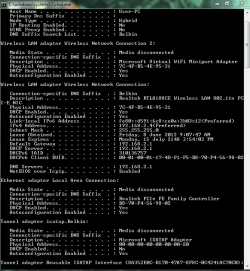
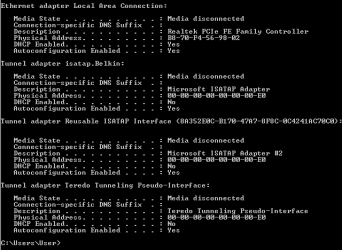
Please post an ipconfig /all for review.
Click on Start button then type cmd , see on the top right click on it and choose Run as Administrator. From the black screen, type the word ipconfig /all and press enter. Right click on the black screen or Command prompt then choose Select All and Paste the results on your next post.
 

My Computer

Computer Manufacturer/Model Number
Lenovo Desktop/Samsung Laptop
OS
Win7 & Win8 64bit
CPU
Intel i5
Internet Speed
Charter-20 Mbps
Antivirus
Avast
Browser
FF, IE9 and Chrome
Its working now but it usually not work and ill write on here again if it doesn't and I remember last time I went safe mode with networking when it wasn't working in normal mode but it worked in safe mode with networking so it could be a program or firewall or something on the router and thank you for posting.
 

My Computer

OS
windows 7 home Premium 32bit
[/ATTACH] this is when its not working.
 

Attachments

  • ip.PNG
    ip.PNG
    19.5 KB · Views: 57

My Computer

OS
windows 7 home Premium 32bit
safe mode with networking.PNG

2.PNG
this is it with safe mode with networking it didn't disconnect once and it works fine but in normal mode it disconnects every 30 seconds and it either says limited access or no internet access
 

My Computer

OS
windows 7 home Premium 32bit
I see a problem here.

If you can go into Device Manager and disable the Microsoft WIFI miniport adaptor it should help with this disconnection problem. The miniport is only used to host a shared wireless connection.

This Msoft mini port is famous for creating these types of connection problems. :)

Also make sure to use a clear channel for wireless as this will also cause disconnection problems.
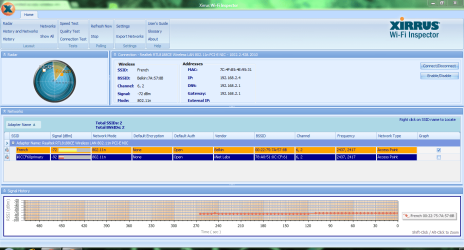
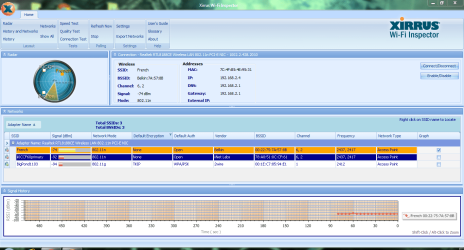
The Xirrus WIFI inspector is a good program for finding a clear channel.
http://www.xirrus.com/Products/Wi-Fi-Inspector
 

My Computer

Computer type
PC/Desktop
Computer Manufacturer/Model Number
Home built
OS
Windows 7 Ult, Windows 8.1 Pro,
CPU
Q9650-4.275GHz, E8600 4.5GHz, E6750-3.8GHz
Motherboard
Evga 780i FTW
Memory
G.Skill PC2 9600 1200Mhz 5 5 5 15 2T
Graphics Card(s)
GTX480
Sound Card
Asus Xonar D2
Monitor(s) Displays
HannsG
Screen Resolution
1680X1050
Hard Drives
GSkill Phoenix Pro 120GB SSD
PSU
ThermalTake Toughpower 1000Watt modular
Case
ThermalTake XaserV
Cooling
Xigmatek S1283
Keyboard
Logitech G15
Mouse
Logitech G9
Internet Speed
T1
thank you I will try that and hope its fixed
 

My Computer

OS
windows 7 home Premium 32bit

My Computer

Computer Manufacturer/Model Number
HP Compaq 6715B
OS
Windows 7 Ultimate x64
CPU
AMD turion 64x2 TL-64 2.2Ghz
Motherboard
HC030
Memory
Sodimm DDR2 4GB
Graphics Card(s)
ATI Radeon 1250 128MB IGP
Hard Drives
Fujitsu Siemens 500GB sata 3.0 Gb/s
In xirrus do you mean like the first page that comes on or one of the tests or something. The weird part is sometimes it works and sometimes it doesn't but then I have to restart the laptop usually if it doesn't.
 

My Computer

OS
windows 7 home Premium 32bit
Yes the first page when it opens up

Also have followed the advice given previously by others as well and any results from them?
 

My Computer

Computer Manufacturer/Model Number
HP Compaq 6715B
OS
Windows 7 Ultimate x64
CPU
AMD turion 64x2 TL-64 2.2Ghz
Motherboard
HC030
Memory
Sodimm DDR2 4GB
Graphics Card(s)
ATI Radeon 1250 128MB IGP
Hard Drives
Fujitsu Siemens 500GB sata 3.0 Gb/s
with the microsoft miniport adapter didn't do much so I turned it back on and the screenshota.PNG sorry I put 2 there and there's only ment to be 1.
 

Attachments

  • xirus.PNG
    xirus.PNG
    60.1 KB · Views: 26

My Computer

OS
windows 7 home Premium 32bit
Hi two problems in your xirrus:

1. Your network is French on channel 6 and 2 using wide channel 40Mhz on router is that correct?

If yes then network below is also on channel 6 and two i suggest setting primary channel 11 and secondary channel to 8 please do this immediately.

2. Your signal is weak and that is the biggest problem here.

Where is your computer located and where is your router located?

For example are they in same room or different rooms at different ends of the house and what distance approx.

Or are they on different floors please let us know.

Thanks.
 

My Computer

Computer Manufacturer/Model Number
HP Compaq 6715B
OS
Windows 7 Ultimate x64
CPU
AMD turion 64x2 TL-64 2.2Ghz
Motherboard
HC030
Memory
Sodimm DDR2 4GB
Graphics Card(s)
ATI Radeon 1250 128MB IGP
Hard Drives
Fujitsu Siemens 500GB sata 3.0 Gb/s
it didn't do that thing once today but if it does it later ill write again
 

My Computer

OS
windows 7 home Premium 32bit
with the microsoft miniport adapter didn't do much so I turned it back on and the screenshotView attachment 215862 sorry I put 2 there and there's only ment to be 1.

With this weak of a signal you will get better performance using the 20Mhz single channel mode, you can change that setting in your routers set up page. The 40Mhz setting only works well if the signal strength is very high.

You should also enable security and encryption in your routers set up page, best to use WPA2 with AES encryption. I'm not sure why you aren't using any security or encryption for your wireless network?

The bigger problem is that your signal strength isn't very good here so relocating the router or adding a wireless access point would be the best way to make the signal better.
 

My Computer

Computer type
PC/Desktop
Computer Manufacturer/Model Number
Home built
OS
Windows 7 Ult, Windows 8.1 Pro,
CPU
Q9650-4.275GHz, E8600 4.5GHz, E6750-3.8GHz
Motherboard
Evga 780i FTW
Memory
G.Skill PC2 9600 1200Mhz 5 5 5 15 2T
Graphics Card(s)
GTX480
Sound Card
Asus Xonar D2
Monitor(s) Displays
HannsG
Screen Resolution
1680X1050
Hard Drives
GSkill Phoenix Pro 120GB SSD
PSU
ThermalTake Toughpower 1000Watt modular
Case
ThermalTake XaserV
Cooling
Xigmatek S1283
Keyboard
Logitech G15
Mouse
Logitech G9
Internet Speed
T1
Also please let us know where your computer and router are located as asked in post
 

My Computer

Computer Manufacturer/Model Number
HP Compaq 6715B
OS
Windows 7 Ultimate x64
CPU
AMD turion 64x2 TL-64 2.2Ghz
Motherboard
HC030
Memory
Sodimm DDR2 4GB
Graphics Card(s)
ATI Radeon 1250 128MB IGP
Hard Drives
Fujitsu Siemens 500GB sata 3.0 Gb/s
the router is pretty close to my laptop just a room or 2 away.
 

My Computer

OS
windows 7 home Premium 32bit
it doesn't usually disconnect ever anymore
 

My Computer

OS
windows 7 home Premium 32bit
it doesn't usually disconnect ever anymore

You must have made the recommended adjustments in that case. I'm hoping that you enabled the security, changed to the 20Mhz mode and changed the channel. :)
 

My Computer

Computer type
PC/Desktop
Computer Manufacturer/Model Number
Home built
OS
Windows 7 Ult, Windows 8.1 Pro,
CPU
Q9650-4.275GHz, E8600 4.5GHz, E6750-3.8GHz
Motherboard
Evga 780i FTW
Memory
G.Skill PC2 9600 1200Mhz 5 5 5 15 2T
Graphics Card(s)
GTX480
Sound Card
Asus Xonar D2
Monitor(s) Displays
HannsG
Screen Resolution
1680X1050
Hard Drives
GSkill Phoenix Pro 120GB SSD
PSU
ThermalTake Toughpower 1000Watt modular
Case
ThermalTake XaserV
Cooling
Xigmatek S1283
Keyboard
Logitech G15
Mouse
Logitech G9
Internet Speed
T1
Did you implement all the suggestions made by chev65 and I?
 

My Computer

Computer Manufacturer/Model Number
HP Compaq 6715B
OS
Windows 7 Ultimate x64
CPU
AMD turion 64x2 TL-64 2.2Ghz
Motherboard
HC030
Memory
Sodimm DDR2 4GB
Graphics Card(s)
ATI Radeon 1250 128MB IGP
Hard Drives
Fujitsu Siemens 500GB sata 3.0 Gb/s
Yeah pretty much and thank you both for helping me.
 

My Computer

OS
windows 7 home Premium 32bit
Back
Top