Solved Linked images "lost" in Outlook 2010 after SSD installation

Magnet

New member
Member
Local time
8:41 AM
Messages
60
Location
Kent UK
Hi Guys
Having installed an SSD and cloned Windows 7 + Apps to it, I've come up against a couple of problems using Outlook 2010 and I'd be grateful for any help please. The pst file is on another HDD that was not involved in the upgrade.

1) Search function no longer works. either says not found immediately or carries on searching for ever. Clue may be in Indexing? Click on Indexing Status and get "Outlook is currently indexing you items. 2129 items to index" Problem is, this number is increasing, not decreasing! Started around 1600. Should PC be left on and Outlook open, and just be patient, or is something awry?

2)Since SSD installed, all emails with images have lost them. Applies to ones I already have and new ones when opened first time. Red Cross and message in each image frame "Linked Image cannot be displayed. The file may have been moved, renamed or deleted. Verify that the link points to the correct file and location".

Firefox is browser.

If I forward an email that is not showing embedded pictures to another PC the images are present again.
Presumably the images are stored somewhere and the link has been broken by the upgrade?

I've tried a few things suggested on MS forums without luck. Settings in Outlook seem correct.

Thanks for any suggestions!
 

My Computer My Computer

At a glance

Windows 7 Home Premium 64bitCore i7 Quad 870 2.9312GB CorsairZotac GeForce GT240 512Mb
Computer type
PC/Desktop
Computer Manufacturer/Model Number
Home-made
OS
Windows 7 Home Premium 64bit
CPU
Core i7 Quad 870 2.93
Motherboard
Asus P7P55D-EPRO
Memory
12GB Corsair
Graphics Card(s)
Zotac GeForce GT240 512Mb
Sound Card
Some cheap Audigy job!
Monitor(s) Displays
Asus PA248Q
Hard Drives
500GB SATA2 x1
500GB Seagate RAID1 SATA2
Seagate 2TB SATA3
PSU
Coolermaster Silent Pro 600w
Further to above post, have also noticed that when doing a search Programmes and Files from Start button, the only items found are those within Windows, nothing from my data files which are on a separate RAID 1 pair of discs.

Now wondering whether to set old HDD (that still has Windows on it) back as boot drive, check that everything is as it should be booting from that drive, then wipe the SSD and clone again? I used Easius ToDo clone tool so will use another programme next time. Any suggestions on which to use?

Is this the best way forward?

Thanks for any comments.
 

My Computer My Computer

At a glance

Windows 7 Home Premium 64bitCore i7 Quad 870 2.9312GB CorsairZotac GeForce GT240 512Mb
Computer type
PC/Desktop
Computer Manufacturer/Model Number
Home-made
OS
Windows 7 Home Premium 64bit
CPU
Core i7 Quad 870 2.93
Motherboard
Asus P7P55D-EPRO
Memory
12GB Corsair
Graphics Card(s)
Zotac GeForce GT240 512Mb
Sound Card
Some cheap Audigy job!
Monitor(s) Displays
Asus PA248Q
Hard Drives
500GB SATA2 x1
500GB Seagate RAID1 SATA2
Seagate 2TB SATA3
PSU
Coolermaster Silent Pro 600w
As to the images in Outlook, I have had that occur and resolved it by resetting the location for IE temporary internet files. The rest is probably due to indexing not being complete. I'd give it some time and see what happens.
 

My Computer My Computer

At a glance

Windows 7 Pro 64-bit
Computer type
PC/Desktop
OS
Windows 7 Pro 64-bit
Thanks for this. I did reset the location for IE Temp files, also deleted the Outlook temp files folder (which was empty). Has been indexing for a fortnight and files to index in Outlook is increasing, not decreasing! strange!
 

My Computer My Computer

At a glance

Windows 7 Home Premium 64bitCore i7 Quad 870 2.9312GB CorsairZotac GeForce GT240 512Mb
Computer type
PC/Desktop
Computer Manufacturer/Model Number
Home-made
OS
Windows 7 Home Premium 64bit
CPU
Core i7 Quad 870 2.93
Motherboard
Asus P7P55D-EPRO
Memory
12GB Corsair
Graphics Card(s)
Zotac GeForce GT240 512Mb
Sound Card
Some cheap Audigy job!
Monitor(s) Displays
Asus PA248Q
Hard Drives
500GB SATA2 x1
500GB Seagate RAID1 SATA2
Seagate 2TB SATA3
PSU
Coolermaster Silent Pro 600w
Could it be that it sees the .pst files on both the old and new HDD and is indexing both? Just a thought.
 

My Computer My Computer

At a glance

Windows 7 Pro 64-bit
Computer type
PC/Desktop
OS
Windows 7 Pro 64-bit
Thanks. All data files, including the .pst are on a third (pair of) hard drives set as RAID 1. These were not disconnected during cloning, and the RAID set up does not show any faults. So there is only one .pst and this is obviously still located by Windows because all email is there in Outlook.
 

My Computer My Computer

At a glance

Windows 7 Home Premium 64bitCore i7 Quad 870 2.9312GB CorsairZotac GeForce GT240 512Mb
Computer type
PC/Desktop
Computer Manufacturer/Model Number
Home-made
OS
Windows 7 Home Premium 64bit
CPU
Core i7 Quad 870 2.93
Motherboard
Asus P7P55D-EPRO
Memory
12GB Corsair
Graphics Card(s)
Zotac GeForce GT240 512Mb
Sound Card
Some cheap Audigy job!
Monitor(s) Displays
Asus PA248Q
Hard Drives
500GB SATA2 x1
500GB Seagate RAID1 SATA2
Seagate 2TB SATA3
PSU
Coolermaster Silent Pro 600w
All drive letters of drives not involved in cloning are the same as before the clone?
Drive letters of new SSD are the same as source HDD had before?
source HDD is still connected?
 

My Computer My Computer

At a glance

Microsoft Windows 7 Home Premium 64-bits 7601...Intel(R) Core(TM) i3 CPU M 370 @ 2.40GHz4,00 GBATI Mobility Radeon HD 5400 Series
Computer type
Laptop
Computer Manufacturer/Model Number
ACER ASPIRE 5742G
OS
Microsoft Windows 7 Home Premium 64-bits 7601 Multiprocessor Free Service Pack 1
CPU
Intel(R) Core(TM) i3 CPU M 370 @ 2.40GHz
Motherboard
Acer Aspire 5742G
Memory
4,00 GB
Graphics Card(s)
ATI Mobility Radeon HD 5400 Series
Sound Card
(1) AMD High Definition Audio Device (2) Realtek High Defi
Screen Resolution
1366 x 768 x 32 bits (4294967296 colors) @ 60 Hz
Hard Drives
WDC WD5000BEVT-22ZAT0
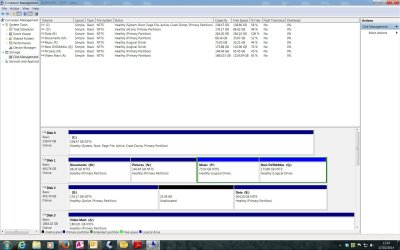
Post screenshot of disk management please
 

My Computer My Computer

At a glance

Microsoft Windows 7 Home Premium 64-bits 7601...Intel(R) Core(TM) i3 CPU M 370 @ 2.40GHz4,00 GBATI Mobility Radeon HD 5400 Series
Computer type
Laptop
Computer Manufacturer/Model Number
ACER ASPIRE 5742G
OS
Microsoft Windows 7 Home Premium 64-bits 7601 Multiprocessor Free Service Pack 1
CPU
Intel(R) Core(TM) i3 CPU M 370 @ 2.40GHz
Motherboard
Acer Aspire 5742G
Memory
4,00 GB
Graphics Card(s)
ATI Mobility Radeon HD 5400 Series
Sound Card
(1) AMD High Definition Audio Device (2) Realtek High Defi
Screen Resolution
1366 x 768 x 32 bits (4294967296 colors) @ 60 Hz
Hard Drives
WDC WD5000BEVT-22ZAT0
DM Screenshot.jpg
Disc 0 is the SSD.
Disc 2 has D partition holding original Windows + Apps, Data B is unused space from when partition was resized.
Disc 1 is RAID1 pair with 4 partitions all holding data.
Disc 3 is my main video data store.

Following cloning, Disc 0 was selected as new Boot Drive, and automatically took C letter. Original HDD boot disc1 was designated D by me in disc management.

Thanks for your help

Sorry, meant to add that, apart from discs involved in cloning, drive letters are unchanged from before.
 

My Computer My Computer

At a glance

Windows 7 Home Premium 64bitCore i7 Quad 870 2.9312GB CorsairZotac GeForce GT240 512Mb
Computer type
PC/Desktop
Computer Manufacturer/Model Number
Home-made
OS
Windows 7 Home Premium 64bit
CPU
Core i7 Quad 870 2.93
Motherboard
Asus P7P55D-EPRO
Memory
12GB Corsair
Graphics Card(s)
Zotac GeForce GT240 512Mb
Sound Card
Some cheap Audigy job!
Monitor(s) Displays
Asus PA248Q
Hard Drives
500GB SATA2 x1
500GB Seagate RAID1 SATA2
Seagate 2TB SATA3
PSU
Coolermaster Silent Pro 600w
So you cloned "partition holding original Windows + Apps" (now called D [previously called C]) to SSD (now called C)
All other partitions haven't changed drive letter. Correct?
 

My Computer My Computer

At a glance

Microsoft Windows 7 Home Premium 64-bits 7601...Intel(R) Core(TM) i3 CPU M 370 @ 2.40GHz4,00 GBATI Mobility Radeon HD 5400 Series
Computer type
Laptop
Computer Manufacturer/Model Number
ACER ASPIRE 5742G
OS
Microsoft Windows 7 Home Premium 64-bits 7601 Multiprocessor Free Service Pack 1
CPU
Intel(R) Core(TM) i3 CPU M 370 @ 2.40GHz
Motherboard
Acer Aspire 5742G
Memory
4,00 GB
Graphics Card(s)
ATI Mobility Radeon HD 5400 Series
Sound Card
(1) AMD High Definition Audio Device (2) Realtek High Defi
Screen Resolution
1366 x 768 x 32 bits (4294967296 colors) @ 60 Hz
Hard Drives
WDC WD5000BEVT-22ZAT0
Yes
 

My Computer My Computer

At a glance

Windows 7 Home Premium 64bitCore i7 Quad 870 2.9312GB CorsairZotac GeForce GT240 512Mb
Computer type
PC/Desktop
Computer Manufacturer/Model Number
Home-made
OS
Windows 7 Home Premium 64bit
CPU
Core i7 Quad 870 2.93
Motherboard
Asus P7P55D-EPRO
Memory
12GB Corsair
Graphics Card(s)
Zotac GeForce GT240 512Mb
Sound Card
Some cheap Audigy job!
Monitor(s) Displays
Asus PA248Q
Hard Drives
500GB SATA2 x1
500GB Seagate RAID1 SATA2
Seagate 2TB SATA3
PSU
Coolermaster Silent Pro 600w
Please boot again but now from old drive for testing. Sure everything is fine?
Sure only thing you did was cloning?
 

My Computer My Computer

At a glance

Microsoft Windows 7 Home Premium 64-bits 7601...Intel(R) Core(TM) i3 CPU M 370 @ 2.40GHz4,00 GBATI Mobility Radeon HD 5400 Series
Computer type
Laptop
Computer Manufacturer/Model Number
ACER ASPIRE 5742G
OS
Microsoft Windows 7 Home Premium 64-bits 7601 Multiprocessor Free Service Pack 1
CPU
Intel(R) Core(TM) i3 CPU M 370 @ 2.40GHz
Motherboard
Acer Aspire 5742G
Memory
4,00 GB
Graphics Card(s)
ATI Mobility Radeon HD 5400 Series
Sound Card
(1) AMD High Definition Audio Device (2) Realtek High Defi
Screen Resolution
1366 x 768 x 32 bits (4294967296 colors) @ 60 Hz
Hard Drives
WDC WD5000BEVT-22ZAT0
Yes I will do that and check. Have not done anything else. Also do not remember it taking ages to Index when I installed Outlook 2010 last year.
So if OK booting from original HDD, try cloning again, perhaps Macrium Reflect?
Shall I leave all drives connected?
Thank you for help.
 

My Computer My Computer

At a glance

Windows 7 Home Premium 64bitCore i7 Quad 870 2.9312GB CorsairZotac GeForce GT240 512Mb
Computer type
PC/Desktop
Computer Manufacturer/Model Number
Home-made
OS
Windows 7 Home Premium 64bit
CPU
Core i7 Quad 870 2.93
Motherboard
Asus P7P55D-EPRO
Memory
12GB Corsair
Graphics Card(s)
Zotac GeForce GT240 512Mb
Sound Card
Some cheap Audigy job!
Monitor(s) Displays
Asus PA248Q
Hard Drives
500GB SATA2 x1
500GB Seagate RAID1 SATA2
Seagate 2TB SATA3
PSU
Coolermaster Silent Pro 600w
If you did clone and nothing else.... it must be fine.
Clone macrium, paragon, easus.... they are all the same. I clone is.... just a clone. After cloning they adjust the boot menu so it points to correct new drive. Also they adjust the drive lettering to the new drive (in one registry key). And they don't copy useless files like pagefile and hibernation file.

But to keep it simple.... the programs work the same.

Did you clone from within windows7 or booted from recovery DVD with cloning software?
 

My Computer My Computer

At a glance

Microsoft Windows 7 Home Premium 64-bits 7601...Intel(R) Core(TM) i3 CPU M 370 @ 2.40GHz4,00 GBATI Mobility Radeon HD 5400 Series
Computer type
Laptop
Computer Manufacturer/Model Number
ACER ASPIRE 5742G
OS
Microsoft Windows 7 Home Premium 64-bits 7601 Multiprocessor Free Service Pack 1
CPU
Intel(R) Core(TM) i3 CPU M 370 @ 2.40GHz
Motherboard
Acer Aspire 5742G
Memory
4,00 GB
Graphics Card(s)
ATI Mobility Radeon HD 5400 Series
Sound Card
(1) AMD High Definition Audio Device (2) Realtek High Defi
Screen Resolution
1366 x 768 x 32 bits (4294967296 colors) @ 60 Hz
Hard Drives
WDC WD5000BEVT-22ZAT0

My Computer My Computer

At a glance

Microsoft Windows 7 Home Premium 64-bits 7601...Intel(R) Core(TM) i3 CPU M 370 @ 2.40GHz4,00 GBATI Mobility Radeon HD 5400 Series
Computer type
Laptop
Computer Manufacturer/Model Number
ACER ASPIRE 5742G
OS
Microsoft Windows 7 Home Premium 64-bits 7601 Multiprocessor Free Service Pack 1
CPU
Intel(R) Core(TM) i3 CPU M 370 @ 2.40GHz
Motherboard
Acer Aspire 5742G
Memory
4,00 GB
Graphics Card(s)
ATI Mobility Radeon HD 5400 Series
Sound Card
(1) AMD High Definition Audio Device (2) Realtek High Defi
Screen Resolution
1366 x 768 x 32 bits (4294967296 colors) @ 60 Hz
Hard Drives
WDC WD5000BEVT-22ZAT0
Sorry, what are phantom drives? OK I'll do this a little later ( wife calls for me to do gardening!!) Can I report back a little later? Thanks for the assistance.
 

My Computer My Computer

At a glance

Windows 7 Home Premium 64bitCore i7 Quad 870 2.9312GB CorsairZotac GeForce GT240 512Mb
Computer type
PC/Desktop
Computer Manufacturer/Model Number
Home-made
OS
Windows 7 Home Premium 64bit
CPU
Core i7 Quad 870 2.93
Motherboard
Asus P7P55D-EPRO
Memory
12GB Corsair
Graphics Card(s)
Zotac GeForce GT240 512Mb
Sound Card
Some cheap Audigy job!
Monitor(s) Displays
Asus PA248Q
Hard Drives
500GB SATA2 x1
500GB Seagate RAID1 SATA2
Seagate 2TB SATA3
PSU
Coolermaster Silent Pro 600w
Sorry, what are phantom drives? OK I'll do this a little later ( wife calls for me to do gardening!!) Can I report back a little later? Thanks for the assistance.
Maybe in the list of drives (when in "system protection" config) are some non-existent drives. that happens if you change the starting sector of a partition, or clone a partition. I call them phantom drives.
You can report back anytime you want.
 
Last edited:

My Computer My Computer

At a glance

Microsoft Windows 7 Home Premium 64-bits 7601...Intel(R) Core(TM) i3 CPU M 370 @ 2.40GHz4,00 GBATI Mobility Radeon HD 5400 Series
Computer type
Laptop
Computer Manufacturer/Model Number
ACER ASPIRE 5742G
OS
Microsoft Windows 7 Home Premium 64-bits 7601 Multiprocessor Free Service Pack 1
CPU
Intel(R) Core(TM) i3 CPU M 370 @ 2.40GHz
Motherboard
Acer Aspire 5742G
Memory
4,00 GB
Graphics Card(s)
ATI Mobility Radeon HD 5400 Series
Sound Card
(1) AMD High Definition Audio Device (2) Realtek High Defi
Screen Resolution
1366 x 768 x 32 bits (4294967296 colors) @ 60 Hz
Hard Drives
WDC WD5000BEVT-22ZAT0
Cheers!
 

My Computer My Computer

At a glance

Windows 7 Home Premium 64bitCore i7 Quad 870 2.9312GB CorsairZotac GeForce GT240 512Mb
Computer type
PC/Desktop
Computer Manufacturer/Model Number
Home-made
OS
Windows 7 Home Premium 64bit
CPU
Core i7 Quad 870 2.93
Motherboard
Asus P7P55D-EPRO
Memory
12GB Corsair
Graphics Card(s)
Zotac GeForce GT240 512Mb
Sound Card
Some cheap Audigy job!
Monitor(s) Displays
Asus PA248Q
Hard Drives
500GB SATA2 x1
500GB Seagate RAID1 SATA2
Seagate 2TB SATA3
PSU
Coolermaster Silent Pro 600w
System Protection is on for only the C (SSD) drive.
 

My Computer My Computer

At a glance

Windows 7 Home Premium 64bitCore i7 Quad 870 2.9312GB CorsairZotac GeForce GT240 512Mb
Computer type
PC/Desktop
Computer Manufacturer/Model Number
Home-made
OS
Windows 7 Home Premium 64bit
CPU
Core i7 Quad 870 2.93
Motherboard
Asus P7P55D-EPRO
Memory
12GB Corsair
Graphics Card(s)
Zotac GeForce GT240 512Mb
Sound Card
Some cheap Audigy job!
Monitor(s) Displays
Asus PA248Q
Hard Drives
500GB SATA2 x1
500GB Seagate RAID1 SATA2
Seagate 2TB SATA3
PSU
Coolermaster Silent Pro 600w
System Protection is on for only the C (SSD) drive.
Was it already correct? Anyway check it once after a clone.


Did you boot from old hdd already? Do images display nicely then? Are all outlook attachment behaving strange btw?
 

My Computer My Computer

At a glance

Microsoft Windows 7 Home Premium 64-bits 7601...Intel(R) Core(TM) i3 CPU M 370 @ 2.40GHz4,00 GBATI Mobility Radeon HD 5400 Series
Computer type
Laptop
Computer Manufacturer/Model Number
ACER ASPIRE 5742G
OS
Microsoft Windows 7 Home Premium 64-bits 7601 Multiprocessor Free Service Pack 1
CPU
Intel(R) Core(TM) i3 CPU M 370 @ 2.40GHz
Motherboard
Acer Aspire 5742G
Memory
4,00 GB
Graphics Card(s)
ATI Mobility Radeon HD 5400 Series
Sound Card
(1) AMD High Definition Audio Device (2) Realtek High Defi
Screen Resolution
1366 x 768 x 32 bits (4294967296 colors) @ 60 Hz
Hard Drives
WDC WD5000BEVT-22ZAT0
Back
Top