Linking two computers through Network

Ralph113

New member
Local time
7:16 AM
Messages
4
I have two computers Computer A runs Windows 7 and Computer B runs Vista.

I have gone through the set up of trying to link them. I have no trouble when I'm on Computer B seeing A.

Problem lies in Computer A seeing B...

When I'm on Computer A it does see the folders that I've set up on B but when I try to access them I get the message " YOU DO NOT HAVE PERMISSION TO ACCESS FILE //RALPH-PC// CONTACT YOUR NETWORK ADMINISTRATOR TO REQUEST ACCESS"

Now does this mean I have to do something on my B Computer(Vista) or on the A Computer(window 7)

Any help would be appreciated.

Thank You,

Ralph
 

My Computer My Computer

OS
Windows 7 PROFESSIONAL 64BIT
Set the network type to work instead of home. Home only allows for Win7 to see Win 7 machines as to were Work allows it to see other operating systems.
 

My Computer My Computer

Computer Manufacturer/Model Number
SMN-Productions
OS
Windows 7 x86/x64, Server 2008r2, Web Server 2008
CPU
i7 v2 3930K Steping stone 2
Motherboard
ASUS Rampage IV Extreme
Memory
G.SKILL Ripjaws Z Series 32GB
Graphics Card(s)
AMD HD 5770
Monitor(s) Displays
Acer 21" and Samsung 20"
Hard Drives
Patriot Pyro 80GB
PSU
1000 Watt
Case
HAF-X
Cooling
4 Fans
Keyboard
Black Widow Ultimate
I have two computers Computer A runs Windows 7 and Computer B runs Vista.

I have gone through the set up of trying to link them. I have no trouble when I'm on Computer B seeing A.

Problem lies in Computer A seeing B...

When I'm on Computer A it does see the folders that I've set up on B but when I try to access them I get the message " YOU DO NOT HAVE PERMISSION TO ACCESS FILE //RALPH-PC// CONTACT YOUR NETWORK ADMINISTRATOR TO REQUEST ACCESS"
Sounds a bit basic, but have you enabled "file and printer sharing" on your Vista machine?

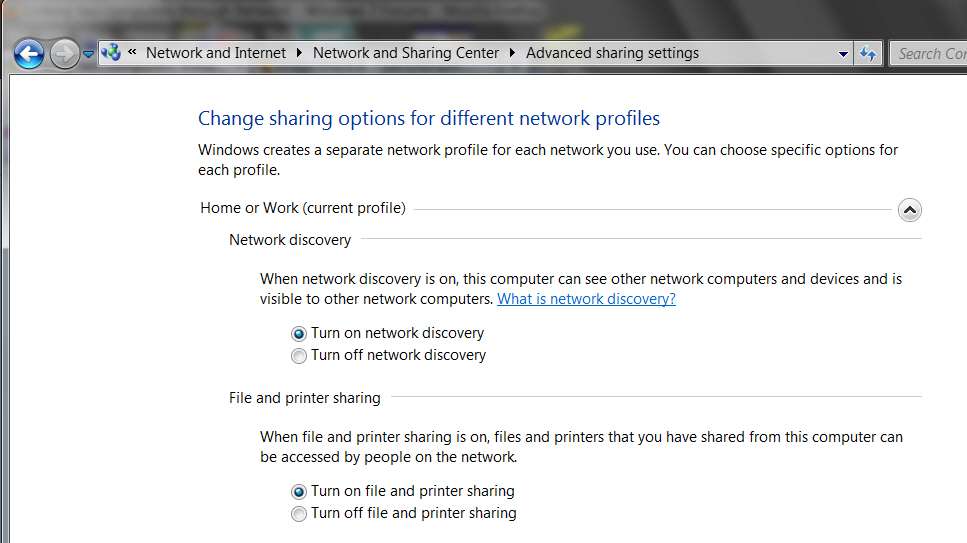
For example, have you done on your Vista machine the equivalent of this on the Win7 machine?:

sharing2.jpg


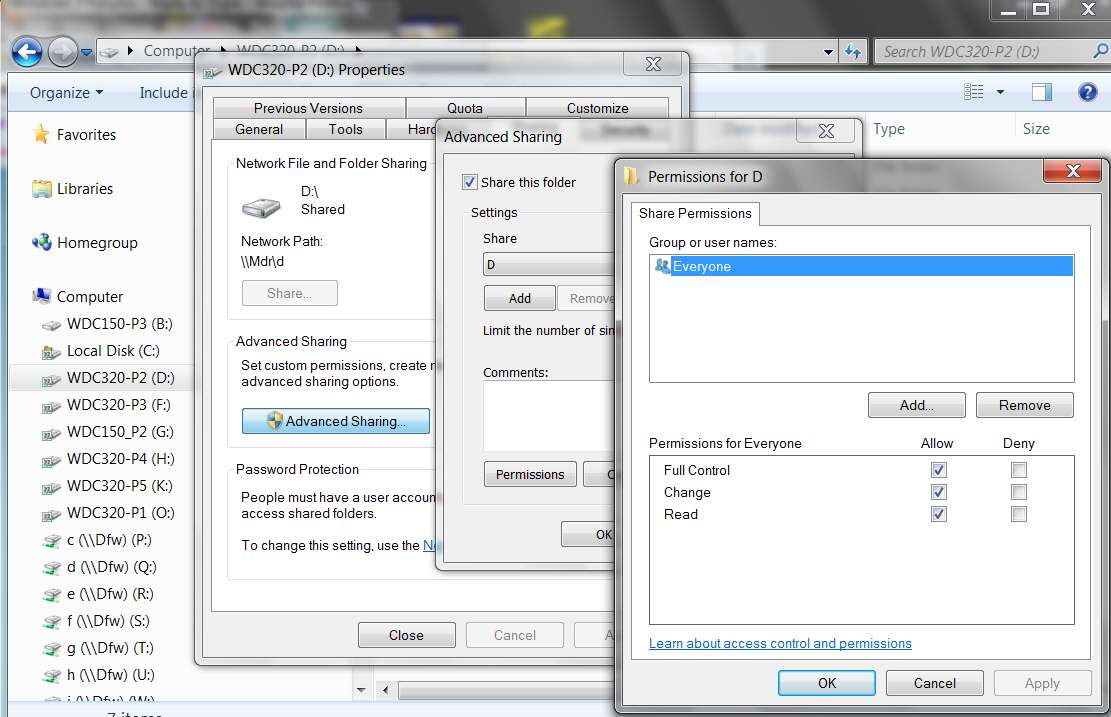
Also, on your Vista machine, have you allowed "full access" to the drives from network users... for everyone?

You've got a login userid/password on your Vista machine? It's not built to start with a selected user (from the Welcome screen) but without a password, is it? You should have a password for the user, both on the accessing and accessed machines.

For example, in my own 2-machine home LAN (both are normally Windows 7, but I can also boot either to WinXP, and can access either machine's drives from the other machine no matter whether the booted OS on either machine is Win7 or WinXP) I have gone through each of the drives on both machines (in both Win7 and WinXP on each machine), right-clicked on each drive, followed the "share with..." wizard for that OS, pushed the "advanced sharing" button, specifically checked the "share this folder" box, and then also pushed the "permissions" button and made sure that "full access" was granted to "everyone".

I assume Vista has just about the same dialogs. You must have done something like this in Win7 (or it was done implicitly when you enabled "file and print sharing" on your Win7 machine with your "home network" setup), but perhaps just have overlooked this on your Vista machine.

For example:

sharingv.jpg
 

My Computer My Computer

Computer type
PC/Desktop
Computer Manufacturer/Model Number
Home-built, two systems (1) and (2)
OS
Windows 7 Pro x64 (1), Win7 Pro X64 (2)
CPU
i5-3350p 3.1Ghz/6MB-cache (1); E8400 3.0Ghz/6MB-cache (2)
Motherboard
ASUS P8Z77-V Pro (1); ASUS P5Q3 (2)
Memory
8GB PC3-12800 DDR3 (1); 4GB PC3-10600 DDR3 (2)
Graphics Card(s)
ATI HD7750 (1), (see TV cards); ATI R7 250 (2)
Sound Card
Realtek ALC892 HD Audio (1); Realtek ALC1200 HD Audio (2)
Monitor(s) Displays
Eizo HD2441W LCD, Eizo S2433W (1); Eizo 24" S2433W (2)
Screen Resolution
1920x1200, 1920x1200 (1); 1920x1200 (2)
Hard Drives
(1) 1TB SATA-II (7200RPM), 2x2TB SATA-III (7200RPM), 250GB SATA-III (10000RPM) for OS; 2x2TB external USB 3.0

(2) 320GB SATA-II (7200RPM), 750GB SATA-II (7200RPM), 150GB SATA-II (10000RPM) for OS; 2TB external USB 3.0
PSU
Nesteq ECS-6001 600W (1); Nesteq ECS-5001 500W (2)
Case
Acousti-Case 360 (1) and (2)
Cooling
Noctua NH-U12P SE2 for CPU, 2x120mm case fans (1) and (2)
Keyboard
IBM PS/2 (1) and (2)
Mouse
Logitech MX Revolution wireless (1); Microsoft wired (2)
Internet Speed
100mbps down / 10mbps up
Antivirus
Microsoft Security Essentials; Malwarebyte Anti-Malware Pro
Browser
Firefox
Other Info
Ceton InfiniTV 4-tuner cablecard-enabled TV card as well as Hauppauge HVR-2250 OTA/ATSC 2-tuner TV card in (1), running under Win7 WMC
You can disable your UAC on the vista & see if it works. Is the permissions set correctly
 

My Computer My Computer

Computer Manufacturer/Model Number
Asus
OS
Seven ultimate 32bit
CPU
Core2Duo E5700
Motherboard
Asus p5qlem
Memory
3GB DDR2
Graphics Card(s)
HD5670
Sound Card
Onboard
Monitor(s) Displays
Philips 18.5 widescreen
Screen Resolution
Depends
Hard Drives
500GB Samsung 7200RPM
PSU
500w Sparta
Case
Aerocool
Cooling
Standard + 2x 40's inserted
Keyboard
Multimedia
Mouse
Genius
Internet Speed
10meg.
I have two computers Computer A runs Windows 7 and Computer B runs Vista.

I have gone through the set up of trying to link them. I have no trouble when I'm on Computer B seeing A.

Problem lies in Computer A seeing B...

When I'm on Computer A it does see the folders that I've set up on B but when I try to access them I get the message " YOU DO NOT HAVE PERMISSION TO ACCESS FILE //RALPH-PC// CONTACT YOUR NETWORK ADMINISTRATOR TO REQUEST ACCESS"

Now does this mean I have to do something on my B Computer(Vista) or on the A Computer(window 7)

Any help would be appreciated.

Thank You,

Ralph

One way to get around that is to use the same user name and password on both PC's. Duplicate your user account on both PC's.
Another solution is to enter a user name and password you used on computer B when prompted for it on PC A. You should also see a check box for remember this password or something similar. If you check that box you'll only have to enter the user name and password once.
 

My Computer My Computer

Computer type
PC/Desktop
Computer Manufacturer/Model Number
Home Built
OS
Windows 10 Education 64 bit
CPU
AMD Phenom II X4 980 Black Edition Deneb 3.7GHz
Motherboard
Asus M4N68T-M V2 µATX Motherboard
Memory
8GB 4GBx2 Kingston PC10600 DDR3 1333 Memory
Graphics Card(s)
Zotac NVIDIA Geforce GT640 2 Gig DDR3 PCIe
Sound Card
VIA VT1708s High Definition Audio 8-channel Onboard
Monitor(s) Displays
22" LG E2242 1080p and 2 19" I-INC AG191D
Screen Resolution
1280x1024 - 1920x1080 - 1280x1024
Hard Drives
Crucial M100 256 GB SSD and 500 GB WD Blue SATA
PSU
Thermaltake TR 620
Case
Power Up Black ATX Mid-Tower Case
Cooling
Stock heatsink and fan
Keyboard
Logitech Wireless K350 Wave
Mouse
Logitech Wireless M570 Trackman Wheel
Internet Speed
80 Mbps Down 30 Mbps Up
Antivirus
Windows Defender
Browser
Internet Explorer 11
Other Info
HP DVD1040e Lightscribe - External USB2
Set the network type to work instead of home. Home only allows for Win7 to see Win 7 machines as to were Work allows it to see other operating systems.

I have my network set to "Home network" on my windows 7 PC's and have no problem accessing a Windows XP PC on my network. I'm doing it with file and print sharing, and not using Home Group.
 

My Computer My Computer

Computer type
PC/Desktop
Computer Manufacturer/Model Number
Home Built
OS
Windows 10 Education 64 bit
CPU
AMD Phenom II X4 980 Black Edition Deneb 3.7GHz
Motherboard
Asus M4N68T-M V2 µATX Motherboard
Memory
8GB 4GBx2 Kingston PC10600 DDR3 1333 Memory
Graphics Card(s)
Zotac NVIDIA Geforce GT640 2 Gig DDR3 PCIe
Sound Card
VIA VT1708s High Definition Audio 8-channel Onboard
Monitor(s) Displays
22" LG E2242 1080p and 2 19" I-INC AG191D
Screen Resolution
1280x1024 - 1920x1080 - 1280x1024
Hard Drives
Crucial M100 256 GB SSD and 500 GB WD Blue SATA
PSU
Thermaltake TR 620
Case
Power Up Black ATX Mid-Tower Case
Cooling
Stock heatsink and fan
Keyboard
Logitech Wireless K350 Wave
Mouse
Logitech Wireless M570 Trackman Wheel
Internet Speed
80 Mbps Down 30 Mbps Up
Antivirus
Windows Defender
Browser
Internet Explorer 11
Other Info
HP DVD1040e Lightscribe - External USB2
Set the network type to work instead of home. Home only allows for Win7 to see Win 7 machines as to were Work allows it to see other operating systems.

I have my network set to "Home network" on my windows 7 PC's and have no problem accessing a Windows XP PC on my network. I'm doing it with file and print sharing, and not using Home Group.
+ 1.
 

My Computer My Computer

Computer type
PC/Desktop
Computer Manufacturer/Model Number
Home-built, two systems (1) and (2)
OS
Windows 7 Pro x64 (1), Win7 Pro X64 (2)
CPU
i5-3350p 3.1Ghz/6MB-cache (1); E8400 3.0Ghz/6MB-cache (2)
Motherboard
ASUS P8Z77-V Pro (1); ASUS P5Q3 (2)
Memory
8GB PC3-12800 DDR3 (1); 4GB PC3-10600 DDR3 (2)
Graphics Card(s)
ATI HD7750 (1), (see TV cards); ATI R7 250 (2)
Sound Card
Realtek ALC892 HD Audio (1); Realtek ALC1200 HD Audio (2)
Monitor(s) Displays
Eizo HD2441W LCD, Eizo S2433W (1); Eizo 24" S2433W (2)
Screen Resolution
1920x1200, 1920x1200 (1); 1920x1200 (2)
Hard Drives
(1) 1TB SATA-II (7200RPM), 2x2TB SATA-III (7200RPM), 250GB SATA-III (10000RPM) for OS; 2x2TB external USB 3.0

(2) 320GB SATA-II (7200RPM), 750GB SATA-II (7200RPM), 150GB SATA-II (10000RPM) for OS; 2TB external USB 3.0
PSU
Nesteq ECS-6001 600W (1); Nesteq ECS-5001 500W (2)
Case
Acousti-Case 360 (1) and (2)
Cooling
Noctua NH-U12P SE2 for CPU, 2x120mm case fans (1) and (2)
Keyboard
IBM PS/2 (1) and (2)
Mouse
Logitech MX Revolution wireless (1); Microsoft wired (2)
Internet Speed
100mbps down / 10mbps up
Antivirus
Microsoft Security Essentials; Malwarebyte Anti-Malware Pro
Browser
Firefox
Other Info
Ceton InfiniTV 4-tuner cablecard-enabled TV card as well as Hauppauge HVR-2250 OTA/ATSC 2-tuner TV card in (1), running under Win7 WMC
I have two computers Computer A runs Windows 7 and Computer B runs Vista.

I have gone through the set up of trying to link them. I have no trouble when I'm on Computer B seeing A.

Problem lies in Computer A seeing B...

When I'm on Computer A it does see the folders that I've set up on B but when I try to access them I get the message " YOU DO NOT HAVE PERMISSION TO ACCESS FILE //RALPH-PC// CONTACT YOUR NETWORK ADMINISTRATOR TO REQUEST ACCESS"

Now does this mean I have to do something on my B Computer(Vista) or on the A Computer(window 7)

Any help would be appreciated.

Thank You,

Ralph

One way to get around that is to use the same user name and password on both PC's. Duplicate your user account on both PC's.
Agreed. This is definitely the most convenient way to make life easier for you.

In my own situation I am the only user of both machines, but have set them both up essentially identically (other than hardware differences, of course). Same userid and password on all four OS's.

Both Win7 and WinXP on both physical machines are all essentially identical, so having logged in at boot time to either OS on either machine allows "silent instant connectivity" to anything on the other machine no matter which OS is booted and running on either machine.


Another solution is to enter a user name and password you used on computer B when prompted for it on PC A. You should also see a check box for remember this password or something similar. If you check that box you'll only have to enter the user name and password once.
Exactly.

In my sister/brother-in-law's situation, they have two desktop machines (one is Win7 for her, the other is WinXP for him). They each have their own userid/password, and again the crucial factor here is that their userids DO have a password associated with them. Trying to support "silent instant connectivity" without the logged-in user not having a password is bound to be unsucessful in one or more ways.

Anyway, after the first access from one machine to the other... which may prompt for a userid/password on that first attempt to access the other machine, with that "remember password" item checked you'll never have to be bothered again. The userid/password being asked for on the accessing machine is the accessed machine's currently logged-on user.


"File and printer sharing", permissions to allow "full control" for "everyone" on the accessed machine's drives, common userid/passwords from both machines but even if not true then simply having a password for all users on both machines, these are all relevant factors which if not quite right can cause access/permissions problems.
 

My Computer My Computer

Computer type
PC/Desktop
Computer Manufacturer/Model Number
Home-built, two systems (1) and (2)
OS
Windows 7 Pro x64 (1), Win7 Pro X64 (2)
CPU
i5-3350p 3.1Ghz/6MB-cache (1); E8400 3.0Ghz/6MB-cache (2)
Motherboard
ASUS P8Z77-V Pro (1); ASUS P5Q3 (2)
Memory
8GB PC3-12800 DDR3 (1); 4GB PC3-10600 DDR3 (2)
Graphics Card(s)
ATI HD7750 (1), (see TV cards); ATI R7 250 (2)
Sound Card
Realtek ALC892 HD Audio (1); Realtek ALC1200 HD Audio (2)
Monitor(s) Displays
Eizo HD2441W LCD, Eizo S2433W (1); Eizo 24" S2433W (2)
Screen Resolution
1920x1200, 1920x1200 (1); 1920x1200 (2)
Hard Drives
(1) 1TB SATA-II (7200RPM), 2x2TB SATA-III (7200RPM), 250GB SATA-III (10000RPM) for OS; 2x2TB external USB 3.0

(2) 320GB SATA-II (7200RPM), 750GB SATA-II (7200RPM), 150GB SATA-II (10000RPM) for OS; 2TB external USB 3.0
PSU
Nesteq ECS-6001 600W (1); Nesteq ECS-5001 500W (2)
Case
Acousti-Case 360 (1) and (2)
Cooling
Noctua NH-U12P SE2 for CPU, 2x120mm case fans (1) and (2)
Keyboard
IBM PS/2 (1) and (2)
Mouse
Logitech MX Revolution wireless (1); Microsoft wired (2)
Internet Speed
100mbps down / 10mbps up
Antivirus
Microsoft Security Essentials; Malwarebyte Anti-Malware Pro
Browser
Firefox
Other Info
Ceton InfiniTV 4-tuner cablecard-enabled TV card as well as Hauppauge HVR-2250 OTA/ATSC 2-tuner TV card in (1), running under Win7 WMC
No Luck As Yet

I'm afraid I'm still back to square one.

I've tried setting passwords, unsetting passwords. Changing work group from Home to Office:(:(

When I try to open a folder on my network I get access denied. I made my Network folders open to Everyone.

Any more suggestions?
 

My Computer My Computer

OS
Windows 7 PROFESSIONAL 64BIT
When I try to open a folder on my network I get access denied. I made my Network folders open to Everyone.

Any more suggestions?
"Network folders"?? What do you mean?

Have you facilitated sharing (on the Vista machine which is trying to be accessed from the Win7 machine) for the drive as a whole?

Have you actually "taken ownership" of the drive on the Vista machine, and reassigned the owner as "Everyone"?

permissionso.jpg


I remember when I first tried to get my Win7 and WinXP systems to allow access to/from each other, I had a problem because of the opposite approach taken by the two systems to default permissions. Only when I manually went through each of my partitions (i.e. drive letters) on each machine, and manually changed ownership and permissions to be one common "everyone" (or my userid which was used commonly on both systems, and which had administrator rights), and manually "took ownership" and granted full access to "everyone", was I finally able to overcome the exact same problem you're describing.

I would have thought that Vista and Win7 would have had the same approach to permissions, though WinXP was backwards. So I wouldn't have expected this to be necessary for your Vista system. But I'd certainly investigate the "permissions" angle of your Vista drive(s).

It's a permissions issue, I'm confident. Right-click on the drive, Properties, Security, and Advanced. Then check the permissions, and the owner. I'd suggest "taking ownership" of the Vista drive(s) and just manually assigning your userid on that machine as the owner, and then delete all permissions and add just one... for "everyone", with full control.

My sympathies to your headache.


P.S. I do not use the "HomeGroup" arrangement of Win7. Also, I've defined my home LAN as a "home network", not a "work network".

And I simply use the old fashioned "work group" approach (a la WinXP), with both machines set up as part of my own named work group (i.e. other than the default "MSHOME" or something).

I still believe it's a permissions issue on your Vista machine which is responsible for your situation.
 

My Computer My Computer

Computer type
PC/Desktop
Computer Manufacturer/Model Number
Home-built, two systems (1) and (2)
OS
Windows 7 Pro x64 (1), Win7 Pro X64 (2)
CPU
i5-3350p 3.1Ghz/6MB-cache (1); E8400 3.0Ghz/6MB-cache (2)
Motherboard
ASUS P8Z77-V Pro (1); ASUS P5Q3 (2)
Memory
8GB PC3-12800 DDR3 (1); 4GB PC3-10600 DDR3 (2)
Graphics Card(s)
ATI HD7750 (1), (see TV cards); ATI R7 250 (2)
Sound Card
Realtek ALC892 HD Audio (1); Realtek ALC1200 HD Audio (2)
Monitor(s) Displays
Eizo HD2441W LCD, Eizo S2433W (1); Eizo 24" S2433W (2)
Screen Resolution
1920x1200, 1920x1200 (1); 1920x1200 (2)
Hard Drives
(1) 1TB SATA-II (7200RPM), 2x2TB SATA-III (7200RPM), 250GB SATA-III (10000RPM) for OS; 2x2TB external USB 3.0

(2) 320GB SATA-II (7200RPM), 750GB SATA-II (7200RPM), 150GB SATA-II (10000RPM) for OS; 2TB external USB 3.0
PSU
Nesteq ECS-6001 600W (1); Nesteq ECS-5001 500W (2)
Case
Acousti-Case 360 (1) and (2)
Cooling
Noctua NH-U12P SE2 for CPU, 2x120mm case fans (1) and (2)
Keyboard
IBM PS/2 (1) and (2)
Mouse
Logitech MX Revolution wireless (1); Microsoft wired (2)
Internet Speed
100mbps down / 10mbps up
Antivirus
Microsoft Security Essentials; Malwarebyte Anti-Malware Pro
Browser
Firefox
Other Info
Ceton InfiniTV 4-tuner cablecard-enabled TV card as well as Hauppauge HVR-2250 OTA/ATSC 2-tuner TV card in (1), running under Win7 WMC
My setup is very similar to what dsperber posted above. My user name and password are setup on each PC, and work group is set to SOHO on all PCs.
I also don't use Home Group.
On my windows 7 PCs I set the following under "Advanced sharing settings" in the Network and Sharing Center.

Home or Work(current profile)
Network Discovery is on
File and print sharing is turned on
Public folder sharing is off
Use 128 bit encryption is checked
Password protected sharing is also on

I created a folder on each PC and shared it. I locked down my shared folders by adding my user account to the permissions and giving it full access, then I remove the "all users". Only my user account can then access the shared folders. On my daughters netbook, which is the only PC with her user account on it, I just entered my user name and password when prompted and checked the box for remember me. She can access the folders but doesn't know the password. I let her friends use my WIFI when they stay over, this way they can't access the shared folders even though they know my WIFI password. ;)
 

My Computer My Computer

Computer type
PC/Desktop
Computer Manufacturer/Model Number
Home Built
OS
Windows 10 Education 64 bit
CPU
AMD Phenom II X4 980 Black Edition Deneb 3.7GHz
Motherboard
Asus M4N68T-M V2 µATX Motherboard
Memory
8GB 4GBx2 Kingston PC10600 DDR3 1333 Memory
Graphics Card(s)
Zotac NVIDIA Geforce GT640 2 Gig DDR3 PCIe
Sound Card
VIA VT1708s High Definition Audio 8-channel Onboard
Monitor(s) Displays
22" LG E2242 1080p and 2 19" I-INC AG191D
Screen Resolution
1280x1024 - 1920x1080 - 1280x1024
Hard Drives
Crucial M100 256 GB SSD and 500 GB WD Blue SATA
PSU
Thermaltake TR 620
Case
Power Up Black ATX Mid-Tower Case
Cooling
Stock heatsink and fan
Keyboard
Logitech Wireless K350 Wave
Mouse
Logitech Wireless M570 Trackman Wheel
Internet Speed
80 Mbps Down 30 Mbps Up
Antivirus
Windows Defender
Browser
Internet Explorer 11
Other Info
HP DVD1040e Lightscribe - External USB2
Back
Top