Linksys Connection Woes - Default Gateway, DNS, etc..

Floyders

New member
Local time
9:56 PM
Messages
7
Here's the story.. My roommate's computer, both of our phones, my 3DS, etc., can all connect to the Linksys Router, but my laptop has issues galore. It will connect, but I'll randomly lose connection. Sometimes it'll reconnect right away, but a lot of the times it will connect with limited availability. Its almost as though it gets stuck on "Identifying..". When I run diagnosis it mentions default gateway issues a lot, and occasionally IP Configuration.

Sometimes all the NETSH reset stuff (winsock, ipv4, etc.) will get it back up and running, but not always.

Here's the weird part: This router (our apartment) is literally the ONLY connection I've had problems with. If I go anywhere else I can easily connect.

Here's my ipconfig/all: (I think while I was tethered to phone)

C:\Users\Floyd>ipconfig/all

Windows IP Configuration

Host Name . . . . . . . . . . . . : Demon
Primary Dns Suffix . . . . . . . :
Node Type . . . . . . . . . . . . : Hybrid
IP Routing Enabled. . . . . . . . : No
WINS Proxy Enabled. . . . . . . . : No

Wireless LAN adapter Wireless Network Connection 2:

Connection-specific DNS Suffix . :
Description . . . . . . . . . . . : Intel(R) WiFi Link 5300 AGN #2
Physical Address. . . . . . . . . : 02-24-CD-3F-57-45
DHCP Enabled. . . . . . . . . . . : Yes
Autoconfiguration Enabled . . . . : Yes
Link-local IPv6 Address . . . . . : fe80::e18c:d55b:8d77:4168%26(Preferred)
Autoconfiguration IPv4 Address. . : 169.254.65.104(Preferred)
Subnet Mask . . . . . . . . . . . : 255.255.0.0
Default Gateway . . . . . . . . . :
DHCPv6 IAID . . . . . . . . . . . : 268444010
DHCPv6 Client DUID. . . . . . . . : 00-01-00-01-17-33-1A-01-00-24-81-B0-41-

DNS Servers . . . . . . . . . . . : fec0:0:0:ffff::1%1
fec0:0:0:ffff::2%1
fec0:0:0:ffff::3%1
NetBIOS over Tcpip. . . . . . . . : Enabled

Ethernet adapter Bluetooth Network Connection 2:

Media State . . . . . . . . . . . : Media disconnected
Connection-specific DNS Suffix . :
Description . . . . . . . . . . . : Bluetooth Device (Personal Area Network
#2
Physical Address. . . . . . . . . : 00-27-13-2F-A8-10
DHCP Enabled. . . . . . . . . . . : Yes
Autoconfiguration Enabled . . . . : Yes

Ethernet adapter Local Area Connection 2:

Media State . . . . . . . . . . . : Media disconnected
Connection-specific DNS Suffix . :
Description . . . . . . . . . . . : Intel(R) 82567LM Gigabit Network Connec
on #2
Physical Address. . . . . . . . . : F4-CE-46-98-83-C4
DHCP Enabled. . . . . . . . . . . : Yes
Autoconfiguration Enabled . . . . : Yes

Tunnel adapter isatap.{79A4E135-88FA-4999-BBFC-6017BFEC1509}:

Media State . . . . . . . . . . . : Media disconnected
Connection-specific DNS Suffix . :
Description . . . . . . . . . . . : Microsoft ISATAP Adapter #3
Physical Address. . . . . . . . . : 00-00-00-00-00-00-00-E0
DHCP Enabled. . . . . . . . . . . : No
Autoconfiguration Enabled . . . . : Yes

Tunnel adapter Local Area Connection* 13:

Media State . . . . . . . . . . . : Media disconnected
Connection-specific DNS Suffix . :
Description . . . . . . . . . . . : Teredo Tunneling Pseudo-Interface
Physical Address. . . . . . . . . : 00-00-00-00-00-00-00-E0
DHCP Enabled. . . . . . . . . . . : No
Autoconfiguration Enabled . . . . : Yes


Any pointers?
 

My Computer My Computer

At a glance

Michigan
Computer type
PC/Desktop
Computer Manufacturer/Model Number
HP Elitebook 6930p
OS
Michigan
You might want to try using the latest drivers from Intel dated Dec. 17 2013, the top linked driver is the "driver only" without the connection software, try uninstalling the driver and Intel connection software from "add remove programs" then install only the driver.
https://downloadcenter.intel.com/Detail_Desc.aspx?ProductID=3062&DwnldID=23491&lang=eng&iid=dc_rss

If this driver don't help you may want to consider updating the firmware on this router since it appears to be the only router you can't connect to consistently. :)
 

My Computer My Computer

At a glance

Windows 7 Ult, Windows 8.1 Pro,Q9650-4.275GHz, E8600 4.5GHz, E6750-3.8GHzG.Skill PC2 9600 1200Mhz 5 5 5 15 2TGTX480
Computer type
PC/Desktop
Computer Manufacturer/Model Number
Home built
OS
Windows 7 Ult, Windows 8.1 Pro,
CPU
Q9650-4.275GHz, E8600 4.5GHz, E6750-3.8GHz
Motherboard
Evga 780i FTW
Memory
G.Skill PC2 9600 1200Mhz 5 5 5 15 2T
Graphics Card(s)
GTX480
Sound Card
Asus Xonar D2
Monitor(s) Displays
HannsG
Screen Resolution
1680X1050
Hard Drives
GSkill Phoenix Pro 120GB SSD
PSU
ThermalTake Toughpower 1000Watt modular
Case
ThermalTake XaserV
Cooling
Xigmatek S1283
Keyboard
Logitech G15
Mouse
Logitech G9
Internet Speed
T1
If this driver don't help you may want to consider updating the firmware on this router since it appears to be the only router you can't connect to consistently. :)

I hadn't thought about the router's settings, but something else to check is the power management settings. Correct me if I'm wrong all you regs, but there are device settings in properties that turn off the NIC during power saving modes. You've probably already been there, but it's one of the first things I look at.

Something else:

Connection-specific DNS Suffix . :
Description . . . . . . . . . . . : Intel(R) WiFi Link 5300 AGN #2
Physical Address. . . . . . . . . : 02-24-CD-3F-57-45
DHCP Enabled. . . . . . . . . . . : Yes
Autoconfiguration Enabled . . . . : Yes
Link-local IPv6 Address . . . . . : fe80::e18c:d55b:8d77:4168%26(Preferred)
Autoconfiguration IPv4 Address. . : 169.254.65.104(Preferred)
Subnet Mask . . . . . . . . . . . : 255.255.0.0
Default Gateway . . . . . . . . . :
DHCPv6 IAID . . . . . . . . . . . : 268444010
DHCPv6 Client DUID. . . . . . . . : 00-01-00-01-17-33-1A-01-00-24-81-B0-41-

DNS Servers . . . . . . . . . . . : fec0:0:0:ffff::1%1

All this indicates that you have no internet gateway defined. I see DHCP enabled, but it seems like there's something hokey about your IP address. I seem to remember something from the XP days and that IP address range (168.254.*.*). Anyone else have a clue? I guess I'd have to go back to router config. Get into your router's internal config webpage. Usually, that's 192.168.1.1 .
 

My Computer My Computer

At a glance

Microsoft Windows 10 Home Build 15036Intel(R) Core(TM) i7-860 @ 2.80GHz4.00 GBNVIDIA GeForce GTX 750
Computer type
PC/Desktop
Computer Manufacturer/Model Number
iBuyPower NZXT
OS
Microsoft Windows 10 Home Build 15036
CPU
Intel(R) Core(TM) i7-860 @ 2.80GHz
Motherboard
Gigabyte Technology Co., Ltd. P55-UD3L
Memory
4.00 GB
Graphics Card(s)
NVIDIA GeForce GTX 750
Sound Card
(1) Line 6 UX2 (2) Realtek High Definition Audio
Monitor(s) Displays
23" acer
Screen Resolution
1920 x 1080 x 32 bits (4294967296 colors) @ 60 Hz
Hard Drives
(1) WDC WD5000AAKS-00D2B0 ATA Device (2) Seagate FreeAgent Go 250G USB Device
Cooling
Corsair H75 liquid cooler (Very easy to install, actually)
Internet Speed
60M cable modem-->Linksys E1200-->1Gbps net card
Browser
Chrome
Other Info
This is probably the longest I've ever had a Windows machine run without having to restore it to scratch. I'm used to restoring to "factory" about every 2 yrs. I've run with Win7 since new in 2009 and only recently (Nov, '14) restored to clean up the machine from all my 'xperimenting. LOL!! I may never need another machine.

Upgraded to 10 when it was still free, then installed 2017 update.
If this driver don't help you may want to consider updating the firmware on this router since it appears to be the only router you can't connect to consistently. :)

I hadn't thought about the router's settings, but something else to check is the power management settings. Correct me if I'm wrong all you regs, but there are device settings in properties that turn off the NIC during power saving modes. You've probably already been there, but it's one of the first things I look at.

Something else:

Connection-specific DNS Suffix . :
Description . . . . . . . . . . . : Intel(R) WiFi Link 5300 AGN #2
Physical Address. . . . . . . . . : 02-24-CD-3F-57-45
DHCP Enabled. . . . . . . . . . . : Yes
Autoconfiguration Enabled . . . . : Yes
Link-local IPv6 Address . . . . . : fe80::e18c:d55b:8d77:4168%26(Preferred)
Autoconfiguration IPv4 Address. . : 169.254.65.104(Preferred)
Subnet Mask . . . . . . . . . . . : 255.255.0.0
Default Gateway . . . . . . . . . :
DHCPv6 IAID . . . . . . . . . . . : 268444010
DHCPv6 Client DUID. . . . . . . . : 00-01-00-01-17-33-1A-01-00-24-81-B0-41-

DNS Servers . . . . . . . . . . . : fec0:0:0:ffff::1%1

All this indicates that you have no internet gateway defined. I see DHCP enabled, but it seems like there's something hokey about your IP address. I seem to remember something from the XP days and that IP address range (168.254.*.*). Anyone else have a clue? I guess I'd have to go back to router config. Get into your router's internal config webpage. Usually, that's 192.168.1.1 .

Hrm.. So are you suggestion that I have it connect through a different IP range? Is that something I would do with a static IP or possibly in the router settings?

Also, I'm finding that resetting the resetlog.txt is the thing that helps the most. :/
 

My Computer My Computer

At a glance

Michigan
Computer type
PC/Desktop
Computer Manufacturer/Model Number
HP Elitebook 6930p
OS
Michigan
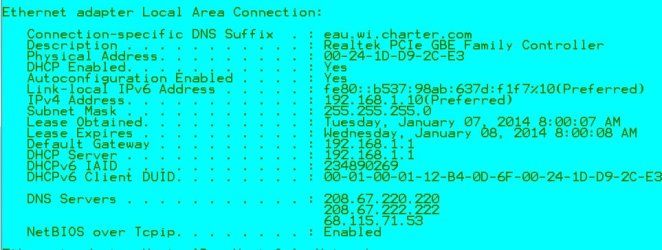
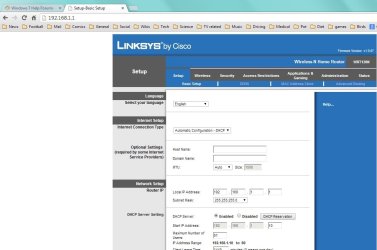
From what I saw on your IPCONFIG, you've got DHCP enabled, meaning that the router is TRYING to give you an IP address. What you come away with (169.254.65.104) however, isn't what one might expect from a LinkSys router. The subnet mask entry also appears to differ from what you'd expect from this router. Check below to see my IPCONFIG and a shot of my router's config page.

From one of the machines that is working fine on your network, open a browser and go to 192.168.1.1. That should open your router's configuration page. I hope someone there knows the username and password for your router (It should NOT be the same as your Wi-Fi password!). From that point, you can see if any of these other issues in previous posts apply to you.

Any luck checking the power settings on your wi-fi card?
 

Attachments

  • IPCONFIG.jpg
    IPCONFIG.jpg
    63.7 KB · Views: 0
  • Linksys.jpg
    Linksys.jpg
    65.2 KB · Views: 1

My Computer My Computer

At a glance

Microsoft Windows 10 Home Build 15036Intel(R) Core(TM) i7-860 @ 2.80GHz4.00 GBNVIDIA GeForce GTX 750
Computer type
PC/Desktop
Computer Manufacturer/Model Number
iBuyPower NZXT
OS
Microsoft Windows 10 Home Build 15036
CPU
Intel(R) Core(TM) i7-860 @ 2.80GHz
Motherboard
Gigabyte Technology Co., Ltd. P55-UD3L
Memory
4.00 GB
Graphics Card(s)
NVIDIA GeForce GTX 750
Sound Card
(1) Line 6 UX2 (2) Realtek High Definition Audio
Monitor(s) Displays
23" acer
Screen Resolution
1920 x 1080 x 32 bits (4294967296 colors) @ 60 Hz
Hard Drives
(1) WDC WD5000AAKS-00D2B0 ATA Device (2) Seagate FreeAgent Go 250G USB Device
Cooling
Corsair H75 liquid cooler (Very easy to install, actually)
Internet Speed
60M cable modem-->Linksys E1200-->1Gbps net card
Browser
Chrome
Other Info
This is probably the longest I've ever had a Windows machine run without having to restore it to scratch. I'm used to restoring to "factory" about every 2 yrs. I've run with Win7 since new in 2009 and only recently (Nov, '14) restored to clean up the machine from all my 'xperimenting. LOL!! I may never need another machine.

Upgraded to 10 when it was still free, then installed 2017 update.
Hrm.. So are you suggestion that I have it connect through a different IP range? Is that something I would do with a static IP or possibly in the router settings? Also, I'm finding that resetting the resetlog.txt is the thing that helps the most.


I am not suggesting anything until after you install the driver which I posted a link to.

The 169 IP which is showing up is just the default Ip when Windows can't pick one up from the router which is a very common problem.

please install the driver from the link I posted because the driver you are using does not appear to be a WHQL Windows approved driver, if it was then I would be seeing the Msoft Virtual WiFi adaptor.
 

My Computer My Computer

At a glance

Windows 7 Ult, Windows 8.1 Pro,Q9650-4.275GHz, E8600 4.5GHz, E6750-3.8GHzG.Skill PC2 9600 1200Mhz 5 5 5 15 2TGTX480
Computer type
PC/Desktop
Computer Manufacturer/Model Number
Home built
OS
Windows 7 Ult, Windows 8.1 Pro,
CPU
Q9650-4.275GHz, E8600 4.5GHz, E6750-3.8GHz
Motherboard
Evga 780i FTW
Memory
G.Skill PC2 9600 1200Mhz 5 5 5 15 2T
Graphics Card(s)
GTX480
Sound Card
Asus Xonar D2
Monitor(s) Displays
HannsG
Screen Resolution
1680X1050
Hard Drives
GSkill Phoenix Pro 120GB SSD
PSU
ThermalTake Toughpower 1000Watt modular
Case
ThermalTake XaserV
Cooling
Xigmatek S1283
Keyboard
Logitech G15
Mouse
Logitech G9
Internet Speed
T1
Hrm.. So are you suggestion that I have it connect through a different IP range? Is that something I would do with a static IP or possibly in the router settings? Also, I'm finding that resetting the resetlog.txt is the thing that helps the most.


I am not suggesting anything until after you install the driver which I posted a link to.

The 169 IP which is showing up is just the default Ip when Windows can't pick one up from the router which is a very common problem.

please install the driver from the link I posted because the driver you are using does not appear to be a WHQL Windows approved driver, if it was then I would be seeing the Msoft Virtual WiFi adaptor.

Sorry, I forgot to mention that my driver is up to date.
 

My Computer My Computer

At a glance

Michigan
Computer type
PC/Desktop
Computer Manufacturer/Model Number
HP Elitebook 6930p
OS
Michigan
Hrm.. So are you suggestion that I have it connect through a different IP range? Is that something I would do with a static IP or possibly in the router settings? Also, I'm finding that resetting the resetlog.txt is the thing that helps the most.


I am not suggesting anything until after you install the driver which I posted a link to.

The 169 IP which is showing up is just the default Ip when Windows can't pick one up from the router which is a very common problem.

please install the driver from the link I posted because the driver you are using does not appear to be a WHQL Windows approved driver, if it was then I would be seeing the Msoft Virtual WiFi adaptor.

Sorry, I forgot to mention that my driver is up to date.

Great, latest driver version installed.

What model/version of Linksys router are you using?

Please unzip and click on the .exe file, it will place a .txt file on your desktop, please upload the file to here so I can have a look.
 

Attachments

My Computer My Computer

At a glance

Windows 7 Ult, Windows 8.1 Pro,Q9650-4.275GHz, E8600 4.5GHz, E6750-3.8GHzG.Skill PC2 9600 1200Mhz 5 5 5 15 2TGTX480
Computer type
PC/Desktop
Computer Manufacturer/Model Number
Home built
OS
Windows 7 Ult, Windows 8.1 Pro,
CPU
Q9650-4.275GHz, E8600 4.5GHz, E6750-3.8GHz
Motherboard
Evga 780i FTW
Memory
G.Skill PC2 9600 1200Mhz 5 5 5 15 2T
Graphics Card(s)
GTX480
Sound Card
Asus Xonar D2
Monitor(s) Displays
HannsG
Screen Resolution
1680X1050
Hard Drives
GSkill Phoenix Pro 120GB SSD
PSU
ThermalTake Toughpower 1000Watt modular
Case
ThermalTake XaserV
Cooling
Xigmatek S1283
Keyboard
Logitech G15
Mouse
Logitech G9
Internet Speed
T1
Okay, did it. Now, I opened it and noticed it shows 1/22/2012 for my driver date. I downloaded the driver again and tried to install it, it just opens and disappears. I tried to manually install it by going to device manager, and browsing to the download folder where it is located and it says that my driver is up to date.
View attachment Network.txt

I don't know if this helps, but just now I was browsing connected to my phone... already went through flushing dns, releasing ip, resetting winsock, etc. None of it worked (sometimes it does). Then I did netsh int ip reset reset.txt and now i'm connected.
 

My Computer My Computer

At a glance

Michigan
Computer type
PC/Desktop
Computer Manufacturer/Model Number
HP Elitebook 6930p
OS
Michigan
Bump.
 

My Computer My Computer

At a glance

Michigan
Computer type
PC/Desktop
Computer Manufacturer/Model Number
HP Elitebook 6930p
OS
Michigan

I need to know the make/model of this Linksys router.

It's only working on wireless G for some reason and so will most likely require a firmware update at the very least to make it compatible with Windows 7.
 

My Computer My Computer

At a glance

Windows 7 Ult, Windows 8.1 Pro,Q9650-4.275GHz, E8600 4.5GHz, E6750-3.8GHzG.Skill PC2 9600 1200Mhz 5 5 5 15 2TGTX480
Computer type
PC/Desktop
Computer Manufacturer/Model Number
Home built
OS
Windows 7 Ult, Windows 8.1 Pro,
CPU
Q9650-4.275GHz, E8600 4.5GHz, E6750-3.8GHz
Motherboard
Evga 780i FTW
Memory
G.Skill PC2 9600 1200Mhz 5 5 5 15 2T
Graphics Card(s)
GTX480
Sound Card
Asus Xonar D2
Monitor(s) Displays
HannsG
Screen Resolution
1680X1050
Hard Drives
GSkill Phoenix Pro 120GB SSD
PSU
ThermalTake Toughpower 1000Watt modular
Case
ThermalTake XaserV
Cooling
Xigmatek S1283
Keyboard
Logitech G15
Mouse
Logitech G9
Internet Speed
T1
It is a Cisco Linksys WRT54GS router and it apparently has "Firmware Version: v3.37.1"
 

My Computer My Computer

At a glance

Michigan
Computer type
PC/Desktop
Computer Manufacturer/Model Number
HP Elitebook 6930p
OS
Michigan
It is a Cisco Linksys WRT54GS router and it apparently has "Firmware Version: v3.37.1"

You would also need the router's version number to find the latest firmware.
 

My Computer My Computer

At a glance

Windows 7 Ult, Windows 8.1 Pro,Q9650-4.275GHz, E8600 4.5GHz, E6750-3.8GHzG.Skill PC2 9600 1200Mhz 5 5 5 15 2TGTX480
Computer type
PC/Desktop
Computer Manufacturer/Model Number
Home built
OS
Windows 7 Ult, Windows 8.1 Pro,
CPU
Q9650-4.275GHz, E8600 4.5GHz, E6750-3.8GHz
Motherboard
Evga 780i FTW
Memory
G.Skill PC2 9600 1200Mhz 5 5 5 15 2T
Graphics Card(s)
GTX480
Sound Card
Asus Xonar D2
Monitor(s) Displays
HannsG
Screen Resolution
1680X1050
Hard Drives
GSkill Phoenix Pro 120GB SSD
PSU
ThermalTake Toughpower 1000Watt modular
Case
ThermalTake XaserV
Cooling
Xigmatek S1283
Keyboard
Logitech G15
Mouse
Logitech G9
Internet Speed
T1
I think I'm SOL, because I don't know the version number. The sticker peeled off.
 

My Computer My Computer

At a glance

Michigan
Computer type
PC/Desktop
Computer Manufacturer/Model Number
HP Elitebook 6930p
OS
Michigan
Back
Top