
spetho2001
New member
- Local time
- 6:30 PM
- Messages
- 20
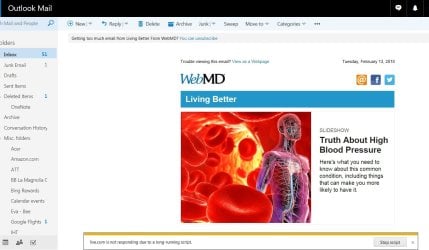
I have a Windows 7 SP1 IE 11 desktop and I use Outlook.com web based email. Quite often lately when I am using my email it seems to be slow loading what ever I click on. I also get a message at the bottom of the page that says "Live.com is not responding due to long running script".
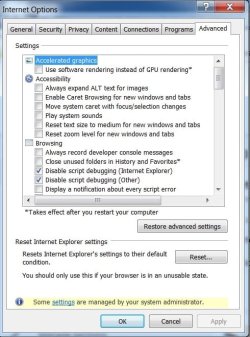
See screen shots. I contacted Outlook support and they want me to reset IE as they say it is unstable. My computer seems to be working OK except for OUTLOOK.COM.
What are the checked debugging script options listed in IE
Also I did a Google search of this problem and it seems that this has or is happening with Microsoft email. See the first hit in the screen shot.
I notice that Microsoft has a Beta of a new email that they want you to try. It is in the top RH corner of the Outlook.com page.
Can anyone help me with this? Thank you, TomS
See screen shots. I contacted Outlook support and they want me to reset IE as they say it is unstable. My computer seems to be working OK except for OUTLOOK.COM.
What are the checked debugging script options listed in IE
Also I did a Google search of this problem and it seems that this has or is happening with Microsoft email. See the first hit in the screen shot.
I notice that Microsoft has a Beta of a new email that they want you to try. It is in the top RH corner of the Outlook.com page.
Can anyone help me with this? Thank you, TomS
Attachments

My Computer
- Computer type
- PC/Desktop
- Computer Manufacturer/Model Number
- custom build
- OS
- Windows 7 Home Premium 64Bit
- CPU
- Intel
- Graphics Card(s)
- AMD Radeon 7700
- Antivirus
- Microsoft Security Essentials
- Browser
- Internet Explorer
 very frustrating. seems to correlate with the advertisements running in outlook on the right side of screen. very random. it seems like it is too much of a program for my computer, or something is conflicting. after reading both responses above, I saved 2 hours of frustration out of my life by NOT calling MS support.


