Live Mail not letting me see my Emails

gdisarcina

New member
Local time
1:12 PM
Messages
1
I am using Live Mail. When I am in my Inbox and double click on an email, it seems to be getting blocked by something and it doesn't render on the screen. Down on the taskbar, where I have Live Mail pinned, the emails are being added to the Live mail area. So, if I click on 3 different emails, they don't show up on my screen, but down below there will be 4 small Live Mail windows open. Also, if I try to create a new message, it gets blocked as well. I have tried everything, including disabling the pop up blocker in my Internet options. Has anyone run into this? Any ideas? Please help. Very frustrating.
 

My Computer My Computer

At a glance

Windows 7 32 bit
OS
Windows 7 32 bit
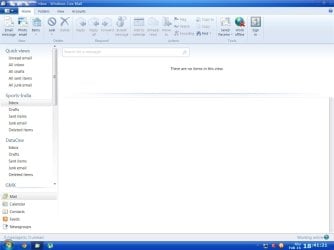
Is your e-Mail display area having two panels? One the smaller header Panel on top and the other the bigger Message Display Panel at the bottom. If not then make them that way by clicking and dragging the dividing line from the bottom to the top. The WLM Window should look like the screenshot below.

WLM.jpg

You should be able to read the mail on the lower panel now if you click on the header on the top panel.
 

My Computer My Computer

At a glance

Windows 7 Pro with SP1 32bit2 gigs of RAMIntel(R) 82845G/GL/GE/PE/GV Graphics Controller
Computer Manufacturer/Model Number
Custom Built
OS
Windows 7 Pro with SP1 32bit
Motherboard
Intel D845GVS1 X86-based PC
Memory
2 gigs of RAM
Graphics Card(s)
Intel(R) 82845G/GL/GE/PE/GV Graphics Controller
Sound Card
Realtek AC'97 Audio
Monitor(s) Displays
Samsung SyncMaster 931BF Black 19" LCD Monitor
Screen Resolution
1280X960
Hard Drives
1. SAMSUNG SP0822N ATA Device ~ 80 GigaBytes

2. Seagate FreeAgent Go USB Device ~ 500 GigaBytes
Keyboard
COMPAQ Standard PS/2 Keyboard
Mouse
iBall Laser Precise Speedster
Internet Speed
4 mb/sec
...When I am in my Inbox and double click on an email, it seems to be getting blocked by something and it doesn't render on the screen...
Clearly not working right. Try a repair of Windows Live Essentials via Programs and Features. While highlighted, use the uninstall/change button at the top of the window. All the installed components of the Live Essentials suite can be repaired, including Mail.
 

My Computer My Computer

At a glance

Windows 8 Pro w/MC 32-bitIntel Atom 1.86 GHz2 GBIntel GMA 500
Computer type
PC/Desktop
Computer Manufacturer/Model Number
OQO 2+
OS
Windows 8 Pro w/MC 32-bit
CPU
Intel Atom 1.86 GHz
Motherboard
OQO 2+
Memory
2 GB
Graphics Card(s)
Intel GMA 500
Sound Card
IDT
Monitor(s) Displays
LCD
Screen Resolution
800 x 480 (portable) 1280 x 1024 (docked)
Hard Drives
64 GB SSD
PSU
9 Ah Battery (portable) or OQO Brick (docked)
Case
Shirt Pocket Sized
Cooling
Tiny Fan
Keyboard
Slide out (portable) DiNovo Edge (docked)
Mouse
Eraser head (portable) Logitech Bluetooth (docked)
Internet Speed
WWAN or 802.11G (portable) T1 (docked)
Browser
IE 10
Other Info
DVD-RW OQO Docking Station
Back
Top