Loading w7 on to a USB

Lioninstreet

New member
Local time
12:44 AM
Messages
29
I'm trying to load a 6.1 os onto a 256gb thumb drive (a pny usb 3.0). The goal being having a USB as the systems boot drive.

I have a disk with sp1 included, I'm using a external USB DVD drive to load in the OS, and the hardware I'm using is circa 2009 (a e5200 processor and only USB 2.0 ports). It also has SATAII but no hard drives are installed.

Once the system boots past bios, the OS begins to load, and will continue installing up until the Installing Windows screen.

But then it seems that the install is not recognizing the USB drive as the load drivers windows states: The installation cannot proceed because a primary hard drive is not detected. To install the storage drivers for the primary hard drive click load drivers.

I've tried using Rufus to make the USB drive bootable (MS DOS as the partition scheme w/MBR) but the drive is still not detected.

I know that the thumb drive is USB 3.0, but it is seen on another working system thru a USB 2.0 port so it would seem it should be backwards compatible with the OS install as well. Anyone care to chime in with some guidance on how to get the thumb drive recognized?

Maybe load in a generic USB driver? But shouldn't the OS have installed that as part of the initial install routine already, not to mention the hardware is already recognizing the USB DVD drive...
 
Last edited:

My Computer

Computer type
PC/Desktop
OS
W6.1 64

My Computer

Computer type
PC/Desktop
Computer Manufacturer/Model Number
HP Desktop & Compaq Laptop
OS
Win 10 x64, Linux Lite, Win 7 x64, BlackArch, & Kali
Hard Drives
Samsung 850 Pro 256Gb,
Hitachi HDD 1Tb,
Crucial MX SSD 250Gb
Segate 3Tb USB 3.0 Ext. Backup HDD
Internet Speed
150Mbps dn, 20Mbps up
Antivirus
Avast Free, Malwarebytes Anti-Exploit & Anti-Ransomware
Browser
Firefox, Chrome, Opera, & VPN

My Computers

System One System Two

  • Computer type
    PC/Desktop
    OS
    7 X64
    CPU
    i5 8400
    Motherboard
    gigabyte b365m ds3h
    Memory
    2x8gb 3200mhz
    Hard Drives
    various
    PSU
    pure power 11 400w cm
    Case
    Coolermaster
    Cooling
    cryorig m9i
  • Computer type
    PC/Desktop
    OS
    7x64
    CPU
    g5400
    Motherboard
    ga b365m ds3h
    Memory
    8gb ddr4 2400
    PSU
    xfx pro 450w
Then integrate usb3 drivers.

Simplest way is to use dism++.

Click File>Add PATH and browse to the usb stick.

addpath1.jpg


Then click "open session"

Then click Updates in the left pane, click ADD and browse to windows6.1-kb2864202-x64.msu

Then click Drivers in the left pane, click ADD and browse to XHCI\x64 folder.

Optionally, also click ADD and browse to UASPSTOR\x64 folder.


View attachment Dism++10.1.1000.100.zip

View attachment kb2864202-x64-x86.zip

View attachment XHCI-UASP.zip

That is the 6.2.9200 usb3 stack -works fine on win7
 

My Computers

System One System Two

  • Computer type
    PC/Desktop
    OS
    7 X64
    CPU
    i5 8400
    Motherboard
    gigabyte b365m ds3h
    Memory
    2x8gb 3200mhz
    Hard Drives
    various
    PSU
    pure power 11 400w cm
    Case
    Coolermaster
    Cooling
    cryorig m9i
  • Computer type
    PC/Desktop
    OS
    7x64
    CPU
    g5400
    Motherboard
    ga b365m ds3h
    Memory
    8gb ddr4 2400
    PSU
    xfx pro 450w
I haven't used aomei for win7 to go since I explained to them how to do it - that is quite a while ago. , so I am assuming they haven't changed it.

Whichever tool you use to create the to go usb stick, I strongly recommend integrating the usb3 stack or it will be too slow to bother with.
 

My Computers

System One System Two

  • Computer type
    PC/Desktop
    OS
    7 X64
    CPU
    i5 8400
    Motherboard
    gigabyte b365m ds3h
    Memory
    2x8gb 3200mhz
    Hard Drives
    various
    PSU
    pure power 11 400w cm
    Case
    Coolermaster
    Cooling
    cryorig m9i
  • Computer type
    PC/Desktop
    OS
    7x64
    CPU
    g5400
    Motherboard
    ga b365m ds3h
    Memory
    8gb ddr4 2400
    PSU
    xfx pro 450w
:thumbsup:
 

My Computer

Computer type
PC/Desktop
Computer Manufacturer/Model Number
HP Desktop & Compaq Laptop
OS
Win 10 x64, Linux Lite, Win 7 x64, BlackArch, & Kali
Hard Drives
Samsung 850 Pro 256Gb,
Hitachi HDD 1Tb,
Crucial MX SSD 250Gb
Segate 3Tb USB 3.0 Ext. Backup HDD
Internet Speed
150Mbps dn, 20Mbps up
Antivirus
Avast Free, Malwarebytes Anti-Exploit & Anti-Ransomware
Browser
Firefox, Chrome, Opera, & VPN
Whichever tool you use to create the to go usb stick, I strongly recommend integrating the usb3 stack or it will be too slow to bother with.
Thanks to everyone who replied, gotta love this forum!

[EDIT} Sounds like your suggesting I need USB 3.0 drivers even though the hardware only has usb 2.0. That doesn't make sense, but I'll integrate them in none the less.

Purpose of this exercise is to load WHS11 onto USB using the MBR format and use it to drive HP Mediasmart Server hardware. This will leave all 4 of the drive bays free for GPT storage, permit a massive storage array with the functionality of WHS11, and keep everything in a super compact package.

This should be a fun test.
 
Last edited:

My Computer

Computer type
PC/Desktop
OS
W6.1 64
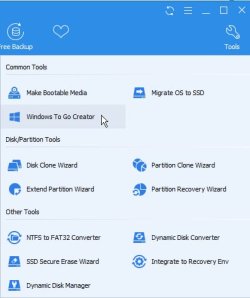
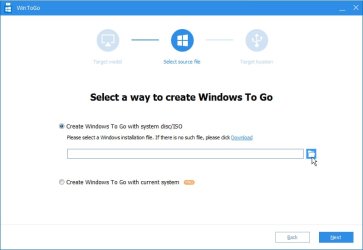
I had a AOMEI PM on my computer already so I first went with their Windows to Go app.

Question or two for @SIW2:

I ran the install on a w7 computer with usb 3.0 the OS transfer took prolly 4-5 hours. Then I transferred the USB stick over to the destination computer (USB 2.0 only) and booted up. That was yesterday. The system started to install but for about the last 20 hours it's been hanging on "Setup is Installing Devices"


Since I'm starting from a system disk, I'm choosing the install.wim file to install when using the WtG app. That is the correct file, yes? Or are there additional files I should be adding as well?

Also, would I necessarily still need to use DISM++ to add the USB 3.0 drivers in considering the destination computer only has USB 2.0 ports?
 

My Computer

Computer type
PC/Desktop
OS
W6.1 64
I wouldn't use usb2. If that is all you have, then don't use win to go.

As I stated in an earlier post.

usb2 is too slow

I have nothing more to add.
 

My Computers

System One System Two

  • Computer type
    PC/Desktop
    OS
    7 X64
    CPU
    i5 8400
    Motherboard
    gigabyte b365m ds3h
    Memory
    2x8gb 3200mhz
    Hard Drives
    various
    PSU
    pure power 11 400w cm
    Case
    Coolermaster
    Cooling
    cryorig m9i
  • Computer type
    PC/Desktop
    OS
    7x64
    CPU
    g5400
    Motherboard
    ga b365m ds3h
    Memory
    8gb ddr4 2400
    PSU
    xfx pro 450w
Thanks anyhow for the arrow pointing SIW2. Couldn't have gotten this far without your suggestions.

I'm stuck with legacy USB 2.0 hardware even though the thumb drive is USB 3.0. But at least the result will be faster than when running nt6.1 on PATA... The issue isn't necessarily that the OS loads slowly, but now not only is it hanging, but its also throwing an unknown install error message. So something is wrong at the install level.

But before abandoning win 2 go, I just wanted to make sure I was using it with the correct .wim file... May have to try the Win to USB and see if that gets me any further.

As I stated in the OP, it's no worries to begin loading in the OS using an external DVD drive plugged into another USB 2.0 port (and it even works thru the process fairly quickly). OS install chugs right along right up to the point where I'm supposed to choose the destination drive. The thumb drive is not seen and the install asks me for a storage driver.

Since BIOS does see the thumb drive, maybe the answer is as simple as trying a few storage divers to see what happens.

If anyone is interested, I'll keep posting results as I go.
 

My Computer

Computer type
PC/Desktop
OS
W6.1 64
Win to USB isn't a solution for this application, the free version wont run put a server based OS onto a memory stick. The software author wants me to pony up $200 for that functionality.

[EDIT] my bad, they want $300 for server functionality...


So I'm back to looking for a storage driver that will detect the USB thumb drive during the OS install.
 
Last edited:

My Computer

Computer type
PC/Desktop
OS
W6.1 64
You can try imaging install.wim to the USB using GImageX. Keep in mind that you have to make the USB active and bootable manually.
 

My Computer

Computer type
PC/Desktop
Computer Manufacturer/Model Number
me!
OS
Windows 10 Pro x64
CPU
AMD Ryzen 5 1600 @ [email protected]
Motherboard
ASUS B350 PRIME-PLUS
Memory
G.Skill Flare X 16GB (2x8GB) DDR4-2400 @ 2666MHz
Graphics Card(s)
Sapphire Radeon Vega 56 NITRO+
Sound Card
None
Monitor(s) Displays
ASUS VG248QZ
Screen Resolution
1920x1080
Hard Drives
Samsung 850 EVO 250GB*, 1TB Seagate Constellation ES, 2x Samsung 840 250GB in RAID0*

*Thanks ICIT2LOL for supplying me with all of these drives!
PSU
Corsair VS550
Case
Corsair Crystal 460X
Cooling
AMD Wraith Spire
Keyboard
Ducky Shine 6 w/ MX Browns and PBT keycaps
Mouse
Xtrfy M1-Ice
Internet Speed
100MBit/s down, 20MBit/s up
Antivirus
Bitdefender
Browser
Google Chrome
Following SIW2's contention that this install issue is caused by hardware limitation (server box only having USB 2.0, I've done a clean install of the OS again to the stick. Will load the USB3.0 drivers on it and then using hardware with USB 3.0, see if as suggested, the problem is being caused by a 2.0 limitation.

I haven't gotten to @Laith's suggestion quite yet, but I have compared the AOMEI USB install against a bare metal install (from OS DVD to hardware's internal hard disk). This to see if there is any difference between the partition setups.

There is. The USB stick only shows one NTFS partition.

The install made to the internal hard disk shows what I am used to seeing with this OS (WHS11), a 100mb system partition, a second OS partition and a third storage partition.

Maybe as the AOMEI install does it's first setup run, the OS creates the other two partitions? Hope to find SIW2 is correct about the USB 3.0 issue and find out.
 

My Computer

Computer type
PC/Desktop
OS
W6.1 64
Then integrate usb3 drivers. Simplest way is to use dism++

Then click Updates in the left pane, click ADD and browse to windows6.1-kb2864202-x64.msu

Then click Drivers in the left pane, click ADD and browse to XHCI\x64 folder. Optionally, also click ADD and browse to UASPSTOR\x64 folder.

That is the 6.2.9200 usb3 stack -works fine on win7


Update kb2864202 installed no worry, but the two drivers failed to integrate. SIW2, Are you open to offer any suggestions on different USB drivers to work with?
 

My Computer

Computer type
PC/Desktop
OS
W6.1 64
Last edited:

My Computers

System One System Two

  • Computer type
    PC/Desktop
    OS
    7 X64
    CPU
    i5 8400
    Motherboard
    gigabyte b365m ds3h
    Memory
    2x8gb 3200mhz
    Hard Drives
    various
    PSU
    pure power 11 400w cm
    Case
    Coolermaster
    Cooling
    cryorig m9i
  • Computer type
    PC/Desktop
    OS
    7x64
    CPU
    g5400
    Motherboard
    ga b365m ds3h
    Memory
    8gb ddr4 2400
    PSU
    xfx pro 450w
Appreciate the assist, will be working with this again today.
 

My Computer

Computer type
PC/Desktop
OS
W6.1 64
Tried all four of the unsigned drivers you linked to. None would integrate using DISM++.

I dropped the driver package onto the desktop and unzipped them. then in the app on the left side of the screen, selected Control Panel/Drivers, navigated to the driver folder and select.

A pop up window appears saying met problem during processing success 0 failure 1 not applicable 0 some of the error: access denied 0x00000005.


This is the same error as with the original drivers.

Maybe I should try to create a disk with the drivers slipstreamed in using something like the Gigabyte or Asrock USB utility and then use with AOMEI? Or is there something with DISM++ that I'm failing to do?
 

My Computer

Computer type
PC/Desktop
OS
W6.1 64
Not sure why you are getting those errors. I have done it several times with dism++.

Unless there is something worng with your installation media.

Maybe you should get a fresh win7 installation media to work with.
 

My Computers

System One System Two

  • Computer type
    PC/Desktop
    OS
    7 X64
    CPU
    i5 8400
    Motherboard
    gigabyte b365m ds3h
    Memory
    2x8gb 3200mhz
    Hard Drives
    various
    PSU
    pure power 11 400w cm
    Case
    Coolermaster
    Cooling
    cryorig m9i
  • Computer type
    PC/Desktop
    OS
    7x64
    CPU
    g5400
    Motherboard
    ga b365m ds3h
    Memory
    8gb ddr4 2400
    PSU
    xfx pro 450w
Back
Top