Local Area Connection" doesn't have a valid IP configuration

Suzanne,
Firstly, did you get the opportunity to back up your work onto a portable device?
or even onto a cloud based storage provider, I use dropbox myself but tis quite limited in storage (2gb). Chev has suggested elsewhere Livemesh2011 they provide upto 25gb !
I asumming that as you're at college you have quite a bit of coursework which would be a bugger to replace....
...don't worry backups are the last thing on most IT bods minds until they come to needing to restore from one...LOL.

anyhow. was flciking back through things and saw that you asked the same question(ish) back in september of last year. did that get resolved, if so how ?

also just realised that you said that the machine is only seven months old.
was it bought from new ?
is it still covered by a warrantee ?
 

My Computer My Computer

At a glance

windows 7 enterprise 32bit
OS
windows 7 enterprise 32bit
Haxcid, I'm at college

Still very well could be the issue. Usually when services assignments are all the same like

192.168.1.1 for gateway, dhcp, etc then your being handled by a router.

Can you open the properties for your network card TCPIP V4, and I would like you to change your DNS to manual and use the following

8.8.8.8

and the secondary

8.8.4.4

save and wait 10 seconds then try and surf the internet.

Instructions (vista but pretty much the same for 7)

Changing DNS Settings in Windows Vista
 

My Computer My Computer

At a glance

Windows 7; Server 08; Window Home Server; Vis...Intel E8400 @ 3.4Ghz8 Gb Patriot DDr2 800NVidia GTX460 OC
Computer Manufacturer/Model Number
Home Built
OS
Windows 7; Server 08; Window Home Server; Vista; XP
CPU
Intel E8400 @ 3.4Ghz
Motherboard
Gigabyte P35 DS3L
Memory
8 Gb Patriot DDr2 800
Graphics Card(s)
NVidia GTX460 OC
Sound Card
Onboard
Monitor(s) Displays
Samsung 21"
Screen Resolution
1920x1080
Hard Drives
Seagate 160Gb x2
Samsung 250Gb
PSU
Cooler Master 650w 52a on 12v
Case
Antec 300
Cooling
Stock
Keyboard
HP Standard USB
Mouse
Logitech 518
Internet Speed
25Mbit Down 1.5Mbit up
Other Info
http://www.speedtest.net/result/723924362.png
Haxcid, I'm at college, not home.

Okay, so I'm getting frustrated.

I've been toodling along, blahblahblah, and I've looked at the device manager a few todays. Today I do it and I see a little yellow triangle over the Microsoft Teredo Tunneling Adapter - which I could have sworn said Teredo Tunneling Pseudo-Interface earlier, but whatever. Code 10, the device can't start because it hates me. That wasn't there the other day. I'm not sure if AVG caused it to spazz or my attempts at using anta's 6to4 adapter.

So I was like, "screw it, we'll try a restore."

I try that.


Can't get on wireless. It SAID it was connected, but generally, I'm prompted for my college username and and password when I open the browser. The username/password wouldn't come up. The error was gone on the teredo thing, though. Wired connection still didn't work.

So I undid the system restore and now my wireless works again, but the teredo thing has the yellow icon again, even after I tried updating the software.

The 220 6to4 adapters are gone, though. So I guess that's something.

Yes that is something, it's a start anyway,I'm glad you followed my advice on that. AVG causes nothing but problems, my advice is to remove it from your system. As for the other network problems.

Try running this batch file which will reset winsock, reset the TCP/IP stack and release renew your IP.


My Computer My Computer

At a glance

Windows 7 Ult, Windows 8.1 Pro,Q9650-4.275GHz, E8600 4.5GHz, E6750-3.8GHzG.Skill PC2 9600 1200Mhz 5 5 5 15 2TGTX480
Computer type
PC/Desktop
Computer Manufacturer/Model Number
Home built
OS
Windows 7 Ult, Windows 8.1 Pro,
CPU
Q9650-4.275GHz, E8600 4.5GHz, E6750-3.8GHz
Motherboard
Evga 780i FTW
Memory
G.Skill PC2 9600 1200Mhz 5 5 5 15 2T
Graphics Card(s)
GTX480
Sound Card
Asus Xonar D2
Monitor(s) Displays
HannsG
Screen Resolution
1680X1050
Hard Drives
GSkill Phoenix Pro 120GB SSD
PSU
ThermalTake Toughpower 1000Watt modular
Case
ThermalTake XaserV
Cooling
Xigmatek S1283
Keyboard
Logitech G15
Mouse
Logitech G9
Internet Speed
T1
Sorry for the 3 day delay.

anta - yes, all my data is backed up.
I'm hesitant about doing a restore, though, because I don't know if it would be successful. I just tried uninstalling the LAN driver (and its software) and using Samsung Recovery to reinstall it, but it's still not working.

Regarding the thread from September - I'm not sure. It just resolved on its own. First the wireless came back on (which was never NOT working in this instance) and then the wired connection was working.

This is a new laptop, which should still be under its limited warranty.

haxcid - tried it, it didn't work. >.<
chev - I don't know how AVG could have stopped Teredo from working, but it definitely wasn't the cause of my wired connection not working, as I didn't have it installed at the time.

If I can renew right from the cmd, I'd rather do it there. I'm so sick of downloading files. X_x. I don't know how this would help, though, as I've tried resets and whatnot before.


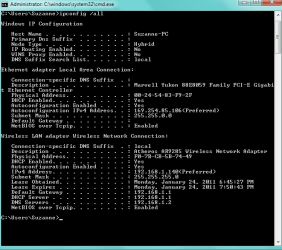
Anyway, this is what ipconfig /all shows now that the 6to4 adapters have been cleared (attached)
 

Attachments

  • new.png
    new.png
    14 KB · Views: 40

My Computer My Computer

At a glance

Windows 7 Home 64 bit OEM
OS
Windows 7 Home 64 bit OEM
Sorry for the 3 day delay.

anta - yes, all my data is backed up.
I'm hesitant about doing a restore, though, because I don't know if it would be successful. I just tried uninstalling the LAN driver (and its software) and using Samsung Recovery to reinstall it, but it's still not working.

Regarding the thread from September - I'm not sure. It just resolved on its own. First the wireless came back on (which was never NOT working in this instance) and then the wired connection was working.

This is a new laptop, which should still be under its limited warranty.

haxcid - tried it, it didn't work. >.<
chev - I don't know how AVG could have stopped Teredo from working, but it definitely wasn't the cause of my wired connection not working, as I didn't have it installed at the time.

If I can renew right from the cmd, I'd rather do it there. I'm so sick of downloading files. X_x. I don't know how this would help, though, as I've tried resets and whatnot before.


Anyway, this is what ipconfig /all shows now that the 6to4 adapters have been cleared (attached)


Actually I never said that AVG caused the problem at all, that was someone else's idea. I'm just the guy who posted the batch file to remove the extra tunnel adaptors. I might point out the batch file has already worked countless times to remove those tunnel adaptors.

From what I can see you are connected wirelessly and it should be working.

Windows 7 does not like being connected to a wired and wireless connection at the same time so choose one or the other and it should work.

If you like typing in your own commands here are a couple commands, although the batch file "which I already posted" does all this automatically and also renews your IP.

The first commands you should try when you encounter network connectivity issues are:
ipconfig /release
ipconfig /renew
Winsock entries tells Windows 7 how to access your network services. Additionally, your TCP/IP protocol can be corrupted. The TCP/IP protocol is a stack of 4 layers that includes several transport layers, but when this stack is corrupt you will constantly have connectivity issues.
netsh winsock reset catalog (reset winsock entries)
netsh int ip reset reset.log hit (reset TCP/IP stack)
Knock yourself out, hope it helps although at this point it looks like your wireless is online.
 

My Computer My Computer

At a glance

Windows 7 Ult, Windows 8.1 Pro,Q9650-4.275GHz, E8600 4.5GHz, E6750-3.8GHzG.Skill PC2 9600 1200Mhz 5 5 5 15 2TGTX480
Computer type
PC/Desktop
Computer Manufacturer/Model Number
Home built
OS
Windows 7 Ult, Windows 8.1 Pro,
CPU
Q9650-4.275GHz, E8600 4.5GHz, E6750-3.8GHz
Motherboard
Evga 780i FTW
Memory
G.Skill PC2 9600 1200Mhz 5 5 5 15 2T
Graphics Card(s)
GTX480
Sound Card
Asus Xonar D2
Monitor(s) Displays
HannsG
Screen Resolution
1680X1050
Hard Drives
GSkill Phoenix Pro 120GB SSD
PSU
ThermalTake Toughpower 1000Watt modular
Case
ThermalTake XaserV
Cooling
Xigmatek S1283
Keyboard
Logitech G15
Mouse
Logitech G9
Internet Speed
T1
Yes, my wireless connection works. I haven't had a problem with my wireless connection; it's the cable connection that isn't working.

Normally I do not have the wired connection and wireless on at the same time. It was only for the purposes of taking the screenshot and uploading it that I had the wireless on while the cable was plugged in.

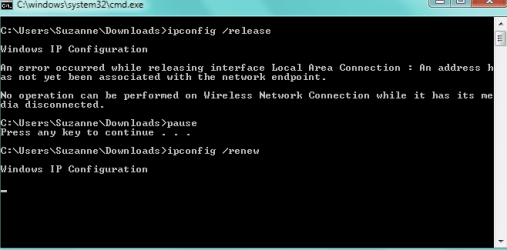
The screenshot I just took is what occurred when I tried running the batch file (wireless off).
 

Attachments

  • batch.png
    batch.png
    6.9 KB · Views: 37

My Computer My Computer

At a glance

Windows 7 Home 64 bit OEM
OS
Windows 7 Home 64 bit OEM
Bumping this up. D:
 

My Computer My Computer

At a glance

Windows 7 Home 64 bit OEM
OS
Windows 7 Home 64 bit OEM
Do me a quick favor. Open a command window and type ping 192.168.1.2 > c:\pingdns.txt

then go to your c drive, open the pingdns text file and copy and paste the results here.

Thanks,

H.

Also, are you running a router in your room or straight from the wall to the computer?
 

My Computer My Computer

At a glance

Windows 7; Server 08; Window Home Server; Vis...Intel E8400 @ 3.4Ghz8 Gb Patriot DDr2 800NVidia GTX460 OC
Computer Manufacturer/Model Number
Home Built
OS
Windows 7; Server 08; Window Home Server; Vista; XP
CPU
Intel E8400 @ 3.4Ghz
Motherboard
Gigabyte P35 DS3L
Memory
8 Gb Patriot DDr2 800
Graphics Card(s)
NVidia GTX460 OC
Sound Card
Onboard
Monitor(s) Displays
Samsung 21"
Screen Resolution
1920x1080
Hard Drives
Seagate 160Gb x2
Samsung 250Gb
PSU
Cooler Master 650w 52a on 12v
Case
Antec 300
Cooling
Stock
Keyboard
HP Standard USB
Mouse
Logitech 518
Internet Speed
25Mbit Down 1.5Mbit up
Other Info
http://www.speedtest.net/result/723924362.png
I. . .

I want to cry.

First off, it's working.

But I have no idea why or what did it.

For the past few days, I was getting this error when shutting down (but mind you, it was days after my internet stopped working). For a split second, it would say something about background processes needing to shut down, but it happened so fast I could never read it. The two things I can figure that might have resulted in it are one, that I installed AVG - but it'd never happened when I installed AVG before. However, when I did a scan, it said Rezip.exe was a virus and I put it in the recycle bin. However, I was informed that this was a samsung service, so this may have had something to do wit it. Even though I restored it from the recycle bin, though, I was still getting this error message on shutting down, so I don't know if the two events are related.

Then yesterday, it wouldn't shut down, saying something about taskeng needing to shut down and I had to force it to shut down. So I went googling for an explanation to this and found this solution. I opened the command prompt and did sfc /scannow. It got through the verification process, then stopped doing anything, so I closed it. This the only thing I can attribute to getting it to work. When I shut down, the pause of shutting down background processes ended. This was yesterday. I got on, went on wireless, and only from reading this thread did I then plug the cable back in. And then it worked.

So . . . I don't know.

I'm too chicken to restart my computer and see if it continues to work. xD
 

My Computer My Computer

At a glance

Windows 7 Home 64 bit OEM
OS
Windows 7 Home 64 bit OEM
I have the same problem but only in my building internet, whe I go to the university the lan Connection works fine. Why could it be that? How can I fix that? Please help me
 

My Computer My Computer

At a glance

windows 7 enterprise 64 bit
OS
windows 7 enterprise 64 bit
I have the same problem but only in my building internet, whe I go to the university the lan Connection works fine. Why could it be that? How can I fix that? Please help me

goto start > run > type in CMD and press ok,

at the command prompt type ipconfig /all > c:\ipconfig.txt

open computer, goto your C drive and open the file called ipconfig.txt

post the contents.

Thanks...
 

My Computer My Computer

At a glance

Windows 7; Server 08; Window Home Server; Vis...Intel E8400 @ 3.4Ghz8 Gb Patriot DDr2 800NVidia GTX460 OC
Computer Manufacturer/Model Number
Home Built
OS
Windows 7; Server 08; Window Home Server; Vista; XP
CPU
Intel E8400 @ 3.4Ghz
Motherboard
Gigabyte P35 DS3L
Memory
8 Gb Patriot DDr2 800
Graphics Card(s)
NVidia GTX460 OC
Sound Card
Onboard
Monitor(s) Displays
Samsung 21"
Screen Resolution
1920x1080
Hard Drives
Seagate 160Gb x2
Samsung 250Gb
PSU
Cooler Master 650w 52a on 12v
Case
Antec 300
Cooling
Stock
Keyboard
HP Standard USB
Mouse
Logitech 518
Internet Speed
25Mbit Down 1.5Mbit up
Other Info
http://www.speedtest.net/result/723924362.png
Back
Top