Lock Computer Screen - Display User Information or Not

How to Display User Information or Not when a Windows Session is Locked

   Information
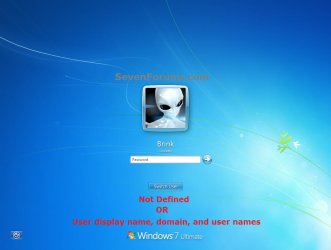
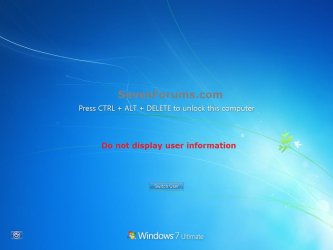
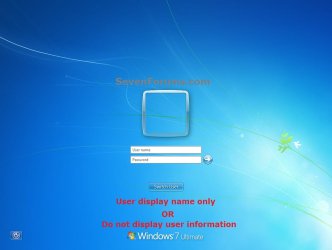
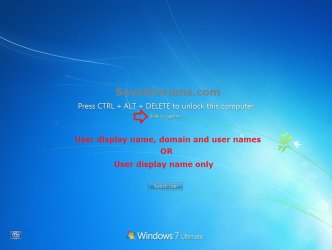
This will show you how to have the user name to show or hide when a user locks the computer in Vista and Windows 7. If set to be hidden, users will be required to enter both their user name and password when logging back in from the locked computer screen.

You must be logged in as an administrator to be able to do the steps in this tutorial.


EXAMPLE: Locked Computer Screen
Default-1.jpgdefault.jpg
Do_not_display.jpgUsername-Password.jpg


OPTION ONE

Using a REG File Download


1. To Set as "Not Defined"
NOTE: This is the default setting. It does the same as the setting in step 2.
A) Click on the Download button below to download the file below.
Locked-Not_Defined.reg

Download


B) Go to step 5.
2. To Set as "User display name, domain and user names"
A) Click on the Download button below to download the file below.
Locked-User_display_name_domain_and_user_names.reg

Download


B) Go to step 5.
3. To Set as "User display name only"
A) Click on the Download button below to download the file below.
Locked-User_display_name_only.reg

Download


B) Go to step 5.
4. To Set as "Do not display user information"
A) Click on the Download button below to download the file below.
Locked-Do_not_display_user_information.reg

Download


B) Continue on to step 5.
5. Click on Save, and save the .reg file to the Desktop.

6. Right click on the downloaded .reg file and click on Merge.

7. Click on the Run, Yes (UAC-Windows 7) or Continue (UAC-Vista), Yes, and then OK when prompted.

8. When done, you can delete the .reg file on desktop if you like.

9. Lock the computer (Windows Key + L) to see the change.

10. You may also wish to set the same setting for the Windows logon screen: How to Make Windows 7 Require a User Name and Password in Logon Screen


OPTION TWO

Using Local Security Policy


1. Open the Local Security Policy editor.

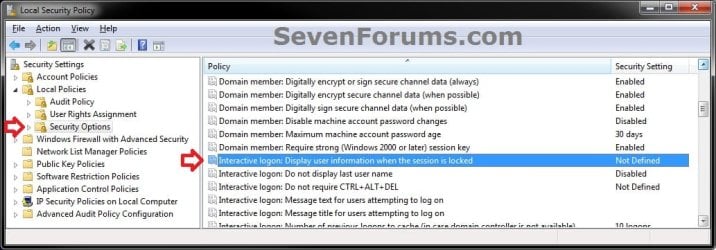
2. In the left pane, expand Local Policies, and click on Security Options. (see screenshot below)
SecPol-1.jpg
3. In the right pane, double click on Interactive logon: Display user information when the session is locked. (see screenshot above)

4. Select the option you want, and click on OK. (see screenshot below)
SecPol-2.jpg
5. Lock the computer (Windows Key + L) to see the change.

6. You may also wish to set the same setting for the Windows logon screen: How to Make Windows 7 Require a User Name and Password in Logon Screen
That's it,
Shawn


Attachments

Last edited:
Great tutorial, Shawn. :) +1
 

My Computer My Computer

Computer Manufacturer/Model Number
Custom Build
OS
Windows 7 Ultimate x64/Windows 8 Consumer Preview x64/Ubuntu 11.04
CPU
Intel Pentium Dual Core E6700 3.2GHz
Motherboard
ASUS P5G41T-M LX
Memory
Strontium 8192MB DDR3 1333Mhz
Graphics Card(s)
msi GeForce N560GTX-M2D1GD5 1GB
Sound Card
Realtek HD Audio
Monitor(s) Displays
CHIMEI CMV 221D 22"
Screen Resolution
1680x1050
Hard Drives
Seagate Barracuda LP Green 3.5'' 2TB Internal HDD 5900RPM + WD Elements Desktop 1TB External HDD 7200RPM
PSU
SHAW Viper-1500w Gaming PSU
Case
Black eMaxx ATX Mini Tower Case
Keyboard
Microsoft Wireless Keyboard 1000
Mouse
Microsoft Wireless Optical Mouse 2000
Internet Speed
100GB @ 4.76Mbps
Thank you Jaidyn. :)
 

My Computer My Computer

Computer type
PC/Desktop
Computer Manufacturer/Model Number
Self built custom
OS
64-bit Windows 11 Pro for Workstations
CPU
Intel i7-8700K OC'd to 5 GHz
Motherboard
ASUS ROG Maximus XI Formula Z390
Memory
64 GB (4x16GB) G.SKILL TridentZ RGB DDR4 3600 MHz
Graphics Card(s)
ASUS ROG-STRIX-GTX1080TI-O11G-GAMING
Sound Card
Integrated
Monitor(s) Displays
2 x Samsung Odyssey G7 27"
Screen Resolution
2560x1440
Hard Drives
1TB Samsung 990 PRO M.2,
4TB Samsung 990 PRO PRO M.2,
TerraMaster F8 SSD Plus NAS
PSU
Seasonic Prime Titanium 850W
Case
Thermaltake Core P3
Cooling
Corsair Hydro H115i
Keyboard
Logitech wireless K800
Mouse
Logitech MX Master 4
Internet Speed
2 Gb/s Download and 100 Mb/s Upload
Antivirus
Malwarebyte Anti-Malware Premium
Browser
Google Chrome
Other Info
Logitech Z625 speaker system,
Logitech BRIO 4K Pro webcam,
HP Color LaserJet Pro MFP M477fdn,
APC SMART-UPS RT 1000 XL - SURT1000XLI,
Galaxy S23 Plus phone
Worked great! Thank you!
 

My Computer My Computer

Computer Manufacturer/Model Number
Dell
OS
Windows 7 Ultimate 64bit
CPU
i3
Memory
4Gb
Graphics Card(s)
Intel(R) HD Graphics
Hard Drives
350G built-in, 1T Seagate External, 2T Buffalo External
Case
I prefer upper, but I will settle for lower
Internet Speed
Yes, I would like some please...
Other Info
Ham & Eggs - A days work for a chicken, but a lifetime of commitment for a pig.
You're most welcome, and welcome to Seven Forums. :)
 

My Computer My Computer

Computer type
PC/Desktop
Computer Manufacturer/Model Number
Self built custom
OS
64-bit Windows 11 Pro for Workstations
CPU
Intel i7-8700K OC'd to 5 GHz
Motherboard
ASUS ROG Maximus XI Formula Z390
Memory
64 GB (4x16GB) G.SKILL TridentZ RGB DDR4 3600 MHz
Graphics Card(s)
ASUS ROG-STRIX-GTX1080TI-O11G-GAMING
Sound Card
Integrated
Monitor(s) Displays
2 x Samsung Odyssey G7 27"
Screen Resolution
2560x1440
Hard Drives
1TB Samsung 990 PRO M.2,
4TB Samsung 990 PRO PRO M.2,
TerraMaster F8 SSD Plus NAS
PSU
Seasonic Prime Titanium 850W
Case
Thermaltake Core P3
Cooling
Corsair Hydro H115i
Keyboard
Logitech wireless K800
Mouse
Logitech MX Master 4
Internet Speed
2 Gb/s Download and 100 Mb/s Upload
Antivirus
Malwarebyte Anti-Malware Premium
Browser
Google Chrome
Other Info
Logitech Z625 speaker system,
Logitech BRIO 4K Pro webcam,
HP Color LaserJet Pro MFP M477fdn,
APC SMART-UPS RT 1000 XL - SURT1000XLI,
Galaxy S23 Plus phone
Thanks for the welcome :) I've been to the site many times before. Just figured it was time to join in on all the discussion! I'm hooked on these registry tweaks of yours. Too much fun!
 

My Computer My Computer

Computer Manufacturer/Model Number
Dell
OS
Windows 7 Ultimate 64bit
CPU
i3
Memory
4Gb
Graphics Card(s)
Intel(R) HD Graphics
Hard Drives
350G built-in, 1T Seagate External, 2T Buffalo External
Case
I prefer upper, but I will settle for lower
Internet Speed
Yes, I would like some please...
Other Info
Ham & Eggs - A days work for a chicken, but a lifetime of commitment for a pig.
Can you do this in a GPM?

Anyone know where this setting is in the GPM (Group Policy Management)?

Thanks,

Andre'
 

My Computer My Computer

OS
Windows 2008 Server, R2
Hello Andre', and welcome to Seven Forums.

As far as I know, this is only in Local Security Policy (secpol.msc). :(

What were you wanting to do? Someone may know a workaround.
 

My Computer My Computer

Computer type
PC/Desktop
Computer Manufacturer/Model Number
Self built custom
OS
64-bit Windows 11 Pro for Workstations
CPU
Intel i7-8700K OC'd to 5 GHz
Motherboard
ASUS ROG Maximus XI Formula Z390
Memory
64 GB (4x16GB) G.SKILL TridentZ RGB DDR4 3600 MHz
Graphics Card(s)
ASUS ROG-STRIX-GTX1080TI-O11G-GAMING
Sound Card
Integrated
Monitor(s) Displays
2 x Samsung Odyssey G7 27"
Screen Resolution
2560x1440
Hard Drives
1TB Samsung 990 PRO M.2,
4TB Samsung 990 PRO PRO M.2,
TerraMaster F8 SSD Plus NAS
PSU
Seasonic Prime Titanium 850W
Case
Thermaltake Core P3
Cooling
Corsair Hydro H115i
Keyboard
Logitech wireless K800
Mouse
Logitech MX Master 4
Internet Speed
2 Gb/s Download and 100 Mb/s Upload
Antivirus
Malwarebyte Anti-Malware Premium
Browser
Google Chrome
Other Info
Logitech Z625 speaker system,
Logitech BRIO 4K Pro webcam,
HP Color LaserJet Pro MFP M477fdn,
APC SMART-UPS RT 1000 XL - SURT1000XLI,
Galaxy S23 Plus phone
Windows 10

Hello,

I configured this trough one of our GPOs, but it seems not to work on Windows 10?
 

My Computer My Computer

Computer type
PC/Desktop
OS
Windows Server 2012R2

My Computer My Computer

Computer type
PC/Desktop
Computer Manufacturer/Model Number
Self built custom
OS
64-bit Windows 11 Pro for Workstations
CPU
Intel i7-8700K OC'd to 5 GHz
Motherboard
ASUS ROG Maximus XI Formula Z390
Memory
64 GB (4x16GB) G.SKILL TridentZ RGB DDR4 3600 MHz
Graphics Card(s)
ASUS ROG-STRIX-GTX1080TI-O11G-GAMING
Sound Card
Integrated
Monitor(s) Displays
2 x Samsung Odyssey G7 27"
Screen Resolution
2560x1440
Hard Drives
1TB Samsung 990 PRO M.2,
4TB Samsung 990 PRO PRO M.2,
TerraMaster F8 SSD Plus NAS
PSU
Seasonic Prime Titanium 850W
Case
Thermaltake Core P3
Cooling
Corsair Hydro H115i
Keyboard
Logitech wireless K800
Mouse
Logitech MX Master 4
Internet Speed
2 Gb/s Download and 100 Mb/s Upload
Antivirus
Malwarebyte Anti-Malware Premium
Browser
Google Chrome
Other Info
Logitech Z625 speaker system,
Logitech BRIO 4K Pro webcam,
HP Color LaserJet Pro MFP M477fdn,
APC SMART-UPS RT 1000 XL - SURT1000XLI,
Galaxy S23 Plus phone
Back
Top