Log On Screen Saver - Enable or Disable

How to Enable or Disable the Windows 7 Log On Screen Saver


   Information
By default the log on screen saver is disabled in Windows 7. This will show you how to enable a blank screen saver to run at the log on screen after an amount of idle time that you specify. This affects all log on screens in Windows 7 including the Welcome, Lock computer, Log off, and Switch User log on screens.
   Note
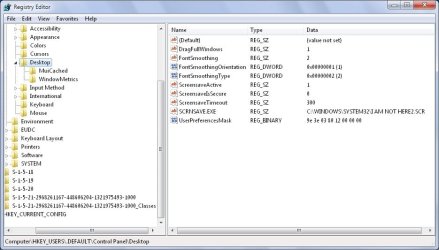
Enabling the log on screen saver will add these registry entries, and disabling it will remove them.
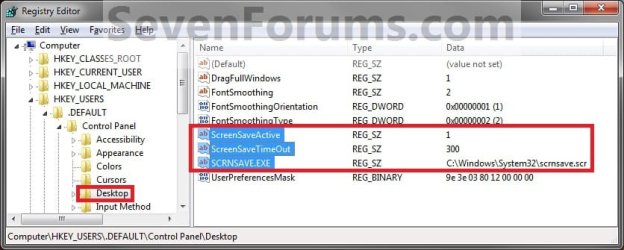
Registry.jpg
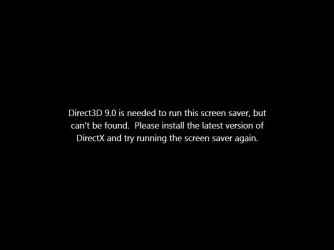
This will only work using the blank black C:\Windows\System32\scrnsave.scr screen saver as the value for SCRNSAVE.EXE. Using any other screen saver will result in this error below when it tries to run from the log on screen. Other_Screen_Saver.jpg
   Warning
You can only do this tutorial while logged on as an administrator.

EXAMPLE: Log On Screen Saver in Windows 7
NOTE: This is the log on screen (left screenshot below) and the blank log on screen saver (right screenshot below). Log_On_Screen.jpg
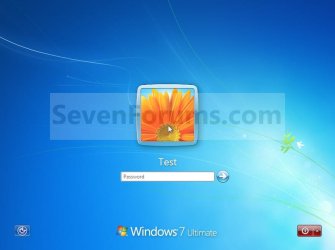
Blank_Screen_Saver.jpg


STEP ONE

Enable or Disable the Log On Screen Saver

1. To Enable the Log On Screen Saver
NOTE: This will enable the log on screen saver with a 300 second (5 minute) idle wait time. If you would like to change this wait time to what you would like instead, then see the STEP TWO section below after finishing this STEP ONE section to change it. A) Click on the Download button below to download the file below. Enable_Log_on_Screen_Saver.reg

Download


B) Go to step 3.
2. To Disable the Log On Screen Saver A) Click on the Download button below to download the file below. Disable_Log_on_Screen_Saver.reg

Download


3. Click on Save, and save the .reg file to the desktop.

4. Right click on the downloaded .reg file and click on Merge.

5. Click on Run, Yes, Yes, and OK when prompted.

6. Log off to test the screen saver.

7. When done, you can delete the downloaded .reg file on the desktop if you like.


STEP TWO

Change the Log On Screen Saver Wait Time


NOTE: After you have enabled the log on screen saver in the STEP ONE section above, you can change the 300 second (5 minutes) idle wait time to what you would like it to be instead if you would like to. 1. Open the Start Menu, and type regedit in the search box and press enter.

2. If prompted by UAC, then click on Yes.

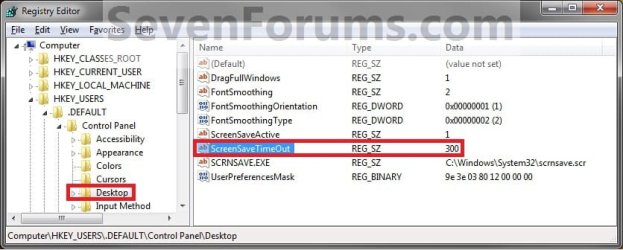
3. In regedit, navigate to: (see screenshot below) HKEY_USERS\.DEFAULT\Control Panel\Desktop
Reg1.jpg
4. In the right pane, right click on ScreenSaveTimeOut and click on Modify. (see screenshot above)

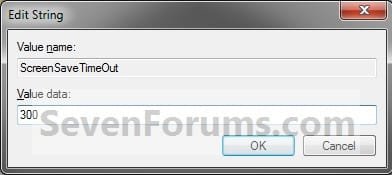
5. Type in how long you want the idle wait time to be for in seconds (60 seconds = 1 minute) before the screen saver will run, then click on OK. (see screenshot below) Modify.jpg
6. Close regedit.

7. Log off to test the screen saver.
That's it,
Shawn


Attachments

Last edited:
I found the following instructions elsewhere which differ from yours in a couple of areas.

First choose the screensaver you want. Look in C:\WINDOWS\SYSTEM32 for files with the .SCR extension.
Typically there are the following . . .
- SSTEXT3D - 3D Text
- BUBBLES.SCR - Bubbles
- MYSTIFY.SCR - Mystify
- PHOTOSCREENSAVER.SCR - Photos
- RIBBONS.SCR - Ribbons

If you do not want to use one of the above, add one you like to System32 and name it LogOn.scr or a name of your choice. Once you have your screensaver, open your registry editor and navigate to the following key:
HKEY_USERS \ .Default \ Control Panel \ Desktop
Below this key create the following REG_SZ values
SCRNSAVE.EXE = C:\WINDOWS\SYSTEM32\LOGON.SCR (or whatever your file is called).
ScreenSaveActive = 1
ScreenSaveIsSecure = 0
ScreenSaveTimeOut = 60 (or whatever timeout you want in seconds)


First, you say to only use the blank one, screensave.scr, where the other says to choose one. If I were to choose the blank one, and change the registry settings as you show, what will appear on the blank screen besides a blank screen since nothing has been added to it?

The second difference I noticed is this other one contains: ScreenSaveIsSecure = 0

Hope you understand what I am attempting to explain.
 

My Computer

Computer Manufacturer/Model Number
Visionman Slim Intel Desktop Computer
OS
Windows 7 Home Premium 32bit
CPU
Intel Pentium Dual Core E2180
Motherboard
Biostar P4M900-M7 SE
Memory
2GB DDR2-667
Graphics Card(s)
NVIDIA 8400GS 256MB
Sound Card
Realtek
Monitor(s) Displays
Viewsonic VX1940w LCD Display
Screen Resolution
1280 x 800
Hard Drives
WD 250GB SATA-2 HDD
Keyboard
Kensington Comfort Type (ergonomic)
Mouse
I have mice.....a collection.
Hello Kitti,

If you choose another screen saver other than the solid black blank screensave.scr one, you will get the black message screenshot in the blue NOTE box at the top of the tutorial instead of a solid black blank screen.

ScreenSaveIsSecure = 0 is to enable (1) or disable (o) the screen saver password. Since it will not work at log on anyway, it is not necessary to have that DWORD value added.
 

My Computer

Computer type
PC/Desktop
Computer Manufacturer/Model Number
Self built custom
OS
64-bit Windows 11 Pro for Workstations
CPU
Intel i7-8700K OC'd to 5 GHz
Motherboard
ASUS ROG Maximus XI Formula Z390
Memory
64 GB (4x16GB) G.SKILL TridentZ RGB DDR4 3600 MHz
Graphics Card(s)
ASUS ROG-STRIX-GTX1080TI-O11G-GAMING
Sound Card
Integrated
Monitor(s) Displays
2 x Samsung Odyssey G7 27"
Screen Resolution
2560x1440
Hard Drives
1TB Samsung 990 PRO M.2,
4TB Samsung 990 PRO PRO M.2,
TerraMaster F8 SSD Plus NAS
PSU
Seasonic Prime Titanium 850W
Case
Thermaltake Core P3
Cooling
Corsair Hydro H115i
Keyboard
Logitech wireless K800
Mouse
Logitech MX Master 4
Internet Speed
2 Gb/s Download and 100 Mb/s Upload
Antivirus
Malwarebyte Anti-Malware Premium
Browser
Google Chrome
Other Info
Logitech Z625 speaker system,
Logitech BRIO 4K Pro webcam,
HP Color LaserJet Pro MFP M477fdn,
APC SMART-UPS RT 1000 XL - SURT1000XLI,
Galaxy S23 Plus phone
Brink:

Ok, you've made that part clear. However, if I use the blank one, there will be no animation on the page to act as a screensaver. Is that correct?

Kitti
 

My Computer

Computer Manufacturer/Model Number
Visionman Slim Intel Desktop Computer
OS
Windows 7 Home Premium 32bit
CPU
Intel Pentium Dual Core E2180
Motherboard
Biostar P4M900-M7 SE
Memory
2GB DDR2-667
Graphics Card(s)
NVIDIA 8400GS 256MB
Sound Card
Realtek
Monitor(s) Displays
Viewsonic VX1940w LCD Display
Screen Resolution
1280 x 800
Hard Drives
WD 250GB SATA-2 HDD
Keyboard
Kensington Comfort Type (ergonomic)
Mouse
I have mice.....a collection.
Correct. By default, you have no screen saver at log on. With this, you only have the option of a black blank screen saver instead if one is wanted or needed at log on.

The ability to use any other, or animated screen savers, at log on has been removed by Microsoft. :(
 

My Computer

Computer type
PC/Desktop
Computer Manufacturer/Model Number
Self built custom
OS
64-bit Windows 11 Pro for Workstations
CPU
Intel i7-8700K OC'd to 5 GHz
Motherboard
ASUS ROG Maximus XI Formula Z390
Memory
64 GB (4x16GB) G.SKILL TridentZ RGB DDR4 3600 MHz
Graphics Card(s)
ASUS ROG-STRIX-GTX1080TI-O11G-GAMING
Sound Card
Integrated
Monitor(s) Displays
2 x Samsung Odyssey G7 27"
Screen Resolution
2560x1440
Hard Drives
1TB Samsung 990 PRO M.2,
4TB Samsung 990 PRO PRO M.2,
TerraMaster F8 SSD Plus NAS
PSU
Seasonic Prime Titanium 850W
Case
Thermaltake Core P3
Cooling
Corsair Hydro H115i
Keyboard
Logitech wireless K800
Mouse
Logitech MX Master 4
Internet Speed
2 Gb/s Download and 100 Mb/s Upload
Antivirus
Malwarebyte Anti-Malware Premium
Browser
Google Chrome
Other Info
Logitech Z625 speaker system,
Logitech BRIO 4K Pro webcam,
HP Color LaserJet Pro MFP M477fdn,
APC SMART-UPS RT 1000 XL - SURT1000XLI,
Galaxy S23 Plus phone
At least I know I'm not as dumb as I was beginning to think. Microsoft sure knows how to screw up that which could be good. Thanks again for your help.

Kitti
 

My Computer

Computer Manufacturer/Model Number
Visionman Slim Intel Desktop Computer
OS
Windows 7 Home Premium 32bit
CPU
Intel Pentium Dual Core E2180
Motherboard
Biostar P4M900-M7 SE
Memory
2GB DDR2-667
Graphics Card(s)
NVIDIA 8400GS 256MB
Sound Card
Realtek
Monitor(s) Displays
Viewsonic VX1940w LCD Display
Screen Resolution
1280 x 800
Hard Drives
WD 250GB SATA-2 HDD
Keyboard
Kensington Comfort Type (ergonomic)
Mouse
I have mice.....a collection.
It was removed back since Vista SP2 for security purposes to prevent a screen saver that may have malware in it from running before the OS and bypassing all security measures (ex: antivirus program) and causing more security risks. It may be less customizable, but it is a very good move for security purposes.
 

My Computer

Computer type
PC/Desktop
Computer Manufacturer/Model Number
Self built custom
OS
64-bit Windows 11 Pro for Workstations
CPU
Intel i7-8700K OC'd to 5 GHz
Motherboard
ASUS ROG Maximus XI Formula Z390
Memory
64 GB (4x16GB) G.SKILL TridentZ RGB DDR4 3600 MHz
Graphics Card(s)
ASUS ROG-STRIX-GTX1080TI-O11G-GAMING
Sound Card
Integrated
Monitor(s) Displays
2 x Samsung Odyssey G7 27"
Screen Resolution
2560x1440
Hard Drives
1TB Samsung 990 PRO M.2,
4TB Samsung 990 PRO PRO M.2,
TerraMaster F8 SSD Plus NAS
PSU
Seasonic Prime Titanium 850W
Case
Thermaltake Core P3
Cooling
Corsair Hydro H115i
Keyboard
Logitech wireless K800
Mouse
Logitech MX Master 4
Internet Speed
2 Gb/s Download and 100 Mb/s Upload
Antivirus
Malwarebyte Anti-Malware Premium
Browser
Google Chrome
Other Info
Logitech Z625 speaker system,
Logitech BRIO 4K Pro webcam,
HP Color LaserJet Pro MFP M477fdn,
APC SMART-UPS RT 1000 XL - SURT1000XLI,
Galaxy S23 Plus phone
Wanted to let you know, I finally got around to trying the instructions highlighted in my first post. I typed in the name of one of my own screensavers in place of the LOGON.SCR in the referenced instructions above and it works as any normal animated screensaver. Try it and you will see for yourself.
 

My Computer

Computer Manufacturer/Model Number
Visionman Slim Intel Desktop Computer
OS
Windows 7 Home Premium 32bit
CPU
Intel Pentium Dual Core E2180
Motherboard
Biostar P4M900-M7 SE
Memory
2GB DDR2-667
Graphics Card(s)
NVIDIA 8400GS 256MB
Sound Card
Realtek
Monitor(s) Displays
Viewsonic VX1940w LCD Display
Screen Resolution
1280 x 800
Hard Drives
WD 250GB SATA-2 HDD
Keyboard
Kensington Comfort Type (ergonomic)
Mouse
I have mice.....a collection.
Hello Kitti,

Sorry, but I still get the screen in the NOTE box at the top of the tutorial instead. It does not work for me.
 

My Computer

Computer type
PC/Desktop
Computer Manufacturer/Model Number
Self built custom
OS
64-bit Windows 11 Pro for Workstations
CPU
Intel i7-8700K OC'd to 5 GHz
Motherboard
ASUS ROG Maximus XI Formula Z390
Memory
64 GB (4x16GB) G.SKILL TridentZ RGB DDR4 3600 MHz
Graphics Card(s)
ASUS ROG-STRIX-GTX1080TI-O11G-GAMING
Sound Card
Integrated
Monitor(s) Displays
2 x Samsung Odyssey G7 27"
Screen Resolution
2560x1440
Hard Drives
1TB Samsung 990 PRO M.2,
4TB Samsung 990 PRO PRO M.2,
TerraMaster F8 SSD Plus NAS
PSU
Seasonic Prime Titanium 850W
Case
Thermaltake Core P3
Cooling
Corsair Hydro H115i
Keyboard
Logitech wireless K800
Mouse
Logitech MX Master 4
Internet Speed
2 Gb/s Download and 100 Mb/s Upload
Antivirus
Malwarebyte Anti-Malware Premium
Browser
Google Chrome
Other Info
Logitech Z625 speaker system,
Logitech BRIO 4K Pro webcam,
HP Color LaserJet Pro MFP M477fdn,
APC SMART-UPS RT 1000 XL - SURT1000XLI,
Galaxy S23 Plus phone
More info

Make sure a copy of the preferred screensaver has been added to System 32. Here is a copy of the registry changes made.
 

Attachments

  • LogOnScreensaver.jpg
    LogOnScreensaver.jpg
    56.6 KB · Views: 2,264

My Computer

Computer Manufacturer/Model Number
Visionman Slim Intel Desktop Computer
OS
Windows 7 Home Premium 32bit
CPU
Intel Pentium Dual Core E2180
Motherboard
Biostar P4M900-M7 SE
Memory
2GB DDR2-667
Graphics Card(s)
NVIDIA 8400GS 256MB
Sound Card
Realtek
Monitor(s) Displays
Viewsonic VX1940w LCD Display
Screen Resolution
1280 x 800
Hard Drives
WD 250GB SATA-2 HDD
Keyboard
Kensington Comfort Type (ergonomic)
Mouse
I have mice.....a collection.
Yep, that's what I used with a 5 second timout for testing purposes, and with the Bubbles.scr. Still will not work with that screen saver, or any other one that came with Windows 7 other than the blank scrnsave.scr one.


Could you upload your screen saver in a ZIP file to see if something may be with it?
 

My Computer

Computer type
PC/Desktop
Computer Manufacturer/Model Number
Self built custom
OS
64-bit Windows 11 Pro for Workstations
CPU
Intel i7-8700K OC'd to 5 GHz
Motherboard
ASUS ROG Maximus XI Formula Z390
Memory
64 GB (4x16GB) G.SKILL TridentZ RGB DDR4 3600 MHz
Graphics Card(s)
ASUS ROG-STRIX-GTX1080TI-O11G-GAMING
Sound Card
Integrated
Monitor(s) Displays
2 x Samsung Odyssey G7 27"
Screen Resolution
2560x1440
Hard Drives
1TB Samsung 990 PRO M.2,
4TB Samsung 990 PRO PRO M.2,
TerraMaster F8 SSD Plus NAS
PSU
Seasonic Prime Titanium 850W
Case
Thermaltake Core P3
Cooling
Corsair Hydro H115i
Keyboard
Logitech wireless K800
Mouse
Logitech MX Master 4
Internet Speed
2 Gb/s Download and 100 Mb/s Upload
Antivirus
Malwarebyte Anti-Malware Premium
Browser
Google Chrome
Other Info
Logitech Z625 speaker system,
Logitech BRIO 4K Pro webcam,
HP Color LaserJet Pro MFP M477fdn,
APC SMART-UPS RT 1000 XL - SURT1000XLI,
Galaxy S23 Plus phone
I'm unable to create a zip file of an scr file, the option does not appear in my right click menu. The option does appear in the right click menu for other files. ??? Your uploader does not accept scr files either. Any suggestions?
 

My Computer

Computer Manufacturer/Model Number
Visionman Slim Intel Desktop Computer
OS
Windows 7 Home Premium 32bit
CPU
Intel Pentium Dual Core E2180
Motherboard
Biostar P4M900-M7 SE
Memory
2GB DDR2-667
Graphics Card(s)
NVIDIA 8400GS 256MB
Sound Card
Realtek
Monitor(s) Displays
Viewsonic VX1940w LCD Display
Screen Resolution
1280 x 800
Hard Drives
WD 250GB SATA-2 HDD
Keyboard
Kensington Comfort Type (ergonomic)
Mouse
I have mice.....a collection.
Strange, you should be able to right click on the .scr file and click on Send To and Compressed (zipped) folder. Do you have this option for other files?
 

My Computer

Computer type
PC/Desktop
Computer Manufacturer/Model Number
Self built custom
OS
64-bit Windows 11 Pro for Workstations
CPU
Intel i7-8700K OC'd to 5 GHz
Motherboard
ASUS ROG Maximus XI Formula Z390
Memory
64 GB (4x16GB) G.SKILL TridentZ RGB DDR4 3600 MHz
Graphics Card(s)
ASUS ROG-STRIX-GTX1080TI-O11G-GAMING
Sound Card
Integrated
Monitor(s) Displays
2 x Samsung Odyssey G7 27"
Screen Resolution
2560x1440
Hard Drives
1TB Samsung 990 PRO M.2,
4TB Samsung 990 PRO PRO M.2,
TerraMaster F8 SSD Plus NAS
PSU
Seasonic Prime Titanium 850W
Case
Thermaltake Core P3
Cooling
Corsair Hydro H115i
Keyboard
Logitech wireless K800
Mouse
Logitech MX Master 4
Internet Speed
2 Gb/s Download and 100 Mb/s Upload
Antivirus
Malwarebyte Anti-Malware Premium
Browser
Google Chrome
Other Info
Logitech Z625 speaker system,
Logitech BRIO 4K Pro webcam,
HP Color LaserJet Pro MFP M477fdn,
APC SMART-UPS RT 1000 XL - SURT1000XLI,
Galaxy S23 Plus phone
I am able to create a zip file from all files other than scr. There is no zip option under send to. The zip option is at the top of the right click menu, directly under Open.

I created a folder and put a copy of the screensaver in it and was able to then create a zip file. Hope it works for you this way.
 

Attachments

Last edited by a moderator:

My Computer

Computer Manufacturer/Model Number
Visionman Slim Intel Desktop Computer
OS
Windows 7 Home Premium 32bit
CPU
Intel Pentium Dual Core E2180
Motherboard
Biostar P4M900-M7 SE
Memory
2GB DDR2-667
Graphics Card(s)
NVIDIA 8400GS 256MB
Sound Card
Realtek
Monitor(s) Displays
Viewsonic VX1940w LCD Display
Screen Resolution
1280 x 800
Hard Drives
WD 250GB SATA-2 HDD
Keyboard
Kensington Comfort Type (ergonomic)
Mouse
I have mice.....a collection.
Well, the screen saver works normally, but still will not run at log on for me. :(
 

My Computer

Computer type
PC/Desktop
Computer Manufacturer/Model Number
Self built custom
OS
64-bit Windows 11 Pro for Workstations
CPU
Intel i7-8700K OC'd to 5 GHz
Motherboard
ASUS ROG Maximus XI Formula Z390
Memory
64 GB (4x16GB) G.SKILL TridentZ RGB DDR4 3600 MHz
Graphics Card(s)
ASUS ROG-STRIX-GTX1080TI-O11G-GAMING
Sound Card
Integrated
Monitor(s) Displays
2 x Samsung Odyssey G7 27"
Screen Resolution
2560x1440
Hard Drives
1TB Samsung 990 PRO M.2,
4TB Samsung 990 PRO PRO M.2,
TerraMaster F8 SSD Plus NAS
PSU
Seasonic Prime Titanium 850W
Case
Thermaltake Core P3
Cooling
Corsair Hydro H115i
Keyboard
Logitech wireless K800
Mouse
Logitech MX Master 4
Internet Speed
2 Gb/s Download and 100 Mb/s Upload
Antivirus
Malwarebyte Anti-Malware Premium
Browser
Google Chrome
Other Info
Logitech Z625 speaker system,
Logitech BRIO 4K Pro webcam,
HP Color LaserJet Pro MFP M477fdn,
APC SMART-UPS RT 1000 XL - SURT1000XLI,
Galaxy S23 Plus phone
Could the problem have anything to do with the fact that you have the 64 bit version of Windows 7?

Most of what I have learned about computers is by trial and error. So far, I have not managed to screw up anything so bad that it can't be fixed. If that should happen, I do know how to do a clean install, which I have always done about once a year to clean the system anyway. By skipping Vista and going to Windows 7 I'm not happy with it and still attempting to change as much as possible to the way I like it. Since you are the expert, can you tell me why Microsoft does not create an operating system which contains all possible bells and whistles with the option to turn each of them on or off?
 

My Computer

Computer Manufacturer/Model Number
Visionman Slim Intel Desktop Computer
OS
Windows 7 Home Premium 32bit
CPU
Intel Pentium Dual Core E2180
Motherboard
Biostar P4M900-M7 SE
Memory
2GB DDR2-667
Graphics Card(s)
NVIDIA 8400GS 256MB
Sound Card
Realtek
Monitor(s) Displays
Viewsonic VX1940w LCD Display
Screen Resolution
1280 x 800
Hard Drives
WD 250GB SATA-2 HDD
Keyboard
Kensington Comfort Type (ergonomic)
Mouse
I have mice.....a collection.
Could be a 64-bit issue.

Well, that question is for another thread to keep this one topic. While most items can be turned off, some may not be so easy to do.
 

My Computer

Computer type
PC/Desktop
Computer Manufacturer/Model Number
Self built custom
OS
64-bit Windows 11 Pro for Workstations
CPU
Intel i7-8700K OC'd to 5 GHz
Motherboard
ASUS ROG Maximus XI Formula Z390
Memory
64 GB (4x16GB) G.SKILL TridentZ RGB DDR4 3600 MHz
Graphics Card(s)
ASUS ROG-STRIX-GTX1080TI-O11G-GAMING
Sound Card
Integrated
Monitor(s) Displays
2 x Samsung Odyssey G7 27"
Screen Resolution
2560x1440
Hard Drives
1TB Samsung 990 PRO M.2,
4TB Samsung 990 PRO PRO M.2,
TerraMaster F8 SSD Plus NAS
PSU
Seasonic Prime Titanium 850W
Case
Thermaltake Core P3
Cooling
Corsair Hydro H115i
Keyboard
Logitech wireless K800
Mouse
Logitech MX Master 4
Internet Speed
2 Gb/s Download and 100 Mb/s Upload
Antivirus
Malwarebyte Anti-Malware Premium
Browser
Google Chrome
Other Info
Logitech Z625 speaker system,
Logitech BRIO 4K Pro webcam,
HP Color LaserJet Pro MFP M477fdn,
APC SMART-UPS RT 1000 XL - SURT1000XLI,
Galaxy S23 Plus phone
Thanks for everything. Hope it helps someone else.

Kitti
 

My Computer

Computer Manufacturer/Model Number
Visionman Slim Intel Desktop Computer
OS
Windows 7 Home Premium 32bit
CPU
Intel Pentium Dual Core E2180
Motherboard
Biostar P4M900-M7 SE
Memory
2GB DDR2-667
Graphics Card(s)
NVIDIA 8400GS 256MB
Sound Card
Realtek
Monitor(s) Displays
Viewsonic VX1940w LCD Display
Screen Resolution
1280 x 800
Hard Drives
WD 250GB SATA-2 HDD
Keyboard
Kensington Comfort Type (ergonomic)
Mouse
I have mice.....a collection.
Windows 7 Blank Screen saver

Can someone tell me how to fix this problem with windows 7 Professional? The screen saver no longer works the way screen savers are supposed to. In selecting blank as the screen saver type (or any other, I would assume), I have to set a wait time period and tick on resume, display logon screen.

Windows then proceeds to wait the number of minutes indicated then display the logon screen.

So if someone interrupts the screen saver by touching the keyboard or mouse before that wait time elapsed, the logon screen would not be displayed. Also, when the minutes indicated elapsed, the logon screen is displayed immediately thereafter.

Screen savers are supposed to run forever until a key is touched or the mouse is pressed and whenever such actions occur, the logon screen should be presented. This is how screen savers used to work in previous versions of windows - suddenly the numskulls effectively remove the very essence of a screen saver.

Can someone help me with getting a screen saver that runs forever and only present the logon screen when interrupted by either pressing a key or the mouse. Windows 7 is worthless as far as this screen saver function is concerned and I cannot find an independent free program that gives me a blank screen, and remains blank until either a key on the keyboard or the mouse is pressed, at which time it should give me a logon screen.

Help!
 

My Computer

OS
Windows 7 Professional
Woke up this morning, to find my computer had been sitting at the logon screen since at least 2am (automatic updates time for my pc). Was disappointed to see no screensaver, as I usually never do any unattended updates, so I never have to leave my computer at the logon screen. Ever. However, for my LCD TV's sake, I appreciate this tut to no end! Thanks again, Brink, for making things easy, and helping keep my LCD safe. :D


EDIT: @HenryB: Not sure if you found a solution yet, but try this:
76739114212645043797.png
 
Last edited:

My Computer

Computer Manufacturer/Model Number
Gateway GT5268E
OS
Windows 7 Professional 64bit SP1
CPU
Intel Core2 Duo E7500
Motherboard
OEM
Memory
4GB 800MHz
Graphics Card(s)
Nvidia Geforce 8600GTS
Sound Card
Onboard HD Audio with S/PDIF optical output
Monitor(s) Displays
Vizio M220VA (22" LCD TV)
Screen Resolution
1920*1080
Hard Drives
250GB SATA
1TB SATA
1TB USB
1TB USB
PSU
285 watts
Case
OEM
Cooling
OEM
Keyboard
OEM
Mouse
Logitech M-BZ96C
Internet Speed
Depends on amount of ISP throttling at any given moment.
Other Info
APC XS1300 (shows my computer's average power draw is 145-155w); same UPS for second PC, but average power draw is only around 65-80w.

Second PC: HP SR5110NX, Win7 Pro 64, AMD Athon 3800+, 4GB 533MHz RAM, Onboard graphics, 17" CRT display @1280*1024, 200w PSU, 250GB boot hdd, 640GB USB HDD.
Back
Top