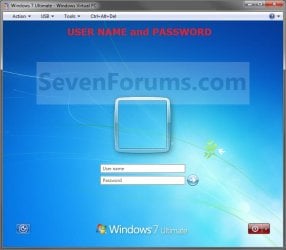
Log On with User Name and Password

How to Make Windows 7 Require a User Name and Password in Log On Screen

   Information
This will show you how to make Windows 7 require all users to type in their user name and password in the Windows log on screen instead of only selecting their user icon and entering their password. This is like the old classic Windows log on screen.
   Note
For the "User name" entry field in the log on screen, you would type in your account's user name as it is on your C:\Users\(user-name) folder. To log on to a domain, you would type Domain Name (Computer Name)/User name instead in the "User name" entry field.

If you did not create a password (recommended to have one) for your user account, then just leave the field empty. You can press TAB or SHIFT+TAB to move between the User name and Password fields if you entered something incorrectly.

EXAMPLE: Log On Screen
NOTE: This is the default log on screen (left screenshot below) and the user name and password log on screen (right screenshot below).
Default.jpg

Changed.jpg


OPTION ONE

Using a REG File Download


1. To Enable Enter User Name and Password Log On Screen
A) Click on the Download button below to download the file below.
Log_On_with_User_Name_and_Password.reg

Download


B) Go to step 3.
2. To Restore Enter Password Only Log On Screen
NOTE: This is the default setting.
A) Click on the Download button below to download the file below.
Log_On_with_Default_Password_Only.reg

Download


3. Click on Save, and save the .reg file to the Desktop.

4. Right click on the downloaded .reg file and click on Merge.

5. Click on the Run, Yes, Yes, and then OK when prompted.

6. When done, you can delete the .reg file on desktop if you like.

7. Log off and log on to see the change.

8. You may also wish to set the same setting for the locked computer screen: How to Display User Information or Not when a Windows Session is Locked


OPTION TWO

Manually in Registry Editor


1. Open the Start Menu, then type regedit in the search box and press enter.

2. If prompted by UAC, then click on Yes.

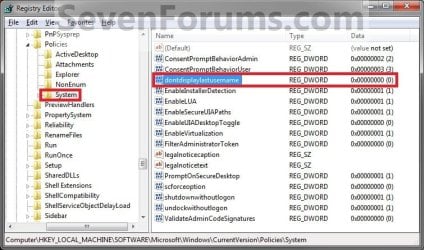
3. In regedit, navigate to: (See screenshot below)

Code:
HKEY_LOCAL_MACHINE\SOFTWARE\Microsoft\Windows\CurrentVersion\Policies\System
Reg.jpg
4. In the right pane, right click on dontdisplaylastusername and click on Modify. (See screenshot above)

5. To Enable Enter User Name and Password Log On Screen
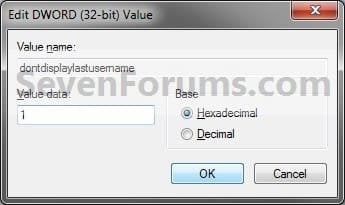
A) Type 1 and click on OK. (See screenshot below)

B) Go to step 7.
6. To Restore Enter Password Only Log On Screen
NOTE: This is the default setting.
A) Type 0 (number zero) and click on OK. (See screenshot above)
Modify.jpg
7. Close regedit.

8. Log off and log on to see the change.

9. You may also wish to set the same setting for the locked computer screen: How to Display User Information or Not when a Windows Session is Locked


OPTION THREE

Through Local Security Policy


1. Open the Local Security Policy editor.

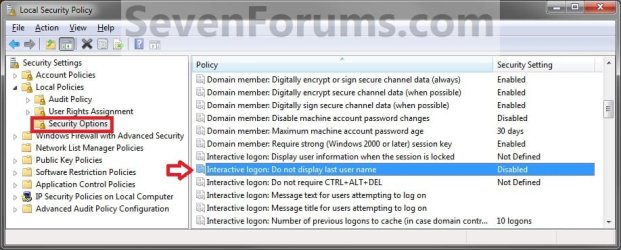
2. In the left pane, expand Local Policies, and click on Security Options. (See screenshot below)
secpol.jpg
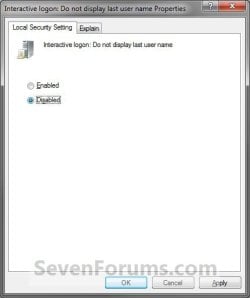
3. In the right pane, right click on Interactive logon: Do not display last user name and click on Properties. (See screenshot above)

4. To Enable Enter User Name and Password Log On Screen
A) Select (dot) Enabled, and click on OK. (See screenshot below)
Properties.jpg
B) Go to step 7.
5. To Restore Enter Password Only Log On Screen
NOTE: This is the default setting.
A) Select (dot) Disabled, and click on OK. (See screenshot above)
6. Close the Local Security Policy window.

7. Log off and log on to see the change.

8. You may also wish to set the same setting for the locked computer screen: How to Display User Information or Not when a Windows Session is Locked
That's it,
Shawn


Attachments

Last edited:
These are not domain users so that is not the problem.

Using the Advanced Boot Options screen, to attempt to boot in Safe Mode, I have tried these these choices:

Repair
Safe Mode
Safe Mode with Command Prompt

and for every one, I am asked for a username and password. However, the username/password combinations I was successfully using (prior to changing the registry following your instructions) are all rejected with the "incorrect login info" error message.

Other suggestions?

Thank you for your very prompt reply!
 

My Computer My Computer

Computer type
PC/Desktop
Computer Manufacturer/Model Number
Dell
OS
Windows 7 Home Premium x64
In that case, you could also do a system restore at boot using a restore point dated before you made the registry change to undo it.
 

My Computer My Computer

Computer type
PC/Desktop
Computer Manufacturer/Model Number
Self built custom
OS
64-bit Windows 11 Pro for Workstations
CPU
Intel i7-8700K OC'd to 5 GHz
Motherboard
ASUS ROG Maximus XI Formula Z390
Memory
64 GB (4x16GB) G.SKILL TridentZ RGB DDR4 3600 MHz
Graphics Card(s)
ASUS ROG-STRIX-GTX1080TI-O11G-GAMING
Sound Card
Integrated
Monitor(s) Displays
2 x Samsung Odyssey G7 27"
Screen Resolution
2560x1440
Hard Drives
1TB Samsung 990 PRO M.2,
4TB Samsung 990 PRO PRO M.2,
TerraMaster F8 SSD Plus NAS
PSU
Seasonic Prime Titanium 850W
Case
Thermaltake Core P3
Cooling
Corsair Hydro H115i
Keyboard
Logitech wireless K800
Mouse
Logitech MX Master 4
Internet Speed
2 Gb/s Download and 100 Mb/s Upload
Antivirus
Malwarebyte Anti-Malware Premium
Browser
Google Chrome
Other Info
Logitech Z625 speaker system,
Logitech BRIO 4K Pro webcam,
HP Color LaserJet Pro MFP M477fdn,
APC SMART-UPS RT 1000 XL - SURT1000XLI,
Galaxy S23 Plus phone
(I thought I posted this earlier but I don't see it ?)

From what I can tell, to do a System Restore at Boot, I will need the CDs with Windows 7 on them. Correct?

I don't have the CDs, as this is a new PC I just bought, and like almost all new PCs the CDs were not included.

Any other suggestions?
 

My Computer My Computer

Computer type
PC/Desktop
Computer Manufacturer/Model Number
Dell
OS
Windows 7 Home Premium x64

My Computer My Computer

Computer type
PC/Desktop
Computer Manufacturer/Model Number
Self built custom
OS
64-bit Windows 11 Pro for Workstations
CPU
Intel i7-8700K OC'd to 5 GHz
Motherboard
ASUS ROG Maximus XI Formula Z390
Memory
64 GB (4x16GB) G.SKILL TridentZ RGB DDR4 3600 MHz
Graphics Card(s)
ASUS ROG-STRIX-GTX1080TI-O11G-GAMING
Sound Card
Integrated
Monitor(s) Displays
2 x Samsung Odyssey G7 27"
Screen Resolution
2560x1440
Hard Drives
1TB Samsung 990 PRO M.2,
4TB Samsung 990 PRO PRO M.2,
TerraMaster F8 SSD Plus NAS
PSU
Seasonic Prime Titanium 850W
Case
Thermaltake Core P3
Cooling
Corsair Hydro H115i
Keyboard
Logitech wireless K800
Mouse
Logitech MX Master 4
Internet Speed
2 Gb/s Download and 100 Mb/s Upload
Antivirus
Malwarebyte Anti-Malware Premium
Browser
Google Chrome
Other Info
Logitech Z625 speaker system,
Logitech BRIO 4K Pro webcam,
HP Color LaserJet Pro MFP M477fdn,
APC SMART-UPS RT 1000 XL - SURT1000XLI,
Galaxy S23 Plus phone
OK I did some of the next steps now:

* I downloaded the Windows 7 Home Premium 64bit "most current" ISO file.
* I used the Windows 7 USB/DVD download tool and burned a new DVD with the ISO file.
* By hitting F12 during bootup (this is a Dell Inspiron 3847) I was able to confirm that the boot mode is "legacy" not UEFI, and also that secure boot is disabled.

So I should now be equipped to do "System Restore at Boot", correct?

The reason I ask is that I put the new DVD in to the drive, did a restart, and then hit F12 and chose to boot from the DVD drive. Then I was given the "do a new Windows Installation" screen.

But I don't want to do a new installation, I just want to do a System Restore from a Restore Point created earlier. If I go ahead and say "next" anyway (which to me seems to imply I want to do a new installation)will I then be given the option to "repair" and/or do "system restore"?

Or do I need to create a "System Repair Disc"?
 

My Computer My Computer

Computer type
PC/Desktop
Computer Manufacturer/Model Number
Dell
OS
Windows 7 Home Premium x64
It sounds like you didn't click on the Repair your computer link when you got to the point below to go to "System Recovery Options".

212270d1337270227-clean-install-windows-7-a-step4.jpg
 

My Computer My Computer

Computer type
PC/Desktop
Computer Manufacturer/Model Number
Self built custom
OS
64-bit Windows 11 Pro for Workstations
CPU
Intel i7-8700K OC'd to 5 GHz
Motherboard
ASUS ROG Maximus XI Formula Z390
Memory
64 GB (4x16GB) G.SKILL TridentZ RGB DDR4 3600 MHz
Graphics Card(s)
ASUS ROG-STRIX-GTX1080TI-O11G-GAMING
Sound Card
Integrated
Monitor(s) Displays
2 x Samsung Odyssey G7 27"
Screen Resolution
2560x1440
Hard Drives
1TB Samsung 990 PRO M.2,
4TB Samsung 990 PRO PRO M.2,
TerraMaster F8 SSD Plus NAS
PSU
Seasonic Prime Titanium 850W
Case
Thermaltake Core P3
Cooling
Corsair Hydro H115i
Keyboard
Logitech wireless K800
Mouse
Logitech MX Master 4
Internet Speed
2 Gb/s Download and 100 Mb/s Upload
Antivirus
Malwarebyte Anti-Malware Premium
Browser
Google Chrome
Other Info
Logitech Z625 speaker system,
Logitech BRIO 4K Pro webcam,
HP Color LaserJet Pro MFP M477fdn,
APC SMART-UPS RT 1000 XL - SURT1000XLI,
Galaxy S23 Plus phone
Alright I was just being very cautious. This time I went ahead and clicked "next", then chose Repair system, and then was able to do the system restore, back to a restore point prior to being locked out. So I am all set now.

Thank you Brink for your patience leading me back-- from a catastrophic situation in which I could not log in to any account on the machine at all (I believe the PC could be referred to as "bricked")-- to being able to use my PC again like normal.

However, I do strongly urge you to modify your tutorial!!!! It should state clearly that some users end up locked out (again, it happened to me as well as at least two others who posted), which will require doing a system restore in order to get one back in.
 

My Computer My Computer

Computer type
PC/Desktop
Computer Manufacturer/Model Number
Dell
OS
Windows 7 Home Premium x64
Great news.

The ones having an issue of it not accepting your user name, did you rename the user profile or anything similar?
 

My Computer My Computer

Computer type
PC/Desktop
Computer Manufacturer/Model Number
Self built custom
OS
64-bit Windows 11 Pro for Workstations
CPU
Intel i7-8700K OC'd to 5 GHz
Motherboard
ASUS ROG Maximus XI Formula Z390
Memory
64 GB (4x16GB) G.SKILL TridentZ RGB DDR4 3600 MHz
Graphics Card(s)
ASUS ROG-STRIX-GTX1080TI-O11G-GAMING
Sound Card
Integrated
Monitor(s) Displays
2 x Samsung Odyssey G7 27"
Screen Resolution
2560x1440
Hard Drives
1TB Samsung 990 PRO M.2,
4TB Samsung 990 PRO PRO M.2,
TerraMaster F8 SSD Plus NAS
PSU
Seasonic Prime Titanium 850W
Case
Thermaltake Core P3
Cooling
Corsair Hydro H115i
Keyboard
Logitech wireless K800
Mouse
Logitech MX Master 4
Internet Speed
2 Gb/s Download and 100 Mb/s Upload
Antivirus
Malwarebyte Anti-Malware Premium
Browser
Google Chrome
Other Info
Logitech Z625 speaker system,
Logitech BRIO 4K Pro webcam,
HP Color LaserJet Pro MFP M477fdn,
APC SMART-UPS RT 1000 XL - SURT1000XLI,
Galaxy S23 Plus phone
This problem did not have to do with renaming the account or profile. How could it? Both accounts were locked out.

Again I do think you really must update your tutorial to explain there is risk of getting all accounts locked out (catastrophic!)-- and to recommend that anybody who tries it should first create a restore point and have a bootable USB/DVD ready, in case they are one of the not-so-lucky ones.
 

My Computer My Computer

Computer type
PC/Desktop
Computer Manufacturer/Model Number
Dell
OS
Windows 7 Home Premium x64
That's the problem though. I've never had an issue of it not accepting user names on all my systems unless there was an issue with the user profile to begin with. I'm trying to see if there is anything related with the folks that are having this issue.

I'm thinking there may be an issue with the account's name VS full name. Check using this below to see if they show what you typed for the accounts.

User Accounts - View Detailed Information About in Windows
 

My Computer My Computer

Computer type
PC/Desktop
Computer Manufacturer/Model Number
Self built custom
OS
64-bit Windows 11 Pro for Workstations
CPU
Intel i7-8700K OC'd to 5 GHz
Motherboard
ASUS ROG Maximus XI Formula Z390
Memory
64 GB (4x16GB) G.SKILL TridentZ RGB DDR4 3600 MHz
Graphics Card(s)
ASUS ROG-STRIX-GTX1080TI-O11G-GAMING
Sound Card
Integrated
Monitor(s) Displays
2 x Samsung Odyssey G7 27"
Screen Resolution
2560x1440
Hard Drives
1TB Samsung 990 PRO M.2,
4TB Samsung 990 PRO PRO M.2,
TerraMaster F8 SSD Plus NAS
PSU
Seasonic Prime Titanium 850W
Case
Thermaltake Core P3
Cooling
Corsair Hydro H115i
Keyboard
Logitech wireless K800
Mouse
Logitech MX Master 4
Internet Speed
2 Gb/s Download and 100 Mb/s Upload
Antivirus
Malwarebyte Anti-Malware Premium
Browser
Google Chrome
Other Info
Logitech Z625 speaker system,
Logitech BRIO 4K Pro webcam,
HP Color LaserJet Pro MFP M477fdn,
APC SMART-UPS RT 1000 XL - SURT1000XLI,
Galaxy S23 Plus phone
it works in windows 8.1 also

mine does not lock out because im on windows 8.1 so it would not affect with it i just type my real email but this tutorial works the same way with windows 8.1 and 8
 

My Computer My Computer

Computer type
Laptop
Computer Manufacturer/Model Number
HP
OS
64bit Windows 8.1 pro
CPU
AMD E1-2100 APU with Radeon(TM) HD Graphics
Memory
4GB
Graphics Card(s)
AMD Radeon HD 8210
Hard Drives
HGST HTS545050A7E680 SATA Disk Drive 400GB
Antivirus
Avast
Browser
Internet explorer, firefox, google chrome

My Computer My Computer

Computer type
PC/Desktop
Computer Manufacturer/Model Number
Self built custom
OS
64-bit Windows 11 Pro for Workstations
CPU
Intel i7-8700K OC'd to 5 GHz
Motherboard
ASUS ROG Maximus XI Formula Z390
Memory
64 GB (4x16GB) G.SKILL TridentZ RGB DDR4 3600 MHz
Graphics Card(s)
ASUS ROG-STRIX-GTX1080TI-O11G-GAMING
Sound Card
Integrated
Monitor(s) Displays
2 x Samsung Odyssey G7 27"
Screen Resolution
2560x1440
Hard Drives
1TB Samsung 990 PRO M.2,
4TB Samsung 990 PRO PRO M.2,
TerraMaster F8 SSD Plus NAS
PSU
Seasonic Prime Titanium 850W
Case
Thermaltake Core P3
Cooling
Corsair Hydro H115i
Keyboard
Logitech wireless K800
Mouse
Logitech MX Master 4
Internet Speed
2 Gb/s Download and 100 Mb/s Upload
Antivirus
Malwarebyte Anti-Malware Premium
Browser
Google Chrome
Other Info
Logitech Z625 speaker system,
Logitech BRIO 4K Pro webcam,
HP Color LaserJet Pro MFP M477fdn,
APC SMART-UPS RT 1000 XL - SURT1000XLI,
Galaxy S23 Plus phone
Added Info

Sorry if this is too old. I just tried this on a Windows 7 Home Premium PC using the manual method to change the registry entry. This PC has 4 users: 2 admins and 2 standard, all in a Workgroup. I was logged into an admin account where the user had changed the name on his account. After the registry change, I was not able to log in as this user any longer, but I was able to log in as the other admin.

I tested this quite a lot, and my conclusion is that you need a clean profile where the name has not been changed, and I suspect that the user in the profile needs a password. Regardless, I really like the solution you provided (Brink) and am very impressed with your patience and skills. I'm going to create a new profile for the one that couldn't log in and I feel confident this will work fine.

Hope this helps a bit. Have you found any additional info for those experiencing a problem with this?

Thanks,
Paul
 

My Computer My Computer

Computer type
PC/Desktop
OS
Windows 7 professional 64-bit
Hello Paul, and welcome to Seven Forums. :)

That's correct, and was my findings as well. Changing the user name of an account will not work for this since the account is still referenced by the original name.

It's best to create a new account with the user name you want instead.
 

My Computer My Computer

Computer type
PC/Desktop
Computer Manufacturer/Model Number
Self built custom
OS
64-bit Windows 11 Pro for Workstations
CPU
Intel i7-8700K OC'd to 5 GHz
Motherboard
ASUS ROG Maximus XI Formula Z390
Memory
64 GB (4x16GB) G.SKILL TridentZ RGB DDR4 3600 MHz
Graphics Card(s)
ASUS ROG-STRIX-GTX1080TI-O11G-GAMING
Sound Card
Integrated
Monitor(s) Displays
2 x Samsung Odyssey G7 27"
Screen Resolution
2560x1440
Hard Drives
1TB Samsung 990 PRO M.2,
4TB Samsung 990 PRO PRO M.2,
TerraMaster F8 SSD Plus NAS
PSU
Seasonic Prime Titanium 850W
Case
Thermaltake Core P3
Cooling
Corsair Hydro H115i
Keyboard
Logitech wireless K800
Mouse
Logitech MX Master 4
Internet Speed
2 Gb/s Download and 100 Mb/s Upload
Antivirus
Malwarebyte Anti-Malware Premium
Browser
Google Chrome
Other Info
Logitech Z625 speaker system,
Logitech BRIO 4K Pro webcam,
HP Color LaserJet Pro MFP M477fdn,
APC SMART-UPS RT 1000 XL - SURT1000XLI,
Galaxy S23 Plus phone
Back
Top