Log On with User Name and Password

How to Make Windows 7 Require a User Name and Password in Log On Screen

   Information
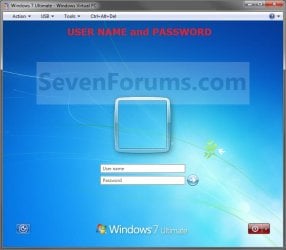
This will show you how to make Windows 7 require all users to type in their user name and password in the Windows log on screen instead of only selecting their user icon and entering their password. This is like the old classic Windows log on screen.
   Note
For the "User name" entry field in the log on screen, you would type in your account's user name as it is on your C:\Users\(user-name) folder. To log on to a domain, you would type Domain Name (Computer Name)/User name instead in the "User name" entry field.

If you did not create a password (recommended to have one) for your user account, then just leave the field empty. You can press TAB or SHIFT+TAB to move between the User name and Password fields if you entered something incorrectly.

EXAMPLE: Log On Screen
NOTE: This is the default log on screen (left screenshot below) and the user name and password log on screen (right screenshot below).
Default.jpg

Changed.jpg


OPTION ONE

Using a REG File Download


1. To Enable Enter User Name and Password Log On Screen
A) Click on the Download button below to download the file below.
Log_On_with_User_Name_and_Password.reg

Download


B) Go to step 3.
2. To Restore Enter Password Only Log On Screen
NOTE: This is the default setting.
A) Click on the Download button below to download the file below.
Log_On_with_Default_Password_Only.reg

Download


3. Click on Save, and save the .reg file to the Desktop.

4. Right click on the downloaded .reg file and click on Merge.

5. Click on the Run, Yes, Yes, and then OK when prompted.

6. When done, you can delete the .reg file on desktop if you like.

7. Log off and log on to see the change.

8. You may also wish to set the same setting for the locked computer screen: How to Display User Information or Not when a Windows Session is Locked


OPTION TWO

Manually in Registry Editor


1. Open the Start Menu, then type regedit in the search box and press enter.

2. If prompted by UAC, then click on Yes.

3. In regedit, navigate to: (See screenshot below)

Code:
HKEY_LOCAL_MACHINE\SOFTWARE\Microsoft\Windows\CurrentVersion\Policies\System
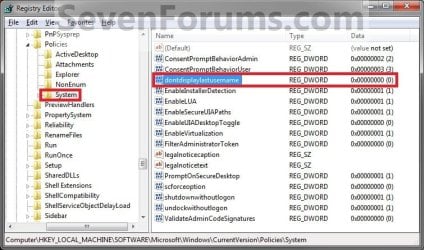
Reg.jpg
4. In the right pane, right click on dontdisplaylastusername and click on Modify. (See screenshot above)

5. To Enable Enter User Name and Password Log On Screen
A) Type 1 and click on OK. (See screenshot below)

B) Go to step 7.
6. To Restore Enter Password Only Log On Screen
NOTE: This is the default setting.
A) Type 0 (number zero) and click on OK. (See screenshot above)
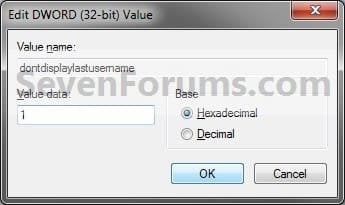
Modify.jpg
7. Close regedit.

8. Log off and log on to see the change.

9. You may also wish to set the same setting for the locked computer screen: How to Display User Information or Not when a Windows Session is Locked


OPTION THREE

Through Local Security Policy


1. Open the Local Security Policy editor.

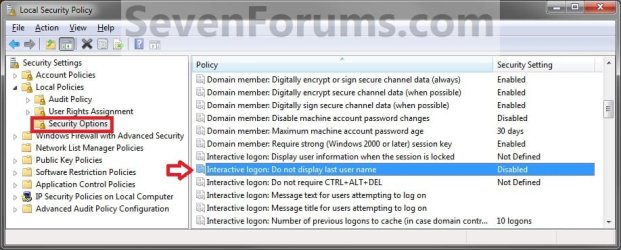
2. In the left pane, expand Local Policies, and click on Security Options. (See screenshot below)
secpol.jpg
3. In the right pane, right click on Interactive logon: Do not display last user name and click on Properties. (See screenshot above)

4. To Enable Enter User Name and Password Log On Screen
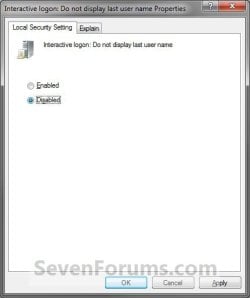
A) Select (dot) Enabled, and click on OK. (See screenshot below)
Properties.jpg
B) Go to step 7.
5. To Restore Enter Password Only Log On Screen
NOTE: This is the default setting.
A) Select (dot) Disabled, and click on OK. (See screenshot above)
6. Close the Local Security Policy window.

7. Log off and log on to see the change.

8. You may also wish to set the same setting for the locked computer screen: How to Display User Information or Not when a Windows Session is Locked
That's it,
Shawn


Attachments

Last edited:
Problem

i am writing on my windows 7 but i did this on my vista. i know my username and password but i cannot get on to it. it just says username and password incorrect. please help!:)
 

My Computer My Computer

At a glance

Windows 7 Home Premium 32bit
OS
Windows 7 Home Premium 32bit
Hello olsyboy, and welcome to Seven Forums.

Double check to make sure that you do not have caps lock on, and for any possible typos.

If that doesn't help, then you could do a system restore at boot using a restore point (if available) dated before you did this to undo and go back to how it was when the restore point was dated.

Hope this helps, ;)
Shawn
 

My Computer My Computer

At a glance

64-bit Windows 11 Pro for WorkstationsIntel i7-8700K OC'd to 5 GHz64 GB (4x16GB) G.SKILL TridentZ RGB DDR4 3600...ASUS ROG-STRIX-GTX1080TI-O11G-GAMING
Computer type
PC/Desktop
Computer Manufacturer/Model Number
Self built custom
OS
64-bit Windows 11 Pro for Workstations
CPU
Intel i7-8700K OC'd to 5 GHz
Motherboard
ASUS ROG Maximus XI Formula Z390
Memory
64 GB (4x16GB) G.SKILL TridentZ RGB DDR4 3600 MHz
Graphics Card(s)
ASUS ROG-STRIX-GTX1080TI-O11G-GAMING
Sound Card
Integrated
Monitor(s) Displays
2 x Samsung Odyssey G7 27"
Screen Resolution
2560x1440
Hard Drives
1TB Samsung 990 PRO M.2,
4TB Samsung 990 PRO PRO M.2,
TerraMaster F8 SSD Plus NAS
PSU
Seasonic Prime Titanium 850W
Case
Thermaltake Core P3
Cooling
Corsair Hydro H115i
Keyboard
Logitech wireless K800
Mouse
Logitech MX Master 4
Internet Speed
2 Gb/s Download and 100 Mb/s Upload
Antivirus
Malwarebyte Anti-Malware Premium
Browser
Google Chrome
Other Info
Logitech Z625 speaker system,
Logitech BRIO 4K Pro webcam,
HP Color LaserJet Pro MFP M477fdn,
APC SMART-UPS RT 1000 XL - SURT1000XLI,
Galaxy S23 Plus phone
no caps lock is off as it says it is on when it is. How do i restore?

and i do like it how would i get it to work?
 

My Computer My Computer

At a glance

Windows 7 Home Premium 32bit
OS
Windows 7 Home Premium 32bit
Clicking on the tutorial link in my post above can help show you how to do a system restore in Vista. :)
 

My Computer My Computer

At a glance

64-bit Windows 11 Pro for WorkstationsIntel i7-8700K OC'd to 5 GHz64 GB (4x16GB) G.SKILL TridentZ RGB DDR4 3600...ASUS ROG-STRIX-GTX1080TI-O11G-GAMING
Computer type
PC/Desktop
Computer Manufacturer/Model Number
Self built custom
OS
64-bit Windows 11 Pro for Workstations
CPU
Intel i7-8700K OC'd to 5 GHz
Motherboard
ASUS ROG Maximus XI Formula Z390
Memory
64 GB (4x16GB) G.SKILL TridentZ RGB DDR4 3600 MHz
Graphics Card(s)
ASUS ROG-STRIX-GTX1080TI-O11G-GAMING
Sound Card
Integrated
Monitor(s) Displays
2 x Samsung Odyssey G7 27"
Screen Resolution
2560x1440
Hard Drives
1TB Samsung 990 PRO M.2,
4TB Samsung 990 PRO PRO M.2,
TerraMaster F8 SSD Plus NAS
PSU
Seasonic Prime Titanium 850W
Case
Thermaltake Core P3
Cooling
Corsair Hydro H115i
Keyboard
Logitech wireless K800
Mouse
Logitech MX Master 4
Internet Speed
2 Gb/s Download and 100 Mb/s Upload
Antivirus
Malwarebyte Anti-Malware Premium
Browser
Google Chrome
Other Info
Logitech Z625 speaker system,
Logitech BRIO 4K Pro webcam,
HP Color LaserJet Pro MFP M477fdn,
APC SMART-UPS RT 1000 XL - SURT1000XLI,
Galaxy S23 Plus phone
thanksss

but is there a way to make it work?

sorry you may not understand but i am locked out of my pc?

i also do not have the cd/dvd thingy
 
Last edited by a moderator:

My Computer My Computer

At a glance

Windows 7 Home Premium 32bit
OS
Windows 7 Home Premium 32bit
olsyboy,

You could use the tutorial below to create a Vista Recovery Disc on another Vista 32-bit computer to use on your's.

Create a Recovery Disc - Vista Forums

If that is not an option for you, then please post back with what brand and model your Vista computer is. I'll look up how to do a factory recovery for it.
 

My Computer My Computer

At a glance

64-bit Windows 11 Pro for WorkstationsIntel i7-8700K OC'd to 5 GHz64 GB (4x16GB) G.SKILL TridentZ RGB DDR4 3600...ASUS ROG-STRIX-GTX1080TI-O11G-GAMING
Computer type
PC/Desktop
Computer Manufacturer/Model Number
Self built custom
OS
64-bit Windows 11 Pro for Workstations
CPU
Intel i7-8700K OC'd to 5 GHz
Motherboard
ASUS ROG Maximus XI Formula Z390
Memory
64 GB (4x16GB) G.SKILL TridentZ RGB DDR4 3600 MHz
Graphics Card(s)
ASUS ROG-STRIX-GTX1080TI-O11G-GAMING
Sound Card
Integrated
Monitor(s) Displays
2 x Samsung Odyssey G7 27"
Screen Resolution
2560x1440
Hard Drives
1TB Samsung 990 PRO M.2,
4TB Samsung 990 PRO PRO M.2,
TerraMaster F8 SSD Plus NAS
PSU
Seasonic Prime Titanium 850W
Case
Thermaltake Core P3
Cooling
Corsair Hydro H115i
Keyboard
Logitech wireless K800
Mouse
Logitech MX Master 4
Internet Speed
2 Gb/s Download and 100 Mb/s Upload
Antivirus
Malwarebyte Anti-Malware Premium
Browser
Google Chrome
Other Info
Logitech Z625 speaker system,
Logitech BRIO 4K Pro webcam,
HP Color LaserJet Pro MFP M477fdn,
APC SMART-UPS RT 1000 XL - SURT1000XLI,
Galaxy S23 Plus phone
thank you for your time it is appreciated but is there a way to make it work? is there a thing i didnt do i just clicked it, then ok then logged off
 

My Computer My Computer

At a glance

Windows 7 Home Premium 32bit
OS
Windows 7 Home Premium 32bit
If you followed the tutorial exactly, then it's just a matter of enter the correct user account name and password at log on. Otherwise, it's not going to let you log in. :(
 

My Computer My Computer

At a glance

64-bit Windows 11 Pro for WorkstationsIntel i7-8700K OC'd to 5 GHz64 GB (4x16GB) G.SKILL TridentZ RGB DDR4 3600...ASUS ROG-STRIX-GTX1080TI-O11G-GAMING
Computer type
PC/Desktop
Computer Manufacturer/Model Number
Self built custom
OS
64-bit Windows 11 Pro for Workstations
CPU
Intel i7-8700K OC'd to 5 GHz
Motherboard
ASUS ROG Maximus XI Formula Z390
Memory
64 GB (4x16GB) G.SKILL TridentZ RGB DDR4 3600 MHz
Graphics Card(s)
ASUS ROG-STRIX-GTX1080TI-O11G-GAMING
Sound Card
Integrated
Monitor(s) Displays
2 x Samsung Odyssey G7 27"
Screen Resolution
2560x1440
Hard Drives
1TB Samsung 990 PRO M.2,
4TB Samsung 990 PRO PRO M.2,
TerraMaster F8 SSD Plus NAS
PSU
Seasonic Prime Titanium 850W
Case
Thermaltake Core P3
Cooling
Corsair Hydro H115i
Keyboard
Logitech wireless K800
Mouse
Logitech MX Master 4
Internet Speed
2 Gb/s Download and 100 Mb/s Upload
Antivirus
Malwarebyte Anti-Malware Premium
Browser
Google Chrome
Other Info
Logitech Z625 speaker system,
Logitech BRIO 4K Pro webcam,
HP Color LaserJet Pro MFP M477fdn,
APC SMART-UPS RT 1000 XL - SURT1000XLI,
Galaxy S23 Plus phone
Enter User Name and Password Log On Screen

hey thank you for helping us with that but now i am wondering how to add a picture to that plz help
 

My Computer My Computer

At a glance

windows 7 32 bit
Computer type
PC/Desktop
OS
windows 7 32 bit
hey thank you for helping us with that but now i am wondering how to add a picture to that plz help

you can click on the start menu picture and it will give you editing options example below
 

Attachments

  • log.PNG
    log.PNG
    51.3 KB · Views: 150

My Computer My Computer

At a glance

Windows 10 Home Premium 64bit sp1Intel I7-6700K @ 4.6 Ghz 1.344 volts everyday OC32GB G-Skill TridentZ 3200mhz 16-18-18-38 DDR4Sli Gigabyte Windforce GTX 980 G1
Computer type
PC/Desktop
Computer Manufacturer/Model Number
CoreI7-6700K MrFingerIII Special Builds
OS
Windows 10 Home Premium 64bit sp1
CPU
Intel I7-6700K @ 4.6 Ghz 1.344 volts everyday OC
Motherboard
Asrock Fatality K6 Z170 Socket 1151
Memory
32GB G-Skill TridentZ 3200mhz 16-18-18-38 DDR4
Graphics Card(s)
Sli Gigabyte Windforce GTX 980 G1
Sound Card
AC97 Creative Rage Tactic 3D Headphones Bluetooth
Monitor(s) Displays
27" Asus ROG Swift PG278Q G-Sync 48" Vizio Smart HD TV
Screen Resolution
2560x1440p 27"- 48" Currently Gaming at 2560x1440p Res 2K
Hard Drives
250GB Samsung Evo840SSD Seagate baracuda 500 GB WD Mybook 500Gb 1TB Seagate Barracuda
PSU
HX1050w Corsair Silver 80plus certified crosfire/sli
Case
Enthod Pro Full Tower
Cooling
Corsair H110i GT 280 mm High Performance WaterBlock
Keyboard
Logitech wireless keyboard
Mouse
Logitech wireless mouse
Internet Speed
Cox Cable 100+ mb
Antivirus
WebRoot Spysweeper with Antivirus
Browser
IE-10, Chrome, Opera
Other Info
My Other Rig is a AMD FX8320E @4.6Ghz 16GB Ballistic Sport Ram
Mobo Asrock Fatality 990FX 120GB OCZ SSD 1TB Seagate Barracuda Corsair H75 Cooling PSU Corsair CX750
GPU GTX Gigabyte 970G1
hey thank you for helping us with that but now i am wondering how to add a picture to that plz help

Hello Aaron, and welcome to Seven Forums.

Sorry, but I'm not aware of any way to add a picture to the box when it's set to require both a user name and password at log on. :(
 

My Computer My Computer

At a glance

64-bit Windows 11 Pro for WorkstationsIntel i7-8700K OC'd to 5 GHz64 GB (4x16GB) G.SKILL TridentZ RGB DDR4 3600...ASUS ROG-STRIX-GTX1080TI-O11G-GAMING
Computer type
PC/Desktop
Computer Manufacturer/Model Number
Self built custom
OS
64-bit Windows 11 Pro for Workstations
CPU
Intel i7-8700K OC'd to 5 GHz
Motherboard
ASUS ROG Maximus XI Formula Z390
Memory
64 GB (4x16GB) G.SKILL TridentZ RGB DDR4 3600 MHz
Graphics Card(s)
ASUS ROG-STRIX-GTX1080TI-O11G-GAMING
Sound Card
Integrated
Monitor(s) Displays
2 x Samsung Odyssey G7 27"
Screen Resolution
2560x1440
Hard Drives
1TB Samsung 990 PRO M.2,
4TB Samsung 990 PRO PRO M.2,
TerraMaster F8 SSD Plus NAS
PSU
Seasonic Prime Titanium 850W
Case
Thermaltake Core P3
Cooling
Corsair Hydro H115i
Keyboard
Logitech wireless K800
Mouse
Logitech MX Master 4
Internet Speed
2 Gb/s Download and 100 Mb/s Upload
Antivirus
Malwarebyte Anti-Malware Premium
Browser
Google Chrome
Other Info
Logitech Z625 speaker system,
Logitech BRIO 4K Pro webcam,
HP Color LaserJet Pro MFP M477fdn,
APC SMART-UPS RT 1000 XL - SURT1000XLI,
Galaxy S23 Plus phone
hey thank you for helping us with that but now i am wondering how to add a picture to that plz help

Hello Aaron, and welcome to Seven Forums.

Sorry, but I'm not aware of any way to add a picture to the box when it's set to require both a user name and password at log on. :(

what about the Ctrl + Alt + Del before you logon

20130329_203331.jpg

i did that but its not letting me do that i did the Log On with User Name and Password here is the link http://www.sevenforums.com/tutorials/61650-log-user-name-password.html
 
Last edited by a moderator:

My Computer My Computer

At a glance

windows 7 32 bit
Computer type
PC/Desktop
OS
windows 7 32 bit

My Computer My Computer

At a glance

64-bit Windows 11 Pro for WorkstationsIntel i7-8700K OC'd to 5 GHz64 GB (4x16GB) G.SKILL TridentZ RGB DDR4 3600...ASUS ROG-STRIX-GTX1080TI-O11G-GAMING
Computer type
PC/Desktop
Computer Manufacturer/Model Number
Self built custom
OS
64-bit Windows 11 Pro for Workstations
CPU
Intel i7-8700K OC'd to 5 GHz
Motherboard
ASUS ROG Maximus XI Formula Z390
Memory
64 GB (4x16GB) G.SKILL TridentZ RGB DDR4 3600 MHz
Graphics Card(s)
ASUS ROG-STRIX-GTX1080TI-O11G-GAMING
Sound Card
Integrated
Monitor(s) Displays
2 x Samsung Odyssey G7 27"
Screen Resolution
2560x1440
Hard Drives
1TB Samsung 990 PRO M.2,
4TB Samsung 990 PRO PRO M.2,
TerraMaster F8 SSD Plus NAS
PSU
Seasonic Prime Titanium 850W
Case
Thermaltake Core P3
Cooling
Corsair Hydro H115i
Keyboard
Logitech wireless K800
Mouse
Logitech MX Master 4
Internet Speed
2 Gb/s Download and 100 Mb/s Upload
Antivirus
Malwarebyte Anti-Malware Premium
Browser
Google Chrome
Other Info
Logitech Z625 speaker system,
Logitech BRIO 4K Pro webcam,
HP Color LaserJet Pro MFP M477fdn,
APC SMART-UPS RT 1000 XL - SURT1000XLI,
Galaxy S23 Plus phone
thanks you so much :thumbsup:
 

My Computer My Computer

At a glance

windows 7 32 bit
Computer type
PC/Desktop
OS
windows 7 32 bit
You're most welcome. :)
 

My Computer My Computer

At a glance

64-bit Windows 11 Pro for WorkstationsIntel i7-8700K OC'd to 5 GHz64 GB (4x16GB) G.SKILL TridentZ RGB DDR4 3600...ASUS ROG-STRIX-GTX1080TI-O11G-GAMING
Computer type
PC/Desktop
Computer Manufacturer/Model Number
Self built custom
OS
64-bit Windows 11 Pro for Workstations
CPU
Intel i7-8700K OC'd to 5 GHz
Motherboard
ASUS ROG Maximus XI Formula Z390
Memory
64 GB (4x16GB) G.SKILL TridentZ RGB DDR4 3600 MHz
Graphics Card(s)
ASUS ROG-STRIX-GTX1080TI-O11G-GAMING
Sound Card
Integrated
Monitor(s) Displays
2 x Samsung Odyssey G7 27"
Screen Resolution
2560x1440
Hard Drives
1TB Samsung 990 PRO M.2,
4TB Samsung 990 PRO PRO M.2,
TerraMaster F8 SSD Plus NAS
PSU
Seasonic Prime Titanium 850W
Case
Thermaltake Core P3
Cooling
Corsair Hydro H115i
Keyboard
Logitech wireless K800
Mouse
Logitech MX Master 4
Internet Speed
2 Gb/s Download and 100 Mb/s Upload
Antivirus
Malwarebyte Anti-Malware Premium
Browser
Google Chrome
Other Info
Logitech Z625 speaker system,
Logitech BRIO 4K Pro webcam,
HP Color LaserJet Pro MFP M477fdn,
APC SMART-UPS RT 1000 XL - SURT1000XLI,
Galaxy S23 Plus phone
Hi Brink,
well it works, but in windows 7 HOME PREMIUM you cannot log on at a standard account,
you can log on only on adminstrator accounts.
Is there any way to have this option enabled and also to be able ta access the standard accounts?
 

My Computer My Computer

At a glance

Windows 7 Ultimate x64
OS
Windows 7 Ultimate x64
Hello Charli,

You should just be able to type in the user name and password of any account on the computer to log in to it.

If you renamed the account, try using the original name to see if it may work.
 

My Computer My Computer

At a glance

64-bit Windows 11 Pro for WorkstationsIntel i7-8700K OC'd to 5 GHz64 GB (4x16GB) G.SKILL TridentZ RGB DDR4 3600...ASUS ROG-STRIX-GTX1080TI-O11G-GAMING
Computer type
PC/Desktop
Computer Manufacturer/Model Number
Self built custom
OS
64-bit Windows 11 Pro for Workstations
CPU
Intel i7-8700K OC'd to 5 GHz
Motherboard
ASUS ROG Maximus XI Formula Z390
Memory
64 GB (4x16GB) G.SKILL TridentZ RGB DDR4 3600 MHz
Graphics Card(s)
ASUS ROG-STRIX-GTX1080TI-O11G-GAMING
Sound Card
Integrated
Monitor(s) Displays
2 x Samsung Odyssey G7 27"
Screen Resolution
2560x1440
Hard Drives
1TB Samsung 990 PRO M.2,
4TB Samsung 990 PRO PRO M.2,
TerraMaster F8 SSD Plus NAS
PSU
Seasonic Prime Titanium 850W
Case
Thermaltake Core P3
Cooling
Corsair Hydro H115i
Keyboard
Logitech wireless K800
Mouse
Logitech MX Master 4
Internet Speed
2 Gb/s Download and 100 Mb/s Upload
Antivirus
Malwarebyte Anti-Malware Premium
Browser
Google Chrome
Other Info
Logitech Z625 speaker system,
Logitech BRIO 4K Pro webcam,
HP Color LaserJet Pro MFP M477fdn,
APC SMART-UPS RT 1000 XL - SURT1000XLI,
Galaxy S23 Plus phone
Hello Charli,

You should just be able to type in the user name and password of any account on the computer to log in to it.

If you renamed the account, try using the original name to see if it may work.

Thanks for the quick response mate,
well yes, i changed the name of the standard account following the great guide mate always by you
Code:
http://www.sevenforums.com/tutorials/147545-user-profile-folder-change-user-account-folder-name.html

now i'll try to create another standard account and try that way,will keep updated.

EDIT:
it works just fine with a created newly standard user, but sadly it doesn't work with a renamed user.
 
Last edited:

My Computer My Computer

At a glance

Windows 7 Ultimate x64
OS
Windows 7 Ultimate x64
Option Two in W7 Home Premium locks all accounts out!

I realize this is an old thread. Hopefully not so old there will be no reply, though.

I am setting up a new W7 Home Premium desktop. I had created one admin account and one regular user account and all was going fine. I hoped to implement the "Log on with User Name and Password" as explained in the tutorial.

I followed the instructions for Option Two. It is so trivial (change one registry item from 0 to 1) that I figured the risk would be minimal.

However, while I do now have a logon screen that asks for both User Name and Password, neither of the accounts' User/Pass info allowed in! Either one gets the "user/pass not valid" message.

Suggestions very welcome, as you can imagine! I should have read the thread more carefully before trusting the tutorial, I guess-- and paid heed to the sage old advice to always avoid messing with the registry.

So as you can guess, now that I am locked out entirely, I went back and read the entire thread more carefully. My unpleasant outcome seems to be the same as what happened to Darkdemise50 and olsyboy. Apparently I am not the first one to be completely locked out, and unable to even attempt any other fix, on following this tutorial.

What next?

Thank you in advance.
 

My Computer My Computer

At a glance

Windows 7 Home Premium x64
Computer type
PC/Desktop
Computer Manufacturer/Model Number
Dell
OS
Windows 7 Home Premium x64
Hello ReluuctantSysAdm, and welcome to Seven Forums.

All three options are just different ways to set the same setting.

If these are domain users, then you would need to type "Computer Name/User name" instead of just the user name in the "User name" field.

If you have renamed these user accounts, then see if using the old name may work.

If nothing helps, then you could boot into Safe Mode, and set dontdisplaylastusername back to 0.
 

My Computer My Computer

At a glance

64-bit Windows 11 Pro for WorkstationsIntel i7-8700K OC'd to 5 GHz64 GB (4x16GB) G.SKILL TridentZ RGB DDR4 3600...ASUS ROG-STRIX-GTX1080TI-O11G-GAMING
Computer type
PC/Desktop
Computer Manufacturer/Model Number
Self built custom
OS
64-bit Windows 11 Pro for Workstations
CPU
Intel i7-8700K OC'd to 5 GHz
Motherboard
ASUS ROG Maximus XI Formula Z390
Memory
64 GB (4x16GB) G.SKILL TridentZ RGB DDR4 3600 MHz
Graphics Card(s)
ASUS ROG-STRIX-GTX1080TI-O11G-GAMING
Sound Card
Integrated
Monitor(s) Displays
2 x Samsung Odyssey G7 27"
Screen Resolution
2560x1440
Hard Drives
1TB Samsung 990 PRO M.2,
4TB Samsung 990 PRO PRO M.2,
TerraMaster F8 SSD Plus NAS
PSU
Seasonic Prime Titanium 850W
Case
Thermaltake Core P3
Cooling
Corsair Hydro H115i
Keyboard
Logitech wireless K800
Mouse
Logitech MX Master 4
Internet Speed
2 Gb/s Download and 100 Mb/s Upload
Antivirus
Malwarebyte Anti-Malware Premium
Browser
Google Chrome
Other Info
Logitech Z625 speaker system,
Logitech BRIO 4K Pro webcam,
HP Color LaserJet Pro MFP M477fdn,
APC SMART-UPS RT 1000 XL - SURT1000XLI,
Galaxy S23 Plus phone
Back
Top