Solved logitech webcam instalation problem

Yes and yes...(as i said earlier i had it previously installed on win 7 32 bit..

After i skipped the message and installed anyway, it still used the generic driver (see screenshot)..the result was the same..non functional camera. (black screen)

Truly, i have no idea what could it be...
OK
The other advice was to go to the Logitech Website. Try this:
Clean install of Logitech camera software for Windows
 

My Computer

Computer type
PC/Desktop
OS
Microsoft Windows 7 Home Premium 64-bit 7601 Multiprocessor Free Service Pack 1
CPU
Intel(R) Core(TM) i7-3770 CPU @ 3.40GHz
Motherboard
ASUSTeK COMPUTER INC. P8H77-M
Memory
8.00 GB
Graphics Card(s)
Intel(R) HD Graphics 4000
Sound Card
On Board
Monitor(s) Displays
Dell 24"
Screen Resolution
1920 x 1080
Hard Drives
(1) INTEL SSDSC2CT180A3 ATA Device (2) ST500DM002-1BD142 ATA Device (3) WDC WD3200AAKS-75L9A0 ATA Device (4) Generic- Compact Flash USB Device (5) Generic- MS/MS-Pro USB Device (6) Generic- SD/MMC USB Device (7) Generic- SM/xD-Picture USB
PSU
500w Corsair
Case
Cooler Master
Cooling
3 Fans
Keyboard
Logitech MK300
Mouse
Logitech WOM
Internet Speed
75Mb
Antivirus
Norton 360
Browser
Firefox, Opera, IE
Mitchell I have this same webcam, and can confirm that the LED is only active when the unit is actually engaged and sending a video feed into the computer. Or thinks it is.

.after i do a restart and windows just auto-instals the generic drivers by itself...
It would not do that if you followed my advice. It wwill not install drivers for a USB device that is not plugged in. Of course the light will stay on the ewebcam, it picks up its power supply from the USB lead. If you follow advice given we will try o help you, if you don't then I for one will go off to watch some paint dry!
 

My Computer

Computer Manufacturer/Model Number
Custom
OS
Windows 7 Ultimate 64-bit
CPU
AMD Phenom II X4 955 Black OC'ed 4.0GHz
Motherboard
Asus M5A88-V EVO
Memory
8GB Mushkin Enhanced Silverline (2x4GB) 1333
Graphics Card(s)
XFX Radeon HD6870 1024MB GDDR5 OC'ed 945MHz; 1151MHz
Sound Card
Soundblaster X-Fi Xtreme PCIe
Monitor(s) Displays
32" Hannspree SE32LMNB
Screen Resolution
1920 x 1080
Hard Drives
250GB Hitachi Deskstar (OS); 2TB Western Digital Elements
PSU
650W XFX XXX Edition 80PLUS Bronze Modular
Case
Cougar 6GR1 Evolution
Cooling
Corsair H60 p/p 120mm; Zalman VF3000A; x4 120mm; x1 140mm
Keyboard
Logitech G510
Mouse
CM Storm Sentinel Advance Zero-G
Internet Speed
Not fast enough :I
Other Info
No matter what your specs, my PC is better.
Mitchell I have this same webcam, and can confirm that the LED is only active when the unit is actually engaged and sending a video feed into the computer. Or thinks it is.

.after i do a restart and windows just auto-instals the generic drivers by itself...
It would not do that if you followed my advice. It wwill not install drivers for a USB device that is not plugged in. Of course the light will stay on the ewebcam, it picks up its power supply from the USB lead. If you follow advice given we will try o help you, if you don't then I for one will go off to watch some paint dry!

i can confirm that, from my previous installation (win 7 32 bit)..i suppose it could be that it will not work with 64 bit?
 

My Computer

OS
win 7
What have you got to loose by trying my Post 21?
 

My Computer

Computer type
PC/Desktop
OS
Microsoft Windows 7 Home Premium 64-bit 7601 Multiprocessor Free Service Pack 1
CPU
Intel(R) Core(TM) i7-3770 CPU @ 3.40GHz
Motherboard
ASUSTeK COMPUTER INC. P8H77-M
Memory
8.00 GB
Graphics Card(s)
Intel(R) HD Graphics 4000
Sound Card
On Board
Monitor(s) Displays
Dell 24"
Screen Resolution
1920 x 1080
Hard Drives
(1) INTEL SSDSC2CT180A3 ATA Device (2) ST500DM002-1BD142 ATA Device (3) WDC WD3200AAKS-75L9A0 ATA Device (4) Generic- Compact Flash USB Device (5) Generic- MS/MS-Pro USB Device (6) Generic- SD/MMC USB Device (7) Generic- SM/xD-Picture USB
PSU
500w Corsair
Case
Cooler Master
Cooling
3 Fans
Keyboard
Logitech MK300
Mouse
Logitech WOM
Internet Speed
75Mb
Antivirus
Norton 360
Browser
Firefox, Opera, IE
Check your software downloads. Have you got file "lws231_full.??? (there is exe after the dot)?
 

My Computer

Computer type
PC/Desktop
OS
Microsoft Windows 7 Home Premium 64-bit 7601 Multiprocessor Free Service Pack 1
CPU
Intel(R) Core(TM) i7-3770 CPU @ 3.40GHz
Motherboard
ASUSTeK COMPUTER INC. P8H77-M
Memory
8.00 GB
Graphics Card(s)
Intel(R) HD Graphics 4000
Sound Card
On Board
Monitor(s) Displays
Dell 24"
Screen Resolution
1920 x 1080
Hard Drives
(1) INTEL SSDSC2CT180A3 ATA Device (2) ST500DM002-1BD142 ATA Device (3) WDC WD3200AAKS-75L9A0 ATA Device (4) Generic- Compact Flash USB Device (5) Generic- MS/MS-Pro USB Device (6) Generic- SD/MMC USB Device (7) Generic- SM/xD-Picture USB
PSU
500w Corsair
Case
Cooler Master
Cooling
3 Fans
Keyboard
Logitech MK300
Mouse
Logitech WOM
Internet Speed
75Mb
Antivirus
Norton 360
Browser
Firefox, Opera, IE
Mitchell I have this same webcam, and can confirm that the LED is only active when the unit is actually engaged and sending a video feed into the computer. Or thinks it is.
Yes you are right, my mistake. Sorry:o
 

My Computer

Computer type
PC/Desktop
OS
Microsoft Windows 7 Home Premium 64-bit 7601 Multiprocessor Free Service Pack 1
CPU
Intel(R) Core(TM) i7-3770 CPU @ 3.40GHz
Motherboard
ASUSTeK COMPUTER INC. P8H77-M
Memory
8.00 GB
Graphics Card(s)
Intel(R) HD Graphics 4000
Sound Card
On Board
Monitor(s) Displays
Dell 24"
Screen Resolution
1920 x 1080
Hard Drives
(1) INTEL SSDSC2CT180A3 ATA Device (2) ST500DM002-1BD142 ATA Device (3) WDC WD3200AAKS-75L9A0 ATA Device (4) Generic- Compact Flash USB Device (5) Generic- MS/MS-Pro USB Device (6) Generic- SD/MMC USB Device (7) Generic- SM/xD-Picture USB
PSU
500w Corsair
Case
Cooler Master
Cooling
3 Fans
Keyboard
Logitech MK300
Mouse
Logitech WOM
Internet Speed
75Mb
Antivirus
Norton 360
Browser
Firefox, Opera, IE
Check your software downloads. Have you got file "lws231_full.??? (there is exe after the dot)?

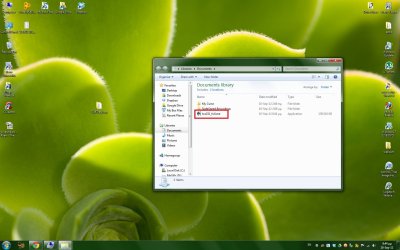
Yes i do (see SS)...i proceeded to start your intruction from post #21 now !
 

Attachments

  • 1.jpg
    1.jpg
    134.6 KB · Views: 14

My Computer

OS
win 7
Yes and yes...(as i said earlier i had it previously installed on win 7 32 bit..

After i skipped the message and installed anyway, it still used the generic driver (see screenshot)..the result was the same..non functional camera. (black screen)

Truly, i have no idea what could it be...
OK
The other advice was to go to the Logitech Website. Try this:
Clean install of Logitech camera software for Windows

Tried that just now...still no avail..
 

My Computer

OS
win 7
Tried that just now...still no avail..

What message did you receive at what stage? And when it came to the decision did you point the install to the lws231_full.exe file?
 

My Computer

Computer type
PC/Desktop
OS
Microsoft Windows 7 Home Premium 64-bit 7601 Multiprocessor Free Service Pack 1
CPU
Intel(R) Core(TM) i7-3770 CPU @ 3.40GHz
Motherboard
ASUSTeK COMPUTER INC. P8H77-M
Memory
8.00 GB
Graphics Card(s)
Intel(R) HD Graphics 4000
Sound Card
On Board
Monitor(s) Displays
Dell 24"
Screen Resolution
1920 x 1080
Hard Drives
(1) INTEL SSDSC2CT180A3 ATA Device (2) ST500DM002-1BD142 ATA Device (3) WDC WD3200AAKS-75L9A0 ATA Device (4) Generic- Compact Flash USB Device (5) Generic- MS/MS-Pro USB Device (6) Generic- SD/MMC USB Device (7) Generic- SM/xD-Picture USB
PSU
500w Corsair
Case
Cooler Master
Cooling
3 Fans
Keyboard
Logitech MK300
Mouse
Logitech WOM
Internet Speed
75Mb
Antivirus
Norton 360
Browser
Firefox, Opera, IE
Tried that just now...still no avail..

What message did you receive at what stage? And when it came to the decision did you point the install to the lws231_full.exe file?
i got the exact same error in clean boot.."incompatible webcam detected"...it was unpluged at all times until the step that installer asked me to plug it in and thats when i got the error.
and yep.thats the installer i use (shown in screenshot 1 post above)..

Did quite a few googling on the issue and there seems to be alot of other ppl getting the same error.
 

My Computer

OS
win 7
Have just read you other thread of two days ago where you say Windows keeps crashing. Had I known this at the beginning we could have saved an awful lot of time and trouble. You clearly have an iffy Windows install. When you say you reformatted did you have Windows 7 64bit installed before and was the webcam working ok then? If you installed the Windows 7 for the first time did you install from a download or a disc. Either way where did your copy of Windows 7 come from?
 

My Computer

Computer type
PC/Desktop
OS
Microsoft Windows 7 Home Premium 64-bit 7601 Multiprocessor Free Service Pack 1
CPU
Intel(R) Core(TM) i7-3770 CPU @ 3.40GHz
Motherboard
ASUSTeK COMPUTER INC. P8H77-M
Memory
8.00 GB
Graphics Card(s)
Intel(R) HD Graphics 4000
Sound Card
On Board
Monitor(s) Displays
Dell 24"
Screen Resolution
1920 x 1080
Hard Drives
(1) INTEL SSDSC2CT180A3 ATA Device (2) ST500DM002-1BD142 ATA Device (3) WDC WD3200AAKS-75L9A0 ATA Device (4) Generic- Compact Flash USB Device (5) Generic- MS/MS-Pro USB Device (6) Generic- SD/MMC USB Device (7) Generic- SM/xD-Picture USB
PSU
500w Corsair
Case
Cooler Master
Cooling
3 Fans
Keyboard
Logitech MK300
Mouse
Logitech WOM
Internet Speed
75Mb
Antivirus
Norton 360
Browser
Firefox, Opera, IE
Have just read you other thread of two days ago where you say Windows keeps crashing. Had I known this at the beginning we could have saved an awful lot of time and trouble. You clearly have an iffy Windows install. When you say you reformatted did you have Windows 7 64bit installed before and was the webcam working ok then? If you installed the Windows 7 for the first time did you install from a download or a disc. Either way where did your copy of Windows 7 come from?

Oh i forgot to mark that topic as solved..well i have a wireless adaptor that included a usb cradle..it turns out that when this cradle was connected i got freezes..now i plugged it directly to the mobo usb port (without the cradle) and haven't had a single problem with that, ever since.

( TL-WN821NC - Welcome to TP-LINK )

Yes i used that with windows7 32 bit version..The webcam used to work 100% fine then..
now i reformated and gone to windows7 64 bit version.(webcam+drivers are compatible with both-as reported on cd label and website).

On 32bit i had it installed with the cd and on the 64 bit, windows installed it itself before i even get the cd(then i got it in and installed).


Both windows are official from the university i am in cooperation from their msdnaa alliance with MS.It is called dreamspark now ( https://www.dreamspark.com/ )
 

My Computer

OS
win 7

My Computer

Computer type
PC/Desktop
OS
Microsoft Windows 7 Home Premium 64-bit 7601 Multiprocessor Free Service Pack 1
CPU
Intel(R) Core(TM) i7-3770 CPU @ 3.40GHz
Motherboard
ASUSTeK COMPUTER INC. P8H77-M
Memory
8.00 GB
Graphics Card(s)
Intel(R) HD Graphics 4000
Sound Card
On Board
Monitor(s) Displays
Dell 24"
Screen Resolution
1920 x 1080
Hard Drives
(1) INTEL SSDSC2CT180A3 ATA Device (2) ST500DM002-1BD142 ATA Device (3) WDC WD3200AAKS-75L9A0 ATA Device (4) Generic- Compact Flash USB Device (5) Generic- MS/MS-Pro USB Device (6) Generic- SD/MMC USB Device (7) Generic- SM/xD-Picture USB
PSU
500w Corsair
Case
Cooler Master
Cooling
3 Fans
Keyboard
Logitech MK300
Mouse
Logitech WOM
Internet Speed
75Mb
Antivirus
Norton 360
Browser
Firefox, Opera, IE
i can confirm that, from my previous installation (win 7 32 bit)..i suppose it could be that it will not work with 64 bit?

Unfortunately not the case. I have Windows 7 Ultimate 64-bit and the webcam works as intended. Incidentally I can't find (or I'm being a bit thick) whether you entirely erased all associated drivers through Device Manager. I believe in one post you expressed some sort of difficulty with doing so?
 

My Computer

Computer Manufacturer/Model Number
Custom
OS
Windows 7 Ultimate 64-bit
CPU
AMD Phenom II X4 955 Black OC'ed 4.0GHz
Motherboard
Asus M5A88-V EVO
Memory
8GB Mushkin Enhanced Silverline (2x4GB) 1333
Graphics Card(s)
XFX Radeon HD6870 1024MB GDDR5 OC'ed 945MHz; 1151MHz
Sound Card
Soundblaster X-Fi Xtreme PCIe
Monitor(s) Displays
32" Hannspree SE32LMNB
Screen Resolution
1920 x 1080
Hard Drives
250GB Hitachi Deskstar (OS); 2TB Western Digital Elements
PSU
650W XFX XXX Edition 80PLUS Bronze Modular
Case
Cougar 6GR1 Evolution
Cooling
Corsair H60 p/p 120mm; Zalman VF3000A; x4 120mm; x1 140mm
Keyboard
Logitech G510
Mouse
CM Storm Sentinel Advance Zero-G
Internet Speed
Not fast enough :I
Other Info
No matter what your specs, my PC is better.
i can confirm that, from my previous installation (win 7 32 bit)..i suppose it could be that it will not work with 64 bit?

Unfortunately not the case. I have Windows 7 Ultimate 64-bit and the webcam works as intended. Incidentally I can't find (or I'm being a bit thick) whether you entirely erased all associated drivers through Device Manager. I believe in one post you expressed some sort of difficulty with doing so?

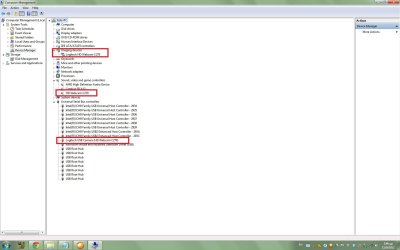
Drivers have been fixed..at least it seems that way..(see screenshot attached)

but still camera just freezes...when i try to use it, i only get blank screen and no feed, also after i shut down the light on the webcam stays lit...EVEN if i shut down pc completely, the lid does not go out..
 

Attachments

  • 1.jpg
    1.jpg
    101.1 KB · Views: 8

My Computer

OS
win 7
And what do you get if you double click on the webcam in the Imaging Devices (the top red box in your screenshot?
 

My Computer

Computer type
PC/Desktop
OS
Microsoft Windows 7 Home Premium 64-bit 7601 Multiprocessor Free Service Pack 1
CPU
Intel(R) Core(TM) i7-3770 CPU @ 3.40GHz
Motherboard
ASUSTeK COMPUTER INC. P8H77-M
Memory
8.00 GB
Graphics Card(s)
Intel(R) HD Graphics 4000
Sound Card
On Board
Monitor(s) Displays
Dell 24"
Screen Resolution
1920 x 1080
Hard Drives
(1) INTEL SSDSC2CT180A3 ATA Device (2) ST500DM002-1BD142 ATA Device (3) WDC WD3200AAKS-75L9A0 ATA Device (4) Generic- Compact Flash USB Device (5) Generic- MS/MS-Pro USB Device (6) Generic- SD/MMC USB Device (7) Generic- SM/xD-Picture USB
PSU
500w Corsair
Case
Cooler Master
Cooling
3 Fans
Keyboard
Logitech MK300
Mouse
Logitech WOM
Internet Speed
75Mb
Antivirus
Norton 360
Browser
Firefox, Opera, IE
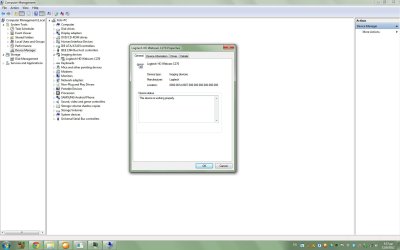
And when you click "Driver" does it show this one "13.31.1044.0"?
 

My Computer

Computer type
PC/Desktop
OS
Microsoft Windows 7 Home Premium 64-bit 7601 Multiprocessor Free Service Pack 1
CPU
Intel(R) Core(TM) i7-3770 CPU @ 3.40GHz
Motherboard
ASUSTeK COMPUTER INC. P8H77-M
Memory
8.00 GB
Graphics Card(s)
Intel(R) HD Graphics 4000
Sound Card
On Board
Monitor(s) Displays
Dell 24"
Screen Resolution
1920 x 1080
Hard Drives
(1) INTEL SSDSC2CT180A3 ATA Device (2) ST500DM002-1BD142 ATA Device (3) WDC WD3200AAKS-75L9A0 ATA Device (4) Generic- Compact Flash USB Device (5) Generic- MS/MS-Pro USB Device (6) Generic- SD/MMC USB Device (7) Generic- SM/xD-Picture USB
PSU
500w Corsair
Case
Cooler Master
Cooling
3 Fans
Keyboard
Logitech MK300
Mouse
Logitech WOM
Internet Speed
75Mb
Antivirus
Norton 360
Browser
Firefox, Opera, IE
And when you click "Driver" does it show this one "13.31.1044.0"?

nope.. a tad older one it seems..but i did install from the "lws231_full.exe" package...
 

Attachments

  • 3.jpg
    3.jpg
    100.7 KB · Views: 3

My Computer

OS
win 7
Back
Top