Solved Look of Win7

koenh

New member
Member
Local time
5:29 AM
Messages
37
Hello,
When i start my pc, i have the old 'start' logo with grey bar. (the top bar of the programs is blue)

When i go to System properties - advanced - Settings and press apply on the 'let windows choose what's best' option, i get the nice 'flag start button', aero look and feel...

When i restart my pc, i get back the old look and feel and have to apply again in 'system properties'...

How can i adjust my settings (register?) to have the aero look and feel every time i start up my laptop?

tx.
 

My Computer My Computer

At a glance

Windows 7 professional
OS
Windows 7 professional
Try applying a theme by right clicking desktop, personalisation
R u using a custom theme (without uxtheme patcher, or uxstyle)?, or a theme that is for windows vista? if you have, it will turn to classic theme because vista themes don't work on win7. And everytime your computer starts up it might just keep activating that theme.
I can't really help you unless you tell me in more detail what were you doing before it became like this.
 

My Computer My Computer

At a glance

Windows 7 Professional 32-bit SP1Intel Mobile Core 2 Duo SU9600 @ 1.60GHz3.00GB Dual-Channel DDR3 @ 398MHz (6-6-6-15)Intel Mobile Intel 4 Series Express Chipset F...
Computer type
Laptop
Computer Manufacturer/Model Number
Dell Latitude XT2 Tablet PC
OS
Windows 7 Professional 32-bit SP1
CPU
Intel Mobile Core 2 Duo SU9600 @ 1.60GHz
Motherboard
Dell Inc. 0M374P (Microprocessor)
Memory
3.00GB Dual-Channel DDR3 @ 398MHz (6-6-6-15)
Graphics Card(s)
Intel Mobile Intel 4 Series Express Chipset Family (Dell)
Sound Card
High Definition Audio Device
Monitor(s) Displays
Generic PnP Monitor (1280x800@60Hz)
Screen Resolution
1280 x 800
Hard Drives
232GB TOSHIBA MK2529GSGF (SATA)
Keyboard
HID Keyboard Device; Standard PS/2 Keyboard
Mouse
HID-compliant mouse; PS/2 Compatible Mouse
Antivirus
Norton 360
Browser
Google Chrome, Mozilla Firefox
Other Info
From Piriform Speccy!
Tx for the answer,

In fact it is my laptop of work, and i received it like that.
I tried changing theme, but that didn't worked...

What theme can i use so it might be ok?

tx
 

My Computer My Computer

At a glance

Windows 7 professional
OS
Windows 7 professional

My Computer My Computer

At a glance

Windows 7 Professional 64-bit SP1Intel E84004GB Crucial BallistixATI ASUS Radeon HD 4830
Computer Manufacturer/Model Number
Home Built
OS
Windows 7 Professional 64-bit SP1
CPU
Intel E8400
Motherboard
MSI P35 Neo
Memory
4GB Crucial Ballistix
Graphics Card(s)
ATI ASUS Radeon HD 4830
Sound Card
Realtek ALC888 on Board
Monitor(s) Displays
Asus 22-inch VH226H Widescreen
Screen Resolution
1920 x 1080
Hard Drives
Two Western Digital 500GB
PSU
Hiper HPU-4M 530W
Case
Thermaltake Tsunami Dream Black
Cooling
Air/Fans
Keyboard
Saitek Eclipse
Mouse
Razer
Internet Speed
Sky Broadband
Other Info
USB Hub/Card Reader - 2 Pen Drives, 1 Phone Dock
Ok, tx!
But i tried it, and it didn't solve my problem...
I think some registry is preventing my pc from keeping the aero look, but i don't find which one...

grz
 

My Computer My Computer

At a glance

Windows 7 professional
OS
Windows 7 professional
so u can't even do windows basic theme? could you put system specs into your profile, like do you have a graphics card that is capable
 

My Computer My Computer

At a glance

Windows 7 Professional 32-bit SP1Intel Mobile Core 2 Duo SU9600 @ 1.60GHz3.00GB Dual-Channel DDR3 @ 398MHz (6-6-6-15)Intel Mobile Intel 4 Series Express Chipset F...
Computer type
Laptop
Computer Manufacturer/Model Number
Dell Latitude XT2 Tablet PC
OS
Windows 7 Professional 32-bit SP1
CPU
Intel Mobile Core 2 Duo SU9600 @ 1.60GHz
Motherboard
Dell Inc. 0M374P (Microprocessor)
Memory
3.00GB Dual-Channel DDR3 @ 398MHz (6-6-6-15)
Graphics Card(s)
Intel Mobile Intel 4 Series Express Chipset Family (Dell)
Sound Card
High Definition Audio Device
Monitor(s) Displays
Generic PnP Monitor (1280x800@60Hz)
Screen Resolution
1280 x 800
Hard Drives
232GB TOSHIBA MK2529GSGF (SATA)
Keyboard
HID Keyboard Device; Standard PS/2 Keyboard
Mouse
HID-compliant mouse; PS/2 Compatible Mouse
Antivirus
Norton 360
Browser
Google Chrome, Mozilla Firefox
Other Info
From Piriform Speccy!
What do you mean with basic theme? I have a grey control bar with a gray 'start' button which mensions 'start'...
The top bars of programs are blue...

When i go to advanced settings, everythins is "normal" until the next reboot...

My graphic cards memory is in my RAM memory... I placed 4GB for a 32 bit system, where i use 3GB for windows, and 0.5GB for graphics...

tx.
 

My Computer My Computer

At a glance

Windows 7 professional
OS
Windows 7 professional
Try group policy, im currently looking for settings that affect aero, but there are lots of settings here and careful for which ones get changed.

EDIT: here:
Computer configuration ->administrative templates ->windows components -> desktop window manager. AND/OR

User configuration ->administrative templates ->windows components -> desktop window manager.

Try changing those 3 settings: window animations, desktop composition, flip 3D.

Just one thing, when you press (Windows Button) + (Tab), do u get all your windows looking nice with your desktop wallpaper in the background? or something that doesn't look as nice as what i described.

I need to know if it is the whole Windows Classic (grey ugly) theme that is enabled or parts of aero are enabled.

Also could u post a screenshot?

ooh i know maybe, desktop window manager (dwm.exe) is the process that runs windows basic (without aero transparency) and windows aero. Check task manager in the processes tab if there is any dwm.exe
 

My Computer My Computer

At a glance

Windows 7 Professional 32-bit SP1Intel Mobile Core 2 Duo SU9600 @ 1.60GHz3.00GB Dual-Channel DDR3 @ 398MHz (6-6-6-15)Intel Mobile Intel 4 Series Express Chipset F...
Computer type
Laptop
Computer Manufacturer/Model Number
Dell Latitude XT2 Tablet PC
OS
Windows 7 Professional 32-bit SP1
CPU
Intel Mobile Core 2 Duo SU9600 @ 1.60GHz
Motherboard
Dell Inc. 0M374P (Microprocessor)
Memory
3.00GB Dual-Channel DDR3 @ 398MHz (6-6-6-15)
Graphics Card(s)
Intel Mobile Intel 4 Series Express Chipset Family (Dell)
Sound Card
High Definition Audio Device
Monitor(s) Displays
Generic PnP Monitor (1280x800@60Hz)
Screen Resolution
1280 x 800
Hard Drives
232GB TOSHIBA MK2529GSGF (SATA)
Keyboard
HID Keyboard Device; Standard PS/2 Keyboard
Mouse
HID-compliant mouse; PS/2 Compatible Mouse
Antivirus
Norton 360
Browser
Google Chrome, Mozilla Firefox
Other Info
From Piriform Speccy!
If this is a computer that is provided by the company that you work for, I would take your problem to your IT department ... just to be on the safe side.. ;)
 

My Computer My Computer

At a glance

64-bit Windows 8.1 ProCore(TM) i5 CPU 4330 Haswell @ 3.20GHz12.00 GBIntel(R) HD Graphics
Computer type
PC/Desktop
Computer Manufacturer/Model Number
LENOVO K450 @3.0GHZ
OS
64-bit Windows 8.1 Pro
CPU
Core(TM) i5 CPU 4330 Haswell @ 3.20GHz
Motherboard
LENOVO
Memory
12.00 GB
Graphics Card(s)
Intel(R) HD Graphics
Sound Card
Intel HD integtrated
Monitor(s) Displays
HP 25' ISP Monitor
Screen Resolution
1900/1020
Hard Drives
(1) ST1000DM003-1CH162 (2) Generic STORAGE DEVICE USB Device (3) Generic STORAGE DEVICE USB Device
Internet Speed
100mb down/10mb up
Hello,
Thanks for the answers.

It is a company pc, but i have permission to change it... (But since it is not necessary, i have to do it in my free time...)

How to access the settings described? I searched for 'computer configuration' and 'user configuration' but didn't found them...
(Windows Button) + (Tab) doesn't change a thing...
I see that dwm.exe is started...
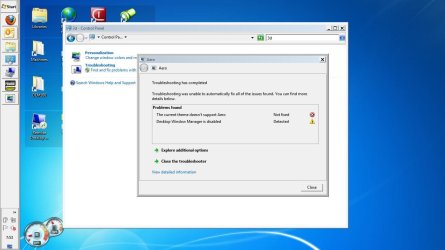
In attachment you find a screenshot... I did a screenshot of a search to aero problems... I have an win7 theme activated...

Allready thanks.
 

Attachments

  • aero_2.JPG
    aero_2.JPG
    86.2 KB · Views: 35

My Computer My Computer

At a glance

Windows 7 professional
OS
Windows 7 professional
but in your troubleshooting it says dwm is disabled. did it fix it for u?
o i get it, troubleshoot started it up but aero still doesn't work.
group policy - search from the start menu it is called "edit group policy"
 

My Computer My Computer

At a glance

Windows 7 Professional 32-bit SP1Intel Mobile Core 2 Duo SU9600 @ 1.60GHz3.00GB Dual-Channel DDR3 @ 398MHz (6-6-6-15)Intel Mobile Intel 4 Series Express Chipset F...
Computer type
Laptop
Computer Manufacturer/Model Number
Dell Latitude XT2 Tablet PC
OS
Windows 7 Professional 32-bit SP1
CPU
Intel Mobile Core 2 Duo SU9600 @ 1.60GHz
Motherboard
Dell Inc. 0M374P (Microprocessor)
Memory
3.00GB Dual-Channel DDR3 @ 398MHz (6-6-6-15)
Graphics Card(s)
Intel Mobile Intel 4 Series Express Chipset Family (Dell)
Sound Card
High Definition Audio Device
Monitor(s) Displays
Generic PnP Monitor (1280x800@60Hz)
Screen Resolution
1280 x 800
Hard Drives
232GB TOSHIBA MK2529GSGF (SATA)
Keyboard
HID Keyboard Device; Standard PS/2 Keyboard
Mouse
HID-compliant mouse; PS/2 Compatible Mouse
Antivirus
Norton 360
Browser
Google Chrome, Mozilla Firefox
Other Info
From Piriform Speccy!
Hello
Group policy didn't solve it..

I tried to end the dwm.exe, but it didn't solve my problem. When i restart my pc, it is started again...

tx
 

My Computer My Computer

At a glance

Windows 7 professional
OS
Windows 7 professional
I don't know what else to try, a solution might become complicated now.
 

My Computer My Computer

At a glance

Windows 7 Professional 32-bit SP1Intel Mobile Core 2 Duo SU9600 @ 1.60GHz3.00GB Dual-Channel DDR3 @ 398MHz (6-6-6-15)Intel Mobile Intel 4 Series Express Chipset F...
Computer type
Laptop
Computer Manufacturer/Model Number
Dell Latitude XT2 Tablet PC
OS
Windows 7 Professional 32-bit SP1
CPU
Intel Mobile Core 2 Duo SU9600 @ 1.60GHz
Motherboard
Dell Inc. 0M374P (Microprocessor)
Memory
3.00GB Dual-Channel DDR3 @ 398MHz (6-6-6-15)
Graphics Card(s)
Intel Mobile Intel 4 Series Express Chipset Family (Dell)
Sound Card
High Definition Audio Device
Monitor(s) Displays
Generic PnP Monitor (1280x800@60Hz)
Screen Resolution
1280 x 800
Hard Drives
232GB TOSHIBA MK2529GSGF (SATA)
Keyboard
HID Keyboard Device; Standard PS/2 Keyboard
Mouse
HID-compliant mouse; PS/2 Compatible Mouse
Antivirus
Norton 360
Browser
Google Chrome, Mozilla Firefox
Other Info
From Piriform Speccy!
Ok,
Tx for the info...

If you think at something else, please give me the info...
When i find a solution, i'll post it to this forum...

grz
 

My Computer My Computer

At a glance

Windows 7 professional
OS
Windows 7 professional
u sure that you have chosen an aero theme? to just be sure try and choose one of the 7 original windows themes: Windows 7, Architecture, Characters, Landscapes, Nature, Scenes, (Theme of your country if included)
 

My Computer My Computer

At a glance

Windows 7 Professional 32-bit SP1Intel Mobile Core 2 Duo SU9600 @ 1.60GHz3.00GB Dual-Channel DDR3 @ 398MHz (6-6-6-15)Intel Mobile Intel 4 Series Express Chipset F...
Computer type
Laptop
Computer Manufacturer/Model Number
Dell Latitude XT2 Tablet PC
OS
Windows 7 Professional 32-bit SP1
CPU
Intel Mobile Core 2 Duo SU9600 @ 1.60GHz
Motherboard
Dell Inc. 0M374P (Microprocessor)
Memory
3.00GB Dual-Channel DDR3 @ 398MHz (6-6-6-15)
Graphics Card(s)
Intel Mobile Intel 4 Series Express Chipset Family (Dell)
Sound Card
High Definition Audio Device
Monitor(s) Displays
Generic PnP Monitor (1280x800@60Hz)
Screen Resolution
1280 x 800
Hard Drives
232GB TOSHIBA MK2529GSGF (SATA)
Keyboard
HID Keyboard Device; Standard PS/2 Keyboard
Mouse
HID-compliant mouse; PS/2 Compatible Mouse
Antivirus
Norton 360
Browser
Google Chrome, Mozilla Firefox
Other Info
From Piriform Speccy!
Hello,

Did check that, but no luck.

tx.
 

My Computer My Computer

At a glance

Windows 7 professional
OS
Windows 7 professional
Hello,
I found it per accident:

* Go to advanced system settings - Settings
* Choose 'adjust for best performance'
* Apply
* Choose 'Let windows choose...'
* Apply

Then it was fixed...

grz.
 

My Computer My Computer

At a glance

Windows 7 professional
OS
Windows 7 professional
Well done, it's great to hear.

Thanks for posting back as the solution will probably help others who are experiencing a similar problem.
 

My Computer My Computer

At a glance

Windows 7 Ultimate SP1 64-BitIntel Core i7 870 @ 2.93GHz8Gb Dual-Channel DDR3 @ 664MHznVidia GeForce GTX 460 1024MB dedicated RAM
Computer Manufacturer/Model Number
HP Pavilion Elite 495UK
OS
Windows 7 Ultimate SP1 64-Bit
CPU
Intel Core i7 870 @ 2.93GHz
Motherboard
MSI 2A9C (CPU1)
Memory
8Gb Dual-Channel DDR3 @ 664MHz
Graphics Card(s)
nVidia GeForce GTX 460 1024MB dedicated RAM
Sound Card
Realtek HD Audio
Monitor(s) Displays
HP2310i
Screen Resolution
1920 x 1080
Hard Drives
1x1954GB Hitachi HDS22020ALA 330 (RAID), 1x1954GB Hitachi External for backup and storage
PSU
460W
Case
HP Elite
Cooling
Air cooled
Keyboard
Logitech K750 solar-powered keyboard
Mouse
Logitech Wireless M180 mouse
Internet Speed
2Mb
Other Info
Pure Avanti Flow Internet Radio with iPod Dock, 64Gb iPod, HP USB Speakers, Sony MDR-V500 Headphones, Sony Vaio F-Series Laptop
Back
Top