Looking for 3rd party image viewers?

ringo14

New member
Member
Local time
8:40 PM
Messages
74
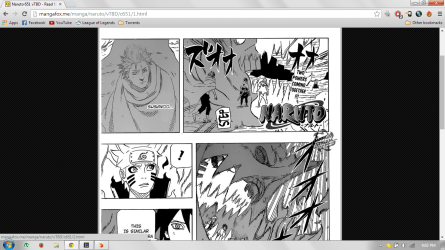
So I read quite a bit of manga/comics online. When I view these pictures online the image is expand and quite big. Allowing me to read the text on the images without needing to zoom in and out. But if I save these on my computer and use the default image viewer, the picture is smaller and I have to zoom in to read the text, which can be annoying when read quite a lot of images..

So my question is is there an 3rd party software that can achieve this? Sort of make the image larger and bigger so it fits more of my screen?
 

My Computer

Computer Manufacturer/Model Number
Dell Inspiron 1545
OS
Windows 7 and Vista basic
So I read quite a bit of manga/comics online. When I view these pictures online the image is expand and quite big. Allowing me to read the text on the images without needing to zoom in and out. But if I save these on my computer and use the default image viewer, the picture is smaller and I have to zoom in to read the text, which can be annoying when read quite a lot of images..

So my question is is there an 3rd party software that can achieve this? Sort of make the image larger and bigger so it fits more of my screen?

Achieve what?

Almost any image viewer can zoom in. In your first paragraph above you say the default image viewer requires you to zoom in, which you find annoying.

So you don't want to zoom in.

What DO you want to do?

Enlarge the pictures and resave in a different size? Pretty much any image editor can do that. Irfanview, LViewPro, Photoshop, etc, etc.

Or do you want to do something else?

Show the pictures in full-screen mode without actually changing the dimensions? I know LViewPro can do that and I suspect many other editors can as well. But you may find that method blurs the image and text more than you'd like.
 

My Computer

Computer type
PC/Desktop
Computer Manufacturer/Model Number
Ignatz Special; 4 speed manual gearbox; factory air conditioning; one of one
OS
Windows 7 Home Premium SP1, 64-bit
CPU
Intel Skylake i5-6600K, not overclocked
Motherboard
AsRock Z170M Extreme 4, micro ATX
Memory
8 GB HyperX DDR4-2666 (2 x 4 GB)
Graphics Card(s)
none; graphics are integrated on CPU
Sound Card
onboard: Realtek ALC1150; external: USB Behringer UF0-202
Monitor(s) Displays
Dell S2340M 23 inch IPS
Screen Resolution
1600 x 900
Hard Drives
System: Crucial MX100 series SSD, 128 GB;
Data: Samsung Spinpoint 103SJ, 1 TB;
Backup: WD Caviar Green WD30EZRX-00D8PB0, 3 TB
PSU
Rosewill SilentNight 500 watt fanless, semi-modular
Case
Antec Solo II
Cooling
Noctua NH-U12S; Noctua F12 intake, Noctua S12A exhaust
Keyboard
Microsoft 200 6JH-00001 USB
Mouse
Dell or Microsoft optical wired; USB
Antivirus
Microsoft Security Essentials and Malwarebytes Premium
Browser
Pale Moon
Other Info
All fans PWM; speeds at idle: CPU circa 500 rpm; intake circa 600 rpm; exhaust circa 600 rpm; CPU temps 27 idle and 47 C load in a warm room (27 C/81 F) when running Intel Extreme Tuning Utility stress test.
It would perhaps help matters if you could link to one of these comics that you view, quite often when you "view" an image online and there is a "bigger version" the version that you actually download is the smaller version hence why you have to zoom in to read the text.

Whether you can download the bigger version or not is a totally different matter.

As for software that can make an image fill your screen more, ignatzatsonic is right, even the default windows image viewer will let you zoom in on images so you don't need a 3rd party app for that.
 

My Computer

Computer type
PC/Desktop
Computer Manufacturer/Model Number
Self Built
OS
Windows 7 Ultimate x64
CPU
Intil i7-860
Motherboard
Gigabyte GA-P55a-UD6
Memory
16Gb Corsair XMS3 1600MHz
Graphics Card(s)
MSI N470GTXTwin FrozR II
Monitor(s) Displays
Samsung S23A700D
Hard Drives
1x Samsung 840Pro SSD 256Gb for Windows
2x WD Green 2Tb (for Storage)
1x Western Digital Caviar Black 2 TB 7200 RPM (also for storage)
1x Samsung HD501LJ 500Gb for Ubuntu
PSU
Antec TruePower New Blue Modular 750W
Case
Antec 300
Cooling
Cosair H70
Internet Speed
60Mb/s DL, 3Mb/s UL
Antivirus
Norton Internet Security
Browser
IE, FF, Chrome
In Irfanview you can choose the view option of View> Original size (Ctrl + H). This will stay default as you scroll through the images in that folder/directory. You can also set it to always fit the image to the window size View> Display Options> Fit window to image

A Guy
 

My Computer

Computer type
PC/Desktop
OS
Windows 10 Home x64
CPU
INTEL Core i5-750 Quad-Core 3.37GHz
Motherboard
ASUS P7P55D
Memory
HyperX Fury Black Series 8GB (2 x 4GB) 1866Mhz
Graphics Card(s)
EVGA GeForce GTX 750 Superclocked 1GB 128-Bit GDDR5
Monitor(s) Displays
LG 32MA68HY 32" IPS
Screen Resolution
1920 x 1080
Hard Drives
Samsung 840 Evo 120GB, SEAGATE 500GB Barracuda® 7200.12, SATA 3 Gb/s, 7200 RPM, 16MB cache
PSU
ANTEC TruePower New TP-550, 80 PLUS, 550W
Case
ANTEC Three Hundred Illusion
Cooling
COOLER MASTER Hyper 212 Plus, 4 x 120mm 1 x 140mm Noctua's
Internet Speed
85 + Mbps
Antivirus
Avast
Browser
Vivaldi
snip1.png

snip2.png

This is what I mean
 

My Computer

Computer Manufacturer/Model Number
Dell Inspiron 1545
OS
Windows 7 and Vista basic
So I read quite a bit of manga/comics online. When I view these pictures online the image is expand and quite big. Allowing me to read the text on the images without needing to zoom in and out. But if I save these on my computer and use the default image viewer, the picture is smaller and I have to zoom in to read the text, which can be annoying when read quite a lot of images..

So my question is is there an 3rd party software that can achieve this? Sort of make the image larger and bigger so it fits more of my screen?

I guess you could try CDisplay Image Display Program by David Ayton, You can find it here. CDisplay was written to easily view JPEG, PNG and static GIF format images sequentially. CDisplay supports Comic Book Archive files, which have the extension .cbr, .cbz, .cbt, or .cba and are simply renamed RAR, ZIP, TAR, or ACE files, respectively.

In opening your files, click the File>Load Files (L), then select the first image and holding the Shift key, select the last image you want to view, then click Open.

I used this program to view comics (a .cbr/.cbz files).

I hope this help.


-Jethro.
 

My Computer

Computer type
Laptop
Computer Manufacturer/Model Number
Neo
OS
Windows 7 Home Premium 32-bit
CPU
Intel(R) Atom(TM) CPU N2600 @ 1.60GHz
Motherboard
CLEVO CO. W210CUQ
Memory
2.00 GB
Graphics Card(s)
Intel(R) Graphics Media Accelerator 3600 Series
Sound Card
(1) VIA High Definition Audio (2) Intel(R) Display Audio
Hard Drives
Hitachi HTS543232A7A384 ATA Device
Antivirus
Avast!/Malwarebytes (Free)
Browser
Firefox/Pale Moon
Back
Top