Looking for a screenshot capture application

stax76

New member
Local time
7:55 AM
Messages
18
I've used greenshot in the past but it don't work on Win 7 and the author don't reply my support request. I would like to be able to capture the active window so I don't have to trimm things by hand. Greenshot trimms too much of the borders, here is a screenshot where you can see the issue:

stax76's place » BackupRobo
 

My Computer

OS
Win7 x64
Alt-Print Sc will copy the active window to the clipboard.
Windows 7 has the snipping tool built in (type snip into the start search)
 

My Computers

System One System Two

  • Computer type
    PC/Desktop
    Computer Manufacturer/Model Number
    ChillBlast - Custom to my design
    OS
    Windows 11 Pro x64 [Latest Release and Release Preview]
    CPU
    Ryzen 9 5950X, 3.8 - 5.2 MHz
    Motherboard
    Asus Prime X570-Pro
    Memory
    64GB [2 x 32GB] DDR4 3200MHz
    Graphics Card(s)
    4GB NVIDIA GEFORCE GTX 1650 Ti
    Sound Card
    On-board SPDIF to 5.1 System + HDMI [5.1 system]
    Monitor(s) Displays
    32" UHD 32 Bit HDR Monitor + 43" UHD 4K 32Bit HDR TV
    Screen Resolution
    2 x 3840 x 2160 @60Hz
    Hard Drives
    1TB M2 SSD OS, 500GB Fast Access SSD, 2 x 8TB Data + Various Externals from 1TB to 4TB, 10TB NAS
    PSU
    NZXT C750 80 PLUS Gold 750W Modular PSU
    Case
    Workstation Case [Matt Black]
    Cooling
    NZXT Kraken X63 280mm CPU Cooler +2x Quiet Case fans
    Keyboard
    Logitech Wireless MX Keys & K400 + others
    Mouse
    Logitech Wireless MX Master 3S
    Internet Speed
    920 MB Down 50 MB Up
    Antivirus
    BitDefender Total Security Pro
    Browser
    Chrome (always run latest Non-Beta)
    Other Info
    Also run ...
    Laptop - Quad 8GB - Windows 10 Pro x64
    Nexus 7 Android tablet x2
    Samsung 10.2" tablet
    Blackview TAB 8 4G Android Tablet c/w Keyboard
    Wacom Intuos Pro Medium Pen Pad
    Wacom Intuos Pro Small Pen Pad
    Wacom Expresskeys Remote
    Loopdeck+ Graphics Controller
    Shuttle Pro v2 Control
  • Computer type
    Laptop
    System Manufacturer/Model Number
    Dell XPS 17 10750H
    OS
    Windows 11 Pro x64 Latest RP
    CPU
    Intel I7 10750H 5.0GHz
    Motherboard
    Dell XPS
    Memory
    32GB [2x16GB] DDR4 2933 MHz
    Graphics Card(s)
    nVidia GTX1650Ti 4 GB GDDR6
    Sound Card
    Stock [Realtek] 4 Speaker
    Monitor(s) Displays
    17" IPS UHD+ Infinity Edge Touchscreen
    Screen Resolution
    3840 x 2400
    Hard Drives
    2TB M2 NVMe, 4TB External + various 500GB & 1TB External NVMe (also have access to spinner HDD from
    PSU
    Stock
    Case
    Stock XPS Aluminium & Carbon Fibre
    Cooling
    Stock - Active Fan Control
    Keyboard
    Backlit + Various Logitech
    Mouse
    Stock Track Pad + Logitech MX Trackball
    Internet Speed
    72 MB Down 18MB Up
    Browser
    Chrome
    Other Info
    Also run ...
    Laptop - Quad 8GB - Windows 10 Pro x64
    Nexus 7 Android tablet x2
    10.2" tablet
    Sony Z3 Android Smartphone
    Wacom Intuos Pro Medium Pen Pad
    Wacom Intuos Pro Small Pen Pad
    Wacom Expresskeys Remote
    Loopdeck+ Graphics Controller
    Shuttle Pro v2 Control Pad
    10TB NAS
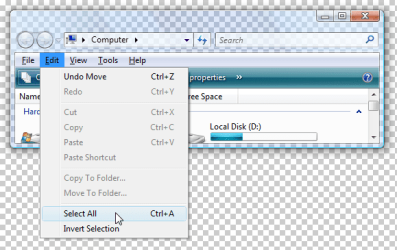
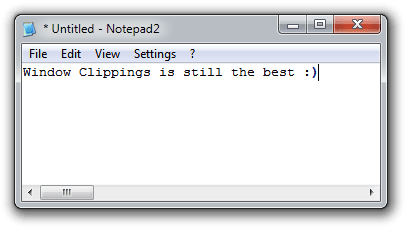
if you don't mind paying a little ($18), i would suggest looking into Window Clippings. it can capture the transparency of aero window borders, and can save them as transparent PNGs. it's also great at capturing menus. it all happens via a right-click menu that becomes available when you hit the special hotkey, so there's no GUI to get in the way.

Window Clippings - High quality screen capture for Windows
 

Attachments

  • Transparency.png
    Transparency.png
    23.3 KB · Views: 60

My Computer

OS
7600 x86
CPU
Core 2 Duo e7200, 2.53 ghz
Motherboard
Micro-Star MS-7529
Memory
2x DDR2 PC5300 1gb, 667 mhz
Graphics Card(s)
GeForce 9500gt, 512mb
Monitor(s) Displays
22" LG Flatron w2234s
Screen Resolution
1680x1050
Hard Drives
Excelstor SATA-II 250gb 7200rpm, 8mb cache
PSU
CoolerMaster M520
Internet Speed
30/20 mbits
Thanks Barman58 and garbanzo, I didn't know about the snipping tool, it has the same issue then greenshot and probably most other capture tools. I hope there will be a free alternative to Window Clippings.
 

My Computer

OS
Win7 x64

My Computers

System One System Two

  • Computer type
    PC/Desktop
    Computer Manufacturer/Model Number
    ChillBlast - Custom to my design
    OS
    Windows 11 Pro x64 [Latest Release and Release Preview]
    CPU
    Ryzen 9 5950X, 3.8 - 5.2 MHz
    Motherboard
    Asus Prime X570-Pro
    Memory
    64GB [2 x 32GB] DDR4 3200MHz
    Graphics Card(s)
    4GB NVIDIA GEFORCE GTX 1650 Ti
    Sound Card
    On-board SPDIF to 5.1 System + HDMI [5.1 system]
    Monitor(s) Displays
    32" UHD 32 Bit HDR Monitor + 43" UHD 4K 32Bit HDR TV
    Screen Resolution
    2 x 3840 x 2160 @60Hz
    Hard Drives
    1TB M2 SSD OS, 500GB Fast Access SSD, 2 x 8TB Data + Various Externals from 1TB to 4TB, 10TB NAS
    PSU
    NZXT C750 80 PLUS Gold 750W Modular PSU
    Case
    Workstation Case [Matt Black]
    Cooling
    NZXT Kraken X63 280mm CPU Cooler +2x Quiet Case fans
    Keyboard
    Logitech Wireless MX Keys & K400 + others
    Mouse
    Logitech Wireless MX Master 3S
    Internet Speed
    920 MB Down 50 MB Up
    Antivirus
    BitDefender Total Security Pro
    Browser
    Chrome (always run latest Non-Beta)
    Other Info
    Also run ...
    Laptop - Quad 8GB - Windows 10 Pro x64
    Nexus 7 Android tablet x2
    Samsung 10.2" tablet
    Blackview TAB 8 4G Android Tablet c/w Keyboard
    Wacom Intuos Pro Medium Pen Pad
    Wacom Intuos Pro Small Pen Pad
    Wacom Expresskeys Remote
    Loopdeck+ Graphics Controller
    Shuttle Pro v2 Control
  • Computer type
    Laptop
    System Manufacturer/Model Number
    Dell XPS 17 10750H
    OS
    Windows 11 Pro x64 Latest RP
    CPU
    Intel I7 10750H 5.0GHz
    Motherboard
    Dell XPS
    Memory
    32GB [2x16GB] DDR4 2933 MHz
    Graphics Card(s)
    nVidia GTX1650Ti 4 GB GDDR6
    Sound Card
    Stock [Realtek] 4 Speaker
    Monitor(s) Displays
    17" IPS UHD+ Infinity Edge Touchscreen
    Screen Resolution
    3840 x 2400
    Hard Drives
    2TB M2 NVMe, 4TB External + various 500GB & 1TB External NVMe (also have access to spinner HDD from
    PSU
    Stock
    Case
    Stock XPS Aluminium & Carbon Fibre
    Cooling
    Stock - Active Fan Control
    Keyboard
    Backlit + Various Logitech
    Mouse
    Stock Track Pad + Logitech MX Trackball
    Internet Speed
    72 MB Down 18MB Up
    Browser
    Chrome
    Other Info
    Also run ...
    Laptop - Quad 8GB - Windows 10 Pro x64
    Nexus 7 Android tablet x2
    10.2" tablet
    Sony Z3 Android Smartphone
    Wacom Intuos Pro Medium Pen Pad
    Wacom Intuos Pro Small Pen Pad
    Wacom Expresskeys Remote
    Loopdeck+ Graphics Controller
    Shuttle Pro v2 Control Pad
    10TB NAS
I use FastStone Capture.
6.3 is shareware, 5.3 was the last freeware version they released.
Does what you want and more.
 

My Computer

Computer Manufacturer/Model Number
Personal build
OS
Windows 7 Ultimate x64 (Retail)
CPU
Intel I7-860
Motherboard
Asus Maximus III Formula
Memory
G.Skill RipJaw DDR3-1333 16GB (4x4GB)
Graphics Card(s)
Nvidia GTS-250 1GB
Sound Card
SupremeFX X-Fi 7.1 HD sound system.
Monitor(s) Displays
VisionQuest VQL-22WSHD LCD Monitor
Screen Resolution
1680x1050
Hard Drives
1x Seagate ST3500418AS 500G SATA2 HDD
1x Western Digital Caviar SE16 500G SATA2 HDD
1x Western Digital Caviar SE16 750G SATA2 HDD
2x Western Digital Caviar Green 2TB SATA2 HDD, configured RAID1
PSU
OCZ EliteXtream OCZ1000EXS 1000W ATX12V 20/24 Pin Active PFC
Case
Antec 1200
Cooling
Swifteck H2O-220 Ultima XT Liquid Cooling w/ 320 Radiator
Keyboard
Logitech G11 Keyboard
Mouse
Logitech MX518 Optical Mouse
Internet Speed
Cable Modem
Other Info
Visiontek TV Wonder 650 Theater PCI-E TV Tuner Card
Logitech 9000 Pro Web Camera
Logitech Cordless RumblePad 2 game controller
LG 18x SuperMulti SATA2 DVD Writer
NmediaPC CR98 Multi Card reader
Nmedia Pro-LCD
Corsair Dominator Memory Fan
Coolermaster R4-L2R-20ac 120mm Case Fan x2
And really doesn't overcrop Aero borders like the other capture tools?
 

My Computer

OS
Win7 x64
alt printscr don't work for me..why?
 

My Computer

Computer Manufacturer/Model Number
Dell E520
OS
7600x64 RTM
CPU
Intel® Q6700, 2.66 GHz stock clock (upgraded)
Motherboard
Dell
Memory
4g (upgraded)
Graphics Card(s)
Sapphire Radeon Toxic HD 3870 512MB GDDR4 (upgraded)
Sound Card
HT Omega Claro Plus (upgraded)
Monitor(s) Displays
22' , 40"
Screen Resolution
1050, 1080p
Hard Drives
1.5tb (upgraded)
PSU
Zalman 600w (upgraded)
Case
Dell
Cooling
stock Dell
Keyboard
dell
Mouse
dell
Internet Speed
100m Fiber optical
Other Info
Bought the Dell secondhand for cheap and upgraded cpu, vga, ram, soundcard, psu and HDD's.
another great app is SnagIt
 

My Computer

Computer Manufacturer/Model Number
Black_Box (homebuilt)
OS
windows 7 RTM x64
CPU
Phenom II 965 Quad Core 3.4Ghz
Motherboard
Asus M4A79T Deluxe
Memory
Mushkin Blackline 8GB (4x2gb)
Graphics Card(s)
XFX Radeon 5970 Black Edition
Sound Card
onboard
Monitor(s) Displays
Dell 2408WPF-main Dell E248WFP-secondary
Screen Resolution
1920x1200-main 1920x1200-secondary
Hard Drives
OCZ Vertex Limited Edition 100GB (OS)
x1 WD Black Edition 500GB drive (Storage)
PSU
XFX 850w Black Edition (Modular)
Case
Mountian Mods H2go
Cooling
CoolITSystems ECO A.L.C.
Keyboard
Logitech MX 5500 wireless keyboard
Mouse
Razor Copperhead
Internet Speed
16Mb down/2Mb up Wowway Cable Internet
And FastStone Capture and SnagIt really don't overcrop Aero borders like the other capture tools?

backuprobo.png
 

My Computer

OS
Win7 x64
PicPick is another good free one. it also has a ruler, protractor, color picker, magnifier, and whiteboard. and no, it does not over-crop.

PicPick Support Center
 

My Computer

OS
7600 x86
CPU
Core 2 Duo e7200, 2.53 ghz
Motherboard
Micro-Star MS-7529
Memory
2x DDR2 PC5300 1gb, 667 mhz
Graphics Card(s)
GeForce 9500gt, 512mb
Monitor(s) Displays
22" LG Flatron w2234s
Screen Resolution
1680x1050
Hard Drives
Excelstor SATA-II 250gb 7200rpm, 8mb cache
PSU
CoolerMaster M520
Internet Speed
30/20 mbits

My Computer

Computer Manufacturer/Model Number
Dell E520
OS
7600x64 RTM
CPU
Intel® Q6700, 2.66 GHz stock clock (upgraded)
Motherboard
Dell
Memory
4g (upgraded)
Graphics Card(s)
Sapphire Radeon Toxic HD 3870 512MB GDDR4 (upgraded)
Sound Card
HT Omega Claro Plus (upgraded)
Monitor(s) Displays
22' , 40"
Screen Resolution
1050, 1080p
Hard Drives
1.5tb (upgraded)
PSU
Zalman 600w (upgraded)
Case
Dell
Cooling
stock Dell
Keyboard
dell
Mouse
dell
Internet Speed
100m Fiber optical
Other Info
Bought the Dell secondhand for cheap and upgraded cpu, vga, ram, soundcard, psu and HDD's.
I've tried PicPick but the borders look like the screenshot I've posted, this don't look good, I guess I will use a white background and crop manually to get something like this:

TeaserSharpDevelop2OnVista.png
 

My Computer

OS
Win7 x64
What is this "overcrop Aero borders" that thou dost speak of.

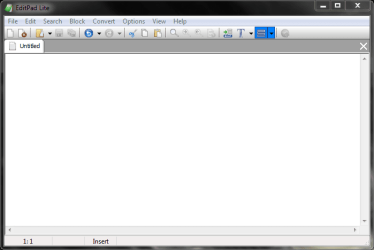
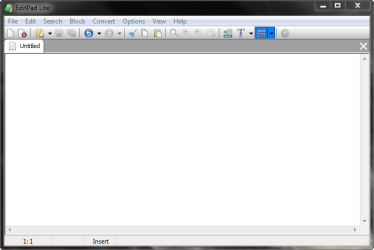
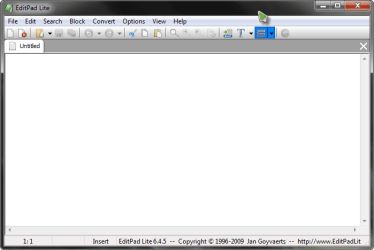
I've just tested Built in (Alt->Prt) Screen for a window - result perfect
t1_builtin.jpg
Snip - result nearly perfect _slight remnant on the corners of rounded corner
t3_snip.PNG
Snag-It - remnants of rounded corner remain
t2_snagit.png
Fast Stone also leaves the remnant
t4 -fs.png

Apart from the corners - all are perfect
(my background - wallpaper is very dark - thus the dark title bar

My surprise is that snagit didn't do a better job.
 

My Computer

Computer Manufacturer/Model Number
AMD Athlon 64 3200+, Lenovo G560 i3
OS
Windows 7 Ultimate, Ubuntu
Motherboard
Gigabyte K8T8000
Memory
DDR 2Gb (!)
Graphics Card(s)
6600GT
Monitor(s) Displays
MultiMonitor (2) LCD
Hard Drives
Old Seagate 75
Big Western Digital
Samsung 500Gb pulled out of an external drive and installed
Ext: Maxtor (Firewire), 1Gb Lacie (Samsung)
Mouse
Logitech MX620 Cordless
Meant to say that Snagit and Faststone capture also offer scrolling window (eg for web pages that scroll beyond the screen) which can be very useful - the editing capabilities of Snag-It are stunning, worth every penny!
TechSmith (maker of snagit) also make Jing (free) which has cool text Arrows editing and social networking built in - don't know how it works in 7.
 

My Computer

Computer Manufacturer/Model Number
AMD Athlon 64 3200+, Lenovo G560 i3
OS
Windows 7 Ultimate, Ubuntu
Motherboard
Gigabyte K8T8000
Memory
DDR 2Gb (!)
Graphics Card(s)
6600GT
Monitor(s) Displays
MultiMonitor (2) LCD
Hard Drives
Old Seagate 75
Big Western Digital
Samsung 500Gb pulled out of an external drive and installed
Ext: Maxtor (Firewire), 1Gb Lacie (Samsung)
Mouse
Logitech MX620 Cordless
@Charles Kane

Your caps look good so I wonder why it don't work here, maybe it's my color scheme.
 

My Computer

OS
Win7 x64
I've tried PicPick but the borders look like the screenshot I've posted, this don't look good, I guess I will use a white background and crop manually to get something like this:

TeaserSharpDevelop2OnVista.png
That has got "Shadow" applied - turn off the shadow and it should be good.
 

My Computer

Computer Manufacturer/Model Number
AMD Athlon 64 3200+, Lenovo G560 i3
OS
Windows 7 Ultimate, Ubuntu
Motherboard
Gigabyte K8T8000
Memory
DDR 2Gb (!)
Graphics Card(s)
6600GT
Monitor(s) Displays
MultiMonitor (2) LCD
Hard Drives
Old Seagate 75
Big Western Digital
Samsung 500Gb pulled out of an external drive and installed
Ext: Maxtor (Firewire), 1Gb Lacie (Samsung)
Mouse
Logitech MX620 Cordless
nothing compares...
 

Attachments

  • Untitled - Notepad2 (2).png
    Untitled - Notepad2 (2).png
    5.7 KB · Views: 18

My Computer

OS
7600 x86
CPU
Core 2 Duo e7200, 2.53 ghz
Motherboard
Micro-Star MS-7529
Memory
2x DDR2 PC5300 1gb, 667 mhz
Graphics Card(s)
GeForce 9500gt, 512mb
Monitor(s) Displays
22" LG Flatron w2234s
Screen Resolution
1680x1050
Hard Drives
Excelstor SATA-II 250gb 7200rpm, 8mb cache
PSU
CoolerMaster M520
Internet Speed
30/20 mbits
It is, with white background and dark window color my problem was solved, thanks guys, this is a great place here.
 

My Computer

OS
Win7 x64
Back
Top