
Looking for help OCing a 4790K

Twisty

New member
Local time
1:15 AM
Messages
25

My Computer

Computer type
PC/Desktop
OS
Windows 7 premium 64 bit
CPU
i7 4790K
Motherboard
Asus z97-A
Memory
16 Corsair Vengeance
Graphics Card(s)
Geforce 770 GTX
Hard Drives
Samsung 840 SSD
WD 1 TB Caviar
KBRADY1979 is the resident expert on OCing.

I'm sure he'll be along shortly-if not, PM him,I'm sure he'd be glad to help.

Just realized you cannot PM until you have more posts, but Kelly will be here, I'm sure.
 

My Computer

Computer type
PC/Desktop
Computer Manufacturer/Model Number
Self-Built
OS
Windows 7 Professional X64
CPU
Core i7 (2nd gen) i7-2600K / 3.40GHz
Motherboard
ASUS P8Z77-V Intel 7 Series Motherboard
Memory
DDR3 2400MHz (OC) 16gb
Graphics Card(s)
Intel(R) HD Graphics 3000, -1988 Mb
Sound Card
8 ChannelsAudio Chipset Realtek ALC892
Monitor(s) Displays
LG 29UM65 Black 29"
Screen Resolution
2560 x 1080
Hard Drives
840 EVO 250 GB SSD ;2tb (2);Seagate;1tb Seagate; 750 gb Seagate; wd ext (2) 750 gb,WD 2tb X 2;WD 3TB Black
PSU
750 watt
Case
Thermaltake RX -1
Cooling
2120mm Fans Included 1Other Fan Ports 5x 200mm Fan Ports
Keyboard
Microsoft Digital Media Pro
Mouse
Microsoft Wireless 6000
Internet Speed
U-verse 18 mbps
Antivirus
MSE
Browser
Firefox, Chrome and my favorite: Pale Moon
Other Info
HdHomerun Dual Tuner.
SRS Audio Lab,
Pioneer BDR 208-DBK
PS3-What a difference in my Surround Sound Receiver!
HP 4540s - My new Toy.
Epson R280 Printer- To personalize my Dvds.
Canon MP 560 - For scanning.
Looks like a fresh system and install. I'd run it for a week of so to make sure you don't have any hardware and/or software issues before overclocking. That will also give the heatsink compound a chance to set. Besides that, It will give you time to read up on overclocking and learn what items are critical to a stable system.
 

My Computer

Computer type
PC/Desktop
Computer Manufacturer/Model Number
Built 2/11/2011
OS
Windows 7 Pro-x64
CPU
i7-2600 3.4GHz - 3.8GHz Turbo
Motherboard
Intel DH67BL-B3
Memory
8Gb - 2x4GB, Muskin 991770 PC3-1333
Graphics Card(s)
Integrated Intel HD 2000
Sound Card
Integrated Intel 10.1 HD, RealTek ALC892
Monitor(s) Displays
Asus LCD VH222H, Haier HL24XSL2a
Screen Resolution
1920x1080, 1920x1080
Hard Drives
Crucial SSD C300-128Gb,
Western Digital WD5002AALX - 500Gb,
Western Digital WD7501AALS - 750Gb
PSU
Seasonic 650W 80+ Gold Modular
Case
Rosewill Defender
Cooling
Stock CPU, Four 120mm case fans, PCH fan added
Keyboard
Logitech EX100 Y-RBH94 Wireless
Mouse
Logitech EX100 M-RCE95 Wireless
Internet Speed
3.0/1.5 Mbs
Antivirus
Microsoft Security Essentials
Browser
Microsoft Internet Explorer 11
Other Info
Antec Veris Premier-Multimedia IR Station,
Cyber Accoustics-3602 Speakers,
AFT XM-5U Card Reader,
Hauppauge TV-HVR-2250,
Sony LX300 USB Turntable
LOL I'm far from the resident OC'ing expert, but thanks for the compliment! If it were Ivy Bridge, I could have you overclocked in a few minutes.........Haswell/Z97 setups, on the other hand, are quite a bit more complicated to do it correctly. There are some other guys on here that have overclocked Haswell CPU's successfully and safely and I'm sure they will be able to help you out.

I have to agree with carwiz also.........I'd run it stock for a week or so to make sure things work like they are supposed to. Take this time to stress test it to record voltages, temps and to find a good guide on OC'ing that particular CPU/Mobo. I bet there's a guide out there that tells you exactly what each feature does, what to change and what not to change.

What kind of CPU cooler do you have?
 

My Computer

Computer type
PC/Desktop
Computer Manufacturer/Model Number
Custom Built
OS
Windows 7 Professional 64bit SP1
CPU
Intel Core i5-3570K @ 4.5GHz
Motherboard
Asus Sabertooth Z77
Memory
Corsair Vengeance 16GB (4x4) @1866MHz CL 9-9-9-24 1T
Graphics Card(s)
EVGA GTX 750 Ti FTW
Sound Card
Onboard Audio
Monitor(s) Displays
Dell S2309W
Screen Resolution
1920x1080
Hard Drives
Samsung 830 128GB SSD - OS
(4) Seagate 5TB HDD
(1) Seagate 2TB HDD
PSU
Seasonic X750 80+ Gold Full Modular
Case
Antec Eleven Hundred Super Mid Tower
Cooling
Intel Liquid Cooler
Keyboard
Max Nighthawk X8 Mechanical keyboard
Mouse
Mionix Naos 7000
Internet Speed
50 Mbps Down / 10 Mbps Up
Antivirus
Microsoft Security Essentials/Malwarebytes Anti-Malware
Browser
Chrome/Firefox
Other Info
Klipsch ProMedia 2.1's
Asus RT-N66R Wireless Router
Cooler Master Hyper 212 EVO
 

My Computer

Computer type
PC/Desktop
OS
Windows 7 premium 64 bit
CPU
i7 4790K
Motherboard
Asus z97-A
Memory
16 Corsair Vengeance
Graphics Card(s)
Geforce 770 GTX
Hard Drives
Samsung 840 SSD
WD 1 TB Caviar
bump
 

My Computer

Computer type
PC/Desktop
OS
Windows 7 premium 64 bit
CPU
i7 4790K
Motherboard
Asus z97-A
Memory
16 Corsair Vengeance
Graphics Card(s)
Geforce 770 GTX
Hard Drives
Samsung 840 SSD
WD 1 TB Caviar
I don't know why you are bumping.
Have you done any of the stress test while you are at default and recorded results as recommended?
My clock says it hasn't been a week or so.

Please read the forum rules.

http://www.sevenforums.com/misc.php?do=showrules


2) No useless posts, e.g., thread bumping, useless one liners, junk posting to increase post count, and identical multi-postings in different forums.
 

My Computer

Computer type
PC/Desktop
Computer Manufacturer/Model Number
Home made Desktop
OS
Windows 10 Pro. 64/ version 1709 Windows 7 Pro/64
CPU
Intel i7-6800K @ 4.3
Motherboard
ASUS X-99 Deluxe II
Memory
Corsair Platinum 16 gig @2400
Graphics Card(s)
EVGA GTX 1070 OC
Monitor(s) Displays
Asus 27" LED LCD/VE278Q
Screen Resolution
1920-1080 or 1280-720 HDMI
Hard Drives
INTEL SSD 730-240 Gb Sata 3.0/
PSU
EVGA Platium 1200W
Case
Phanteks Luxe Tempered Glass 8 fans/ one radiator
Cooling
XSPC/ Water Cooled CPU
Keyboard
Das 4 Professional
Mouse
Logitech M705/MX Anywhere 2-S
Internet Speed
100 mbits
Antivirus
Microsoft Security Essentials/ Malwarebytes Premium 3.0/ SAS
Browser
I.E. 11 default/Firefox/ ISP Time Warner Cable/Spectrum
Other Info
LG BluRay Burner/
Sound system-KLipsch-THX/
Icy Dock ssd Hot Swap bays.
what kind of stress test software should I use, is what I was getting at.
 

My Computer

Computer type
PC/Desktop
OS
Windows 7 premium 64 bit
CPU
i7 4790K
Motherboard
Asus z97-A
Memory
16 Corsair Vengeance
Graphics Card(s)
Geforce 770 GTX
Hard Drives
Samsung 840 SSD
WD 1 TB Caviar
Unless you're in a hurry to RMA parts, you shouldn't be doing any "stress" test now. The parts need a period of "burn-in" and that's done with light usage. Did you even read the manual for your CPU and motherboard? I guess not since you didn't read the directions here? :rolleyes:
 

My Computer

Computer type
PC/Desktop
Computer Manufacturer/Model Number
Built 2/11/2011
OS
Windows 7 Pro-x64
CPU
i7-2600 3.4GHz - 3.8GHz Turbo
Motherboard
Intel DH67BL-B3
Memory
8Gb - 2x4GB, Muskin 991770 PC3-1333
Graphics Card(s)
Integrated Intel HD 2000
Sound Card
Integrated Intel 10.1 HD, RealTek ALC892
Monitor(s) Displays
Asus LCD VH222H, Haier HL24XSL2a
Screen Resolution
1920x1080, 1920x1080
Hard Drives
Crucial SSD C300-128Gb,
Western Digital WD5002AALX - 500Gb,
Western Digital WD7501AALS - 750Gb
PSU
Seasonic 650W 80+ Gold Modular
Case
Rosewill Defender
Cooling
Stock CPU, Four 120mm case fans, PCH fan added
Keyboard
Logitech EX100 Y-RBH94 Wireless
Mouse
Logitech EX100 M-RCE95 Wireless
Internet Speed
3.0/1.5 Mbs
Antivirus
Microsoft Security Essentials
Browser
Microsoft Internet Explorer 11
Other Info
Antec Veris Premier-Multimedia IR Station,
Cyber Accoustics-3602 Speakers,
AFT XM-5U Card Reader,
Hauppauge TV-HVR-2250,
Sony LX300 USB Turntable
Things to do on my new systems.
1. Run your system for a week or so at default with no stress test to make sure everything is working properly.
Always watching the temps.
2. Stress test my system at default and log the readings.
Ambient temps
CPU temps
GPU temps
Load
Under load time.
This information will let me know if everything is okay before continuing.
It will also give me a log I can compare with when I over clock.
 

My Computer

Computer type
PC/Desktop
Computer Manufacturer/Model Number
Home made Desktop
OS
Windows 10 Pro. 64/ version 1709 Windows 7 Pro/64
CPU
Intel i7-6800K @ 4.3
Motherboard
ASUS X-99 Deluxe II
Memory
Corsair Platinum 16 gig @2400
Graphics Card(s)
EVGA GTX 1070 OC
Monitor(s) Displays
Asus 27" LED LCD/VE278Q
Screen Resolution
1920-1080 or 1280-720 HDMI
Hard Drives
INTEL SSD 730-240 Gb Sata 3.0/
PSU
EVGA Platium 1200W
Case
Phanteks Luxe Tempered Glass 8 fans/ one radiator
Cooling
XSPC/ Water Cooled CPU
Keyboard
Das 4 Professional
Mouse
Logitech M705/MX Anywhere 2-S
Internet Speed
100 mbits
Antivirus
Microsoft Security Essentials/ Malwarebytes Premium 3.0/ SAS
Browser
I.E. 11 default/Firefox/ ISP Time Warner Cable/Spectrum
Other Info
LG BluRay Burner/
Sound system-KLipsch-THX/
Icy Dock ssd Hot Swap bays.
Agreed, use the pc for awhile before you have a meltdown ;)
 

My Computer

Computer type
PC/Desktop
Computer Manufacturer/Model Number
Skylake Special #666
OS
Windows 10 Pro x64
CPU
Intel Core i7 6700K
Motherboard
Asus Sabertooth Z170 Mark 1
Memory
GSkill TridentZ RGB 16GB 3600 16-16-16-36
Graphics Card(s)
EVGA GTX 980 Ti SC x2
Sound Card
Realtek High Definition
Monitor(s) Displays
AOC G2460PG
Screen Resolution
1920 x 1080 144Hz
Hard Drives
Samsung 860 Pro 256GB, Seagate Barracuda 4TB x2
PSU
EVGA 1000 P2, EVGA White Custom Braided Cables
Case
Corsair Vengeance C70 Gunmetal Black
Cooling
Corsair H100i v2, Corsair ML120 x2, Thermal Grizzly Kryonaut
Keyboard
Logitech G910 Orion Spectrum
Mouse
Logitech G700s
Internet Speed
Verizon Fios Quantum Gateway 75/75
Antivirus
Windows Defender, Malwarebytes Free 3.8.3
Browser
Chrome
Other Info
Corsair SP120 x4, LG Blu-ray Drive, Durabrand HT-395 100 Watt Dolby Digital Amp, Corsair H2100 Wireless 7.1 Headset
I didn't even put it together.

I'll give it a few weeks at normal speed. It just crashed today after 3 days of being solid. :(

Thanks and sorry
 

My Computer

Computer type
PC/Desktop
OS
Windows 7 premium 64 bit
CPU
i7 4790K
Motherboard
Asus z97-A
Memory
16 Corsair Vengeance
Graphics Card(s)
Geforce 770 GTX
Hard Drives
Samsung 840 SSD
WD 1 TB Caviar

My Computer

Computer type
PC/Desktop
Computer Manufacturer/Model Number
Home made Desktop
OS
Windows 10 Pro. 64/ version 1709 Windows 7 Pro/64
CPU
Intel i7-6800K @ 4.3
Motherboard
ASUS X-99 Deluxe II
Memory
Corsair Platinum 16 gig @2400
Graphics Card(s)
EVGA GTX 1070 OC
Monitor(s) Displays
Asus 27" LED LCD/VE278Q
Screen Resolution
1920-1080 or 1280-720 HDMI
Hard Drives
INTEL SSD 730-240 Gb Sata 3.0/
PSU
EVGA Platium 1200W
Case
Phanteks Luxe Tempered Glass 8 fans/ one radiator
Cooling
XSPC/ Water Cooled CPU
Keyboard
Das 4 Professional
Mouse
Logitech M705/MX Anywhere 2-S
Internet Speed
100 mbits
Antivirus
Microsoft Security Essentials/ Malwarebytes Premium 3.0/ SAS
Browser
I.E. 11 default/Firefox/ ISP Time Warner Cable/Spectrum
Other Info
LG BluRay Burner/
Sound system-KLipsch-THX/
Icy Dock ssd Hot Swap bays.
it is 1.2v in the bios. It's falsely reporting it.

that is the only thread I have...are you mistaken? This one is something totally different...
 

My Computer

Computer type
PC/Desktop
OS
Windows 7 premium 64 bit
CPU
i7 4790K
Motherboard
Asus z97-A
Memory
16 Corsair Vengeance
Graphics Card(s)
Geforce 770 GTX
Hard Drives
Samsung 840 SSD
WD 1 TB Caviar
We have no way of know what is falsely reported; all we can do is read your post.
All these could be caused by the same thing. Over clocking and over heating.
We are trying to help you but we can't chase you all over the forum.
You may have more than one problem but you must be sure you don't have a overheating problem and your system will run default without problems before the other problems can be addressed.
This is not tweeter or Facebook. This is the best Windows 7 help forum in the world. You must help us help you by concentrating on the subject at hand. Fixing your computer. Please post back in this thread so we all can follow how things are going.

Now run your computer at default for a week or so. Watch your temps and record them. We need this information. If you have to remove the side panel because your system get to hot we need to know things like that.
Heat will destroy a computer.


Post #3
It hasn't happened since I removed the side of my case to check the fans on the GFX card... hmmmmmm

hope it's not an overheating issue. How do I check the temp of my gfx card?

From here:
http://www.sevenforums.com/bsod-help-support/337054-bsod-only-when-pc-sits-idle-random-time.html


Post #13
Another thing I noticed was the vcore is reporting at 1.808v.

From here:
http://www.sevenforums.com/bsod-help-support/337054-bsod-only-when-pc-sits-idle-random-time-2.html


And of course this thread.
http://www.sevenforums.com/pc-custom-builds-overclocking/337292-looking-help-ocing-4790k-2.html
 

My Computer

Computer type
PC/Desktop
Computer Manufacturer/Model Number
Home made Desktop
OS
Windows 10 Pro. 64/ version 1709 Windows 7 Pro/64
CPU
Intel i7-6800K @ 4.3
Motherboard
ASUS X-99 Deluxe II
Memory
Corsair Platinum 16 gig @2400
Graphics Card(s)
EVGA GTX 1070 OC
Monitor(s) Displays
Asus 27" LED LCD/VE278Q
Screen Resolution
1920-1080 or 1280-720 HDMI
Hard Drives
INTEL SSD 730-240 Gb Sata 3.0/
PSU
EVGA Platium 1200W
Case
Phanteks Luxe Tempered Glass 8 fans/ one radiator
Cooling
XSPC/ Water Cooled CPU
Keyboard
Das 4 Professional
Mouse
Logitech M705/MX Anywhere 2-S
Internet Speed
100 mbits
Antivirus
Microsoft Security Essentials/ Malwarebytes Premium 3.0/ SAS
Browser
I.E. 11 default/Firefox/ ISP Time Warner Cable/Spectrum
Other Info
LG BluRay Burner/
Sound system-KLipsch-THX/
Icy Dock ssd Hot Swap bays.
Yeah, I saw those too. I'm removing myself from this one.
 

My Computer

Computer type
PC/Desktop
Computer Manufacturer/Model Number
Built 2/11/2011
OS
Windows 7 Pro-x64
CPU
i7-2600 3.4GHz - 3.8GHz Turbo
Motherboard
Intel DH67BL-B3
Memory
8Gb - 2x4GB, Muskin 991770 PC3-1333
Graphics Card(s)
Integrated Intel HD 2000
Sound Card
Integrated Intel 10.1 HD, RealTek ALC892
Monitor(s) Displays
Asus LCD VH222H, Haier HL24XSL2a
Screen Resolution
1920x1080, 1920x1080
Hard Drives
Crucial SSD C300-128Gb,
Western Digital WD5002AALX - 500Gb,
Western Digital WD7501AALS - 750Gb
PSU
Seasonic 650W 80+ Gold Modular
Case
Rosewill Defender
Cooling
Stock CPU, Four 120mm case fans, PCH fan added
Keyboard
Logitech EX100 Y-RBH94 Wireless
Mouse
Logitech EX100 M-RCE95 Wireless
Internet Speed
3.0/1.5 Mbs
Antivirus
Microsoft Security Essentials
Browser
Microsoft Internet Explorer 11
Other Info
Antec Veris Premier-Multimedia IR Station,
Cyber Accoustics-3602 Speakers,
AFT XM-5U Card Reader,
Hauppauge TV-HVR-2250,
Sony LX300 USB Turntable
The temps have been fine all this time. it's mainly that vcore that is puzzling me. Bios shows it as 1.2v, but the speccy shows 1.8v for some reason :(
 

My Computer

Computer type
PC/Desktop
OS
Windows 7 premium 64 bit
CPU
i7 4790K
Motherboard
Asus z97-A
Memory
16 Corsair Vengeance
Graphics Card(s)
Geforce 770 GTX
Hard Drives
Samsung 840 SSD
WD 1 TB Caviar
Vcore at 1.2 is great.
Make sure Speccy is updated. Or you could remove it and reinstall it.

You could also install Real Temp. It' works well with Intel cpu's.
Only run one temp program at a time.
 

My Computer

Computer type
PC/Desktop
Computer Manufacturer/Model Number
Home made Desktop
OS
Windows 10 Pro. 64/ version 1709 Windows 7 Pro/64
CPU
Intel i7-6800K @ 4.3
Motherboard
ASUS X-99 Deluxe II
Memory
Corsair Platinum 16 gig @2400
Graphics Card(s)
EVGA GTX 1070 OC
Monitor(s) Displays
Asus 27" LED LCD/VE278Q
Screen Resolution
1920-1080 or 1280-720 HDMI
Hard Drives
INTEL SSD 730-240 Gb Sata 3.0/
PSU
EVGA Platium 1200W
Case
Phanteks Luxe Tempered Glass 8 fans/ one radiator
Cooling
XSPC/ Water Cooled CPU
Keyboard
Das 4 Professional
Mouse
Logitech M705/MX Anywhere 2-S
Internet Speed
100 mbits
Antivirus
Microsoft Security Essentials/ Malwarebytes Premium 3.0/ SAS
Browser
I.E. 11 default/Firefox/ ISP Time Warner Cable/Spectrum
Other Info
LG BluRay Burner/
Sound system-KLipsch-THX/
Icy Dock ssd Hot Swap bays.
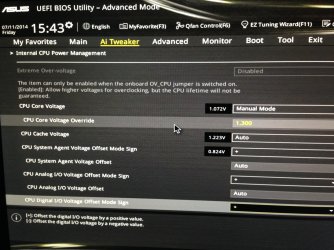
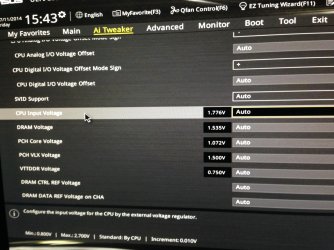
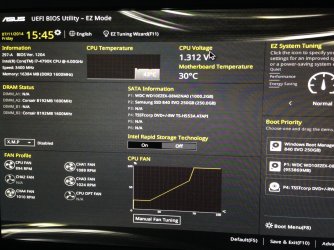
I went back into the bios and noticed it was set to 1.072v, so that could explain it.

I change it so 1.3v - should i put it at 1.2v?


Also - forgot to mention it crashed while I was at work this whole time - sitting idle. :(

I'll attach some screenies to show you what my BIOS looks like.


http://gpuz.techpowerup.com/14/07/11/8vu.png
 

Attachments

  • IMG_2984.jpg
    IMG_2984.jpg
    652.7 KB · Views: 0
  • IMG_2985.jpg
    IMG_2985.jpg
    651.3 KB · Views: 0
  • IMG_2986.jpg
    IMG_2986.jpg
    754.9 KB · Views: 0
Last edited:

My Computer

Computer type
PC/Desktop
OS
Windows 7 premium 64 bit
CPU
i7 4790K
Motherboard
Asus z97-A
Memory
16 Corsair Vengeance
Graphics Card(s)
Geforce 770 GTX
Hard Drives
Samsung 840 SSD
WD 1 TB Caviar
Back
Top