Looking for Help with a SSD install

Again, the Paragon tools I listed in my post does not do backups or create/restore images. Do yourself a favor and over what I posted about the two programs, then check out the links.

Good luck.
 

My Computer

Computer type
PC/Desktop
Computer Manufacturer/Model Number
Custom built by me.
OS
Windows 10 Pro
CPU
Intel Core i7-4770K (3.5Ghz)
Motherboard
Gigabyte G1 Sniper 5 (F10 Bios)
Memory
32 gig Corsair Dominator Platinum (4x8Gig)
Graphics Card(s)
Sapphire Tri-X R9 Fury
Sound Card
Soundblaster ZXR
Monitor(s) Displays
NEC PA242W 24" LCD Monitor
Screen Resolution
1920 x 1200
Hard Drives
Primary - Samsung 850 Pro (512gig), Samsung 840 Pro (256gig), 2TB WD Caviar Black.
PSU
EVGA Supernova 1000 G2
Case
Cooler Master HAF X
Cooling
Corsair H100i with Corsair Air Series SP120 Quiet Fans
Keyboard
Logitech Wireless Wave
Mouse
Logitech Performance MX
Internet Speed
High Speed Cable
Antivirus
Norton Security
Browser
IE11
Other Info
Memory Timings - 1866MHz @ 9-9-9-27-1T @ 1.5 volts

My Computers

System One System Two

  • Computer type
    PC/Desktop
    Computer Manufacturer/Model Number
    ALWAYS UNDER CONSTRUCTION
    OS
    Windows 11 Pro
    CPU
    Ryzen 9 5900X
    Motherboard
    Asus X570 Crosshair Viii Hero
    Memory
    32GB G Skill DDR4-3600
    Graphics Card(s)
    EVGA RTX 3080 FTW 3 Ultra
    Sound Card
    On Board/Sennheiser PC37X Headset
    Monitor(s) Displays
    3 X Asus 27"
    Screen Resolution
    2560x1440
    Hard Drives
    2 X 1 TB NVME drives
    PSU
    EVGA 850
    Case
    Phanteks Eclipse P400A
    Cooling
    EVGA 280 AIO
    Keyboard
    Logitech G510s/ Logitech G13
    Mouse
    Logitech G502
    Internet Speed
    24/1
    Antivirus
    ESET/MBAM Pro/SAS Pro
    Browser
    Chrome/ Firefox/ Edge
  • Computer type
    Laptop
    System Manufacturer/Model Number
    Dell 16 Plus
    OS
    Windows 11 Pro
    CPU
    Intel Ultra 9 288V
    Memory
    32 GB LPDDR5X 8533
    Monitor(s) Displays
    16" Mini-LED HDR600 Touch 90 Hz
    Screen Resolution
    2560X1600
    Hard Drives
    1 TB NVME
I would try the reimaging option first to get some experience with it and see how performance pans out.

Having the installation DVD gives you the option of doing a booted Clean Install whenever you're ready. You can also use it to boot for Repairs.

Here are some tips for getting a perfect clean reinstall - use the ones which apply: Reinstalling Windows 7
 
Hi guys,
I have been reviewing your post & tutorials, I have decided to get another SSD for my games (this is a gaming pc)so this is what I will have. The OS will be on a 64gb SSD, the second SSD 128gb will be for Games (Steam) and the 3rd will be for everything else. So I will have a program file on each drive. What programs should I keep on the OS drive? and if I am correct on the 128gb drive I shouldn't need to partition it. the 3rd drive will be a 1.5tb HHD. Any thoughts?
 

My Computer

Computer Manufacturer/Model Number
Cyberpower, INF8800PROSE
OS
Windows 7 Home Premium 64bit
CPU
i7-975 extreme
Motherboard
Asus P6T SE
Memory
Corsair 3 x 2GB DDR3 / 1600 MHZ MEMORY
Graphics Card(s)
Visiontek HD 4870
Sound Card
onboard
Monitor(s) Displays
Acer 22" widescreen
Hard Drives
1.5TB SATA-II 3.0GB/S 32MB CACHE 7200
PSU
Corsair 1000HX
Case
IN-WIN MAELSTROM FULL CASE
Cooling
Stock fans & ASETEK 510LC 120MM WATERCOOLER (CPU)
Hi guys,
I have been reviewing your post & tutorials. I have already saved everything that I wanted to save on another drive, so I'll be doing a new install like it is a new computer. I have decided to get another SSD for my games (this is a gaming pc)so this is what I will have. The OS will be on a 64gb SSD, the second SSD 128gb will be for Games (Steam) and the 3rd will be for everything else. So I will have a program file on each drive. What programs should I keep on the OS drive? and if I am correct on the 128gb drive I shouldn't need to partition it. the 3rd drive will be a 1.5tb HHD. Any thoughts?
 

My Computer

Computer Manufacturer/Model Number
Cyberpower, INF8800PROSE
OS
Windows 7 Home Premium 64bit
CPU
i7-975 extreme
Motherboard
Asus P6T SE
Memory
Corsair 3 x 2GB DDR3 / 1600 MHZ MEMORY
Graphics Card(s)
Visiontek HD 4870
Sound Card
onboard
Monitor(s) Displays
Acer 22" widescreen
Hard Drives
1.5TB SATA-II 3.0GB/S 32MB CACHE 7200
PSU
Corsair 1000HX
Case
IN-WIN MAELSTROM FULL CASE
Cooling
Stock fans & ASETEK 510LC 120MM WATERCOOLER (CPU)
I suggest on the OS drive, just the OS and most frequently used programs, other programs and user files on the 1.5TB.
 

My Computers

System One System Two

  • Computer type
    PC/Desktop
    Computer Manufacturer/Model Number
    ALWAYS UNDER CONSTRUCTION
    OS
    Windows 11 Pro
    CPU
    Ryzen 9 5900X
    Motherboard
    Asus X570 Crosshair Viii Hero
    Memory
    32GB G Skill DDR4-3600
    Graphics Card(s)
    EVGA RTX 3080 FTW 3 Ultra
    Sound Card
    On Board/Sennheiser PC37X Headset
    Monitor(s) Displays
    3 X Asus 27"
    Screen Resolution
    2560x1440
    Hard Drives
    2 X 1 TB NVME drives
    PSU
    EVGA 850
    Case
    Phanteks Eclipse P400A
    Cooling
    EVGA 280 AIO
    Keyboard
    Logitech G510s/ Logitech G13
    Mouse
    Logitech G502
    Internet Speed
    24/1
    Antivirus
    ESET/MBAM Pro/SAS Pro
    Browser
    Chrome/ Firefox/ Edge
  • Computer type
    Laptop
    System Manufacturer/Model Number
    Dell 16 Plus
    OS
    Windows 11 Pro
    CPU
    Intel Ultra 9 288V
    Memory
    32 GB LPDDR5X 8533
    Monitor(s) Displays
    16" Mini-LED HDR600 Touch 90 Hz
    Screen Resolution
    2560X1600
    Hard Drives
    1 TB NVME
Hi guys
Thanks for all your input and patience I think I got the sequence down
This will be my sequence of the install:
1. Shut down
2. Unplug the SATA cable from the existing HHD
3. Install the 64gb SSD and plug the SATA from the existing HHD into this one.
4. Insert the disk.
5. Start the PC, hit delete to get in the BIOS and check that the SSD is there.
6. In the bios set first boot device to dvd
7. Change onchip sata from IDE to SATA hit save.
8. Start pc and install the OS.
9. After the OS is installed, restart, go into bios and change first boot device to the ssd.
10. Start pc install video drivers.
11. Then do the alignment now?
12. Turn off hibernation.
13. Turn off pc and install 2nd ssd and restart check my computer to see that the second SSD is there.
14. Turn off pc install 3rd drive(1.5 HHD), restart and check my computer.
15. Move user folder to 3rd drive.
16. How do I put a “Programs files & Programs file (x86) on the 2nd and 3rd drive?
I'll be doing this next weekend
 

My Computer

Computer Manufacturer/Model Number
Cyberpower, INF8800PROSE
OS
Windows 7 Home Premium 64bit
CPU
i7-975 extreme
Motherboard
Asus P6T SE
Memory
Corsair 3 x 2GB DDR3 / 1600 MHZ MEMORY
Graphics Card(s)
Visiontek HD 4870
Sound Card
onboard
Monitor(s) Displays
Acer 22" widescreen
Hard Drives
1.5TB SATA-II 3.0GB/S 32MB CACHE 7200
PSU
Corsair 1000HX
Case
IN-WIN MAELSTROM FULL CASE
Cooling
Stock fans & ASETEK 510LC 120MM WATERCOOLER (CPU)
Hi Guys
This where I am at. I installed the 64GB ssd for my boot disk. Perfect. I then add my 128GB ssd and the 1.5tb hhd.
In the bios and device manager all 3 drives show up.
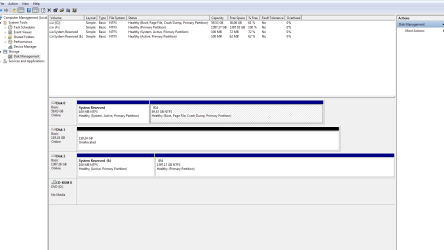
in "My Computer" I have C drive the ssd 64gb as it should be, then I have an System reserved E drive 61.8MB of 99.9mb and the 1.5 F drive. but no 128gb ssd.
In disk Management the E drive is a partition of the 1.5 drive. I did format the 1.5 tb drive. but the E drive is still there.
In disk management the 128 gb ssd is shown as 119,24 gb unallocated. So what do I need to do with the 128Gb ssd and can I get rid of the E drive is a partition of the F drive?
 

My Computer

Computer Manufacturer/Model Number
Cyberpower, INF8800PROSE
OS
Windows 7 Home Premium 64bit
CPU
i7-975 extreme
Motherboard
Asus P6T SE
Memory
Corsair 3 x 2GB DDR3 / 1600 MHZ MEMORY
Graphics Card(s)
Visiontek HD 4870
Sound Card
onboard
Monitor(s) Displays
Acer 22" widescreen
Hard Drives
1.5TB SATA-II 3.0GB/S 32MB CACHE 7200
PSU
Corsair 1000HX
Case
IN-WIN MAELSTROM FULL CASE
Cooling
Stock fans & ASETEK 510LC 120MM WATERCOOLER (CPU)
Is BIOS set to ahci? If not, do not change it now. Open computer where it shows all drives and take a screenshot. Open and expand disk management and post a screenshot showing both the upper and lower sections. Also, go to device manager, expand ATI/Atapi Controllers and Disk drives. what controller is at the bottom of the ata/atapi section and do you see each disk in the disk portion of device manager.
 

My Computers

System One System Two

  • Computer type
    PC/Desktop
    Computer Manufacturer/Model Number
    ALWAYS UNDER CONSTRUCTION
    OS
    Windows 11 Pro
    CPU
    Ryzen 9 5900X
    Motherboard
    Asus X570 Crosshair Viii Hero
    Memory
    32GB G Skill DDR4-3600
    Graphics Card(s)
    EVGA RTX 3080 FTW 3 Ultra
    Sound Card
    On Board/Sennheiser PC37X Headset
    Monitor(s) Displays
    3 X Asus 27"
    Screen Resolution
    2560x1440
    Hard Drives
    2 X 1 TB NVME drives
    PSU
    EVGA 850
    Case
    Phanteks Eclipse P400A
    Cooling
    EVGA 280 AIO
    Keyboard
    Logitech G510s/ Logitech G13
    Mouse
    Logitech G502
    Internet Speed
    24/1
    Antivirus
    ESET/MBAM Pro/SAS Pro
    Browser
    Chrome/ Firefox/ Edge
  • Computer type
    Laptop
    System Manufacturer/Model Number
    Dell 16 Plus
    OS
    Windows 11 Pro
    CPU
    Intel Ultra 9 288V
    Memory
    32 GB LPDDR5X 8533
    Monitor(s) Displays
    16" Mini-LED HDR600 Touch 90 Hz
    Screen Resolution
    2560X1600
    Hard Drives
    1 TB NVME
Did you leave the other HD's unplugged when you installed to the 64gb SSD? Is E:System Reserved on the same HD? It should not have a drive letter, so you can remove it in Disk Management.

It should not be on another HD/SSD if that's the case, unless that HD also has an OS and is booting independently via System Reserved.

While in Disk Mgmt, please maximize the window and post back a screenshot of your full Disk Mgmt drive map with listings, using Snipping Tool in Start Menu - attach file using paper clip in reply box.
 
The 128GB drive you have to align and allocate a partition. The procedure is explained in my link in post #5. But you probably do not want it "active".
 

My Computer

Computer Manufacturer/Model Number
HP, Dell, Gateway, Toshiba - 4 laptops and 2 desktops
OS
Vista, Windows7, Mint Mate, Zorin, Windows 8
CPU
from 1.6GHz Duo to i7
Monitor(s) Displays
2x HP w2207
Hard Drives
5x HDD, 7x SSD, 12x Externals
Keyboard
with trackball - no mices
Mouse
Trackball mice
Internet Speed
DSL 6000
Capture 1.PNG

Hi guys
When I installed the OS on the 64gb ssd no other drive was hooked up. The E drive is left over from the original 1.5tb drive. The 128GB drive is where Steam will be.
Thanks again guys
 

My Computer

Computer Manufacturer/Model Number
Cyberpower, INF8800PROSE
OS
Windows 7 Home Premium 64bit
CPU
i7-975 extreme
Motherboard
Asus P6T SE
Memory
Corsair 3 x 2GB DDR3 / 1600 MHZ MEMORY
Graphics Card(s)
Visiontek HD 4870
Sound Card
onboard
Monitor(s) Displays
Acer 22" widescreen
Hard Drives
1.5TB SATA-II 3.0GB/S 32MB CACHE 7200
PSU
Corsair 1000HX
Case
IN-WIN MAELSTROM FULL CASE
Cooling
Stock fans & ASETEK 510LC 120MM WATERCOOLER (CPU)
Your drive you could not find is Disk 1 at the bottom. You have to create an aligned partition and give it a drive letter. Read the link WHS gave about creating an aligned partition post #5 I think. It's there it just needs a letter.

The concern is the E drive with the system reserved. The system reserved should not be there unless you have another OS on that drive. If you don't, you could just delete the partition. There are other ways to do it, but if you have nothing on the 1.5TB drive, just delete both partitions and then create 1 partition of the whole drive if that is what you want. or just delete it and don't worry about the 100MB.
 

My Computers

System One System Two

  • Computer type
    PC/Desktop
    Computer Manufacturer/Model Number
    ALWAYS UNDER CONSTRUCTION
    OS
    Windows 11 Pro
    CPU
    Ryzen 9 5900X
    Motherboard
    Asus X570 Crosshair Viii Hero
    Memory
    32GB G Skill DDR4-3600
    Graphics Card(s)
    EVGA RTX 3080 FTW 3 Ultra
    Sound Card
    On Board/Sennheiser PC37X Headset
    Monitor(s) Displays
    3 X Asus 27"
    Screen Resolution
    2560x1440
    Hard Drives
    2 X 1 TB NVME drives
    PSU
    EVGA 850
    Case
    Phanteks Eclipse P400A
    Cooling
    EVGA 280 AIO
    Keyboard
    Logitech G510s/ Logitech G13
    Mouse
    Logitech G502
    Internet Speed
    24/1
    Antivirus
    ESET/MBAM Pro/SAS Pro
    Browser
    Chrome/ Firefox/ Edge
  • Computer type
    Laptop
    System Manufacturer/Model Number
    Dell 16 Plus
    OS
    Windows 11 Pro
    CPU
    Intel Ultra 9 288V
    Memory
    32 GB LPDDR5X 8533
    Monitor(s) Displays
    16" Mini-LED HDR600 Touch 90 Hz
    Screen Resolution
    2560X1600
    Hard Drives
    1 TB NVME
Hi Guys
Well I did what you guys said and Thanks everything is looking great.
Thank you everyone.
 

My Computer

Computer Manufacturer/Model Number
Cyberpower, INF8800PROSE
OS
Windows 7 Home Premium 64bit
CPU
i7-975 extreme
Motherboard
Asus P6T SE
Memory
Corsair 3 x 2GB DDR3 / 1600 MHZ MEMORY
Graphics Card(s)
Visiontek HD 4870
Sound Card
onboard
Monitor(s) Displays
Acer 22" widescreen
Hard Drives
1.5TB SATA-II 3.0GB/S 32MB CACHE 7200
PSU
Corsair 1000HX
Case
IN-WIN MAELSTROM FULL CASE
Cooling
Stock fans & ASETEK 510LC 120MM WATERCOOLER (CPU)
Good, looks like this is solved.
 

My Computer

Computer Manufacturer/Model Number
HP, Dell, Gateway, Toshiba - 4 laptops and 2 desktops
OS
Vista, Windows7, Mint Mate, Zorin, Windows 8
CPU
from 1.6GHz Duo to i7
Monitor(s) Displays
2x HP w2207
Hard Drives
5x HDD, 7x SSD, 12x Externals
Keyboard
with trackball - no mices
Mouse
Trackball mice
Internet Speed
DSL 6000
Good job. Glad it works for you.
 

My Computers

System One System Two

  • Computer type
    PC/Desktop
    Computer Manufacturer/Model Number
    ALWAYS UNDER CONSTRUCTION
    OS
    Windows 11 Pro
    CPU
    Ryzen 9 5900X
    Motherboard
    Asus X570 Crosshair Viii Hero
    Memory
    32GB G Skill DDR4-3600
    Graphics Card(s)
    EVGA RTX 3080 FTW 3 Ultra
    Sound Card
    On Board/Sennheiser PC37X Headset
    Monitor(s) Displays
    3 X Asus 27"
    Screen Resolution
    2560x1440
    Hard Drives
    2 X 1 TB NVME drives
    PSU
    EVGA 850
    Case
    Phanteks Eclipse P400A
    Cooling
    EVGA 280 AIO
    Keyboard
    Logitech G510s/ Logitech G13
    Mouse
    Logitech G502
    Internet Speed
    24/1
    Antivirus
    ESET/MBAM Pro/SAS Pro
    Browser
    Chrome/ Firefox/ Edge
  • Computer type
    Laptop
    System Manufacturer/Model Number
    Dell 16 Plus
    OS
    Windows 11 Pro
    CPU
    Intel Ultra 9 288V
    Memory
    32 GB LPDDR5X 8533
    Monitor(s) Displays
    16" Mini-LED HDR600 Touch 90 Hz
    Screen Resolution
    2560X1600
    Hard Drives
    1 TB NVME
Hi Guys
Well today was going along I took a break from playing on my rig with a Windows Performance of 7.6. so I thought I'd be proactive and do a system image of my C ssd drive. Plugged in my external hard drive and started the program and got a freaking Blue Screen. This is the same Hard drive I did a system image on last week. It was formatted. The image was just starting when the Blue Screen came on. Also in System Information/windows error reporting there seems to be a lot of errors (a whole page). Any ideas?
Thanks


5/22/2011 8:57 PM Windows Error Reporting Fault bucket X64_0x3B_fltmgr!FltpGetNextCallbackNodeForInstance+2809, type 0
Event Name: BlueScreen
Response: Not available
Cab Id: 0

Problem signature:
P1:
P2:
P3:
P4:
P5:
P6:
P7:
P8:
P9:
P10:

Attached files:
C:\Windows\Minidump\052211-10452-01.dmp
C:\Users\Mike\AppData\Local\Temp\WER-13088-0.sysdata.xml
C:\Users\Mike\AppData\Local\Temp\WERE9E1.tmp.WERInternalMetadata.xml

These files may be available here:
C:\ProgramData\Microsoft\Windows\WER\ReportArchive\Kernel_0_0_cab_0ad0fa26

Analysis symbol: X64_0x3B_fltmgr!FltpGetNextCallbackNodeForInstance+2809
Rechecking for solution: 0
Report Id: 052211-10452-01
Report Status: 0
 

My Computer

Computer Manufacturer/Model Number
Cyberpower, INF8800PROSE
OS
Windows 7 Home Premium 64bit
CPU
i7-975 extreme
Motherboard
Asus P6T SE
Memory
Corsair 3 x 2GB DDR3 / 1600 MHZ MEMORY
Graphics Card(s)
Visiontek HD 4870
Sound Card
onboard
Monitor(s) Displays
Acer 22" widescreen
Hard Drives
1.5TB SATA-II 3.0GB/S 32MB CACHE 7200
PSU
Corsair 1000HX
Case
IN-WIN MAELSTROM FULL CASE
Cooling
Stock fans & ASETEK 510LC 120MM WATERCOOLER (CPU)
Open an elevated command prompt (Start-type CMD-right click- select run as administrator) When it opens type-
sfc /scannow and see what happens. Run it at least 3 times.
 

My Computers

System One System Two

  • Computer type
    PC/Desktop
    Computer Manufacturer/Model Number
    ALWAYS UNDER CONSTRUCTION
    OS
    Windows 11 Pro
    CPU
    Ryzen 9 5900X
    Motherboard
    Asus X570 Crosshair Viii Hero
    Memory
    32GB G Skill DDR4-3600
    Graphics Card(s)
    EVGA RTX 3080 FTW 3 Ultra
    Sound Card
    On Board/Sennheiser PC37X Headset
    Monitor(s) Displays
    3 X Asus 27"
    Screen Resolution
    2560x1440
    Hard Drives
    2 X 1 TB NVME drives
    PSU
    EVGA 850
    Case
    Phanteks Eclipse P400A
    Cooling
    EVGA 280 AIO
    Keyboard
    Logitech G510s/ Logitech G13
    Mouse
    Logitech G502
    Internet Speed
    24/1
    Antivirus
    ESET/MBAM Pro/SAS Pro
    Browser
    Chrome/ Firefox/ Edge
  • Computer type
    Laptop
    System Manufacturer/Model Number
    Dell 16 Plus
    OS
    Windows 11 Pro
    CPU
    Intel Ultra 9 288V
    Memory
    32 GB LPDDR5X 8533
    Monitor(s) Displays
    16" Mini-LED HDR600 Touch 90 Hz
    Screen Resolution
    2560X1600
    Hard Drives
    1 TB NVME
Thanks guys,
Will do
 

My Computer

Computer Manufacturer/Model Number
Cyberpower, INF8800PROSE
OS
Windows 7 Home Premium 64bit
CPU
i7-975 extreme
Motherboard
Asus P6T SE
Memory
Corsair 3 x 2GB DDR3 / 1600 MHZ MEMORY
Graphics Card(s)
Visiontek HD 4870
Sound Card
onboard
Monitor(s) Displays
Acer 22" widescreen
Hard Drives
1.5TB SATA-II 3.0GB/S 32MB CACHE 7200
PSU
Corsair 1000HX
Case
IN-WIN MAELSTROM FULL CASE
Cooling
Stock fans & ASETEK 510LC 120MM WATERCOOLER (CPU)
Back
Top