Solved Losing Drive After Sleep Mode

Thanks centaur78

Attached is the snapshot from Hardware Monitor.


Cheers

Dumfy
 

Attachments

  • HWMonitor Results.jpg
    HWMonitor Results.jpg
    109.7 KB · Views: 5

My Computer My Computer

At a glance

Microsoft Windows 7 Home Premium 64-bit 7601 ...AMD Phenom(tm) II X4 955 Processor8.00 GBATI Radeon HD 5700 Series
Computer type
PC/Desktop
Computer Manufacturer/Model Number
Self Build
OS
Microsoft Windows 7 Home Premium 64-bit 7601 Multiprocessor Free Service Pack 1
CPU
AMD Phenom(tm) II X4 955 Processor
Motherboard
Gigabyte Technology Co., Ltd. GA-MA790FXT-UD5P
Memory
8.00 GB
Graphics Card(s)
ATI Radeon HD 5700 Series
Sound Card
(1) ATI HDMI Audio (2) Realtek High Definition Audio
Monitor(s) Displays
ViewSonic VX2260wm
Screen Resolution
1920 x 1080 x 32 bits (4294967296 colors) @ 60 Hz
Hard Drives
(1) SAMSUNG HD103UJ ATA Device (2) SanDisk SDSSDX120GG25 ATA Device (3) WDC WD10EARS-00Y5B1 ATA Device (4) Y-E DATA USB HS-CF Card USB Device (5) Y-E DATA USB HS-MS Card USB Device (6) Y-E DATA USB HS-SD Card USB Device (7) Y-E DATA
PSU
Antec 650Watt
Case
Antec 900 II
Cooling
Zalman CNPs10X
Keyboard
Microsoft
Mouse
Microsoft
Internet Speed
20MB
Antivirus
MS Security Essentials
Browser
Firefox/IE
Hi centaur78,

Have posted the Hardware Monitor results for you to have a look at.

Here's the Dropbox link to the boot log file. I included both files just in case . . . (hope I've done it correctly - let me know)

https://www.dropbox.com/s/vxuw2qudzg6i51b/Bootlog & Bootlog-1 pml.rar


The memory test proved interesting. I have 4 sticks of RAM installed. 2BG each fitted in pairs. Have managed to isolate one particular stick that causes an error within minutes of the test starting when it's installed. It fails on '1st pass moving inversions 8bit pattern'

Have removed this stick and am currently running on 6GB instead of 8GB.

I figured this might be causing the slow boot, but alas not. With the faulty stick removed, boot still takes a long time. I'm hoping the bootlog will expain everything.

You don't have to read through my fault finding process for the memory stick, but here it is in case I did something wrong . . .

4 sticks of 2GB RAM installed in pairs. 4 sockets on the mobo labelled 1 to 4. The first 2 sockets are white colour, the next 2 sockets are blue.

Labelled up stick 1 and stick 2 going into white sockets 1 & 2
Labelled up stick 3 and stick 4 going into blue sockets 3 & 4

All four sticks inserted as above gave error after short period.

Removed sticks 1 & 2 from white sockets leaving sticks 3 & 4 in blue sockets. Error.

Now swapped around . .

Removed sticks 3 & 4 from blue sockets & installed stick 1 & 2 into white sockets leaving the blue sockets empty. Memtest ran for 8 passes with no error. Concluded that sticks 1 & 2 along with white sockets are good.

Confrim status of sticks 3 & 4 . .

Installed these into white sockets. Error

Connect stick 3 on its own into white socket - error.

Connect stick 4 on its own into white socket - Good. 8 pass mem test complete without error.

To double check blue sockets on mobo, fitted sticks 1 & 2 into them and ran test. No error. (Didn't run full 8 passes for this as error was showing up very quickly when present)

Therefore, suspect stick 3 as being faulty. Reconfirmed by plugging this back in to first white socket and had error.

If you can make head or tail of that explanantion, I'll be impressed!!

Thanks and regards

Dumfy

 

My Computer My Computer

At a glance

Microsoft Windows 7 Home Premium 64-bit 7601 ...AMD Phenom(tm) II X4 955 Processor8.00 GBATI Radeon HD 5700 Series
Computer type
PC/Desktop
Computer Manufacturer/Model Number
Self Build
OS
Microsoft Windows 7 Home Premium 64-bit 7601 Multiprocessor Free Service Pack 1
CPU
AMD Phenom(tm) II X4 955 Processor
Motherboard
Gigabyte Technology Co., Ltd. GA-MA790FXT-UD5P
Memory
8.00 GB
Graphics Card(s)
ATI Radeon HD 5700 Series
Sound Card
(1) ATI HDMI Audio (2) Realtek High Definition Audio
Monitor(s) Displays
ViewSonic VX2260wm
Screen Resolution
1920 x 1080 x 32 bits (4294967296 colors) @ 60 Hz
Hard Drives
(1) SAMSUNG HD103UJ ATA Device (2) SanDisk SDSSDX120GG25 ATA Device (3) WDC WD10EARS-00Y5B1 ATA Device (4) Y-E DATA USB HS-CF Card USB Device (5) Y-E DATA USB HS-MS Card USB Device (6) Y-E DATA USB HS-SD Card USB Device (7) Y-E DATA
PSU
Antec 650Watt
Case
Antec 900 II
Cooling
Zalman CNPs10X
Keyboard
Microsoft
Mouse
Microsoft
Internet Speed
20MB
Antivirus
MS Security Essentials
Browser
Firefox/IE
Well i am impressed.. attaboy !!

Well just getting off work.. will have a look on the bootlog and let you know my evening.
 

My Computer My Computer

At a glance

Windows 7 ultimate x64
Computer Manufacturer/Model Number
Nothing specific....what ever the clients provide for Repair
OS
Windows 7 ultimate x64
Cheers !! :D
 

My Computer My Computer

At a glance

Microsoft Windows 7 Home Premium 64-bit 7601 ...AMD Phenom(tm) II X4 955 Processor8.00 GBATI Radeon HD 5700 Series
Computer type
PC/Desktop
Computer Manufacturer/Model Number
Self Build
OS
Microsoft Windows 7 Home Premium 64-bit 7601 Multiprocessor Free Service Pack 1
CPU
AMD Phenom(tm) II X4 955 Processor
Motherboard
Gigabyte Technology Co., Ltd. GA-MA790FXT-UD5P
Memory
8.00 GB
Graphics Card(s)
ATI Radeon HD 5700 Series
Sound Card
(1) ATI HDMI Audio (2) Realtek High Definition Audio
Monitor(s) Displays
ViewSonic VX2260wm
Screen Resolution
1920 x 1080 x 32 bits (4294967296 colors) @ 60 Hz
Hard Drives
(1) SAMSUNG HD103UJ ATA Device (2) SanDisk SDSSDX120GG25 ATA Device (3) WDC WD10EARS-00Y5B1 ATA Device (4) Y-E DATA USB HS-CF Card USB Device (5) Y-E DATA USB HS-MS Card USB Device (6) Y-E DATA USB HS-SD Card USB Device (7) Y-E DATA
PSU
Antec 650Watt
Case
Antec 900 II
Cooling
Zalman CNPs10X
Keyboard
Microsoft
Mouse
Microsoft
Internet Speed
20MB
Antivirus
MS Security Essentials
Browser
Firefox/IE
Hi centaur78

Was just wondering if you've had the chance to look over the boot log yet please and what your thoughts are?

Many Thanks

Dumfy
 

My Computer My Computer

At a glance

Microsoft Windows 7 Home Premium 64-bit 7601 ...AMD Phenom(tm) II X4 955 Processor8.00 GBATI Radeon HD 5700 Series
Computer type
PC/Desktop
Computer Manufacturer/Model Number
Self Build
OS
Microsoft Windows 7 Home Premium 64-bit 7601 Multiprocessor Free Service Pack 1
CPU
AMD Phenom(tm) II X4 955 Processor
Motherboard
Gigabyte Technology Co., Ltd. GA-MA790FXT-UD5P
Memory
8.00 GB
Graphics Card(s)
ATI Radeon HD 5700 Series
Sound Card
(1) ATI HDMI Audio (2) Realtek High Definition Audio
Monitor(s) Displays
ViewSonic VX2260wm
Screen Resolution
1920 x 1080 x 32 bits (4294967296 colors) @ 60 Hz
Hard Drives
(1) SAMSUNG HD103UJ ATA Device (2) SanDisk SDSSDX120GG25 ATA Device (3) WDC WD10EARS-00Y5B1 ATA Device (4) Y-E DATA USB HS-CF Card USB Device (5) Y-E DATA USB HS-MS Card USB Device (6) Y-E DATA USB HS-SD Card USB Device (7) Y-E DATA
PSU
Antec 650Watt
Case
Antec 900 II
Cooling
Zalman CNPs10X
Keyboard
Microsoft
Mouse
Microsoft
Internet Speed
20MB
Antivirus
MS Security Essentials
Browser
Firefox/IE
Hi Dumfy

Sorry was busy with family...

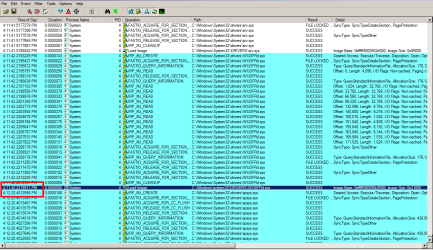
Here is what i have analysed. Just look at the time taken by WUDFRd.sys and before the load of spsys.sys has taken almost 1 min and 38 sec !!

procmon.png


Now WUDFRd.sys is know as the Windows Driver Foundation- User Mode Driver Framework Reflector... which baiscally means driver looking after mostly usb devices.

The reflector is a Microsoft Windows Driver Model (WDM) kernel-mode driver that permits an application and a driver host process to communicate. The reflector creates a separate device object for each device instance and handles Plug and Play (PnP) and power I/O requests associated with each device instance. All communication between the application and the driver host process happens through the reflector.

From MSDN

Further analysing the process after the last WUDFRd.sys... i can see that the driver is trying to load/ Read Y-E DATA USB HS-CF Card USB Device....

I presume this is the card reader or the usb storage of your Canon PIXMA MG6220 ... Do you have the updated drivers for this ??? Could you remove this and let me know if the boot slows down.
 
Last edited:

My Computer My Computer

At a glance

Windows 7 ultimate x64
Computer Manufacturer/Model Number
Nothing specific....what ever the clients provide for Repair
OS
Windows 7 ultimate x64
Hi centaur78,

No need for sorry - family must always come first!

Late last night, it seems I inadvertently fixed the long boot problem and the cause/solution baffled me completely, but have just read your reply and it explains it a little. Perhaps you have a better understanding and can explain it to me further . . . ?

It is/was USB related. I have a wireless keyboard and mouse and all I did was to plug the USB receiver for these devices into a different USB slot on the back of the mobo - Bingo - boot time back to normal !?

The device you mentioned that was taking 1min 38secs is a card reader, but not the one on the Canon as the printer is currently uninstalled.
When I built the PC a couple of years ago, I fitted an all in one card reader-cum-floppy disk.

http://www.scythe-eu.com/en/products/pc-accessory/floppy-card-reader-combo.html

The floppy drive is connected to the mobo with the usual IDE cable and the card reader to a USB pin header on the mobo. Having just re-read the website, I noticed that OS up to Vista is mentioned and not Windows 7. Could that be an issue? Am also wondering if I would be better routing the USB cable from the reader outside the tower and plugging it in to a USB 2 port instead of the mobo pin header?

I assume from all this that there was some sort of conflict between the USB card reader and the USB wireless receiver for the keyboard/mouse?

So it looks like I'm finally back to normal . . . and also no disappearing drives after using Sleep Mode!

As a precaution, I've done another fresh install of Windows on to the SSD. What would you recommend as the best set up for this and the best tweaks to use? I have already moved the Paging File to E:\ and also Indexing to E:\
Have redirected the Libraries to E:\ as well ( Documents/Pictures/Music/Videos)
Are there other things I can easily do to stop the SSD filling up?

And lastly . . . is there a Codec pack you can recommend? All my music is flac and videos are MKVs. I've always used Shark's Codecs in the past, if there's anything better, then let me know. I've tended to use Windows Media Player Classic (MPC-HC) up to now.

Thanks

Dumfy
 
Last edited:

My Computer My Computer

At a glance

Microsoft Windows 7 Home Premium 64-bit 7601 ...AMD Phenom(tm) II X4 955 Processor8.00 GBATI Radeon HD 5700 Series
Computer type
PC/Desktop
Computer Manufacturer/Model Number
Self Build
OS
Microsoft Windows 7 Home Premium 64-bit 7601 Multiprocessor Free Service Pack 1
CPU
AMD Phenom(tm) II X4 955 Processor
Motherboard
Gigabyte Technology Co., Ltd. GA-MA790FXT-UD5P
Memory
8.00 GB
Graphics Card(s)
ATI Radeon HD 5700 Series
Sound Card
(1) ATI HDMI Audio (2) Realtek High Definition Audio
Monitor(s) Displays
ViewSonic VX2260wm
Screen Resolution
1920 x 1080 x 32 bits (4294967296 colors) @ 60 Hz
Hard Drives
(1) SAMSUNG HD103UJ ATA Device (2) SanDisk SDSSDX120GG25 ATA Device (3) WDC WD10EARS-00Y5B1 ATA Device (4) Y-E DATA USB HS-CF Card USB Device (5) Y-E DATA USB HS-MS Card USB Device (6) Y-E DATA USB HS-SD Card USB Device (7) Y-E DATA
PSU
Antec 650Watt
Case
Antec 900 II
Cooling
Zalman CNPs10X
Keyboard
Microsoft
Mouse
Microsoft
Internet Speed
20MB
Antivirus
MS Security Essentials
Browser
Firefox/IE
Hi Dumfy

First Good to hear you that the system is back to normal

Second for tweaks and such with reference to SSD and windows there are numerous site offering the same. Some of them as below.. Though some of maynot be relevent today as the SSD technology keeps on improving ... some of them is worth a try .

1. For SSD Windows 7 SSD Tweaking Guide
2. For Windows BV guides provides lots of info. » Black Viper’s Windows 7 Service Pack 1 Service Configurations

Thirdly I mostly use K-Lite Mega Codec Pack and VLC player for all my video palying needs..With these i can play almost 95% of the formats.
 

My Computer My Computer

At a glance

Windows 7 ultimate x64
Computer Manufacturer/Model Number
Nothing specific....what ever the clients provide for Repair
OS
Windows 7 ultimate x64
Hi Dumfy

Just following up... If the issue is resolved kindly close the thread and mark the post as solved and do rep those helped

Thanks
 

My Computer My Computer

At a glance

Windows 7 ultimate x64
Computer Manufacturer/Model Number
Nothing specific....what ever the clients provide for Repair
OS
Windows 7 ultimate x64
Hi centaur78,

Just wanted to add that the PC is running fine now with no disappearing drives after Sleep Mode and also boot time back to normal.

In closing I'd like to thank you for your time, patience and perserverance in helping me resolve these issues. I've learned a lot along the way.

As always, appreciate the help

Take care

Dumfy
 

My Computer My Computer

At a glance

Microsoft Windows 7 Home Premium 64-bit 7601 ...AMD Phenom(tm) II X4 955 Processor8.00 GBATI Radeon HD 5700 Series
Computer type
PC/Desktop
Computer Manufacturer/Model Number
Self Build
OS
Microsoft Windows 7 Home Premium 64-bit 7601 Multiprocessor Free Service Pack 1
CPU
AMD Phenom(tm) II X4 955 Processor
Motherboard
Gigabyte Technology Co., Ltd. GA-MA790FXT-UD5P
Memory
8.00 GB
Graphics Card(s)
ATI Radeon HD 5700 Series
Sound Card
(1) ATI HDMI Audio (2) Realtek High Definition Audio
Monitor(s) Displays
ViewSonic VX2260wm
Screen Resolution
1920 x 1080 x 32 bits (4294967296 colors) @ 60 Hz
Hard Drives
(1) SAMSUNG HD103UJ ATA Device (2) SanDisk SDSSDX120GG25 ATA Device (3) WDC WD10EARS-00Y5B1 ATA Device (4) Y-E DATA USB HS-CF Card USB Device (5) Y-E DATA USB HS-MS Card USB Device (6) Y-E DATA USB HS-SD Card USB Device (7) Y-E DATA
PSU
Antec 650Watt
Case
Antec 900 II
Cooling
Zalman CNPs10X
Keyboard
Microsoft
Mouse
Microsoft
Internet Speed
20MB
Antivirus
MS Security Essentials
Browser
Firefox/IE
Back
Top