Lost "Adminstrator" option with Run command

trinaz

New member
Member
VIP
Local time
6:01 PM
Messages
477
Location
Phoenix
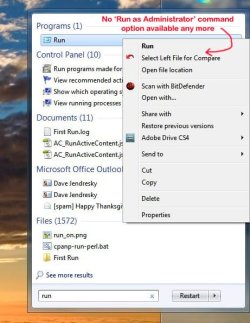
Went to Start-Search programs and files- to run the Run command as "Administrator" and the option is no longer there although it always has been.

Is there a way to run the Run command as "Administrator" without the Start-Search programs and files-Enter Run setup ?

All other window options in other screens appear to still have the "Run as Administrator option...only the Start-Search programs and Files-type 'Run' appear to have the Administrator option missing ?

Thanks...Tim
 

Attachments
  • run.jpg
    run.jpg
    68.3 KB · Views: 6

My Computer

Computer type
PC/Desktop
Computer Manufacturer/Model Number
Self built
OS
Windows 7 Pro 64bit SP1
CPU
AMD FX-6100 Six-Core Processor
Motherboard
M5A78L-M LX PLUS
Memory
2ea Corsair-1333MHz-PC3-10666-240-pin-CMX4GX3M1A1333C9
Graphics Card(s)
NVIDIA GeForce GT 630 - 1023MB (EVGA)
Sound Card
OnBoard Via High Def Audio
Monitor(s) Displays
Samsung 204B main - ASUS VS228 secondary
Screen Resolution
1920x1080 main - 1920x1080 secondary
Hard Drives
Samsung SSD 840 128GB Win7 Pro 64bit - Western Digital WDC 465GB - Seagate 640GB Sata B/U - Maxtor 500GB Sata B/U - Maxtor 200GB Sata
PSU
Antec 650 watt
Cooling
Multiple case fans
Keyboard
MS USB dual Wireless Keyboard - IntelliType Pro
Mouse
MS USB dual Wireless Mouse - IntelliPoint
Internet Speed
Cox Cable
Antivirus
Bitdefender IS 2014
Browser
FireFox Primary - IE 11
Other Info
Hauppaguge Win TV HVR-1250 (Model 22xxx, Hybrid ATSC/QAM)
Samsung HD103SI USB 1TB Desktop Drive - Backup & Disk Image storage
Hello Tim,

This is normal. There is not a Run as administrator option for Run. If you wanted to run a program elevated (Run as administrator), then you will need to right click on that program instead.

Hope this helps,
Shawn
 

My Computer

Computer type
PC/Desktop
Computer Manufacturer/Model Number
Self built custom
OS
64-bit Windows 11 Pro for Workstations
CPU
Intel i7-8700K OC'd to 5 GHz
Motherboard
ASUS ROG Maximus XI Formula Z390
Memory
64 GB (4x16GB) G.SKILL TridentZ RGB DDR4 3600 MHz
Graphics Card(s)
ASUS ROG-STRIX-GTX1080TI-O11G-GAMING
Sound Card
Integrated
Monitor(s) Displays
2 x Samsung Odyssey G7 27"
Screen Resolution
2560x1440
Hard Drives
1TB Samsung 990 PRO M.2,
4TB Samsung 990 PRO PRO M.2,
TerraMaster F8 SSD Plus NAS
PSU
Seasonic Prime Titanium 850W
Case
Thermaltake Core P3
Cooling
Corsair Hydro H115i
Keyboard
Logitech wireless K800
Mouse
Logitech MX Master 4
Internet Speed
2 Gb/s Download and 100 Mb/s Upload
Antivirus
Malwarebyte Anti-Malware Premium
Browser
Google Chrome
Other Info
Logitech Z625 speaker system,
Logitech BRIO 4K Pro webcam,
HP Color LaserJet Pro MFP M477fdn,
APC SMART-UPS RT 1000 XL - SURT1000XLI,
Galaxy S23 Plus phone
Last edited by a moderator:

My Computer

Computer Manufacturer/Model Number
Dell E520
OS
Windows 7 Enterprise x64 SP1, Ubuntu 11.04 x64
CPU
Core2Quad Q6700 - 2.66 GHz
Motherboard
Whatever the heck Dell put in there...
Memory
8 Gig Mushkin DDR2 800 MHz
Graphics Card(s)
EVGA NVIDIA 9800GT - 512MB DDR3
Monitor(s) Displays
2 x 19" ViewSonic LCD
Screen Resolution
2560x1024
Hard Drives
1 Intel X25-M 120G SSD, 1 300G VelociRaptor, 1 WD Caviar Black 1TB
PSU
PCPower & Cooling Silencer 500 Watt
Internet Speed
15/2 Roadrunner Cable
Other Info
NOD32 AV - Malwarebytes
Run launches programs as administrator by default.
 

My Computer

Computer Manufacturer/Model Number
iBuyPower Chimera X58
OS
Windows 8 Pro x64
CPU
Intel Core i7 920
Motherboard
Asus P6T Deluxe V2
Memory
12GB (2GB x6) Triple Channel DDR3 1333 MHz
Graphics Card(s)
ATI Radeon HD 4870 X2 2GB GDDR5
Sound Card
Integrated Digital HD 7.1 Surround Sound
Monitor(s) Displays
24.6-inch ASUS VW246H 20000:1 Contrast, 2 ms response time,
Screen Resolution
1920x1080
Hard Drives
1 TB 7200 RPM SATA II 3 GBps 16MB cache
PSU
NZXT 800W Gaming Series
Case
Guardian Inferno (Custom Painted NZXT Guardian 921)
Cooling
Thermaltake V1 Fan Cooling System OC Proof
Keyboard
Razer Lycosa
Mouse
iBuyPower Ergonomical Internet Mouse
Internet Speed
11 MBps High-speed Cable
"Run launches programs as administrator by default."

Can you provide a link to some data to back this up? This is not what I've experienced.
 

My Computer

Computer type
PC/Desktop
Computer Manufacturer/Model Number
Lenovo IdeaCenter 450
OS
Windows 10 Pro X64
CPU
Intel Quad Core i7-4770 @ 3.4Ghz
Memory
16.0GB PC3-12800 DDR3 SDRAM 1600 MHz
Graphics Card(s)
Intel Integrated HD Graphics
Sound Card
Realtek HD Audio
Monitor(s) Displays
HP 22" LCD
Screen Resolution
1680 x 1050
Hard Drives
250GB Samsung EVO SATA-3 SSD
2TB Seagate ST2000DM001 SATA-2
1.5TB Seagate ST3150041AS SATA
Keyboard
Dell USB
Mouse
Lenovo USB
Internet Speed
Cable via Road Runner 3MB Upload, 30MB Download
Antivirus
Windows Defender, MBAM Pro, MBAE
Browser
Seamonkey
Other Info
UEFI/GPT
PLDS DVD-RW DH16AERSH
:ditto:
 

My Computer

Computer type
PC/Desktop
Computer Manufacturer/Model Number
Self built custom
OS
64-bit Windows 11 Pro for Workstations
CPU
Intel i7-8700K OC'd to 5 GHz
Motherboard
ASUS ROG Maximus XI Formula Z390
Memory
64 GB (4x16GB) G.SKILL TridentZ RGB DDR4 3600 MHz
Graphics Card(s)
ASUS ROG-STRIX-GTX1080TI-O11G-GAMING
Sound Card
Integrated
Monitor(s) Displays
2 x Samsung Odyssey G7 27"
Screen Resolution
2560x1440
Hard Drives
1TB Samsung 990 PRO M.2,
4TB Samsung 990 PRO PRO M.2,
TerraMaster F8 SSD Plus NAS
PSU
Seasonic Prime Titanium 850W
Case
Thermaltake Core P3
Cooling
Corsair Hydro H115i
Keyboard
Logitech wireless K800
Mouse
Logitech MX Master 4
Internet Speed
2 Gb/s Download and 100 Mb/s Upload
Antivirus
Malwarebyte Anti-Malware Premium
Browser
Google Chrome
Other Info
Logitech Z625 speaker system,
Logitech BRIO 4K Pro webcam,
HP Color LaserJet Pro MFP M477fdn,
APC SMART-UPS RT 1000 XL - SURT1000XLI,
Galaxy S23 Plus phone
Run launches programs as administrator by default.
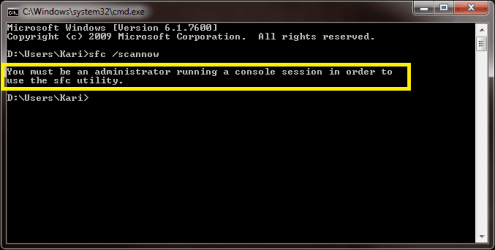
Most definitely not true.

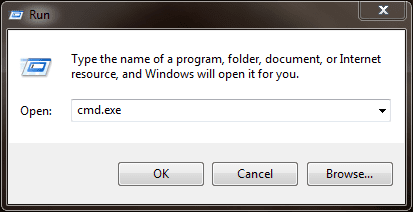
1. Launching command prompt from Run dialog:

step_1.png

2. Trying to run system file checker:

Step_2.png

Kari
 

My Computer

Computer type
Laptop
Computer Manufacturer/Model Number
HP ENVY 17-1150eg
OS
Windows 10 Pro x64 EN-GB
CPU
1.6 GHz Intel Core i7-720QM Processor
Memory
6 GB
Graphics Card(s)
ATI Mobility Radeon HD 5850 Graphics
Sound Card
Beats sound system with integrated subwoofer
Monitor(s) Displays
17" laptop display, 22" LED and 32" Full HD TV through HDMI
Screen Resolution
1600*900 (1), 1920*1080 (2&3)
Hard Drives
Internal: 2 x 500 GB SATA Hard Disk Drive 7200 rpm
External: 2TB for backups, 3TB USB3 network drive for media
Cooling
As Envy runs a bit warm, I have it on a Cooler Master pad
Keyboard
Logitech diNovo Media Desktop Laser (bluetooth)
Mouse
Logitech Performance Mouse MX
Internet Speed
50/10 Mbps VDSL
Antivirus
Windows Defender 4.3.9431.0
Browser
Maxthon 3.5.2., IE11
Back
Top