ps3142
New member
Hi, I know I am behind the times but I have just reluctantly changed from Windows XP to Windows 7 Pro which I installed from a Microsoft DVD.
Prior to the installation my computer had available a C drive, a Samsung 120 GB SSD; a D drive, a DVD R/W SATA; and an E drive, a 2TB HDD which was also used for extra storage and back up. All were working perfectly.
I now have the following problem.
I now only have the C drive (SSD) and the D drive, the DVD. The 2 TB E drive is not visible.
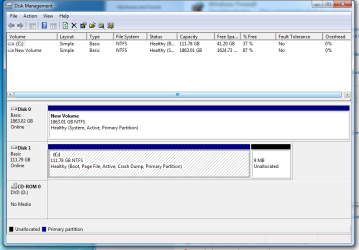
Looking into Control Panel, System and Security, Disc Management I find the 2TB HDD is now Disc 0 and appears to be completely empty.
How do I make this drive E again and recover the data that was on it.
I would add that during the upgrade no physical changes were made, the case was not opened and no plugs touched, the only thing done was to enable the computer to boot from the Windows 7 DVD.
Hope someone can help.
Prior to the installation my computer had available a C drive, a Samsung 120 GB SSD; a D drive, a DVD R/W SATA; and an E drive, a 2TB HDD which was also used for extra storage and back up. All were working perfectly.
I now have the following problem.
I now only have the C drive (SSD) and the D drive, the DVD. The 2 TB E drive is not visible.
Looking into Control Panel, System and Security, Disc Management I find the 2TB HDD is now Disc 0 and appears to be completely empty.
How do I make this drive E again and recover the data that was on it.
I would add that during the upgrade no physical changes were made, the case was not opened and no plugs touched, the only thing done was to enable the computer to boot from the Windows 7 DVD.
Hope someone can help.
My Computer
At a glance
Windows 7 Pro 32 bitIntel Core I58GB
- Computer type
- PC/Desktop
- Computer Manufacturer/Model Number
- custom build
- OS
- Windows 7 Pro 32 bit
- CPU
- Intel Core I5
- Motherboard
- Gigabyte HA65M
- Memory
- 8GB
- Hard Drives
- Samsung 840 EVO SSD 120 GB
WD Caviar Green 2 TB
- Antivirus
- Trend Premium Security
- Browser
- Firefox