Lost individual control?!

kevo

New member
Local time
11:40 PM
Messages
3
I've just upgraded from windows XP to Windows 7 64bit. (clean install)

My system has onboard 7.1 audio (gigabyte motherboard). On windows xp, the realtek HD software allowed individual volume sliders for each output - side, front, sub etc.

I have speakers running from some of them outputs to different rooms in the house. I then used batch files and an application called Zvolume to control which speakers the sound goes to.

But after installing windows 7 and the latest Realtek HD audio driver/software I can only control the over all master volume, there are no longer individual sliders for each output!

Is this feature removed from the latest Realtek HD software and an old version may restore it, or do I have a bigger problem where Windows 7 doesnt work the same way XP did in regards to the audio outputs?

I cant remember the version number for the old Realtek software I had, but I do remember the default theme was a greeny blue color. Does this mean anything?

Any help on this would be greatly appreciated.
 

My Computer My Computer

At a glance

Windows 7 Pro 64bit
OS
Windows 7 Pro 64bit

Hi Kevo,

It seems that you have not installed the supported Audio driver of the Realtek Audio Sound card compatible with Windows 7 in your computer.

At this point, I would recommend you to uninstall all your sound devices and then reboot the computer. Let windows install the generic driver and verify your speakers work on that.

If it not working, this is all you need to do:
Install the Windows 7 specific drivers for this Audio Card. If you are not having the Compatible audio driver with the Windows 7, then you can download the sound card driver from the Realtek website.

If not found the driver on the official website then go to the device manager and update the driver for this device. Complete the update and reboot the system, after that this sound card and the speaker will work properly.


Please reply with the below details if the issue persists even after trying above steps.

1. Model/serial number of Realtek audio chipset they are trying to get to work.
2. Are you using analog or digital speakers? and any other useful information regarding the issue.


Regards,
Ziyad, Bangalore
 
Last edited:

My Computer My Computer

At a glance

Windows 7 Ultimate
OS
Windows 7 Ultimate
Thanks for that, I've tried every driver I can find, I just dont think the feature is there any more.

I'm trying to find out whether thats down to the realtek software - in which case I'll look for other software that will give me the same features.

Or whether the feature is no longer available due to the way Windows 7 works - in which case I'll have to reinstall XP.


Its the onboard sound on a gigabyte P35-DS3L. Speakers are all analog and all work fine, but I dont have the mixers or each output anymore.

Thanks again.
 

My Computer My Computer

At a glance

Windows 7 Pro 64bit
OS
Windows 7 Pro 64bit
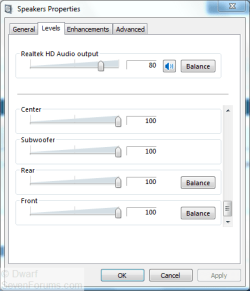
In the Notification area, right-click the Speakers icon (NOT the HD Audio Manager) and click Playback devices. Double-click Speakers (or single-click and click Properties). Click on the Levels tab. If you scroll down, you will see the level controls.

Capture.PNG
 

My Computer My Computer

At a glance

Windows 8.1 Pro RTM x64Intel Core-i5-3570K 4-core @ 3.4GHz (Ivy Brid...4 x 4GB DDR3-1600 Corsair Vengeance CMZ8GX3M2...MSI GeForce GTX770 Gaming OC 2GB
Computer type
PC/Desktop
Computer Manufacturer/Model Number
Dwarf Dwf/11/2012 r09/2013
OS
Windows 8.1 Pro RTM x64
CPU
Intel Core-i5-3570K 4-core @ 3.4GHz (Ivy Bridge) (OC 4.4GHz)
Motherboard
ASRock Z77 Extreme4-M
Memory
4 x 4GB DDR3-1600 Corsair Vengeance CMZ8GX3M2A1600C9B (16GB)
Graphics Card(s)
MSI GeForce GTX770 Gaming OC 2GB
Sound Card
Realtek High Definition on board solution (ALC 898)
Monitor(s) Displays
ViewSonic VA1912w Widescreen (VGA)
Screen Resolution
1440x900
Hard Drives
OCZ Agility 3 SSD 120GB SATA III x2 (RAID 0)
Samsung HD501LJ 500GB SATA II x2
Hitachi HDS721010CLA332 1TB SATA II
Iomega 1.5TB Ext USB 2.0
WD 2.0TB Ext USB 3.0
PSU
XFX Pro Series 850W Semi-Modular
Case
Gigabyte IF233
Cooling
1 x 120mm Front Inlet 1 x 120mm Rear Exhaust
Keyboard
Microsoft Comfort Curve Keyboard 3000 (USB)
Mouse
Microsoft Comfort Mouse 3000 for Business (USB)
Internet Speed
NetGear DG834Gv3 ADSL Modem/Router (Ethernet) ~4.0 Mb/s (O2)
Antivirus
Avast! 8.0.1497
Browser
IE 11
Other Info
Optical Drive: HL-DT-ST BD-RE BH10LS30 SATA Bluray
Lexmark S305 Printer/Scanner/Copier (USB)
WEI Score: 8.1/8.1/8.5/8.5/8.25
Asus Eee PC 1011PX Netbook (Windows 7 x86 Starter)
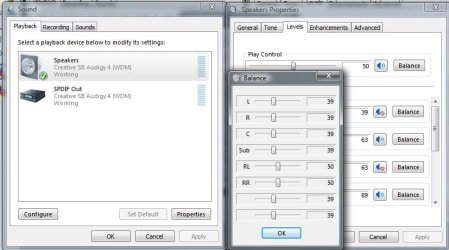
Needed to go one step further Dwarf,

51.jpg

click on Balance and it will open the individual speaker sliders.

P.S. Don't have anything with Realtek audio so can't check, but isn't there something similar in the Realtek controls someplace?
 

My Computer My Computer

At a glance

Win 7 Ultimate x64FX-8350 @ 4.6 GHz so farADATA XPG V1 Series Black 8GB DDR3 1600Sapphire R9 270x Dual-X
Computer type
PC/Desktop
Computer Manufacturer/Model Number
Me
OS
Win 7 Ultimate x64
CPU
FX-8350 @ 4.6 GHz so far
Motherboard
Asus M5A97 EVO
Memory
ADATA XPG V1 Series Black 8GB DDR3 1600
Graphics Card(s)
Sapphire R9 270x Dual-X
Sound Card
Xonar DGX w/ Corsair Vengence 1300
Monitor(s) Displays
Acer S232HL Abid
Screen Resolution
1920x1080
Hard Drives
120 GB OCZ Vertex 3
500 GB Seagate 7200.12
PSU
Antec Earthwatts 650W Green
Case
Antec Three Hundred
Cooling
Cooler Master 212 EVO
Keyboard
Logitech G510
Mouse
Logitech G500s
Internet Speed
35000/3000
Ooh, interesting. Thanks very much, they're there!

Now all I need to do is find out if it can be scripted somehow so I can control it without the sliders. Zvolume that I used on XP still only sees "Master Volume", "CD Audio" and another Master Volume.

Thanks.
 

My Computer My Computer

At a glance

Windows 7 Pro 64bit
OS
Windows 7 Pro 64bit
Back
Top