Lost Master drive status

skirabbit

New member
Local time
12:15 AM
Messages
6
Hi all

I was trying to set up a windows software raid array on my PC running windows 7 ( i did not want to go the reinstall route)- I installed an additional 3 drives and followed the instructions on you tube video I found. However when trying to create the mirror images my main boot drive lost that status and the computer would not boot up. removing all the other drives the computer booted up again. I cannot find how to give the master drive (boot) status back of my original drive. Adding any other drives now and the computer will not boot up.

thanks
 

My Computer

Computer type
PC/Desktop
Computer Manufacturer/Model Number
custom
OS
windows 7
Antivirus
bitdefender
Browser
chrome
Hello skirabbit. Welcome to the Forum.

If you post a screenshot of your Disk Management window - expanded so we can read everything, and with all 4 drives connected - then we might be able to see what is going on. It sounds like an issue with ACTIVE partitions.

Since the PC will not boot when all 4 drives are connected you may have to "hot swap" install them while the PC is running. Do this only if you have hot swap capability set in the BIOS, and be sure to take proper static precautions.

If you do not know what I am talking about then do not attempt this. In that case just post a screenshot of the single drive and we can see what we can do with that.
 

My Computer

Computer type
PC/Desktop
Computer Manufacturer/Model Number
Home Built - Jan 2013
OS
Windows 7 64 Bit Home Premium SP1
CPU
i7-3820
Motherboard
Asus P9X79-PRO - Bios 4608
Memory
GSkill F3-14900CL9Q - 16GB
Graphics Card(s)
EVGA GeForce GTX660 - Driver 352.86
Sound Card
On board Realtek ALC898
Monitor(s) Displays
Acer S271HL
Screen Resolution
1920 x 1080
Hard Drives
#1- Samsung 840 Pro Series
#2- Western Digital WD1002FAEX Sata3 Black
#3- Western Digital WD1002FAEX Sata3 Black
PSU
Corsair CMPSU-850TX-V2 - 850 watt (by Seasonic)
Case
Corsair Obsidian 550D
Cooling
Standard 3 120mm case fans, Cooler Master Hyper 212 EVO
Keyboard
MS KC-0405
Mouse
Intellimouse 5-button
Internet Speed
56 Mbits/Sec (on a good day)
Antivirus
Avast & Malwarebytes
Browser
Firefox
Other Info
Asus DVD - DRW-24B1ST 24X
thanks

Hi I am travelling so cannot post the screenshot right now - what I can tell you though is I cannot boot up the computer anymore with the 4 drives - I have had to remove them. I think the issue was in following the instructions I converted my boot disc to a dynamic disk and then could not change it back to a boot disk. Not sure if this helps - I will only be back at my pc in a few days and will post the screen shot.

thanks
 

My Computer

Computer type
PC/Desktop
Computer Manufacturer/Model Number
custom
OS
windows 7
Antivirus
bitdefender
Browser
chrome
We will be here.

Most likely I expect to see two System Active partitions from the clone process. There should only be one. Windows will sometimes choke when faced with 2 Active partitions.

Might be helpful to post a link to that video.
 

My Computer

Computer type
PC/Desktop
Computer Manufacturer/Model Number
Home Built - Jan 2013
OS
Windows 7 64 Bit Home Premium SP1
CPU
i7-3820
Motherboard
Asus P9X79-PRO - Bios 4608
Memory
GSkill F3-14900CL9Q - 16GB
Graphics Card(s)
EVGA GeForce GTX660 - Driver 352.86
Sound Card
On board Realtek ALC898
Monitor(s) Displays
Acer S271HL
Screen Resolution
1920 x 1080
Hard Drives
#1- Samsung 840 Pro Series
#2- Western Digital WD1002FAEX Sata3 Black
#3- Western Digital WD1002FAEX Sata3 Black
PSU
Corsair CMPSU-850TX-V2 - 850 watt (by Seasonic)
Case
Corsair Obsidian 550D
Cooling
Standard 3 120mm case fans, Cooler Master Hyper 212 EVO
Keyboard
MS KC-0405
Mouse
Intellimouse 5-button
Internet Speed
56 Mbits/Sec (on a good day)
Antivirus
Avast & Malwarebytes
Browser
Firefox
Other Info
Asus DVD - DRW-24B1ST 24X
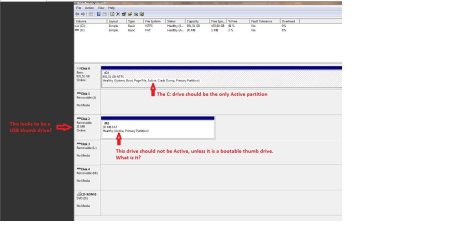
thanks all - here is the screen shot
 

Attachments

My Computer

Computer type
PC/Desktop
Computer Manufacturer/Model Number
custom
OS
windows 7
Antivirus
bitdefender
Browser
chrome
Not much information there. Can you answer some questions?

Screenshot.JPG

Also: what are disks 1, 3, and 4? Are these the 3 other hard drives, installed and connected?
 

My Computer

Computer type
PC/Desktop
Computer Manufacturer/Model Number
Home Built - Jan 2013
OS
Windows 7 64 Bit Home Premium SP1
CPU
i7-3820
Motherboard
Asus P9X79-PRO - Bios 4608
Memory
GSkill F3-14900CL9Q - 16GB
Graphics Card(s)
EVGA GeForce GTX660 - Driver 352.86
Sound Card
On board Realtek ALC898
Monitor(s) Displays
Acer S271HL
Screen Resolution
1920 x 1080
Hard Drives
#1- Samsung 840 Pro Series
#2- Western Digital WD1002FAEX Sata3 Black
#3- Western Digital WD1002FAEX Sata3 Black
PSU
Corsair CMPSU-850TX-V2 - 850 watt (by Seasonic)
Case
Corsair Obsidian 550D
Cooling
Standard 3 120mm case fans, Cooler Master Hyper 212 EVO
Keyboard
MS KC-0405
Mouse
Intellimouse 5-button
Internet Speed
56 Mbits/Sec (on a good day)
Antivirus
Avast & Malwarebytes
Browser
Firefox
Other Info
Asus DVD - DRW-24B1ST 24X
sorry the smaller drive was my phone - The c drive is the only drive - the other bays are empty
 

My Computer

Computer type
PC/Desktop
Computer Manufacturer/Model Number
custom
OS
windows 7
Antivirus
bitdefender
Browser
chrome
Interesting. Disk Management is showing Disks 1, 3, and 4 as Removable Drives with no media. Can you offer any explanation for that? One thing is that modern printers show up as removable drives due to their external ports. You could test that by just unplugging them.
 

My Computer

Computer type
PC/Desktop
Computer Manufacturer/Model Number
Home Built - Jan 2013
OS
Windows 7 64 Bit Home Premium SP1
CPU
i7-3820
Motherboard
Asus P9X79-PRO - Bios 4608
Memory
GSkill F3-14900CL9Q - 16GB
Graphics Card(s)
EVGA GeForce GTX660 - Driver 352.86
Sound Card
On board Realtek ALC898
Monitor(s) Displays
Acer S271HL
Screen Resolution
1920 x 1080
Hard Drives
#1- Samsung 840 Pro Series
#2- Western Digital WD1002FAEX Sata3 Black
#3- Western Digital WD1002FAEX Sata3 Black
PSU
Corsair CMPSU-850TX-V2 - 850 watt (by Seasonic)
Case
Corsair Obsidian 550D
Cooling
Standard 3 120mm case fans, Cooler Master Hyper 212 EVO
Keyboard
MS KC-0405
Mouse
Intellimouse 5-button
Internet Speed
56 Mbits/Sec (on a good day)
Antivirus
Avast & Malwarebytes
Browser
Firefox
Other Info
Asus DVD - DRW-24B1ST 24X
Back
Top