Solved Lost ''new folder'' option

Pantagruel

New member
Member
Local time
12:23 AM
Messages
27
Location
Ontario
When I right-click in a directory and then click on ''New'' I no longer get the the option to create a folder. I get either ''shortcut'' or ''Briefcase''

Can someone help me correct this ?
 

My Computer

Computer Manufacturer/Model Number
Lenovo T520 AC-Think
OS
windows 77 home premium 64bits
CPU
i5 252 m cpu @250GHz
Memory
4GB Ram
Graphics Card(s)
NVIDIA NVS 4200M DRIVER 268.71 --- DIRECTX SUPPORT 11--

My Computer

Computer type
PC/Desktop
Computer Manufacturer/Model Number
Lenovo IdeaCenter 450
OS
Windows 10 Pro X64
CPU
Intel Quad Core i7-4770 @ 3.4Ghz
Memory
16.0GB PC3-12800 DDR3 SDRAM 1600 MHz
Graphics Card(s)
Intel Integrated HD Graphics
Sound Card
Realtek HD Audio
Monitor(s) Displays
HP 22" LCD
Screen Resolution
1680 x 1050
Hard Drives
250GB Samsung EVO SATA-3 SSD
2TB Seagate ST2000DM001 SATA-2
1.5TB Seagate ST3150041AS SATA
Keyboard
Dell USB
Mouse
Lenovo USB
Internet Speed
Cable via Road Runner 3MB Upload, 30MB Download
Antivirus
Windows Defender, MBAM Pro, MBAE
Browser
Seamonkey
Other Info
UEFI/GPT
PLDS DVD-RW DH16AERSH
Thank you. I followed the steps as best I could but did not succeed in reintroducing the ''folder'' option in ''New''.

BTW, I could not follow this step as described in the instructions:

''...14. When prompted, click/tap on Run, Yes (UAC), Yes, and OK to approve merging the .reg file...''

After clicking ''Merge'' I did not get the ''Run'' command etc. All I got was a message alerting me about changing the registry (or something in that sense). I clicked on all the ''yes'' buttons, restarted my computer...but still no ''folder'' options.

BTW, would ''Briefcase'' be effectively the same as a folder ?
 

My Computer

Computer Manufacturer/Model Number
Lenovo T520 AC-Think
OS
windows 77 home premium 64bits
CPU
i5 252 m cpu @250GHz
Memory
4GB Ram
Graphics Card(s)
NVIDIA NVS 4200M DRIVER 268.71 --- DIRECTX SUPPORT 11--
You won't see the prompt if UAC is disabled.

No, Briefcase is not the same a Folder.
 
Last edited:

My Computer

Computer type
PC/Desktop
Computer Manufacturer/Model Number
Lenovo IdeaCenter 450
OS
Windows 10 Pro X64
CPU
Intel Quad Core i7-4770 @ 3.4Ghz
Memory
16.0GB PC3-12800 DDR3 SDRAM 1600 MHz
Graphics Card(s)
Intel Integrated HD Graphics
Sound Card
Realtek HD Audio
Monitor(s) Displays
HP 22" LCD
Screen Resolution
1680 x 1050
Hard Drives
250GB Samsung EVO SATA-3 SSD
2TB Seagate ST2000DM001 SATA-2
1.5TB Seagate ST3150041AS SATA
Keyboard
Dell USB
Mouse
Lenovo USB
Internet Speed
Cable via Road Runner 3MB Upload, 30MB Download
Antivirus
Windows Defender, MBAM Pro, MBAE
Browser
Seamonkey
Other Info
UEFI/GPT
PLDS DVD-RW DH16AERSH
Hi Pantagruel,

I faced the same problem long back and resolved it. How long back I am unable to recollect and I am also unable to recollect which of the following two I used to fix the problem. I had to literally dig it out from my old backups on an external drive.

You may try both. Be advised to backup your registry/registry entries before making any changes.. Below is the verbatim reproduction of the notes I had made then.( I have marked as 1 and 2 now. That marking was not there in my original notes)

File menu NEW missing. Also in Desktop context menu. Solution
1.http://support.microsoft.com/default.aspx?scid=kb;en-us;180257
To resolve this issue, use Registry Editor to verify that the registry key listed below has the value listed, and if needed, edit the value to match the value listed.
Registry key:
HKEY_CLASSES_ROOT\Directory\Background\shellex\ContextMenuHandlers\New\ (Default)
Value for (Default):
{D969A300-E7FF-11d0-A93B-00A0C90F2719}
NOTE: This registry entry only exists if the Windows Desktop Update component is installed. If the Windows Desktop Update component is not installed, add the registry entry and (Default) value.

2. Select Start/Run, type REGEDIT in the 'Open' box and press enter.· · · When Registry Editor opens, click 'Edit' on the Toolbar and then 'Find'. Next· in the 'Find what:' window, type NoFileNew and press enter. If the entry· is found, it should show in the right pane.· · · Right-click it and select 'Delete' from the menu. You can then press the 'F3'· key to continue the search for other instances. · · NoFileNew = enable/disable New in File Menu and Ctrl+N
 
Last edited:

My Computer

OS
Windows 7 Home Premium 32 bit
Thank you all for your help. I don't think I am courageous enough to undertake the task you propose. I will be visiting my son in a couple of months and he has a computer background. He will help me with this.

But if you don't mind a bit of musing in this forum may I ask the following question about the removal of the option to create new folders with Windows 7

If we cannot create new folders and sub folders how are we now supposed to add new documents and photos to our hard drive in new folders ? When I transfer my photos and videos to my computer, do I just add them to the single My Pictures folder and not be able to gather them according to different topics? This makes no sense. There must be something I don't see in this...

Can someone explain why Microsoft removed this essential function of creating folders and sub-folders? If I understood why this was done, it may help me understand the solutions that are proposed.

Thank you in advance for any clarifications about this issue.
 

My Computer

Computer Manufacturer/Model Number
Lenovo T520 AC-Think
OS
windows 77 home premium 64bits
CPU
i5 252 m cpu @250GHz
Memory
4GB Ram
Graphics Card(s)
NVIDIA NVS 4200M DRIVER 268.71 --- DIRECTX SUPPORT 11--
Microsoft did not remove the ability to create new folders.

Something has occurred in your system that has caused this.
 

My Computer

Computer type
PC/Desktop
Computer Manufacturer/Model Number
Custom Built
OS
Windows 10 Pro x64, Windows 8.1 Pro x64, Windows 7 Ultimate x64 SP1,
CPU
INTEL i9-7920X LGA 2066
Motherboard
Gigabyte X299-WU8 F3
Memory
64 GB (4 X 16 GB) G-Skill V Series DDR4 3200 Quad Channel
Graphics Card(s)
EVGA GTX 1060 SC 3 GB
Sound Card
Realtek Onboard ALC1220
Monitor(s) Displays
2 x Samsung S27E310
Screen Resolution
1920x1080
Hard Drives
Samsung 2 x 970 EVO Plus 500 GB NVMe
1 x 6TB WD 6003FZBX SATA
1 x 6TB WD 60EFRX SATA
12 x 3TB WD 30EFRX SATA
PSU
Seasonic X-1050
Case
Thermaltake Armor+
Cooling
Corsair H80i V2 Liquid AOI Cooler
Keyboard
Logitech G510s
Mouse
Logitech MX Master 2S
Internet Speed
200 Mb/s
Antivirus
ESET NOD32 13.1
Browser
EDGE (Dev, Canary, Beta), Chrome
Other Info
ASUS RT-AC68U router
Malwarebytes 4.0.4
(My son) will help me with this.


I meant my son would help me ''execute your suggestion'', not help me more than what you have been doing since I asked for your assistance. ! :D

BTW I have Windows 7 reinstallation CDs...

I may have to use them ! :confused:.
 

My Computer

Computer Manufacturer/Model Number
Lenovo T520 AC-Think
OS
windows 77 home premium 64bits
CPU
i5 252 m cpu @250GHz
Memory
4GB Ram
Graphics Card(s)
NVIDIA NVS 4200M DRIVER 268.71 --- DIRECTX SUPPORT 11--
Is this true for all folders or specific folders? Any chance you are clicking on folder names under Favorites in Windows Explorer?
 

My Computer

Computer type
PC/Desktop
Computer Manufacturer/Model Number
Lenovo IdeaCenter 450
OS
Windows 10 Pro X64
CPU
Intel Quad Core i7-4770 @ 3.4Ghz
Memory
16.0GB PC3-12800 DDR3 SDRAM 1600 MHz
Graphics Card(s)
Intel Integrated HD Graphics
Sound Card
Realtek HD Audio
Monitor(s) Displays
HP 22" LCD
Screen Resolution
1680 x 1050
Hard Drives
250GB Samsung EVO SATA-3 SSD
2TB Seagate ST2000DM001 SATA-2
1.5TB Seagate ST3150041AS SATA
Keyboard
Dell USB
Mouse
Lenovo USB
Internet Speed
Cable via Road Runner 3MB Upload, 30MB Download
Antivirus
Windows Defender, MBAM Pro, MBAE
Browser
Seamonkey
Other Info
UEFI/GPT
PLDS DVD-RW DH16AERSH

My Computer

Computer type
PC/Desktop
Computer Manufacturer/Model Number
Self built custom
OS
64-bit Windows 11 Pro for Workstations
CPU
Intel i7-8700K OC'd to 5 GHz
Motherboard
ASUS ROG Maximus XI Formula Z390
Memory
64 GB (4x16GB) G.SKILL TridentZ RGB DDR4 3600 MHz
Graphics Card(s)
ASUS ROG-STRIX-GTX1080TI-O11G-GAMING
Sound Card
Integrated
Monitor(s) Displays
2 x Samsung Odyssey G7 27"
Screen Resolution
2560x1440
Hard Drives
1TB Samsung 990 PRO M.2,
4TB Samsung 990 PRO PRO M.2,
TerraMaster F8 SSD Plus NAS
PSU
Seasonic Prime Titanium 850W
Case
Thermaltake Core P3
Cooling
Corsair Hydro H115i
Keyboard
Logitech wireless K800
Mouse
Logitech MX Master 4
Internet Speed
2 Gb/s Download and 100 Mb/s Upload
Antivirus
Malwarebyte Anti-Malware Premium
Browser
Google Chrome
Other Info
Logitech Z625 speaker system,
Logitech BRIO 4K Pro webcam,
HP Color LaserJet Pro MFP M477fdn,
APC SMART-UPS RT 1000 XL - SURT1000XLI,
Galaxy S23 Plus phone
Is this true for all folders or specific folders? Any chance you are clicking on folder names under Favorites in Windows Explorer?

Yes, it's true for all directories, even when trying to create sub folders in a detachable device.


Thank you Brink, but your suggestion is really above my abilities. I don't want to risk losing the use of my computer so I will tackle your suggestion in the presence of my son so he can rescue me should I mess up!

I am on the road right now coming back home from Florida. We are doing some sightseeing along the way, and I have to pile on all my photos and videos under one of the existing folders on my hard drive :(

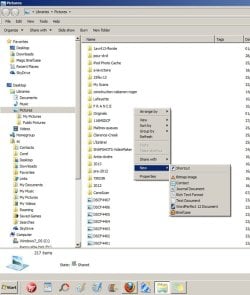
Here is a screen shot of what happens when I click on NEW...
 

Attachments

  • new-folder.jpg
    new-folder.jpg
    56.3 KB · Views: 10

My Computer

Computer Manufacturer/Model Number
Lenovo T520 AC-Think
OS
windows 77 home premium 64bits
CPU
i5 252 m cpu @250GHz
Memory
4GB Ram
Graphics Card(s)
NVIDIA NVS 4200M DRIVER 268.71 --- DIRECTX SUPPORT 11--
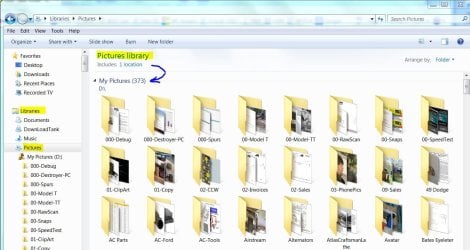
It's because you have the picture library assigned to the Desktop. Clicking on New... gives the options for adding items to the desktop. Your library structure is a little messed up. You need to detach all libraries from the desktop. The sample below shows a Picture Library that contains "My Pictures", the primary folder. Under that are all the sub-folders for individual subjects. When you want to add a new subject (folder), click on Add New Folder and it will create a folder in "My Pictures".
 

Attachments

  • Library Location.JPG
    Library Location.JPG
    126.7 KB · Views: 6

My Computer

Computer type
PC/Desktop
Computer Manufacturer/Model Number
Built 2/11/2011
OS
Windows 7 Pro-x64
CPU
i7-2600 3.4GHz - 3.8GHz Turbo
Motherboard
Intel DH67BL-B3
Memory
8Gb - 2x4GB, Muskin 991770 PC3-1333
Graphics Card(s)
Integrated Intel HD 2000
Sound Card
Integrated Intel 10.1 HD, RealTek ALC892
Monitor(s) Displays
Asus LCD VH222H, Haier HL24XSL2a
Screen Resolution
1920x1080, 1920x1080
Hard Drives
Crucial SSD C300-128Gb,
Western Digital WD5002AALX - 500Gb,
Western Digital WD7501AALS - 750Gb
PSU
Seasonic 650W 80+ Gold Modular
Case
Rosewill Defender
Cooling
Stock CPU, Four 120mm case fans, PCH fan added
Keyboard
Logitech EX100 Y-RBH94 Wireless
Mouse
Logitech EX100 M-RCE95 Wireless
Internet Speed
3.0/1.5 Mbs
Antivirus
Microsoft Security Essentials
Browser
Microsoft Internet Explorer 11
Other Info
Antec Veris Premier-Multimedia IR Station,
Cyber Accoustics-3602 Speakers,
AFT XM-5U Card Reader,
Hauppauge TV-HVR-2250,
Sony LX300 USB Turntable
Alternatives

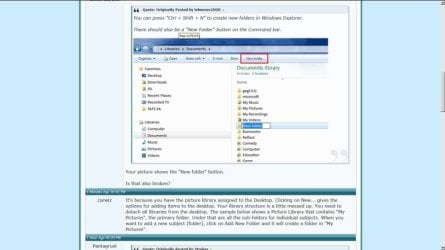
You can press "Ctrl + Shift + N" to create new folders in Windows Explorer.

There should also be a "New Folder" button on the Command bar.

228912d1346294009-create-then-rename-new-folder-folder-button.png

Your picture shows the "New folder" button.

Is that also broken?
 

My Computer

Computer type
PC/Desktop
Computer Manufacturer/Model Number
n/a
OS
W7 Ultimate SP1, LM19.2 MATE, W10 Home 1703, W10 Pro 1703 VM, #All 64 bit
CPU
AMD Phenom II x6 1100T, 3.3 GHz
Motherboard
ASUS M4A88T-M/USB3 (AM3)
Memory
12GB DDR3 1333 G-Skill (4GB x 2), G-Skill (2GB x 2)
Graphics Card(s)
NVIDIA GeForce GTX 660
Sound Card
Realtek?
Monitor(s) Displays
Samsung S23B350
Screen Resolution
1920x1080
Hard Drives
WD Green 2TB (SATA), WD Green 3TB (SATA), WD Blue 4TB (SATA), WD Blue 6TB (SATA)
PSU
Cooler Master
Case
Antec GX300 Tower
Cooling
3x Antec TRICOOL 120mm Fans
Mouse
Wired Optical
Internet Speed
DSL
Antivirus
Avast
Browser
Pale Moon (64 bit)
Other Info
2018-12-27 Upgraded HDDs
2015-12-10 Upgraded case, graphics card, storage
2015-08-15 Upgraded motherboard & RAM
2015-07-15 Upgraded LM17.1 to LM17.2
Hello Pantagruel,

If you still haven't got this sorted, then you might see if downloading and merging the .reg files for the listed folder and directory options in the tutorial below to restore their default associations and registry entries may help.

http://www.sevenforums.com/tutorials/19449-default-file-type-associations-restore.html

Hope this helps, :)
Shawn

.....Thank you Brink, but your suggestion is really above my abilities. I don't want to risk losing the use of my computer so I will tackle your suggestion in the presence of my son so he can rescue me should I mess up!

I am on the road right now coming back home from Florida. We are doing some sightseeing along the way, and I have to pile on all my photos and videos under one of the existing folders on my hard drive :(

Here is a screen shot of what happens when I click on NEW...

No worries Pantagruel. It's not hard to do if you like. :)

You would just click on the folder and directory links in the tutorial to download their .reg files to your desktop.

Afterwards, double click on each .reg file one at a time, and approve as per the steps in the tutorial to merge the .reg files. This will automatically restore the default registry entries for this.

Next, restart the computer to fully apply.

You should have New -> Folder back.
 

My Computer

Computer type
PC/Desktop
Computer Manufacturer/Model Number
Self built custom
OS
64-bit Windows 11 Pro for Workstations
CPU
Intel i7-8700K OC'd to 5 GHz
Motherboard
ASUS ROG Maximus XI Formula Z390
Memory
64 GB (4x16GB) G.SKILL TridentZ RGB DDR4 3600 MHz
Graphics Card(s)
ASUS ROG-STRIX-GTX1080TI-O11G-GAMING
Sound Card
Integrated
Monitor(s) Displays
2 x Samsung Odyssey G7 27"
Screen Resolution
2560x1440
Hard Drives
1TB Samsung 990 PRO M.2,
4TB Samsung 990 PRO PRO M.2,
TerraMaster F8 SSD Plus NAS
PSU
Seasonic Prime Titanium 850W
Case
Thermaltake Core P3
Cooling
Corsair Hydro H115i
Keyboard
Logitech wireless K800
Mouse
Logitech MX Master 4
Internet Speed
2 Gb/s Download and 100 Mb/s Upload
Antivirus
Malwarebyte Anti-Malware Premium
Browser
Google Chrome
Other Info
Logitech Z625 speaker system,
Logitech BRIO 4K Pro webcam,
HP Color LaserJet Pro MFP M477fdn,
APC SMART-UPS RT 1000 XL - SURT1000XLI,
Galaxy S23 Plus phone
You need to detach all libraries from the desktop. .

Thank you for picking that up. It seems that all items are under Desktop. Even My Computer. I take it that this is not how it should be ?

How do I correct this ?

Re Lehnerus 2000 input:

1) Nothing happens when I press "Ctrl + Shift + N" ;

2) the "New folder" button does not work. Nothing happens when I click on it.

BTW, the Quote option is not visible anymore under your posts, and I am not seeing Carwiz attachment anymore (here is a screen shot). What am I doing wrong?

Will get back to you, Brink...
 

Attachments

  • screenshot.jpg
    screenshot.jpg
    35.6 KB · Views: 6

My Computer

Computer Manufacturer/Model Number
Lenovo T520 AC-Think
OS
windows 77 home premium 64bits
CPU
i5 252 m cpu @250GHz
Memory
4GB Ram
Graphics Card(s)
NVIDIA NVS 4200M DRIVER 268.71 --- DIRECTX SUPPORT 11--
That's a quirk with the forum when you click on Quote or post reply to post a response. Only the current message is shown. All other posts are summaries. After you post, you'll get a full screen back with all pics and quotes.
 

My Computer

Computer type
PC/Desktop
Computer Manufacturer/Model Number
Built 2/11/2011
OS
Windows 7 Pro-x64
CPU
i7-2600 3.4GHz - 3.8GHz Turbo
Motherboard
Intel DH67BL-B3
Memory
8Gb - 2x4GB, Muskin 991770 PC3-1333
Graphics Card(s)
Integrated Intel HD 2000
Sound Card
Integrated Intel 10.1 HD, RealTek ALC892
Monitor(s) Displays
Asus LCD VH222H, Haier HL24XSL2a
Screen Resolution
1920x1080, 1920x1080
Hard Drives
Crucial SSD C300-128Gb,
Western Digital WD5002AALX - 500Gb,
Western Digital WD7501AALS - 750Gb
PSU
Seasonic 650W 80+ Gold Modular
Case
Rosewill Defender
Cooling
Stock CPU, Four 120mm case fans, PCH fan added
Keyboard
Logitech EX100 Y-RBH94 Wireless
Mouse
Logitech EX100 M-RCE95 Wireless
Internet Speed
3.0/1.5 Mbs
Antivirus
Microsoft Security Essentials
Browser
Microsoft Internet Explorer 11
Other Info
Antec Veris Premier-Multimedia IR Station,
Cyber Accoustics-3602 Speakers,
AFT XM-5U Card Reader,
Hauppauge TV-HVR-2250,
Sony LX300 USB Turntable
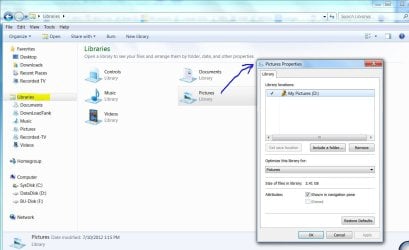
I'm not quite sure how you got the libraries under Desktop so we need to do some exploring. Open Windows Explorer and click on Libraries in the left pane. Right click Pictures in the right pane and select Properties. Post a screen shot of the properties. It should look something like the picture below.
 

Attachments

  • Library Properties.JPG
    Library Properties.JPG
    99.8 KB · Views: 7

My Computer

Computer type
PC/Desktop
Computer Manufacturer/Model Number
Built 2/11/2011
OS
Windows 7 Pro-x64
CPU
i7-2600 3.4GHz - 3.8GHz Turbo
Motherboard
Intel DH67BL-B3
Memory
8Gb - 2x4GB, Muskin 991770 PC3-1333
Graphics Card(s)
Integrated Intel HD 2000
Sound Card
Integrated Intel 10.1 HD, RealTek ALC892
Monitor(s) Displays
Asus LCD VH222H, Haier HL24XSL2a
Screen Resolution
1920x1080, 1920x1080
Hard Drives
Crucial SSD C300-128Gb,
Western Digital WD5002AALX - 500Gb,
Western Digital WD7501AALS - 750Gb
PSU
Seasonic 650W 80+ Gold Modular
Case
Rosewill Defender
Cooling
Stock CPU, Four 120mm case fans, PCH fan added
Keyboard
Logitech EX100 Y-RBH94 Wireless
Mouse
Logitech EX100 M-RCE95 Wireless
Internet Speed
3.0/1.5 Mbs
Antivirus
Microsoft Security Essentials
Browser
Microsoft Internet Explorer 11
Other Info
Antec Veris Premier-Multimedia IR Station,
Cyber Accoustics-3602 Speakers,
AFT XM-5U Card Reader,
Hauppauge TV-HVR-2250,
Sony LX300 USB Turntable
Here is the screenshot
 

Attachments

  • screenshot2.jpg
    screenshot2.jpg
    58.6 KB · Views: 9

My Computer

Computer Manufacturer/Model Number
Lenovo T520 AC-Think
OS
windows 77 home premium 64bits
CPU
i5 252 m cpu @250GHz
Memory
4GB Ram
Graphics Card(s)
NVIDIA NVS 4200M DRIVER 268.71 --- DIRECTX SUPPORT 11--
Pantagruel,

Please post the same screenshot, but for your "Documents" library instead since that was the one that showed all the other locations. :)

Have you already merged the .reg files from my post above to fix your New -> Folder issue, or have any other questions about them?
 

My Computer

Computer type
PC/Desktop
Computer Manufacturer/Model Number
Self built custom
OS
64-bit Windows 11 Pro for Workstations
CPU
Intel i7-8700K OC'd to 5 GHz
Motherboard
ASUS ROG Maximus XI Formula Z390
Memory
64 GB (4x16GB) G.SKILL TridentZ RGB DDR4 3600 MHz
Graphics Card(s)
ASUS ROG-STRIX-GTX1080TI-O11G-GAMING
Sound Card
Integrated
Monitor(s) Displays
2 x Samsung Odyssey G7 27"
Screen Resolution
2560x1440
Hard Drives
1TB Samsung 990 PRO M.2,
4TB Samsung 990 PRO PRO M.2,
TerraMaster F8 SSD Plus NAS
PSU
Seasonic Prime Titanium 850W
Case
Thermaltake Core P3
Cooling
Corsair Hydro H115i
Keyboard
Logitech wireless K800
Mouse
Logitech MX Master 4
Internet Speed
2 Gb/s Download and 100 Mb/s Upload
Antivirus
Malwarebyte Anti-Malware Premium
Browser
Google Chrome
Other Info
Logitech Z625 speaker system,
Logitech BRIO 4K Pro webcam,
HP Color LaserJet Pro MFP M477fdn,
APC SMART-UPS RT 1000 XL - SURT1000XLI,
Galaxy S23 Plus phone
Back
Top