

Hello,
Is there any way to change the Realtek HD Audio "Loudness Equalization" setting to add heavier compression to the audio signal in the registry or otherwise.
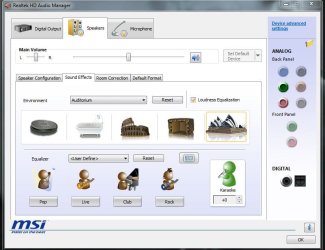
My digital channels seem very low in volume compared to commercials.
The Realtek Loudness Equalization increases the volume, but doesn't compress the signal too much.
Is there any way to change the Realtek HD Audio "Loudness Equalization" setting to add heavier compression to the audio signal in the registry or otherwise.
My digital channels seem very low in volume compared to commercials.
The Realtek Loudness Equalization increases the volume, but doesn't compress the signal too much.
My Computer
- Computer type
- PC/Desktop
- Computer Manufacturer/Model Number
- Custom Build
- OS
- Windows 7 Home Premium 64 bit
- CPU
- Intel Core i7-4790
- Motherboard
- GA-Z87X-D3H
- Memory
- G.SKILL 8GB (2 x 4GB) DDR3 F3-10666CL9D-8GBNT
- Graphics Card(s)
- AMD Radeon R7 250
- Sound Card
- Realtek ALC892
- Monitor(s) Displays
- Samsung UN32EH5000, Dell 1703FPT
- Screen Resolution
- 1920 x 1080, 1280 x 1024
- Hard Drives
- WD5003AZEX
WD10EZEX
Samsung HD103SJ
Samsung 128 GB 840 PRO
- PSU
- SeaSonic M12II SS-500GM
- Case
- Fractal Design Define R4
- Cooling
- Zalman CNPS9900ALED
- Keyboard
- Logitech K800
- Mouse
- Logitech M705
- Internet Speed
- 16 Mbps
- Antivirus
- Avast
- Browser
- Firefox
- Other Info
- Bose Companion 2 Multimedia Speakers


