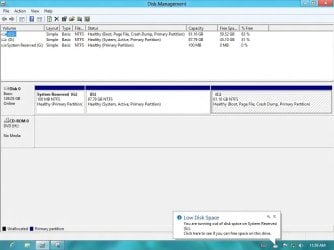
Low disk space on System Reserve

g160689

New member
Local time
10:55 PM
Messages
4
I installed Windows 8 dual booting with windows 7. I followed easyBCD method to solve installation issue.
Now everything is fine except the system reserve itself is running low on disk space.
What should I do?
 

My Computer My Computer

At a glance

Windows 8
OS
Windows 8
What's the total capacity and the occupied space of the System Reserved partition on your PC?

Why is it a problem?
 

My Computer My Computer

At a glance

Windows 7 Home Premium SP1, 64-bitIntel Skylake i5-6600K, not overclocked8 GB HyperX DDR4-2666 (2 x 4 GB)none; graphics are integrated on CPU
Computer type
PC/Desktop
Computer Manufacturer/Model Number
Ignatz Special; 4 speed manual gearbox; factory air conditioning; one of one
OS
Windows 7 Home Premium SP1, 64-bit
CPU
Intel Skylake i5-6600K, not overclocked
Motherboard
AsRock Z170M Extreme 4, micro ATX
Memory
8 GB HyperX DDR4-2666 (2 x 4 GB)
Graphics Card(s)
none; graphics are integrated on CPU
Sound Card
onboard: Realtek ALC1150; external: USB Behringer UF0-202
Monitor(s) Displays
Dell S2340M 23 inch IPS
Screen Resolution
1600 x 900
Hard Drives
System: Crucial MX100 series SSD, 128 GB;
Data: Samsung Spinpoint 103SJ, 1 TB;
Backup: WD Caviar Green WD30EZRX-00D8PB0, 3 TB
PSU
Rosewill SilentNight 500 watt fanless, semi-modular
Case
Antec Solo II
Cooling
Noctua NH-U12S; Noctua F12 intake, Noctua S12A exhaust
Keyboard
Microsoft 200 6JH-00001 USB
Mouse
Dell or Microsoft optical wired; USB
Antivirus
Microsoft Security Essentials and Malwarebytes Premium
Browser
Pale Moon
Other Info
All fans PWM; speeds at idle: CPU circa 500 rpm; intake circa 600 rpm; exhaust circa 600 rpm; CPU temps 27 idle and 47 C load in a warm room (27 C/81 F) when running Intel Extreme Tuning Utility stress test.
You should do nothing. You only use that system reserve space to boot into Windows 7, you never save anything there and it doesn't start filling up with data because nothing should be writing to it. It's usually only present on default installations of Windows 7 and many people delete it upon reinstallation of the system as it's rather unnecessary to split the boot manager from the main partition/drive. When you attempted to install Windows 8, it probably tried to load the boot manager onto that same partition, causing some more space to be lost on an already small partition.
 

My Computer My Computer

At a glance

XP / Win7 x64 ProIntel Quad-Core Q9450 @ 3.2GHz2x2GB GSkill DDR2NVIDIA GeForce 8600 GTS (EVGA)
OS
XP / Win7 x64 Pro
CPU
Intel Quad-Core Q9450 @ 3.2GHz
Motherboard
Asus P5-E
Memory
2x2GB GSkill DDR2
Graphics Card(s)
NVIDIA GeForce 8600 GTS (EVGA)
Monitor(s) Displays
Dell 2408WFP
Screen Resolution
1920x1200
The system reserved partition contains the Windows Recovery Environment, among other things. I personally wouldn't call it unnecessary. I extended the 100 MB system reserved that windows 7 setup to 200 MB when I setup my dual boot with Windows 8 RP. The last time I tried to setup a dual boot with Windows 8 I got that same not enough free space message. Right now disk management is showing 166 MB free so I have no idea why 100 MB wasn't enough?
 

My Computer My Computer

At a glance

Windows 10 Education 64 bitAMD Phenom II X4 980 Black Edition Deneb 3.7GHz8GB 4GBx2 Kingston PC10600 DDR3 1333 MemoryZotac NVIDIA Geforce GT640 2 Gig DDR3 PCIe
Computer type
PC/Desktop
Computer Manufacturer/Model Number
Home Built
OS
Windows 10 Education 64 bit
CPU
AMD Phenom II X4 980 Black Edition Deneb 3.7GHz
Motherboard
Asus M4N68T-M V2 µATX Motherboard
Memory
8GB 4GBx2 Kingston PC10600 DDR3 1333 Memory
Graphics Card(s)
Zotac NVIDIA Geforce GT640 2 Gig DDR3 PCIe
Sound Card
VIA VT1708s High Definition Audio 8-channel Onboard
Monitor(s) Displays
22" LG E2242 1080p and 2 19" I-INC AG191D
Screen Resolution
1280x1024 - 1920x1080 - 1280x1024
Hard Drives
Crucial M100 256 GB SSD and 500 GB WD Blue SATA
PSU
Thermaltake TR 620
Case
Power Up Black ATX Mid-Tower Case
Cooling
Stock heatsink and fan
Keyboard
Logitech Wireless K350 Wave
Mouse
Logitech Wireless M570 Trackman Wheel
Internet Speed
80 Mbps Down 30 Mbps Up
Antivirus
Windows Defender
Browser
Internet Explorer 11
Other Info
HP DVD1040e Lightscribe - External USB2
You can make a recovery disk within Windows that doesn't take up any hard drive space or require a separate partition and is thus less subject to corruption. I suppose some people find not having to use a separate disc for repair more convenient, so that could be something useful it does provide. It does also hold the partition space for BitLocker encryption if you use that, but you can also just create a partition for this at the time you start using it. So, the usefulness of that partition is beyond my purposes and seems to cause more problems than it solves with people multi-booting that don't know how to handle such a partition.
 

My Computer My Computer

At a glance

XP / Win7 x64 ProIntel Quad-Core Q9450 @ 3.2GHz2x2GB GSkill DDR2NVIDIA GeForce 8600 GTS (EVGA)
OS
XP / Win7 x64 Pro
CPU
Intel Quad-Core Q9450 @ 3.2GHz
Motherboard
Asus P5-E
Memory
2x2GB GSkill DDR2
Graphics Card(s)
NVIDIA GeForce 8600 GTS (EVGA)
Monitor(s) Displays
Dell 2408WFP
Screen Resolution
1920x1200
I agree, it seems to cause problems with dual booting to Windows 8. I just wanted to point out that it does have a purpose and wasn't something Microsoft did just for the fun of it. ;)
 

My Computer My Computer

At a glance

Windows 10 Education 64 bitAMD Phenom II X4 980 Black Edition Deneb 3.7GHz8GB 4GBx2 Kingston PC10600 DDR3 1333 MemoryZotac NVIDIA Geforce GT640 2 Gig DDR3 PCIe
Computer type
PC/Desktop
Computer Manufacturer/Model Number
Home Built
OS
Windows 10 Education 64 bit
CPU
AMD Phenom II X4 980 Black Edition Deneb 3.7GHz
Motherboard
Asus M4N68T-M V2 µATX Motherboard
Memory
8GB 4GBx2 Kingston PC10600 DDR3 1333 Memory
Graphics Card(s)
Zotac NVIDIA Geforce GT640 2 Gig DDR3 PCIe
Sound Card
VIA VT1708s High Definition Audio 8-channel Onboard
Monitor(s) Displays
22" LG E2242 1080p and 2 19" I-INC AG191D
Screen Resolution
1280x1024 - 1920x1080 - 1280x1024
Hard Drives
Crucial M100 256 GB SSD and 500 GB WD Blue SATA
PSU
Thermaltake TR 620
Case
Power Up Black ATX Mid-Tower Case
Cooling
Stock heatsink and fan
Keyboard
Logitech Wireless K350 Wave
Mouse
Logitech Wireless M570 Trackman Wheel
Internet Speed
80 Mbps Down 30 Mbps Up
Antivirus
Windows Defender
Browser
Internet Explorer 11
Other Info
HP DVD1040e Lightscribe - External USB2
Right, I don't think it's inherently a terrible idea, rather terrible execution. I think they tried to combine too many disparate and critical things into one secluded partition on the system that gets little to no attention until something goes wrong. Cramming 3 critical services (boot mgr, recovery, and encryption) into one partition pretty much violates all logical reason of why you implement partitions (and ideally separate drives) in a system. Getting rid of it and implementing recovery and encryption partitions on your own seems way more secure and logical to me, not to mention way less complicated.
 

My Computer My Computer

At a glance

XP / Win7 x64 ProIntel Quad-Core Q9450 @ 3.2GHz2x2GB GSkill DDR2NVIDIA GeForce 8600 GTS (EVGA)
OS
XP / Win7 x64 Pro
CPU
Intel Quad-Core Q9450 @ 3.2GHz
Motherboard
Asus P5-E
Memory
2x2GB GSkill DDR2
Graphics Card(s)
NVIDIA GeForce 8600 GTS (EVGA)
Monitor(s) Displays
Dell 2408WFP
Screen Resolution
1920x1200
To each his own. I for the most part just leave it alone and hope I never need it. ;)
 

My Computer My Computer

At a glance

Windows 10 Education 64 bitAMD Phenom II X4 980 Black Edition Deneb 3.7GHz8GB 4GBx2 Kingston PC10600 DDR3 1333 MemoryZotac NVIDIA Geforce GT640 2 Gig DDR3 PCIe
Computer type
PC/Desktop
Computer Manufacturer/Model Number
Home Built
OS
Windows 10 Education 64 bit
CPU
AMD Phenom II X4 980 Black Edition Deneb 3.7GHz
Motherboard
Asus M4N68T-M V2 µATX Motherboard
Memory
8GB 4GBx2 Kingston PC10600 DDR3 1333 Memory
Graphics Card(s)
Zotac NVIDIA Geforce GT640 2 Gig DDR3 PCIe
Sound Card
VIA VT1708s High Definition Audio 8-channel Onboard
Monitor(s) Displays
22" LG E2242 1080p and 2 19" I-INC AG191D
Screen Resolution
1280x1024 - 1920x1080 - 1280x1024
Hard Drives
Crucial M100 256 GB SSD and 500 GB WD Blue SATA
PSU
Thermaltake TR 620
Case
Power Up Black ATX Mid-Tower Case
Cooling
Stock heatsink and fan
Keyboard
Logitech Wireless K350 Wave
Mouse
Logitech Wireless M570 Trackman Wheel
Internet Speed
80 Mbps Down 30 Mbps Up
Antivirus
Windows Defender
Browser
Internet Explorer 11
Other Info
HP DVD1040e Lightscribe - External USB2
Considering the system reserve 100mb space is still the same, then why in the first place Windows 8 refuses to install?
Some member says, using the EasyBCD method just copies the system reserved file as a backup to drive c. So, I would assume that the file are still there intact in that 100mb space. So, how Window8 was installed.
A question here, is it possible to expand the partition of SR to something like 300mb at fresh installation. And if I avoid or delete the partition totally by using some backup method, will there be problems in future??
 

My Computer My Computer

At a glance

Windows 8
OS
Windows 8
I'm also wondering why I got the "not enough free space in the system reserved partition" message. I didn't get that message this time around, I just assumed it was going to happen based on past installs. I expanded mine to 200 MB, but I had to start with a clean slate to do it. I started the Windows 7 install, deleted the Windows 7 partition, then expanded the system reserved into the free space. Then I created my partitions for windows 7 and Windows 8. Right now there is only 33 MB being used in my system reserved? Starting to wonder why I bothered expanding it? I ended up installing Windows 8 from Windows 7 and did a custom install. My PC wouldn't boot from the Windows 8 DVD for some reason.
 

My Computer My Computer

At a glance

Windows 10 Education 64 bitAMD Phenom II X4 980 Black Edition Deneb 3.7GHz8GB 4GBx2 Kingston PC10600 DDR3 1333 MemoryZotac NVIDIA Geforce GT640 2 Gig DDR3 PCIe
Computer type
PC/Desktop
Computer Manufacturer/Model Number
Home Built
OS
Windows 10 Education 64 bit
CPU
AMD Phenom II X4 980 Black Edition Deneb 3.7GHz
Motherboard
Asus M4N68T-M V2 µATX Motherboard
Memory
8GB 4GBx2 Kingston PC10600 DDR3 1333 Memory
Graphics Card(s)
Zotac NVIDIA Geforce GT640 2 Gig DDR3 PCIe
Sound Card
VIA VT1708s High Definition Audio 8-channel Onboard
Monitor(s) Displays
22" LG E2242 1080p and 2 19" I-INC AG191D
Screen Resolution
1280x1024 - 1920x1080 - 1280x1024
Hard Drives
Crucial M100 256 GB SSD and 500 GB WD Blue SATA
PSU
Thermaltake TR 620
Case
Power Up Black ATX Mid-Tower Case
Cooling
Stock heatsink and fan
Keyboard
Logitech Wireless K350 Wave
Mouse
Logitech Wireless M570 Trackman Wheel
Internet Speed
80 Mbps Down 30 Mbps Up
Antivirus
Windows Defender
Browser
Internet Explorer 11
Other Info
HP DVD1040e Lightscribe - External USB2
Please post back a screenshot of your maximized Disk Mgmt drive map and listings, using Snipping Tool in Start Menu. Attach file using paper clip in reply box.

If SysReserved is given a letter it will sometimes fill up with crap written there. But it seems you cut it out by marking C Active to run Startup Repair until C became System flagged, correct?

Did you correctly boot the Win8 installer to install to a second partition. Do you now have the metro-style Win8 Dual Boot menu?
 
Yes I do have the metro dual boot menu.
DiskMngmt.jpg
 

My Computer My Computer

At a glance

Windows 8
OS
Windows 8
You can recover the disk space from SysReserved into D (as shown in screenshot) using free Partition Wizard
bootable CD - not the Home version which like all other 3rd party managers can fail.

Partition Wizard Move/Resize Partition Video Help.

Or you can just delete System Reserved in Disk Mgmt. Have your repair disk handy since resizing or deleting on the boot sector can in rare cases require running Startup Repair.
 
Back
Top