
low memory on x64 help please

flatbush71

New member
Local time
7:23 PM
Messages
15
Help in memory not showing on x64 windows 7 home premium
only 5.39 usable
I'm very old would you please help.
 

My Computer

Computer Manufacturer/Model Number
Custom Built
OS
Windows 7 Business x64
CPU
Intel Core2 Quad 9550
Motherboard
ASUSTeK P5N72-T PREMIUM
Memory
8GB DDR2 800Mgz
Graphics Card(s)
NVIDIA GeForce 9600 GT (X2)
Sound Card
SoundMax Intergrated Digital HD Audio
Monitor(s) Displays
Acer V223W
Hard Drives
Hitachi 1TB (X2)
Western Digital My Book 1TB EXT HD
PSU
850 Watt
Case
Apevia (with 3 analog guages)
Cooling
ZEROtherm Core92 CPU Cooler, Thermaltake DuOrb (X2)
Please do the following in that computer so we have some information about it:

Download and save the tsginfo.exe file.
After it's been downloaded and saved, double-click it to run it.
Information about that computer will appear.
Return here to your thread, then copy-and-paste the ENTIRE text here.
 

My Computer

Computer type
PC/Desktop
Computer Manufacturer/Model Number
Dell OptiPlex 9020
OS
Windows 7 Professional SP1 64-bit
CPU
Intel Core i7-4790 3.60 GHz
Memory
32 GB DDR3-1600 MHz
Graphics Card(s)
Integrated Intel HD Graphics 4600
Monitor(s) Displays
Viewsonic 32" LCD
Hard Drives
Kingston SATA 3 240 GB SSD
Internet Speed
Spectrum Internet 1000 Mbps
Tech Support Guy System Info Utility version 1.0.0.9
OS Version: Microsoft Windows 7 Home Premium, Service Pack 1, 64 bit, Build 7601, Installed 20120301193933.000000-360
Processor: AMD A6-3620 APU with Radeon(tm) HD Graphics, AMD64 Family 18 Model 1 Stepping 0, CPU Count: 4
Total Physical RAM: 10 GB
Graphics Card: AMD Radeon HD 6530D, 512 MB
Hard Drives: C: 448 GB (117 GB Free); E: 931 GB (542 GB Free);
Motherboard: Acer Aspire M3470G
System: American Megatrends Inc., ver ACRSYS - 1072009, s/n PTSJWP20012010B2279200
Antivirus: Avast Antivirus, Enabled and Updated
 

My Computer

Computer Manufacturer/Model Number
Custom Built
OS
Windows 7 Business x64
CPU
Intel Core2 Quad 9550
Motherboard
ASUSTeK P5N72-T PREMIUM
Memory
8GB DDR2 800Mgz
Graphics Card(s)
NVIDIA GeForce 9600 GT (X2)
Sound Card
SoundMax Intergrated Digital HD Audio
Monitor(s) Displays
Acer V223W
Hard Drives
Hitachi 1TB (X2)
Western Digital My Book 1TB EXT HD
PSU
850 Watt
Case
Apevia (with 3 analog guages)
Cooling
ZEROtherm Core92 CPU Cooler, Thermaltake DuOrb (X2)
According to your log, you have a Acer Aspire M3470G Desktop PC which has:
Windows 7 Home Premium SP1 64-bit (installed March 1, 2012)
AMD A6-3620 APU 2.20 GHz quad core processor
10 GB of DDR3 RAM
500 GB(465 GB) SATA hard drive
AMD Radeon HD 6530D graphics (512 MB video memory)

From what I can determine, its motherboard supports a maximum of 16 GB(4 GB X 4) of DDR3 RAM.
From what I can also determine, it originally came with 4 GB of DDR3 RAM.
If that's true, has more RAM been added to it since you purchased it?
If so, can you advise how many modules are in it and what their capacities are?
 

My Computer

Computer type
PC/Desktop
Computer Manufacturer/Model Number
Dell OptiPlex 9020
OS
Windows 7 Professional SP1 64-bit
CPU
Intel Core i7-4790 3.60 GHz
Memory
32 GB DDR3-1600 MHz
Graphics Card(s)
Integrated Intel HD Graphics 4600
Monitor(s) Displays
Viewsonic 32" LCD
Hard Drives
Kingston SATA 3 240 GB SSD
Internet Speed
Spectrum Internet 1000 Mbps
I got 10 in there now, 2x4GB +2GB
I also got a 8GB , not in. I have tried every combination in all 4 slots.
Updated BIOS as well and nothing.
All DDR3
 

My Computer

Computer Manufacturer/Model Number
Custom Built
OS
Windows 7 Business x64
CPU
Intel Core2 Quad 9550
Motherboard
ASUSTeK P5N72-T PREMIUM
Memory
8GB DDR2 800Mgz
Graphics Card(s)
NVIDIA GeForce 9600 GT (X2)
Sound Card
SoundMax Intergrated Digital HD Audio
Monitor(s) Displays
Acer V223W
Hard Drives
Hitachi 1TB (X2)
Western Digital My Book 1TB EXT HD
PSU
850 Watt
Case
Apevia (with 3 analog guages)
Cooling
ZEROtherm Core92 CPU Cooler, Thermaltake DuOrb (X2)
I guessed that desktop had 4 GB + 4 GB + 2 GB = 10 GB, but I needed to know for sure.

That desktop will not support the use of 8 GB modules because of the maximum amount(4 GB X 4) of DDR3 RAM it supports, so don't try to install it.

Hopefully, you have both 4 GB modules installed in the color-coded blue slots - which should be closest to the processor.

If you remove the 2 GB module, what does it show for the amount of usable RAM?
 

My Computer

Computer type
PC/Desktop
Computer Manufacturer/Model Number
Dell OptiPlex 9020
OS
Windows 7 Professional SP1 64-bit
CPU
Intel Core i7-4790 3.60 GHz
Memory
32 GB DDR3-1600 MHz
Graphics Card(s)
Integrated Intel HD Graphics 4600
Monitor(s) Displays
Viewsonic 32" LCD
Hard Drives
Kingston SATA 3 240 GB SSD
Internet Speed
Spectrum Internet 1000 Mbps
I have the two 4s in blue. I'll have to reboot take out the two. I'll be back.
 

My Computer

Computer Manufacturer/Model Number
Custom Built
OS
Windows 7 Business x64
CPU
Intel Core2 Quad 9550
Motherboard
ASUSTeK P5N72-T PREMIUM
Memory
8GB DDR2 800Mgz
Graphics Card(s)
NVIDIA GeForce 9600 GT (X2)
Sound Card
SoundMax Intergrated Digital HD Audio
Monitor(s) Displays
Acer V223W
Hard Drives
Hitachi 1TB (X2)
Western Digital My Book 1TB EXT HD
PSU
850 Watt
Case
Apevia (with 3 analog guages)
Cooling
ZEROtherm Core92 CPU Cooler, Thermaltake DuOrb (X2)
Considering that desktop has 10 GB of RAM, I'm surprised it's showing only 5.39 GB usable.

It's normal for the graphics device(integrated or dedicated) to use a certain amount of RAM, but 4.61 GB usable seems like too much to me.

Let's see what it shows for the amount usable after you remove the 2 GB module.

I'm shutting down for awhile and will check back here later.
 
Last edited:

My Computer

Computer type
PC/Desktop
Computer Manufacturer/Model Number
Dell OptiPlex 9020
OS
Windows 7 Professional SP1 64-bit
CPU
Intel Core i7-4790 3.60 GHz
Memory
32 GB DDR3-1600 MHz
Graphics Card(s)
Integrated Intel HD Graphics 4600
Monitor(s) Displays
Viewsonic 32" LCD
Hard Drives
Kingston SATA 3 240 GB SSD
Internet Speed
Spectrum Internet 1000 Mbps
Sorry guys I fell down and it takes a long time for me to recover.
I'm 73 and can't breath and live alone.
Anyway it looks like one of the 4GB may be bad.
I did find another 2GB.
Its dark and I can't see and can't bend over, I have to get down and then craw which is near impossible.
 

My Computer

Computer Manufacturer/Model Number
Custom Built
OS
Windows 7 Business x64
CPU
Intel Core2 Quad 9550
Motherboard
ASUSTeK P5N72-T PREMIUM
Memory
8GB DDR2 800Mgz
Graphics Card(s)
NVIDIA GeForce 9600 GT (X2)
Sound Card
SoundMax Intergrated Digital HD Audio
Monitor(s) Displays
Acer V223W
Hard Drives
Hitachi 1TB (X2)
Western Digital My Book 1TB EXT HD
PSU
850 Watt
Case
Apevia (with 3 analog guages)
Cooling
ZEROtherm Core92 CPU Cooler, Thermaltake DuOrb (X2)
I've been think and stinking and it looks like one the fours is bad. One way they show 3.39 with just those two 4GB in.
I reversed them in blue and added the two 2GBs in black and now up to 7.39 !!! YA !
 

My Computer

Computer Manufacturer/Model Number
Custom Built
OS
Windows 7 Business x64
CPU
Intel Core2 Quad 9550
Motherboard
ASUSTeK P5N72-T PREMIUM
Memory
8GB DDR2 800Mgz
Graphics Card(s)
NVIDIA GeForce 9600 GT (X2)
Sound Card
SoundMax Intergrated Digital HD Audio
Monitor(s) Displays
Acer V223W
Hard Drives
Hitachi 1TB (X2)
Western Digital My Book 1TB EXT HD
PSU
850 Watt
Case
Apevia (with 3 analog guages)
Cooling
ZEROtherm Core92 CPU Cooler, Thermaltake DuOrb (X2)
I'm glad to hear you didn't seriously hurt yourself or break any bones.

I'm sorry you had to go through all that work, but it paid off for you.
7.39 GB usable is much better than 5.39 GB usable.
 

My Computer

Computer type
PC/Desktop
Computer Manufacturer/Model Number
Dell OptiPlex 9020
OS
Windows 7 Professional SP1 64-bit
CPU
Intel Core i7-4790 3.60 GHz
Memory
32 GB DDR3-1600 MHz
Graphics Card(s)
Integrated Intel HD Graphics 4600
Monitor(s) Displays
Viewsonic 32" LCD
Hard Drives
Kingston SATA 3 240 GB SSD
Internet Speed
Spectrum Internet 1000 Mbps
Don't you think one of the 4GB is bad ?
Just want a Pro opinion.
(3.39 available with just those two 4GBs installed)
 

My Computer

Computer Manufacturer/Model Number
Custom Built
OS
Windows 7 Business x64
CPU
Intel Core2 Quad 9550
Motherboard
ASUSTeK P5N72-T PREMIUM
Memory
8GB DDR2 800Mgz
Graphics Card(s)
NVIDIA GeForce 9600 GT (X2)
Sound Card
SoundMax Intergrated Digital HD Audio
Monitor(s) Displays
Acer V223W
Hard Drives
Hitachi 1TB (X2)
Western Digital My Book 1TB EXT HD
PSU
850 Watt
Case
Apevia (with 3 analog guages)
Cooling
ZEROtherm Core92 CPU Cooler, Thermaltake DuOrb (X2)
Without being there to see your computer, I don't know if there's problem with any of the RAM modules.
Now that it has 7.39 GB usable, I wouldn't mess around any more with the RAM modules.


Right-click an empty space on the desktop, then click "Personalize".
Click "Display", then click "Change display settings", then click "Advanced settings".
When the small window appears, make sure its on the "Adapter" tab.
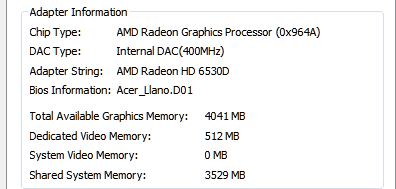
What does it show in these 4 entries?
Total available graphics memory:
Dedicated video memory:
System video memory:
Shared video memory:
 

My Computer

Computer type
PC/Desktop
Computer Manufacturer/Model Number
Dell OptiPlex 9020
OS
Windows 7 Professional SP1 64-bit
CPU
Intel Core i7-4790 3.60 GHz
Memory
32 GB DDR3-1600 MHz
Graphics Card(s)
Integrated Intel HD Graphics 4600
Monitor(s) Displays
Viewsonic 32" LCD
Hard Drives
Kingston SATA 3 240 GB SSD
Internet Speed
Spectrum Internet 1000 Mbps
adpic.png
 

My Computer

Computer Manufacturer/Model Number
Custom Built
OS
Windows 7 Business x64
CPU
Intel Core2 Quad 9550
Motherboard
ASUSTeK P5N72-T PREMIUM
Memory
8GB DDR2 800Mgz
Graphics Card(s)
NVIDIA GeForce 9600 GT (X2)
Sound Card
SoundMax Intergrated Digital HD Audio
Monitor(s) Displays
Acer V223W
Hard Drives
Hitachi 1TB (X2)
Western Digital My Book 1TB EXT HD
PSU
850 Watt
Case
Apevia (with 3 analog guages)
Cooling
ZEROtherm Core92 CPU Cooler, Thermaltake DuOrb (X2)
The AMD Radeon HD 6530D graphics device in your computer has 512 MB of dedicated video memory - which your image confirms.

According to your image, that graphics device is allocated up to 3.45 GB of RAM for shared video memory, but based on the amount of RAM you said is now usable for Windows 7, it appears to be using only 2.61 GB as shared video memory.

I think we're done, and it's almost midnight here, so I'm going to shut down for the night.
 

My Computer

Computer type
PC/Desktop
Computer Manufacturer/Model Number
Dell OptiPlex 9020
OS
Windows 7 Professional SP1 64-bit
CPU
Intel Core i7-4790 3.60 GHz
Memory
32 GB DDR3-1600 MHz
Graphics Card(s)
Integrated Intel HD Graphics 4600
Monitor(s) Displays
Viewsonic 32" LCD
Hard Drives
Kingston SATA 3 240 GB SSD
Internet Speed
Spectrum Internet 1000 Mbps
OK, see you tomorrow. I want to get a little more memory. I run Farming Simulator and that's basically all the life I have.
I want get three 4GBs to make it work better.
Thank You everyone for all your help !!!!
 

My Computer

Computer Manufacturer/Model Number
Custom Built
OS
Windows 7 Business x64
CPU
Intel Core2 Quad 9550
Motherboard
ASUSTeK P5N72-T PREMIUM
Memory
8GB DDR2 800Mgz
Graphics Card(s)
NVIDIA GeForce 9600 GT (X2)
Sound Card
SoundMax Intergrated Digital HD Audio
Monitor(s) Displays
Acer V223W
Hard Drives
Hitachi 1TB (X2)
Western Digital My Book 1TB EXT HD
PSU
850 Watt
Case
Apevia (with 3 analog guages)
Cooling
ZEROtherm Core92 CPU Cooler, Thermaltake DuOrb (X2)
Your computer has a weak AMD A6-3620 APU processor, so buying and installing more RAM in it is a waste of time and money.
 

Attachments

  • Capture.JPG
    Capture.JPG
    16.7 KB · Views: 6

My Computer

Computer type
PC/Desktop
Computer Manufacturer/Model Number
Dell OptiPlex 9020
OS
Windows 7 Professional SP1 64-bit
CPU
Intel Core i7-4790 3.60 GHz
Memory
32 GB DDR3-1600 MHz
Graphics Card(s)
Integrated Intel HD Graphics 4600
Monitor(s) Displays
Viewsonic 32" LCD
Hard Drives
Kingston SATA 3 240 GB SSD
Internet Speed
Spectrum Internet 1000 Mbps
Back
Top