Low Memory warning troubleshooting

mark38090

New member
Local time
6:09 AM
Messages
26
Location
Brooker Florida
Emachines EL1352G
Processor AMD Sempron 145 / 2.8 GHz
Memory 2.0 GB
Hard Drive 500.0 GB - 7200.0 rpm
Operating System Microsoft Windows 7 Home Premium 64-bit Edition
Optical Drive DVD±RW (±R DL) / DVD-RAM
Graphics Processor NVIDIA GeForce 6150 SE
Graphics Controller Integrated

I just recently started getting low memory warnings when the computer is not being used. It just pops up and I have to reboot several times to make it run again. I ran the memory check tool and it found no problems. I try to open task manager when its acting up but it just won't cooperate. Are there any good tools to see whats dumping my memory?
 

My Computer

Computer Manufacturer/Model Number
Emachine EL1352G
OS
Windows 7 Home Premium 64bit
CPU
AMD Athlon II x2 220 processor 2.9GHz
Memory
2gb
Hard Drives
500gb and 150gb external
What are your page file/virtual memory settings? If Windows is handling it automatically it may shrink the page file down too low when there aren't heavy demands. You might try changing to manual control and setting a minimum page file of 1024 MB. Make sure the max is set to at least 2048 MB it Windows does not leave it at unlimited. See what happens.

Also it's a good idea to make sure you have plenty of free space in the partition that has the page file. Usually this is C: partition.
 

My Computer

Computer Manufacturer/Model Number
HP Media Center
OS
Windows 7 32 bit
CPU
AMD 5200+ dual core
Memory
2 GB
Graphics Card(s)
NVidia GeForce 6150SE 128 MB
Monitor(s) Displays
CRT
Screen Resolution
1280x1024
Hard Drives
500 GB Sata internal :

SIIG USB 3.0 docking stations w/WD Caviar Black 6 Gb/s drives
Keyboard
PS/2
Mouse
PS/2 Wheel Mouse
Other Info
SIIG USB 3.0 PCIexpress card.
So this memory problem pops up when the PC is sitting idle, and then you can't open Task Manager, right?

If so, Try this:
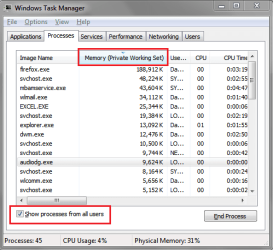
Open Task Manager / Processes tab
Click on Show processes from all users
Sort the list by Memory (Private Working Set) so the highest numbers are at the top of the list (Descending).
To Sort by a column in Task Manager, click on the Column Heading.
Each time you click the heading it will toggle the sort order from ascending to descending.
Now, leave the TM window open and displayed, and let the PC idle to get the Memory popup.
When you get the Memory popup, can you see what program(s) are using so much memory?
Hopefully whatever program(s) are causing your issue will be listed with a HIGH amount of memory at the top of the list.

If you can capture and post a screen print when this happens, that would be great.
If you can't capture and save a screen print, write down the Image Name and Memory amount, and post that info.

Here is an example of what I am trying to explain you want to see
MEMSP01.PNG
 

My Computer

Computer type
PC/Desktop
Computer Manufacturer/Model Number
home built
OS
Multi-Boot W7_Pro_x64 W8.1_Pro_x64 W10_Pro_x64 +Linux_VMs +Chromium_VM
CPU
AMD Athlon II x4 620
Motherboard
Gigabyte GA-MA785G-UD3H
Memory
6GB GSkill DDR2 800
Graphics Card(s)
AMD 4670 GPU + AMD 4200 IGP
Sound Card
on board Realtek ALC889A
Monitor(s) Displays
RCA 40" LCD TV, Insignia 32" LCD TV, HP 15" LCD monitor
Screen Resolution
1680 x 1050
Hard Drives
OCZ Vertex 3 120GB,
Samsung F3 1TB (3),
Several others - WD, Seagate, Hitachi, ...
PSU
Corsair 500 W
Case
Rosewill mid tower
Cooling
CM 90mm rifle
Keyboard
Gyration wireless, Logitech wireless, Dell USB wired
Mouse
Gyration wireless, Logitech wireless, V7 USB wired
Internet Speed
Spectrum - 100Mbps D / 10Mbps U
Antivirus
Avast, MBAM3, EMET, WinPatrol
Browser
Pale Moon, Firefox, IE
Other Info
2 multi-boot PC's
Mainly HTPC/Office/Gen purpose (no gaming).
Trendnet USB KVM.
LG DVD burner/Blue Ray Player.
Tray system for removable SATA backup drives.

Not currently OCd, under-volted.
I use Hybrid sleep, rarely re-boot or shutdown.

Hauppauge HD-PVR, Avermedia PCIe TV Tuner, Hauppauge PCI TV Tuner.
The reason I asked about the page file settings is because I ran a 2 GB system with 32 bit Windows Seven with no swap for awhile. After some time I got OOM errors when there was no "reason" for it. IOW, there was plenty of memory on standby. The system should have discarded that memory to make room as needed. But it wasn't. I changed the settings to create a page file managed according to my settings, and the problem went away.

It's quick enough to try that it's worth a shot. Although it may be a long shot. :)
 

My Computer

Computer Manufacturer/Model Number
HP Media Center
OS
Windows 7 32 bit
CPU
AMD 5200+ dual core
Memory
2 GB
Graphics Card(s)
NVidia GeForce 6150SE 128 MB
Monitor(s) Displays
CRT
Screen Resolution
1280x1024
Hard Drives
500 GB Sata internal :

SIIG USB 3.0 docking stations w/WD Caviar Black 6 Gb/s drives
Keyboard
PS/2
Mouse
PS/2 Wheel Mouse
Other Info
SIIG USB 3.0 PCIexpress card.
I was able to make the suggested change for page file. Now I don't get the error message but computer is unusable. I can't even get task manager to open. It says unable to open security and task manager. If I open ie it takes a good 3-5 minutes for page to open. I'm baffled.
 

My Computer

Computer Manufacturer/Model Number
Emachine EL1352G
OS
Windows 7 Home Premium 64bit
CPU
AMD Athlon II x2 220 processor 2.9GHz
Memory
2gb
Hard Drives
500gb and 150gb external
If this is still the eMachines factory preinstalled WIn7 that is an inferior install larded with bloatware and useless duplicate utilties which interfere with better versions built into WIn7. So I'd do what most tech enthusiasts do and Clean Reinstall - Factory OEM Windows 7 following the steps in blue link tutorial to get it perfect.


Otherwise boot into System Recovery Options to run Startup Repair. If it doesn't offer to System Restore, then choose it from the Options List and work backward until you find a working configuration. But if it's still the factory install then you still have the worst possible install of Win7, so I'd go with the reinstall since we're here to help you.
 
Ok, I finally got into task manager and the hog is (coreserviceshell.exe). It's using 10,599,253 by itself. I googled it and it seems to be related some how to my Trend Micro Titanium anti virus.
 

My Computer

Computer Manufacturer/Model Number
Emachine EL1352G
OS
Windows 7 Home Premium 64bit
CPU
AMD Athlon II x2 220 processor 2.9GHz
Memory
2gb
Hard Drives
500gb and 150gb external
That's great you found the process causing the issue!
When I Google coreserviceshell.exe I see some hits where other folks have performance problems with this.
Here is one Trend Micro article about CPU/Mem issues:
[Hot Fix] B1181 - My computer slows down and CoreServiceShell.exe consumes high CPU usage after installing Titanium 2011
I don't know what version of TM you're using, so that hotfix may not help you...

You should post your issue on the Trend Micro support forum and see if they have a fix for your TM Version/issue...

You could also consider switching to a different AV product...
 

My Computer

Computer type
PC/Desktop
Computer Manufacturer/Model Number
home built
OS
Multi-Boot W7_Pro_x64 W8.1_Pro_x64 W10_Pro_x64 +Linux_VMs +Chromium_VM
CPU
AMD Athlon II x4 620
Motherboard
Gigabyte GA-MA785G-UD3H
Memory
6GB GSkill DDR2 800
Graphics Card(s)
AMD 4670 GPU + AMD 4200 IGP
Sound Card
on board Realtek ALC889A
Monitor(s) Displays
RCA 40" LCD TV, Insignia 32" LCD TV, HP 15" LCD monitor
Screen Resolution
1680 x 1050
Hard Drives
OCZ Vertex 3 120GB,
Samsung F3 1TB (3),
Several others - WD, Seagate, Hitachi, ...
PSU
Corsair 500 W
Case
Rosewill mid tower
Cooling
CM 90mm rifle
Keyboard
Gyration wireless, Logitech wireless, Dell USB wired
Mouse
Gyration wireless, Logitech wireless, V7 USB wired
Internet Speed
Spectrum - 100Mbps D / 10Mbps U
Antivirus
Avast, MBAM3, EMET, WinPatrol
Browser
Pale Moon, Firefox, IE
Other Info
2 multi-boot PC's
Mainly HTPC/Office/Gen purpose (no gaming).
Trendnet USB KVM.
LG DVD burner/Blue Ray Player.
Tray system for removable SATA backup drives.

Not currently OCd, under-volted.
I use Hybrid sleep, rarely re-boot or shutdown.

Hauppauge HD-PVR, Avermedia PCIe TV Tuner, Hauppauge PCI TV Tuner.
You could also consider switching to a different AV product...
Or just make backups and do occasional scans rather than running with a "shield." Sometimes the cure is worse than the disease.
 

My Computer

Computer Manufacturer/Model Number
HP Media Center
OS
Windows 7 32 bit
CPU
AMD 5200+ dual core
Memory
2 GB
Graphics Card(s)
NVidia GeForce 6150SE 128 MB
Monitor(s) Displays
CRT
Screen Resolution
1280x1024
Hard Drives
500 GB Sata internal :

SIIG USB 3.0 docking stations w/WD Caviar Black 6 Gb/s drives
Keyboard
PS/2
Mouse
PS/2 Wheel Mouse
Other Info
SIIG USB 3.0 PCIexpress card.
What does wmpnetwk.exe do? Is it just for networking music and media? I had to disable it because it was usinga ton of resources also. Now my computer is stable but I need a good virus software.
 

My Computer

Computer Manufacturer/Model Number
Emachine EL1352G
OS
Windows 7 Home Premium 64bit
CPU
AMD Athlon II x2 220 processor 2.9GHz
Memory
2gb
Hard Drives
500gb and 150gb external
Are you sure you turned off the WMP Network sharing service completely? It tends to turn itself back on if a batch file is not run to disable it permanently. This is a sales and tracking tool for WMP.

I gave you our most recommended AV.

I would still Clean Reinstall - Factory OEM Windows 7 to get best performance. All of the tools and methods to get and keep a perfect install are there.

eMachines factory pre-installed Win7 is the worst install you can have. Why not get the best, with our help?
 
The clean install is the direction I'm heading.
 

My Computer

Computer Manufacturer/Model Number
Emachine EL1352G
OS
Windows 7 Home Premium 64bit
CPU
AMD Athlon II x2 220 processor 2.9GHz
Memory
2gb
Hard Drives
500gb and 150gb external
Back
Top