Solved Low on memory

s00

New member
Member
VIP
Local time
11:11 PM
Messages
220
Location
SISTAN
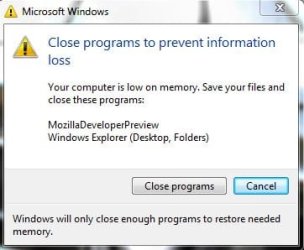
Why is my system shows this error

Capture.JPG
How do I fix it؟
 

My Computer

Computer Manufacturer/Model Number
dell 1558
OS
windows 7 home preminm x64
CPU
i7
Motherboard
dell
Memory
DDR3 4G
Graphics Card(s)
ATI HD 5470 1G
Monitor(s) Displays
15.6 LED
Hard Drives
Hitachi 500G
Is it only Mozilla Developer Preview? Or caused by other programs? If the former then it should likely be directed to the Mozilla mailing list or forum that deals with experimental releases of Mozilla software.

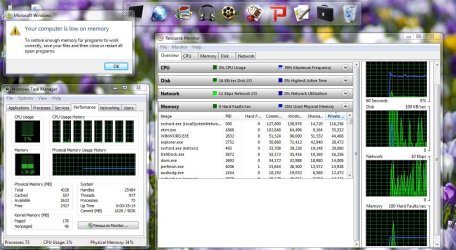
If the latter please give more information. For instance the Resource Monitor screen shot showing memory usage.
 

My Computer

Computer Manufacturer/Model Number
HP Media Center
OS
Windows 7 32 bit
CPU
AMD 5200+ dual core
Memory
2 GB
Graphics Card(s)
NVidia GeForce 6150SE 128 MB
Monitor(s) Displays
CRT
Screen Resolution
1280x1024
Hard Drives
500 GB Sata internal :

SIIG USB 3.0 docking stations w/WD Caviar Black 6 Gb/s drives
Keyboard
PS/2
Mouse
PS/2 Wheel Mouse
Other Info
SIIG USB 3.0 PCIexpress card.

My Computer

Computer type
PC/Desktop
Computer Manufacturer/Model Number
Self built custom
OS
64-bit Windows 11 Pro for Workstations
CPU
Intel i7-8700K OC'd to 5 GHz
Motherboard
ASUS ROG Maximus XI Formula Z390
Memory
64 GB (4x16GB) G.SKILL TridentZ RGB DDR4 3600 MHz
Graphics Card(s)
ASUS ROG-STRIX-GTX1080TI-O11G-GAMING
Sound Card
Integrated
Monitor(s) Displays
2 x Samsung Odyssey G7 27"
Screen Resolution
2560x1440
Hard Drives
1TB Samsung 990 PRO M.2,
4TB Samsung 990 PRO PRO M.2,
TerraMaster F8 SSD Plus NAS
PSU
Seasonic Prime Titanium 850W
Case
Thermaltake Core P3
Cooling
Corsair Hydro H115i
Keyboard
Logitech wireless K800
Mouse
Logitech MX Master 4
Internet Speed
2 Gb/s Download and 100 Mb/s Upload
Antivirus
Malwarebyte Anti-Malware Premium
Browser
Google Chrome
Other Info
Logitech Z625 speaker system,
Logitech BRIO 4K Pro webcam,
HP Color LaserJet Pro MFP M477fdn,
APC SMART-UPS RT 1000 XL - SURT1000XLI,
Galaxy S23 Plus phone
If no other application causes a problem, chances are this developmental program has a huge memory leak.
 

My Computer

Computer Manufacturer/Model Number
HP Media Center
OS
Windows 7 32 bit
CPU
AMD 5200+ dual core
Memory
2 GB
Graphics Card(s)
NVidia GeForce 6150SE 128 MB
Monitor(s) Displays
CRT
Screen Resolution
1280x1024
Hard Drives
500 GB Sata internal :

SIIG USB 3.0 docking stations w/WD Caviar Black 6 Gb/s drives
Keyboard
PS/2
Mouse
PS/2 Wheel Mouse
Other Info
SIIG USB 3.0 PCIexpress card.

My Computer

Computer Manufacturer/Model Number
dell 1558
OS
windows 7 home preminm x64
CPU
i7
Motherboard
dell
Memory
DDR3 4G
Graphics Card(s)
ATI HD 5470 1G
Monitor(s) Displays
15.6 LED
Hard Drives
Hitachi 500G
With the pagefile disabled the commit limit will be something less than RAM size. This can cause some serious problems, even when there is a great deal of available or even free memory available. It can also substantially reduce the amount of memory available. I would urge you to re-enable the pagefile to System Managed.

I have always hated that error dialog because it is so vague in meaning. "Low on memory" has multiple meanings and it doesn't tell you which one. A lack of RAM will reduce performance, possible seriously, but will rarely cause other problems. Hitting the commit limit will cause serious problems. But from the Task Manager numbers it is clear neither condition is true.

Out of memory errors are typically caused when the condition of a processes private address space causes a memory allocation to fail. But closing any number of other applications will have no effect on this situation.

 

My Computer

Computer type
PC/Desktop
Computer Manufacturer/Model Number
HP
OS
Windows 7 Pro 64 bit
CPU
Xeon W3520
Memory
8 GB
Graphics Card(s)
Nvidia Geforce 210
SAEED,

If you set your page file to be managed by the system and restarted the PC afterwards, then you should be good to go if that was the only issue. :)
 

My Computer

Computer type
PC/Desktop
Computer Manufacturer/Model Number
Self built custom
OS
64-bit Windows 11 Pro for Workstations
CPU
Intel i7-8700K OC'd to 5 GHz
Motherboard
ASUS ROG Maximus XI Formula Z390
Memory
64 GB (4x16GB) G.SKILL TridentZ RGB DDR4 3600 MHz
Graphics Card(s)
ASUS ROG-STRIX-GTX1080TI-O11G-GAMING
Sound Card
Integrated
Monitor(s) Displays
2 x Samsung Odyssey G7 27"
Screen Resolution
2560x1440
Hard Drives
1TB Samsung 990 PRO M.2,
4TB Samsung 990 PRO PRO M.2,
TerraMaster F8 SSD Plus NAS
PSU
Seasonic Prime Titanium 850W
Case
Thermaltake Core P3
Cooling
Corsair Hydro H115i
Keyboard
Logitech wireless K800
Mouse
Logitech MX Master 4
Internet Speed
2 Gb/s Download and 100 Mb/s Upload
Antivirus
Malwarebyte Anti-Malware Premium
Browser
Google Chrome
Other Info
Logitech Z625 speaker system,
Logitech BRIO 4K Pro webcam,
HP Color LaserJet Pro MFP M477fdn,
APC SMART-UPS RT 1000 XL - SURT1000XLI,
Galaxy S23 Plus phone
Enabling paging may do it. I had a system with 2 GB ram that really did not need to page. But the system expected it. I set Superfetch to the default settings (3 and 3) and enabled the paging. All the out of memory errors went away.
 

My Computer

Computer Manufacturer/Model Number
HP Media Center
OS
Windows 7 32 bit
CPU
AMD 5200+ dual core
Memory
2 GB
Graphics Card(s)
NVidia GeForce 6150SE 128 MB
Monitor(s) Displays
CRT
Screen Resolution
1280x1024
Hard Drives
500 GB Sata internal :

SIIG USB 3.0 docking stations w/WD Caviar Black 6 Gb/s drives
Keyboard
PS/2
Mouse
PS/2 Wheel Mouse
Other Info
SIIG USB 3.0 PCIexpress card.
Enabling the pagefile may not solve the current problem but is good insurance against future problems. The big problem in doing this is the drastic reduction in the commit limit. With 4 GB RAM and a system managed pagefile this will initially be almost 8 GB. But that is only a soft limit and could go as high as near 16 GB in an emergency without any change in configuration. That should be enough for any normal workload with a comfortable safety margin besides.

With no pagefile the commit limit is somewhat less than RAM size, in this case 4026 MB. And this is a hard limit with no possibility of increasing it. Bad things happen when the commit limit is reached. If you are lucky it may mean only an error message. Or it could mean an application failure with the loss of any unsaved work. Or it could mean a BSOD with an ubrupt termination of all processes.

The commit charge and limit is difficult to explain and I will not try to do so here. It has nothing to do with actual usage of RAM, the pagefile, or any combination of the two. Just be sure the commit charge never reaches the limit.

Advice to disable the pagefile (which can be found all over the Internet) is almost always misguided and is based on a misunderstanding of how the pagefile is actually used. The pagefile is not just an alternative to RAM when it runs short. It was designed to improve performance and it usually does.
 

My Computer

Computer type
PC/Desktop
Computer Manufacturer/Model Number
HP
OS
Windows 7 Pro 64 bit
CPU
Xeon W3520
Memory
8 GB
Graphics Card(s)
Nvidia Geforce 210
I don't know about SP1 but pre-SP1 W7 Ultimate there's some kind of bug. I would have over a GB on standby and be running no memory intensive programs. I'd still get the occasional OOM. It likes prefetch settings to be the default and it likes a page file. Even though the page file is virtually unused. So as compromise I set a 4 GB page file. No more OOM. Of course the min/max both set to 4 GB does not work for everyone. But it works for me.
 

My Computer

Computer Manufacturer/Model Number
HP Media Center
OS
Windows 7 32 bit
CPU
AMD 5200+ dual core
Memory
2 GB
Graphics Card(s)
NVidia GeForce 6150SE 128 MB
Monitor(s) Displays
CRT
Screen Resolution
1280x1024
Hard Drives
500 GB Sata internal :

SIIG USB 3.0 docking stations w/WD Caviar Black 6 Gb/s drives
Keyboard
PS/2
Mouse
PS/2 Wheel Mouse
Other Info
SIIG USB 3.0 PCIexpress card.
Back
Top