
Hello
I was running Smite just fine yesterday, got a constant 150fps all the time. Now, I've been getting less that, fps is usually floating around 110-140. Nothing has changed as far as I can think, no Windows updates or game updates, nothing. I get fps drops in other games too (Diablo 2 actually, down to like 48fps from 50fps at times ) and some things in my computer seem a bit sluggish. Chrome takes around a second to close, and I think it used to be faster just yesterday.
Some windows, when dragged are choppy. Python's IDLE window and Afterburner at least do this, not nearly all windows do it. Might be just the programs, but I happened to notice it today and mentioned it incase it helps. The main problem is the sudden FPS drop, I might be more sensitive to see all these other "problems" which might be nothing. Just trying to provide as much information as I can.
I've tried:
Malwarebytes Antimalware, found nothing. Same with Avast
CrystalDiskInfo, all seems to be good
Event viewer, some errors, nothing that should affect performance. Not an expert though
All cables are properly connected inside the case
GPU temps are fine, always under 50c, cpu is running around 70c when playing Smite.
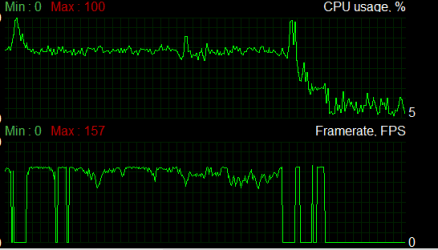
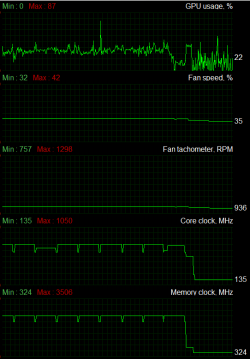
Here are some screenshots from Afterburner right after I stopped playing Smite. The 0 fps is just from alt tabbing. The weird "chops" in gpu memory and core clocks are weird to me, but maybe it's normal.
Any help is much appreciated, I'm stuck with no idea what to do next.
I was running Smite just fine yesterday, got a constant 150fps all the time. Now, I've been getting less that, fps is usually floating around 110-140. Nothing has changed as far as I can think, no Windows updates or game updates, nothing. I get fps drops in other games too (Diablo 2 actually, down to like 48fps from 50fps at times
) and some things in my computer seem a bit sluggish. Chrome takes around a second to close, and I think it used to be faster just yesterday. Some windows, when dragged are choppy. Python's IDLE window and Afterburner at least do this, not nearly all windows do it. Might be just the programs, but I happened to notice it today and mentioned it incase it helps. The main problem is the sudden FPS drop, I might be more sensitive to see all these other "problems" which might be nothing. Just trying to provide as much information as I can.
I've tried:
Malwarebytes Antimalware, found nothing. Same with Avast
CrystalDiskInfo, all seems to be good
Event viewer, some errors, nothing that should affect performance. Not an expert though
All cables are properly connected inside the case
GPU temps are fine, always under 50c, cpu is running around 70c when playing Smite.
Here are some screenshots from Afterburner right after I stopped playing Smite. The 0 fps is just from alt tabbing. The weird "chops" in gpu memory and core clocks are weird to me, but maybe it's normal.
Any help is much appreciated, I'm stuck with no idea what to do next.
My Computer
- Computer type
- PC/Desktop
- Computer Manufacturer/Model Number
- Custom
- OS
- Windows 7 Home Premium x64
- CPU
- Intel i5 3570k
- Motherboard
- MSI H77MA-G43
- Memory
- 16 gb
- Graphics Card(s)
- Asus Strix Gtx 970
- Screen Resolution
- 1920x1080
- Hard Drives
- Corsair force 120 gb SSD
1 Tb hdd
- PSU
- EVGA SuperNova G2 650 W
- Antivirus
- Avast
- Browser
- Chrome


