
Macrium Image Backup & Dual Boot Configurations.

MrJWilson

New member
Local time
3:34 PM
Messages
53
Location
United Kingdom
Hi,

I am new to these forums but hopefully I’ve posted this in the correct spot.

I have set up a dual boot configuration containing two Windows 7 64-bit operating systems (OS) - one specifically geared for “Audio Use”, no internet, antivirus, etcetera, and the other for “General Use”, internet surfing and has antivirus protection enabled and all the other bloating programs and services running on it.

Each OS is installed on its own partition, on its own dedicated hard disk. When booted into each one, it sees itself as the C: drive and the other one as the D: drive. The three hard disks also contain other partitions dedicated for data storage (music, pictures, videos documents).

To clarify:

Disk 0 – System Reserved partition (100MB) created automatically after the dual boot was setup, and one created data / documents partition.

Disk 1 – Win 7 64 OS partition, and one documents partition.

Disk 2 – Win 7 64 OS partition, three other documents partitions.


See Disk Management Screengrab below.
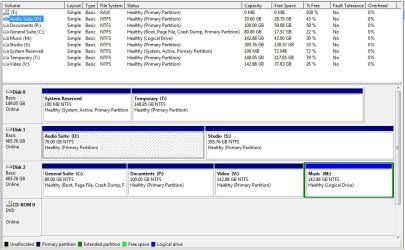
Disk Management.jpg

I have spent a very long time getting everything customised the way I want (all working fine currently), and even longer searching for image backup software that is reliable for handling and restoring a dual boot system, without failing, ruining the MBR, boot order, etc.

I find it difficult to find the answers from searching this topic online because most people are dealing with one Win 7 OS or if they multiboot, its typically with an older Windows version such as XP, or Linux. The boot handling I believe is different in those scenarios.

I have almost settled on using Macrium Reflect, free or paid version (or maybe Paragon) and have extensively read the Macrium help forums, guides and your own dedicated pinned topic but they all deal with a simpler scenario of one operating system which seems straightforward and much less prone to boot problems upon restore.

How would one best go about backing up the type of dual boot configuration I have described?

I realise Macrium doesn’t support “cold-imaging” so the backup has to be performed from inside the operating system. Since this is dual boot, would it make significant differences which OS I make the backup from?

Would I be better selecting both OS partitions (and the system reserved and MBR) all together for backup, from inside one of these operating systems (e.g. my “General Use” Win7 OS), which one?, or should I back each operating system independently as a separate image, from inside its respective operating system, for example, taking backup of the “Audio” partition from inside the “Audio” Windows 7 OS?


I hope I have made that clear but if not I’ll try and describe it better. Does any of this make any difference to the success of a backup / restore in reality?

I am concerned with how to do this all correctly because there is a third “System reserved” partition on the other disk and I’m not sure how this fits into the proposed backup methods described above, especially if I opt for the independent OS backup method?

Again I have read thoroughly about the Macrium restore process with the free version and Linux Boot disc, or using the paid version with a Windows PE boot disc, but I am still unclear about how to specifically restore two operating systems to their corresponding partition spaces / disks, so that after restore and reboot, I am able to still select which OS to boot into, just as before.

Would I need to restore the first OS as the first step, then boot into this, then restore the second after that, or would I restore them both at the same time?

I’m convinced there is more complexity to all this and that one false step will render the whole backup prone to failure if I do not understand it correctly beforehand. What I am trying to avoid is a scenario where I try to restore the images after a catastrophic event but nothing then boots up, the MBR gets messed up and everything is a confused, in which case I’d likely have to reinstall everything (Win 7, updates, drivers) from scratch TWICE! (:eek:shudders :sick:).

I apologise for the VERY long post but any help and clarification regarding all this - multiboot systems of the same OS and the image backup process would be appreciated a lot! Who knows, this topic may help alot of other multibooters with backing up their systems.


Thanks guys.

J.
 

My Computer My Computer

Computer Manufacturer/Model Number
Custom Build
OS
Windows 7 Home Premium 64bit SP1 (x2. Dual Boot)
CPU
Intel(R) Core(TM) i5 CPU 750 @2.67GHz
Motherboard
ASUS P7P55D
Memory
Corsair DDR3 4096MB
Graphics Card(s)
ATI Radeon HD 4650
Sound Card
RME HDSP 9632
Monitor(s) Displays
Two LCD Sharp Monitors (Dualscreen)
Hard Drives
1 x SAMSUNG HD502HJ 500GB
1 x WDC WD1600AAJS-00L7A0 - 160GB
1 x WDC WD5000AAKB-00UKA0 - 500GB
PSU
Corsair PSU 600W
Case
Lilan Li
With separate HD's the cleanest dual boot method is via the BIOS, unplugging the first OS HD during install of the second, so that when you plug the first back in you'll set the preferred OS as first to boot in BIOS setup, then boot the other using one-time BIOS Boot menu key.

This keeps the HD's independent to come and go as you please.

This avoids the mess such as you have with the boot partition, first OS and Second OS on three separate HD's.

You can take a Macrium Image of either OS but it would have to be repaired once reimaged, by marking it Active then running Startup Repair up to 3 separate times with reboots to write the System boot files to the partition.

You could configure it correctly now by unplugging DISK0 temporarily along with one of the OS HD's, set the remaining OS HD first to boot in BIOS (after DVD drive), mark Win7 partition Active then runn the Startup Repairs. Partition - Mark as Active
Startup Repair - Run 3 Separate Times

Once Win7 starts on it's own, power down to unplug it, plug in the other OS HD and repeat the process.
 
Hi,

I am new to these forums but hopefully I’ve posted this in the correct spot.

I have set up a dual boot configuration containing two Windows 7 64-bit operating systems (OS) - one specifically geared for “Audio Use”, no internet, antivirus, etcetera, and the other for “General Use”, internet surfing and has antivirus protection enabled and all the other bloating programs and services running on it.

Each OS is installed on its own partition, on its own dedicated hard disk. When booted into each one, it sees itself as the C: drive and the other one as the D: drive. The three hard disks also contain other partitions dedicated for data storage (music, pictures, videos documents).

To clarify:

Disk 0 – System Reserved partition (100MB) created automatically after the dual boot was setup, and one created data / documents partition.

Disk 1 – Win 7 64 OS partition, and one documents partition.

Disk 2 – Win 7 64 OS partition, three other documents partitions.


See Disk Management Screengrab below.

View attachment 151428

I have spent a very long time getting everything customised the way I want (all working fine currently), and even longer searching for image backup software that is reliable for handling and restoring a dual boot system, without failing, ruining the MBR, boot order, etc.

I find it difficult to find the answers from searching this topic online because most people are dealing with one Win 7 OS or if they multiboot, its typically with an older Windows version such as XP, or Linux. The boot handling I believe is different in those scenarios.

I have almost settled on using Macrium Reflect, free or paid version (or maybe Paragon) and have extensively read the Macrium help forums, guides and your own dedicated pinned topic but they all deal with a simpler scenario of one operating system which seems straightforward and much less prone to boot problems upon restore.

How would one best go about backing up the type of dual boot configuration I have described?

I realise Macrium doesn’t support “cold-imaging” so the backup has to be performed from inside the operating system. Since this is dual boot, would it make significant differences which OS I make the backup from?

Would I be better selecting both OS partitions (and the system reserved and MBR) all together for backup, from inside one of these operating systems (e.g. my “General Use” Win7 OS), which one?, or should I back each operating system independently as a separate image, from inside its respective operating system, for example, taking backup of the “Audio” partition from inside the “Audio” Windows 7 OS?


I hope I have made that clear but if not I’ll try and describe it better. Does any of this make any difference to the success of a backup / restore in reality?

I am concerned with how to do this all correctly because there is a third “System reserved” partition on the other disk and I’m not sure how this fits into the proposed backup methods described above, especially if I opt for the independent OS backup method?

Again I have read thoroughly about the Macrium restore process with the free version and Linux Boot disc, or using the paid version with a Windows PE boot disc, but I am still unclear about how to specifically restore two operating systems to their corresponding partition spaces / disks, so that after restore and reboot, I am able to still select which OS to boot into, just as before.

Would I need to restore the first OS as the first step, then boot into this, then restore the second after that, or would I restore them both at the same time?

I’m convinced there is more complexity to all this and that one false step will render the whole backup prone to failure if I do not understand it correctly beforehand. What I am trying to avoid is a scenario where I try to restore the images after a catastrophic event but nothing then boots up, the MBR gets messed up and everything is a confused, in which case I’d likely have to reinstall everything (Win 7, updates, drivers) from scratch TWICE! (:eek:shudders :sick:).

I apologise for the VERY long post but any help and clarification regarding all this - multiboot systems of the same OS and the image backup process would be appreciated a lot! Who knows, this topic may help alot of other multibooters with backing up their systems.


Thanks guys.

J.

Free Download EASEUS Todo Backup Freeware and Trial version. Complete Backup and Restore Software for Windows & Linux.

The freeware is more than adequate for most home scenarios.

Regards....Mike Connor
 

My Computer My Computer

OS
Several, including Windows 7 x64 Ultimate
I use free Macrium and frequently image several partitions together. For Macrium it does not really matter what is inside the partition. You can very well image system partition2 from system1. You can also image them seperatly with or without the data partitions appended.

But when it comes to restoring, you have to restore each partition seperately. And that is a good thing because it is unlikely that all partitios go down at the same time.

The active 100MB partition you have to image only once and usually you do not restore it (unless the disk breaks and you have to migrate to a new disk). The MBR you never touch. If that breaks, you rebuild it with appropriate tools.

PS: I think what Greg suggests is the best setup. I was using that for a long time running Win7 and Vista on the same system.

Here is a Macrium tutorial I put together a while ago: http://www.sevenforums.com/tutorials/73828-imaging-free-macrium.html?ltr=I
 

My Computer My Computer

Computer Manufacturer/Model Number
HP, Dell, Gateway, Toshiba - 4 laptops and 2 desktops
OS
Vista, Windows7, Mint Mate, Zorin, Windows 8
CPU
from 1.6GHz Duo to i7
Monitor(s) Displays
2x HP w2207
Hard Drives
5x HDD, 7x SSD, 12x Externals
Keyboard
with trackball - no mices
Mouse
Trackball mice
Internet Speed
DSL 6000
Hey,

Thanks for all the replies. That was quick! I must confess I’m much of a computer novice so just to clarify a few things if I can.

I think I understand what you are saying Greg – so this method simply keeps both OS completely independent from each other, with their own dedicated system boot files, nothing is shared between the two OS, and for example, on computer power up it would boot straight into “General OS”?


Only if I needed to use the other OS, I would press F8/F12 (I forget which) for BIOS one time menu and select the “Audio” OS and boot into that without issue. It does sound like a more elegant solution, and one I assume has no disadvantages or potential issues compared to my current method of dual booting with the boot menu choice? Can I name these operating systems like they are when I select from the boot menu?


I’m to assume the dual boot method I have used is needlessly complex when I have multiple drives, and is typically used for people with a single partitioned hard disk then? Wish I had known about this sooner now :)


The backing up and restore procedure is where I’m still a little confused. In this scenario I’m to assume I could use the free Macrium Reflect (no need for pro version then?) installed on each independent OS/drive and I just create the image of its System partition independently, like you typically would do with a computer running a single OS, and this would entirely bypass the potential issues I first questioned regarding taking multiple images at the same time and from which OS perspective. Is that all correct? Thank you very much whs for the clarification on Macrium and dealing with multiple system partitions, still useful to know.

I am very keen to switch to the method you have outlined Greg as this appears the simplest to restore in the event one drive breaks and needs replacing. This way it would not render the other OS/drive unbootable. This is because boot files are not being shared between the two right? Complete independence. :party:


Could I migrate from my current dual boot configuration to this way without a massive headache i.e having to install from scratch the operating systems or without messing up both currently functioning OS? I am not sure what would happen to the system partition that is on DISK0 after doing all of this?

If you wouldn’t mind giving me a very brief step by step tutorial or clarifying mine, it would be of massive help as I’m very new to all of this area and do not want to ruin my current system.

_________________________________________________________________

So is this method, described in complete laymens terms, correct?

1. First things first, I would make sure all files, documents are backed up, and I would use Macrium to create two separate OS images (just in case...), keeping in mind what WHS mentions about dual boot system image partitioning.

2. How do I actually "uninstall" a hard drive? Do I just unconnect it? I would want to make the “General Suite” OS (DISK2) the default to load on system start up so I would power everything down and unplug both Disk 0 (contains the shared system reserved partition) and Disk 1 (contains Audio OS, and is the one I want to boot from the BIOS one time F8 menu). I would then set in BIOS, Disk 2 General OS to boot automatically after CD/DVD drive. Is that the right order or do I connect DISK 1 first and connect DISK2 and DISK 0 last?


Doing this step I assume means that on power up I can at least boot into one of the OS(whichever drive is connected) and everything should function correctly?

3. I would then, once booted into this OS, use disk management is mark the Win 7 system partition as active, or use the other methods outlined in the linked tutorial in the case it won’t boot in the first place.

4. I would then run my Windows 7 repair disc and run the start-up repair three times, rebooting after each one. This would, at this point in the process be the exact equivalent of a single boot system right? Disk Management would not display a separate system reserved partition and the boot menu would no longer have the OS choices like it currently does (I renamed them using EasyBCD after both were installed)?

5. I would then power down the computer and plug in both Disk 0 and Disk 1. Can I do this at the same time or will it confuse BIOS? DISK 0 does not contain an OS. How would I boot into Disk 1’s operating system if by default the system boots immediately into DISK2 General OS?

6 I boot into this Disk 1 Audio OS and mark as active, then run WIN 7 repair disc's start-up repair three times then reboot.

From this point, where exactly does this leave my system? Are the two OS now both entirely independent from each other with no separate “system reserved partition” on Disk 0? Do I need to do anything to enable Disk 2 General OS to boot by default? From here on could I select F8 to boot into the one time BIOS menu and load the Audio OS?

Are both OS the way I left them or are they like a fresh Windows install where I need to install all Windows updates? Am I confusing start-up repair with system repair or similar?

Can I rename these OS using EasyBCD and is there a way to make longer, the option to press F8 after power up? When in each OS, can I see the other drives and partitions? This is important for me to be able to do?

In the case of backing up, I would just install Macrium in each OS and backup the corresponding active system partition to an image, giving me two images in total. From here this would simply be a case of using the Linux boot CD to restore the system partition, one at a time and following the unplug drive, mark active and 3 start-up repair steps in the exact way outlined above.

Really sorry for all the questions but hopefully this topic could be quite a comprehensive one, what with the million questions in it :). Thanks for the help.

J.
 

My Computer My Computer

Computer Manufacturer/Model Number
Custom Build
OS
Windows 7 Home Premium 64bit SP1 (x2. Dual Boot)
CPU
Intel(R) Core(TM) i5 CPU 750 @2.67GHz
Motherboard
ASUS P7P55D
Memory
Corsair DDR3 4096MB
Graphics Card(s)
ATI Radeon HD 4650
Sound Card
RME HDSP 9632
Monitor(s) Displays
Two LCD Sharp Monitors (Dualscreen)
Hard Drives
1 x SAMSUNG HD502HJ 500GB
1 x WDC WD1600AAJS-00L7A0 - 160GB
1 x WDC WD5000AAKB-00UKA0 - 500GB
PSU
Corsair PSU 600W
Case
Lilan Li
You can use the bios boot key method Greg mentioned if you like.

I never do - but it's personal preference.

I have multiple o/s running - well over 30 items on my boot menu when you include wims , iso's and vhd's.

The way you have it set up already is ok.

In the case of backing up, I would just install Macrium in each OS and backup the corresponding active system partition to an image, giving me two images in total. From here this would simply be a case of using the Linux boot CD to restore

Yes, that should be fine.

There is no option for making images offline - but you can manage without.

The free Paragon is very good, too.

Whichever you prefer.
 

My Computers My Computers

System One System Two

  • Computer type
    PC/Desktop
    OS
    7 X64
    CPU
    i5 8400
    Motherboard
    gigabyte b365m ds3h
    Memory
    2x8gb 3200mhz
    Hard Drives
    various
    PSU
    pure power 11 400w cm
    Case
    Coolermaster
    Cooling
    cryorig m9i
  • Computer type
    PC/Desktop
    OS
    7x64
    CPU
    g5400
    Motherboard
    ga b365m ds3h
    Memory
    8gb ddr4 2400
    PSU
    xfx pro 450w
Couple of comments on Macrium ...

Strongly recommend purchasing it, if for no other reason, that to be able to create the WinPE boot disk.

With that, you can do the following:
1) Automatically add the drivers needed for your PC to the boot disk (MR has a free add-on for this)
2) Boot from it and backup/restore -- without needing a working OS on your PC
3) Run a Boot repair option from it -- which does the MS Startup Repair three steps in one pass.

I have found, unfortunately, if you also use the option to install the MR Boot to your hard drive, while the good news is that you don't need the boot disk anymore, the bad news is that if you then restore an image, the PC will no longer boot -- and you will need the WinPE Boot Disk (or your Win7 DVD) to repair the boot loader.
 

My Computer My Computer

Computer type
PC/Desktop
Computer Manufacturer/Model Number
Custom
OS
Win7 Pro 32-bit, Win8 Pro 32-bit
CPU
AMD Phenom II X6 1090T
Motherboard
Gigabyte
Memory
4GB ddr3 1300
Graphics Card(s)
AMD HD 4290 onboard
Sound Card
Builtin Realtek HD Audio
Monitor(s) Displays
Samsung 24" widescreen, LG 23" widescreen
Screen Resolution
1920x1200/1920x1080
Hard Drives
Kingston 256GB SSD
Keyboard
Logitech Illuminated Keyboard
Mouse
Logitech M705 wireless mouse
Antivirus
Norton Av 2013
Browser
IE v10
It seems the boot corrector - tho impressive in many ways, resets your o/s letters to C.

Fine for most people, but a touch inconvenient fo rme.

The couple of times I tried Macrium boot corrector, I had to fix it afterwards with Paragon boot corrector as I'm too lazy to do it manually.
 
Last edited:

My Computers My Computers

System One System Two

  • Computer type
    PC/Desktop
    OS
    7 X64
    CPU
    i5 8400
    Motherboard
    gigabyte b365m ds3h
    Memory
    2x8gb 3200mhz
    Hard Drives
    various
    PSU
    pure power 11 400w cm
    Case
    Coolermaster
    Cooling
    cryorig m9i
  • Computer type
    PC/Desktop
    OS
    7x64
    CPU
    g5400
    Motherboard
    ga b365m ds3h
    Memory
    8gb ddr4 2400
    PSU
    xfx pro 450w
Thanks for the tips on Macrium. Although I see the advantages in terms of convenience, for using the paid Macrium version, I may be able to do what I need with the free version (simple OS backup inside each one) if I follow Greg's method. I have Hiren's bootable CD (which contains Macrium) and I have the Windows repair disc too, so I believe I could use that for startup repairs. It would be great to get some more clarification on Greg's method before I attempt it, so that I don't make silly mistakes. Hopefully I have not alientated everyone with my long posts and questions about it.

Thanks guys, much appreciated.
 

My Computer My Computer

Computer Manufacturer/Model Number
Custom Build
OS
Windows 7 Home Premium 64bit SP1 (x2. Dual Boot)
CPU
Intel(R) Core(TM) i5 CPU 750 @2.67GHz
Motherboard
ASUS P7P55D
Memory
Corsair DDR3 4096MB
Graphics Card(s)
ATI Radeon HD 4650
Sound Card
RME HDSP 9632
Monitor(s) Displays
Two LCD Sharp Monitors (Dualscreen)
Hard Drives
1 x SAMSUNG HD502HJ 500GB
1 x WDC WD1600AAJS-00L7A0 - 160GB
1 x WDC WD5000AAKB-00UKA0 - 500GB
PSU
Corsair PSU 600W
Case
Lilan Li
Here is how I'd do it: Boot into Win7 on Disk1, in Disk Management rightclick C to Mark Active. Or use free Partition Wizard bootable CD: Partition Wizard

Power down, open case to swap the data cable from Disk0 to Disk 2, leaving DIsk 0 unplugged until all repairs are completed.

Set the new Disk0 containing C drive as first to Boot in BIOS setup, boot 64 bit Repair CD, accept any offered Repair. If Win7 won't start up, boot back into Repair console to run Startup Repair up to 3 separate times until Win7 starts on it's own.

Now power down to temporarily unplug Disk 0 (C), set DIsk1 (D) as first to boot in BIOS setup, boot into Repair CD, press Shift + F10 at first screen to open Command Line to mark D Active: Partition - Mark as Active. You can also use free PW CD to do this with a picture of what you're doing.

Close Command Box, select Repair Your Computer, accept any offered Repair, if Win7 doesn't start, boot back into run Startup Repair up to 3 separate times with reboots until Win7 starts on its own.

Once Win7 on D starts, plug back in Disk0, set preferred OS HD as first to boot in BIOS setup, boot the other using Asus F8 BIOS Boot Menu key.

If one OS starts up to old Windows Dual Boot menu, delete the other's listing in msconfig>Boot or using EasyBCD 2.02 to Edit Boot Menu.

You can now plug back in the original DISK0 with System Reserved to delete it in Disk Mgmt, or using Diskpart "Force Delete Override" command from Elevated Command Prompt.
 
I think this statement to be false
"I realise Macrium doesn’t support “cold-imaging” so the backup has to be performed from inside the operating system."

A couple of months ago M.S. sneaked in unannounced an update that was supposed to be an enhancement to WGA.
My system had already been validated, and had the enhancement found evidence to cancel validation it was supposed to inconvenience me periodically.

Soon after Windows trashed itself - totally non-responsive to anything other than pulling the plug within 1.5 minutes of switching on - absolutely repeatable every time.

I wanted to make a backup to preserve all MY changes that I had made after the backup image of the previous week. (I ALWAYS make an image before I permit any Windows Update - but Microsoft forced the update without notice),

1.5 minutes was not long enough for a "hot-image" created under Windows.

I plugged in the Macrium P.E. Boot recovery disc and used its option to create an image.

Then I used the Boot Disc to restore from the good image.
With Windows back to normal I mounted the Macrium image of the trashed system,
and used BestSync to compare the trashed partition with the restored partition C:\,
and then within a few minutes I deselected several thousand files that Windows is always updating, and then BestSync updated my restored system C:\ with my good changes in the trashed image.

N.B. Now under Live Windows I create a total DISC "hot-image" backup of ALL partitions (the active system reserved and System C:\ and programs + data) held on the primary Disc. At any time I may select and restore any partition, and I can restore the whole drive, i.e. all partitions + Partition Table + MBR etc. I do not have to worry about which partition to restore first.
I would expect no difficulty with a Dual O.S. on the same HDD, and it should be feasible to use either O.S. to create the image, and also the O.S. used for creation should not affect which O.S. is used for restoration.

My backup files are held on the Secondary drive and also an ESATA connected external HDD.

It takes about 2.5 minutes to create a Daily Incremental backup of my entire primary drive under Live Windows, and not much longer for a weekly Differential backup.
 
Last edited:

My Computer My Computer

Computer Manufacturer/Model Number
ASUSTeK Computer INC. M3A32-MVP DELUXE (CPU 1)
OS
Windows 7 Ultimate 64 bit SP1 x64
CPU
AMD Phenom X4 9500
Motherboard
ASUSTeK M3A32-MVP Deluxe (CPU 1)
Memory
8 GB
Graphics Card(s)
ATI Radeon HD 4600 Series
Sound Card
AMD High Definition Audio Device
Monitor(s) Displays
SyncMaster (1680x1050@60Hz)
Hard Drives
59GB OCZ-VERTEX2 ATA Device
+
977GB SAMSUNG HD103SJ ATA Device
+
625GB WDC WD6401AALS-00L3B2 ATA Device
Thanks for the detailed instructions Greg. I will attempt this soon as it seems to keep things much simpler for backing up and restoring. I do hope that running these windows repairs on the operating system installations will preserve (with the exception of anything boot related obviously) my current settings, updates, programs and customisations and not take it back to the point of a fresh pre-service pack 1 W7 install?

That might be a silly question but I have never used this repair feature before. I have always just reinstalled both operating systems to the dual boot config I have now. Very time consuming.
 

My Computer My Computer

Computer Manufacturer/Model Number
Custom Build
OS
Windows 7 Home Premium 64bit SP1 (x2. Dual Boot)
CPU
Intel(R) Core(TM) i5 CPU 750 @2.67GHz
Motherboard
ASUS P7P55D
Memory
Corsair DDR3 4096MB
Graphics Card(s)
ATI Radeon HD 4650
Sound Card
RME HDSP 9632
Monitor(s) Displays
Two LCD Sharp Monitors (Dualscreen)
Hard Drives
1 x SAMSUNG HD502HJ 500GB
1 x WDC WD1600AAJS-00L7A0 - 160GB
1 x WDC WD5000AAKB-00UKA0 - 500GB
PSU
Corsair PSU 600W
Case
Lilan Li
You can make a back image with macrium pe disc - not with macrium linux disc
 

My Computers My Computers

System One System Two

  • Computer type
    PC/Desktop
    OS
    7 X64
    CPU
    i5 8400
    Motherboard
    gigabyte b365m ds3h
    Memory
    2x8gb 3200mhz
    Hard Drives
    various
    PSU
    pure power 11 400w cm
    Case
    Coolermaster
    Cooling
    cryorig m9i
  • Computer type
    PC/Desktop
    OS
    7x64
    CPU
    g5400
    Motherboard
    ga b365m ds3h
    Memory
    8gb ddr4 2400
    PSU
    xfx pro 450w
I think this statement to be false
"I realise Macrium doesn’t support “cold-imaging” so the backup has to be performed from inside the operating system."

...I plugged in the Macrium P.E. Boot recovery disc and used its option to create an image.

Then I used the Boot Disc to restore from the good image...

Interesting. I thought even the pro version of Macrium didn't support that way of imaging, but only inside the OS. I am not sure if Hiren's Boot CD effectivly gives me the Macrium Windows PE feature or if there are drawbacks. Anyone tried it?

http://www.sevenforums.com/backup-restore/132113-macrium-users-hirens-boot-cd.html
 

My Computer My Computer

Computer Manufacturer/Model Number
Custom Build
OS
Windows 7 Home Premium 64bit SP1 (x2. Dual Boot)
CPU
Intel(R) Core(TM) i5 CPU 750 @2.67GHz
Motherboard
ASUS P7P55D
Memory
Corsair DDR3 4096MB
Graphics Card(s)
ATI Radeon HD 4650
Sound Card
RME HDSP 9632
Monitor(s) Displays
Two LCD Sharp Monitors (Dualscreen)
Hard Drives
1 x SAMSUNG HD502HJ 500GB
1 x WDC WD1600AAJS-00L7A0 - 160GB
1 x WDC WD5000AAKB-00UKA0 - 500GB
PSU
Corsair PSU 600W
Case
Lilan Li
I think this statement to be false
"I realise Macrium doesn’t support “cold-imaging” so the backup has to be performed from inside the operating system."

...I plugged in the Macrium P.E. Boot recovery disc and used its option to create an image.

Then I used the Boot Disc to restore from the good image...

Interesting. I thought even the pro version of Macrium didn't support that way of imaging, but only inside the OS. I am not sure if Hiren's Boot CD effectivly gives me the Macrium Windows PE feature or if there are drawbacks. Anyone tried it?

http://www.sevenforums.com/backup-restore/132113-macrium-users-hirens-boot-cd.html

Tried it, and also Macrium on a number of machines. The boot disks wont work with certain graphic cards/onboard graphic chips.

If it works on your machine, then it's fine. But try it before you rely on it. It is no use at all being able to make an image from inside the system and then being unable to restore it.

Regards....Mike Connor
 
Last edited:

My Computer My Computer

OS
Several, including Windows 7 x64 Ultimate
Thanks for the detailed instructions Greg. I will attempt this soon as it seems to keep things much simpler for backing up and restoring. I do hope that running these windows repairs on the operating system installations will preserve (with the exception of anything boot related obviously) my current settings, updates, programs and customisations and not take it back to the point of a fresh pre-service pack 1 W7 install?

That might be a silly question but I have never used this repair feature before. I have always just reinstalled both operating systems to the dual boot config I have now. Very time consuming.

Startup Repair only repair or writes the System boot files to the target partition, nothing in the OS is affected.

Be sure to back up your files first, and a Win7 backup image, any time you do repairs or repartitioning.
 
When the Acronis forums were in Wilders I found one experienced Guru that advised :-
An image should always be validated before using it;
The HDD drivers on the Boot CD may be incompatible with the HDD and unable to restore a partition;
Even a fully restored partition may fail to be un-bootable, so he preferred to use two HDD so that if he had the option to swap to the other working HDD.

It was certainly my experience with Acronis that the Linux drivers were very bad at reading the image files on a NTFS partition. I found that restoring C:\ to a NTFS partition was 3 times faster if the image files were held in FAT32 partitions rather than NTFS.

I have no such concern with the Macrium Windows PE Boot Disc.

My secondary HDD has one partition for image files, and space in which I restored an image of C:\ before I risked losing everything with an over-write of C:\ at the start of my first attempt restoring an image.
I also ensured that I had two separate validated image files on different HDD before I ever took the plunge and restored an image to C:\.

I am now much more relaxed and when an image is created it is automatically validated,
and should I ever need to restore it I assume it is still valid and nothing will go wrong,
knowing that if the image file has been corrupted I can fall back to the previous day's image.
 

My Computer My Computer

Computer Manufacturer/Model Number
ASUSTeK Computer INC. M3A32-MVP DELUXE (CPU 1)
OS
Windows 7 Ultimate 64 bit SP1 x64
CPU
AMD Phenom X4 9500
Motherboard
ASUSTeK M3A32-MVP Deluxe (CPU 1)
Memory
8 GB
Graphics Card(s)
ATI Radeon HD 4600 Series
Sound Card
AMD High Definition Audio Device
Monitor(s) Displays
SyncMaster (1680x1050@60Hz)
Hard Drives
59GB OCZ-VERTEX2 ATA Device
+
977GB SAMSUNG HD103SJ ATA Device
+
625GB WDC WD6401AALS-00L3B2 ATA Device
I use free Macrium and frequently image several partitions together. For Macrium it does not really matter what is inside the partition. You can very well image system partition2 from system1. You can also image them seperatly with or without the data partitions appended.

But when it comes to restoring, you have to restore each partition seperately. And that is a good thing because it is unlikely that all partitios go down at the same time.

The active 100MB partition you have to image only once and usually you do not restore it (unless the disk breaks and you have to migrate to a new disk). The MBR you never touch. If that breaks, you rebuild it with appropriate tools.

PS: I think what Greg suggests is the best setup. I was using that for a long time running Win7 and Vista on the same system.

Here is a Macrium tutorial I put together a while ago: http://www.sevenforums.com/tutorials/73828-imaging-free-macrium.html?ltr=I

I have been reading the post you linked and have just a few questions.

In the event both operating systems were damaged for whatever reason, and I wanted to restore only one of the operating systems I had backed up with Macrium, and then do a fresh Windows 7 install of the second operating system (to dual boot), what would this involve and would this be complicated to do?

Would it be the case that I restore just the one operating system from the image backup with Linux rescue disc, delete the corrupted second operating system partition, run Win 7 system repair three times on the Macrium restored OS image, effectivley giving me a single boot system, and then install the second fresh Win 7, which would create a new system reserved partition and MBR?

I hope I have been clear with what I am trying to ask.

J.
 

My Computer My Computer

Computer Manufacturer/Model Number
Custom Build
OS
Windows 7 Home Premium 64bit SP1 (x2. Dual Boot)
CPU
Intel(R) Core(TM) i5 CPU 750 @2.67GHz
Motherboard
ASUS P7P55D
Memory
Corsair DDR3 4096MB
Graphics Card(s)
ATI Radeon HD 4650
Sound Card
RME HDSP 9632
Monitor(s) Displays
Two LCD Sharp Monitors (Dualscreen)
Hard Drives
1 x SAMSUNG HD502HJ 500GB
1 x WDC WD1600AAJS-00L7A0 - 160GB
1 x WDC WD5000AAKB-00UKA0 - 500GB
PSU
Corsair PSU 600W
Case
Lilan Li
You shouldn't need to do all that.

You can restore an image with any of the decent imaging apps. to unallocated space, if you like.

It should boot up straightaway.

Only if you had a separate system partition - e'g' one of those 100mb things - then yes, you can mark the restored image active and run startup repair a couple of times.
 

My Computers My Computers

System One System Two

  • Computer type
    PC/Desktop
    OS
    7 X64
    CPU
    i5 8400
    Motherboard
    gigabyte b365m ds3h
    Memory
    2x8gb 3200mhz
    Hard Drives
    various
    PSU
    pure power 11 400w cm
    Case
    Coolermaster
    Cooling
    cryorig m9i
  • Computer type
    PC/Desktop
    OS
    7x64
    CPU
    g5400
    Motherboard
    ga b365m ds3h
    Memory
    8gb ddr4 2400
    PSU
    xfx pro 450w
It will depend a bit on the bootmgr configuration.

1. the ideal scenario is 2 independent installations on 2 seperate physical disks. Then you can restore each system at will.

2. The next best is if you first do a standard win7 installation that creates the 100MB active partition with the bootmgr. If you image that BERFORE you install the second OS, than you can restore the 100MB partition from that image together with the C partition on win7 and be home free.

3. The complicated case is if you install Linux first and then Win7. That puts everything under the control of the Grub and then you have to rebuild your bootmgr on the C partition of win7. But you then have to first make that C partition "active" - e.g. with the bootable CD of Partition Wizard or cmd/diskpart of the installation disk.
 

My Computer My Computer

Computer Manufacturer/Model Number
HP, Dell, Gateway, Toshiba - 4 laptops and 2 desktops
OS
Vista, Windows7, Mint Mate, Zorin, Windows 8
CPU
from 1.6GHz Duo to i7
Monitor(s) Displays
2x HP w2207
Hard Drives
5x HDD, 7x SSD, 12x Externals
Keyboard
with trackball - no mices
Mouse
Trackball mice
Internet Speed
DSL 6000
Back
Top