Macrium Installation

motim

New member
Local time
7:04 PM
Messages
109
Hello Forum,
Finally installed Macrium (off line), installation was smooth, made the bootable disk,After disk burning, I clicked on " add recovery boot menu option" and now have some questions:
1. How to test the disk if it works (stupid question?)
2. I was asked to register with Macrium (give name and email) shell I ?
3. To make the first backup (only system and prog. files which are on "C"), I want to locate it on "G" disk, (there is also the Windows done backup image which after making backup with Macrium I intend to delete) - make image or clone ?

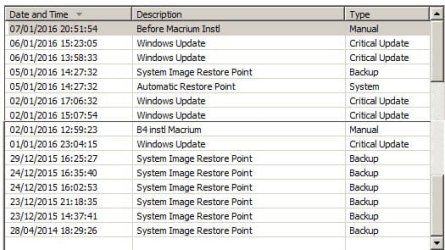
4. Something else, have many restore points, (attached screenshot list), I want to clear some, but in "System restore Explorer" or "Ccleaner" only current year shown, as you can see there is even a 2014 image
which does not exist, and they all consume space.
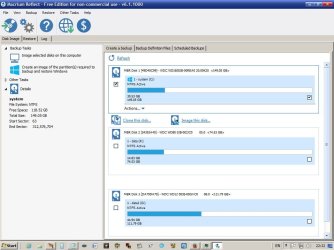
I will attach here screenshots of Macrium and list of restore points I want to clear some.
Answers will be appreciated
Thanks
Motim
 

Attachments
  • Macrium.jpg
    Macrium.jpg
    74.7 KB · Views: 2
  • RestorePoints List.jpg
    RestorePoints List.jpg
    38.1 KB · Views: 37

My Computer My Computer

At a glance

Windows 7 Pro 32 bitintel celeron 2.66GH 2.56GH2.00 GBNvidia fx5500
Computer type
PC/Desktop
Computer Manufacturer/Model Number
custom built
OS
Windows 7 Pro 32 bit
CPU
intel celeron 2.66GH 2.56GH
Memory
2.00 GB
Graphics Card(s)
Nvidia fx5500
Hard Drives
Western digital
Antivirus
AVG
Browser
firefox
See comments in bold


Hello Forum,
Finally installed Macrium (off line), installation was smooth, made the bootable disk,After disk burning, I clicked on " add recovery boot menu option" and now have some questions:
1. How to test the disk if it works (stupid question?)

You need to see if it can boot your PC, which is what you'd have to do if your hard drive failed. If it won't, you're can't restore.

Two ways:

1: go into your BIOS and locate the setting for boot device order or similar wording. It's probably now set to boot from hard drive first. You'd need to change that to CD drive first.

or

2: When booting normally, hit a particular key on your keyboard that will bring up a boot device menu for that particular boot only. Choose your CD drive from that menu.

The second choice is the easiest. The keystroke you need varies from PC to PC. It's probably one of the F keys---F8, F12, etc. You can experiment or look at your manual or Google for your PC or motherboard brand.


2. I was asked to register with Macrium (give name and email) shell I ?

I can't recall being asked to do that, but I use the free version. I'd guess you are using the paid version? I doubt it's mandatory. Might lead to some spam you may not want?

3. To make the first backup (only system and prog. files which are on "C"), I want to locate it on "G" disk, (there is also the Windows done backup image which after making backup with Macrium I intend to delete) - make image or clone ?

Image---if you are trying to protect yourself against a disaster with a proper "backup".

Clone--if things are going fine and you simply want to move your Windows installation to another drive.

I assume you should image--that's the most common use of Macrium.

You may need to image more than just C. What partitions are marked as "system" in Windows Disk Management on your PC? That might be C and might be another partition. If so, you need to image both. You can make separate image files of each or you can make one image file containing both.


4. Something else, have many restore points, (attached screenshot list), I want to clear some, but in "System restore Explorer" or "Ccleaner" only current year shown, as you can see there is even a 2014 image
which does not exist, and they all consume space.
I will attach here screenshots of Macrium and list of restore points I want to clear some.

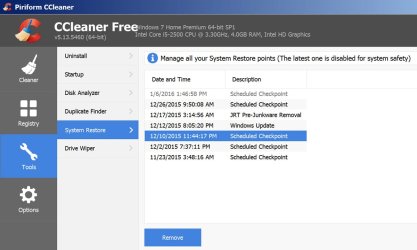
See pic below.

In CCleaner, you can choose individual System Restore points and delete them, one by one. Pic below is my CCleaner. The blue restore point would be deleted if I hit the "remove" button shown.

You can also delete ALL restore points from within System Restore's configuration settings in Windows.
 

Attachments

  • Untitled-1.jpg
    Untitled-1.jpg
    94.6 KB · Views: 1

My Computer My Computer

At a glance

Windows 7 Home Premium SP1, 64-bitIntel Skylake i5-6600K, not overclocked8 GB HyperX DDR4-2666 (2 x 4 GB)none; graphics are integrated on CPU
Computer type
PC/Desktop
Computer Manufacturer/Model Number
Ignatz Special; 4 speed manual gearbox; factory air conditioning; one of one
OS
Windows 7 Home Premium SP1, 64-bit
CPU
Intel Skylake i5-6600K, not overclocked
Motherboard
AsRock Z170M Extreme 4, micro ATX
Memory
8 GB HyperX DDR4-2666 (2 x 4 GB)
Graphics Card(s)
none; graphics are integrated on CPU
Sound Card
onboard: Realtek ALC1150; external: USB Behringer UF0-202
Monitor(s) Displays
Dell S2340M 23 inch IPS
Screen Resolution
1600 x 900
Hard Drives
System: Crucial MX100 series SSD, 128 GB;
Data: Samsung Spinpoint 103SJ, 1 TB;
Backup: WD Caviar Green WD30EZRX-00D8PB0, 3 TB
PSU
Rosewill SilentNight 500 watt fanless, semi-modular
Case
Antec Solo II
Cooling
Noctua NH-U12S; Noctua F12 intake, Noctua S12A exhaust
Keyboard
Microsoft 200 6JH-00001 USB
Mouse
Dell or Microsoft optical wired; USB
Antivirus
Microsoft Security Essentials and Malwarebytes Premium
Browser
Pale Moon
Other Info
All fans PWM; speeds at idle: CPU circa 500 rpm; intake circa 600 rpm; exhaust circa 600 rpm; CPU temps 27 idle and 47 C load in a warm room (27 C/81 F) when running Intel Extreme Tuning Utility stress test.
1. Try it on a small test partition
2. No - I never do
3. Image
4. Do those restore points actually still exist or are those dummy entrie
 

My Computer My Computer

At a glance

Vista, Windows7, Mint Mate, Zorin, Windows 8from 1.6GHz Duo to i7
Computer Manufacturer/Model Number
HP, Dell, Gateway, Toshiba - 4 laptops and 2 desktops
OS
Vista, Windows7, Mint Mate, Zorin, Windows 8
CPU
from 1.6GHz Duo to i7
Monitor(s) Displays
2x HP w2207
Hard Drives
5x HDD, 7x SSD, 12x Externals
Keyboard
with trackball - no mices
Mouse
Trackball mice
Internet Speed
DSL 6000
Hello Forum,
Thanks for your support and answers.
1. I made a test with the rescue disk - it started to load Macrium, then I pressed the Escape to exit and back to normal Win 7,
looks it works.
2. I'll try to make an Image of the system which is on "C" and locate it to "G", but normal Win 7 is scheduled to run a full backup weekly, shall I continue as scheduled or disable it ? (disk space)
3. About lot of restore points, as mentioned before, in Ccleaner or any other program I see only those of current year 2016,
not 2015 or even 2014, I do not know if they exist already. If I use the disk cleaner tool, it is supposed to delete all but the last one, but will it also delete the big backup made by windows ?
4. The Macrium I installed was the free version, and the registration (as explained by them) is to send me info only, so I won't.
5. Finally, how can I collect all your answers to save them in a folder on my computer ?
Thanks for answering
Motim
 

My Computer My Computer

At a glance

Windows 7 Pro 32 bitintel celeron 2.66GH 2.56GH2.00 GBNvidia fx5500
Computer type
PC/Desktop
Computer Manufacturer/Model Number
custom built
OS
Windows 7 Pro 32 bit
CPU
intel celeron 2.66GH 2.56GH
Memory
2.00 GB
Graphics Card(s)
Nvidia fx5500
Hard Drives
Western digital
Antivirus
AVG
Browser
firefox
Hi,
After creating a full image go to the restore section and use the verify image icon.
I would also make a usb flash winpe recovery too just incase the cd gets damaged ;)
 

My Computer My Computer

At a glance

Win-7-Pro64bit 7-H-Prem-64biti7-5930K 2nd i9-9940x both water blocked VRM'...Trident-z 3200C14 2nd Trident-z 3600C16EVGA 1080ti ftw3 2nd Titan Xp both water blocked
Computer type
PC/Desktop
Computer Manufacturer/Model Number
Custom assembled by me :}
OS
Win-7-Pro64bit 7-H-Prem-64bit
CPU
i7-5930K 2nd i9-9940x both water blocked VRM's too
Motherboard
ASUS SABERTOOTH X99 2nd ASUS x299 Apex
Memory
Trident-z 3200C14 2nd Trident-z 3600C16
Graphics Card(s)
EVGA 1080ti ftw3 2nd Titan Xp both water blocked
Sound Card
Built-in Realtek
Monitor(s) Displays
1-AOC G2460PG 24"G-Sync 144Hz/ 2nd 1-ASUS VG248QE 24" 144Hz
Screen Resolution
1920 x 1080 144Hz
Hard Drives
2-Samsung M.2 Evo & Evo Plus
2-Samsung 850 EVO 500GB SSD's/ 3-2.5 W.D. Black 1tb-&3-1tb/3-3.5 WD Black 1tb hdd's
PSU
EVGA SuperNOVA 1000-P2 2nd 1200-P2
Case
2-Corsair Obsidian Series 450D Black ATX Mid Tower
Cooling
Custom water loops
Keyboard
Logitech G710+/ 2nd Logitech G910
Mouse
2-RedDragon M901 Perdition 16400 dpi Gaming mouse = wired
Internet Speed
Comcast Ping 19ms 89.31mbps download speed 6.12mbps upload
Antivirus
Malwarebytes Pro/ Superantispyware Pro
Browser
FireFox & Pale moon
Other Info
2nd ASUS X299 Apex/Intel i9-9940x with Custom water loop/7H-Prem-x64/Corsair 450D case/Ram Trident-z 3600C16 4x8gb / Samsung970Evo plus 500gb SSD/Dual ssd EZ swap evo/PSU EVGA SuperNova 1200w-P2 80+Platinum/GPU Titan Xp /8-ML-140 on push-pull on 2-280GTX rads
5. Finally, how can I collect all your answers to save them in a folder on my computer ?
Right click here on this thread and then "save as".
 

My Computer My Computer

At a glance

Vista, Windows7, Mint Mate, Zorin, Windows 8from 1.6GHz Duo to i7
Computer Manufacturer/Model Number
HP, Dell, Gateway, Toshiba - 4 laptops and 2 desktops
OS
Vista, Windows7, Mint Mate, Zorin, Windows 8
CPU
from 1.6GHz Duo to i7
Monitor(s) Displays
2x HP w2207
Hard Drives
5x HDD, 7x SSD, 12x Externals
Keyboard
with trackball - no mices
Mouse
Trackball mice
Internet Speed
DSL 6000
Disk Cleanup has advanced option, once you finally get to it, to delete all but the last System Restore
Point. I use it all the time just before I do a complete system image backup (not with macrium).
I have my ways and others have theirs. To each, their own.
Good luck. :cool:
 

My Computer My Computer

At a glance

Windows 7
Computer type
Laptop
OS
Windows 7
Disk Cleanup has no effect on backups made by Windows Backup as far as I know.

If CCleaner can find only certain restore points, I'd assume that's all there are. Normally, they should all appear as choices for a possible restore when you use System Restore. It would be very unusual to have restore points from 2014 unless you have it set to use a ridiculously high amount of hard drive space. In my experience, I normally have 5 to 10 restore points per month and at any given moment have perhaps 10 or 12. I allow about 7 GB of hard drive space.

Have you confirmed that you do NOT need to restore any partitions other than C?

There's nothing at all wrong with keeping your Windows backups if you have enough disk space. Some people use 2 methods such as Macrium and Aomei, in an alternating fashion. What's far more important is that you fully understand the methods you do use, to their conclusion. The best way to do that is to do a restore, now, when the heat is off.
 

My Computer My Computer

At a glance

Windows 7 Home Premium SP1, 64-bitIntel Skylake i5-6600K, not overclocked8 GB HyperX DDR4-2666 (2 x 4 GB)none; graphics are integrated on CPU
Computer type
PC/Desktop
Computer Manufacturer/Model Number
Ignatz Special; 4 speed manual gearbox; factory air conditioning; one of one
OS
Windows 7 Home Premium SP1, 64-bit
CPU
Intel Skylake i5-6600K, not overclocked
Motherboard
AsRock Z170M Extreme 4, micro ATX
Memory
8 GB HyperX DDR4-2666 (2 x 4 GB)
Graphics Card(s)
none; graphics are integrated on CPU
Sound Card
onboard: Realtek ALC1150; external: USB Behringer UF0-202
Monitor(s) Displays
Dell S2340M 23 inch IPS
Screen Resolution
1600 x 900
Hard Drives
System: Crucial MX100 series SSD, 128 GB;
Data: Samsung Spinpoint 103SJ, 1 TB;
Backup: WD Caviar Green WD30EZRX-00D8PB0, 3 TB
PSU
Rosewill SilentNight 500 watt fanless, semi-modular
Case
Antec Solo II
Cooling
Noctua NH-U12S; Noctua F12 intake, Noctua S12A exhaust
Keyboard
Microsoft 200 6JH-00001 USB
Mouse
Dell or Microsoft optical wired; USB
Antivirus
Microsoft Security Essentials and Malwarebytes Premium
Browser
Pale Moon
Other Info
All fans PWM; speeds at idle: CPU circa 500 rpm; intake circa 600 rpm; exhaust circa 600 rpm; CPU temps 27 idle and 47 C load in a warm room (27 C/81 F) when running Intel Extreme Tuning Utility stress test.
Macrium - General

Hello,

Recently received answer from ThrashZone, and I would like to ask this: The USB stick is Fat 32 and Hard disks on the computer are NTFS, how will they work together if I will have to boot from the USB ?
2. Can I just copy the CD made into the USB stick, or start the whole process again, this time the target will be the USB stick ?
3. In boot menu there is no option to boot from USB, only from optical device or disk.
Thanks for answers
Motim
 

My Computer My Computer

At a glance

Windows 7 Pro 32 bitintel celeron 2.66GH 2.56GH2.00 GBNvidia fx5500
Computer type
PC/Desktop
Computer Manufacturer/Model Number
custom built
OS
Windows 7 Pro 32 bit
CPU
intel celeron 2.66GH 2.56GH
Memory
2.00 GB
Graphics Card(s)
Nvidia fx5500
Hard Drives
Western digital
Antivirus
AVG
Browser
firefox
Stick needs to be ntfs as well so reformat it
No you need to redo the winpe to the stick = it doesn't take that long
This is why you need to redo the winpe to the usb flash drive Macrium will make it bootable
Then using F8 when the device is connected it will show up
But you must test it after creating it
You might need to go to setup and disable fast or quick startup.
 

My Computer My Computer

At a glance

Win-7-Pro64bit 7-H-Prem-64biti7-5930K 2nd i9-9940x both water blocked VRM'...Trident-z 3200C14 2nd Trident-z 3600C16EVGA 1080ti ftw3 2nd Titan Xp both water blocked
Computer type
PC/Desktop
Computer Manufacturer/Model Number
Custom assembled by me :}
OS
Win-7-Pro64bit 7-H-Prem-64bit
CPU
i7-5930K 2nd i9-9940x both water blocked VRM's too
Motherboard
ASUS SABERTOOTH X99 2nd ASUS x299 Apex
Memory
Trident-z 3200C14 2nd Trident-z 3600C16
Graphics Card(s)
EVGA 1080ti ftw3 2nd Titan Xp both water blocked
Sound Card
Built-in Realtek
Monitor(s) Displays
1-AOC G2460PG 24"G-Sync 144Hz/ 2nd 1-ASUS VG248QE 24" 144Hz
Screen Resolution
1920 x 1080 144Hz
Hard Drives
2-Samsung M.2 Evo & Evo Plus
2-Samsung 850 EVO 500GB SSD's/ 3-2.5 W.D. Black 1tb-&3-1tb/3-3.5 WD Black 1tb hdd's
PSU
EVGA SuperNOVA 1000-P2 2nd 1200-P2
Case
2-Corsair Obsidian Series 450D Black ATX Mid Tower
Cooling
Custom water loops
Keyboard
Logitech G710+/ 2nd Logitech G910
Mouse
2-RedDragon M901 Perdition 16400 dpi Gaming mouse = wired
Internet Speed
Comcast Ping 19ms 89.31mbps download speed 6.12mbps upload
Antivirus
Malwarebytes Pro/ Superantispyware Pro
Browser
FireFox & Pale moon
Other Info
2nd ASUS X299 Apex/Intel i9-9940x with Custom water loop/7H-Prem-x64/Corsair 450D case/Ram Trident-z 3600C16 4x8gb / Samsung970Evo plus 500gb SSD/Dual ssd EZ swap evo/PSU EVGA SuperNova 1200w-P2 80+Platinum/GPU Titan Xp /8-ML-140 on push-pull on 2-280GTX rads
Disk Cleanup has no effect on backups made by Windows Backup as far as I know.
That is true. Disk Cleanup deletes all but last System Restore Point which has nothing to do with
Windows Backup. Two completely different things. :cool:
 

My Computer My Computer

At a glance

Windows 7
Computer type
Laptop
OS
Windows 7
Hello All,
In some post I mentioned that since Macrium installed, my boot sequence changed: Originally boot sequence was checking devices (displayed on screen) then starting Windows (Welcome, pls wait, etc.), now in boot sequence I am asked to select boot from Macrium or boot to windows 7. Is it possible to get back to old boot sequence, if yes, how.
2. How can I slow down the boot sequence - if possible.
Thanks for answering.
Motim
 

My Computer My Computer

At a glance

Windows 7 Pro 32 bitintel celeron 2.66GH 2.56GH2.00 GBNvidia fx5500
Computer type
PC/Desktop
Computer Manufacturer/Model Number
custom built
OS
Windows 7 Pro 32 bit
CPU
intel celeron 2.66GH 2.56GH
Memory
2.00 GB
Graphics Card(s)
Nvidia fx5500
Hard Drives
Western digital
Antivirus
AVG
Browser
firefox
If there's a way it's inside the programs options.
 

My Computer My Computer

At a glance

Win-7-Pro64bit 7-H-Prem-64biti7-5930K 2nd i9-9940x both water blocked VRM'...Trident-z 3200C14 2nd Trident-z 3600C16EVGA 1080ti ftw3 2nd Titan Xp both water blocked
Computer type
PC/Desktop
Computer Manufacturer/Model Number
Custom assembled by me :}
OS
Win-7-Pro64bit 7-H-Prem-64bit
CPU
i7-5930K 2nd i9-9940x both water blocked VRM's too
Motherboard
ASUS SABERTOOTH X99 2nd ASUS x299 Apex
Memory
Trident-z 3200C14 2nd Trident-z 3600C16
Graphics Card(s)
EVGA 1080ti ftw3 2nd Titan Xp both water blocked
Sound Card
Built-in Realtek
Monitor(s) Displays
1-AOC G2460PG 24"G-Sync 144Hz/ 2nd 1-ASUS VG248QE 24" 144Hz
Screen Resolution
1920 x 1080 144Hz
Hard Drives
2-Samsung M.2 Evo & Evo Plus
2-Samsung 850 EVO 500GB SSD's/ 3-2.5 W.D. Black 1tb-&3-1tb/3-3.5 WD Black 1tb hdd's
PSU
EVGA SuperNOVA 1000-P2 2nd 1200-P2
Case
2-Corsair Obsidian Series 450D Black ATX Mid Tower
Cooling
Custom water loops
Keyboard
Logitech G710+/ 2nd Logitech G910
Mouse
2-RedDragon M901 Perdition 16400 dpi Gaming mouse = wired
Internet Speed
Comcast Ping 19ms 89.31mbps download speed 6.12mbps upload
Antivirus
Malwarebytes Pro/ Superantispyware Pro
Browser
FireFox & Pale moon
Other Info
2nd ASUS X299 Apex/Intel i9-9940x with Custom water loop/7H-Prem-x64/Corsair 450D case/Ram Trident-z 3600C16 4x8gb / Samsung970Evo plus 500gb SSD/Dual ssd EZ swap evo/PSU EVGA SuperNova 1200w-P2 80+Platinum/GPU Titan Xp /8-ML-140 on push-pull on 2-280GTX rads
@ motim.

You should be able to remove the start up option, by opening Macrium & on the list at the top, one should have a drop down menu where you can untick "Add boot menu option".
 

My Computer My Computer

At a glance

Windows 7 Home Premium 64 bit sp1Intel i5 3570 3.4Ghz Ivy Bridge SKT 1155 quad...G-Skill Rip Jaws 16Gb (8x2) DDR3 -1600 PC3 12...Gigabyte NVIDIA GT610 1Gb DDR3 810/1200 PCI-E...
Computer type
PC/Desktop
Computer Manufacturer/Model Number
Self built using existing case
OS
Windows 7 Home Premium 64 bit sp1
CPU
Intel i5 3570 3.4Ghz Ivy Bridge SKT 1155 quad core
Motherboard
Gigabyte Z77-HD3 SKT 1155 2xSata 3, 4x USB 3.0
Memory
G-Skill Rip Jaws 16Gb (8x2) DDR3 -1600 PC3 12800 CL 10 red
Graphics Card(s)
Gigabyte NVIDIA GT610 1Gb DDR3 810/1200 PCI-E 2.0 Silent
Sound Card
NVIDIA High Definition & Realtech High Definition Audio
Monitor(s) Displays
2 x Philips 226V4L 16:9 aspect ratio
Screen Resolution
1920 x 1080 HD
Hard Drives
Samsung 840 Pro 256gb SSD, SATA 3.
Hitachi Touro Portable 1tb, USB 3.0 HDD used for image b/ups.
PSU
Corsair VS450
Case
Codeng
Cooling
PSU fan & CPU fan
Keyboard
Logitech
Mouse
Logitech Wireless trackball M570
Internet Speed
Wireless 3G. 3mg down & 550kb up.
Antivirus
Bitdefender Internet Security 2020
Browser
Opera (Current Version) & Firefox
Other Info
MS Office 2013 Pro. Davis weather station software. MGE Nova 600 avr UPS.
Hello All,
In some post I mentioned that since Macrium installed, my boot sequence changed: Originally boot sequence was checking devices (displayed on screen) then starting Windows (Welcome, pls wait, etc.), now in boot sequence I am asked to select boot from Macrium or boot to windows 7. Is it possible to get back to old boot sequence, if yes, how.
2. How can I slow down the boot sequence - if possible.
Thanks for answering.
Motim

See options when you install Macrium Reflect. You must have checked the option to install a boot menu item to load the Macrium Reflect recovery environment.

Macrium Support Forum - Windows Boot Manager is confused by Reflect

Or if using Macrium Reflect v6.0 check options here:

Adding a boot menu option for system Image recovery - KnowledgeBase - Macrium Reflect Knowledgebase

Under Step 2 select "No Menu" and see if that removes the entry from the boot loader.

EDIT: See Ranger4's post above!
 
Last edited:

My Computer My Computer

At a glance

Microsoft Windows 7 Home Premium 64-bit 7601 ...AMD C-60 APU with Radeon(tm) HD Graphics4.00 GBAMD Radeon HD 6290 Graphics
Computer type
Laptop
Computer Manufacturer/Model Number
ASUS
OS
Microsoft Windows 7 Home Premium 64-bit 7601 Multiprocessor Free Service Pack 1
CPU
AMD C-60 APU with Radeon(tm) HD Graphics
Motherboard
ASUSTeK COMPUTER INC. X501U
Memory
4.00 GB
Graphics Card(s)
AMD Radeon HD 6290 Graphics
Sound Card
(1) AMD High Definition Audio Device (2) Realtek High Defi
Screen Resolution
1366 x 768 x 32 bits (4294967296 colors) @ 60 Hz
Hard Drives
Hitachi HTS545050A7E380 SATA Disk Device
Antivirus
Comodo CIS & FW, SecureAplus App Whitelisting, Threatfire
Browser
Cyberfox 64bit, Opera 64bit, Airfox
Other Info
Spy-The-Spy, HitmanPro.Alert, Norton Connect Safe, MJRegWatcher, BitDefender TrafficLight, Voodoo Shield, Zemana AntiMalware
Back
Top