Hello Forum,
Finally installed Macrium (off line), installation was smooth, made the bootable disk,After disk burning, I clicked on " add recovery boot menu option" and now have some questions:
1. How to test the disk if it works (stupid question?)
2. I was asked to register with Macrium (give name and email) shell I ?
3. To make the first backup (only system and prog. files which are on "C"), I want to locate it on "G" disk, (there is also the Windows done backup image which after making backup with Macrium I intend to delete) - make image or clone ?
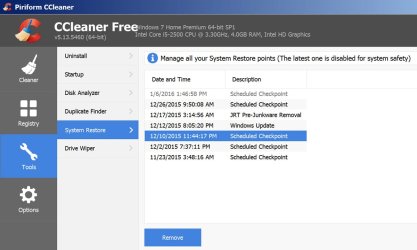
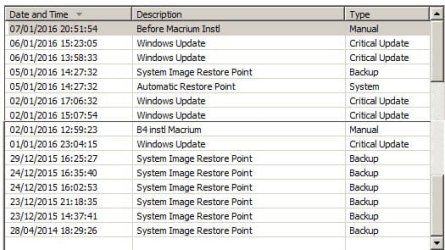
4. Something else, have many restore points, (attached screenshot list), I want to clear some, but in "System restore Explorer" or "Ccleaner" only current year shown, as you can see there is even a 2014 image
which does not exist, and they all consume space.
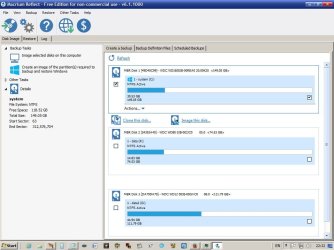
I will attach here screenshots of Macrium and list of restore points I want to clear some.
Answers will be appreciated
Thanks
Motim
Finally installed Macrium (off line), installation was smooth, made the bootable disk,After disk burning, I clicked on " add recovery boot menu option" and now have some questions:
1. How to test the disk if it works (stupid question?)
2. I was asked to register with Macrium (give name and email) shell I ?
3. To make the first backup (only system and prog. files which are on "C"), I want to locate it on "G" disk, (there is also the Windows done backup image which after making backup with Macrium I intend to delete) - make image or clone ?
4. Something else, have many restore points, (attached screenshot list), I want to clear some, but in "System restore Explorer" or "Ccleaner" only current year shown, as you can see there is even a 2014 image
which does not exist, and they all consume space.
I will attach here screenshots of Macrium and list of restore points I want to clear some.
Answers will be appreciated
Thanks
Motim
Attachments
My Computer
At a glance
Windows 7 Pro 32 bitintel celeron 2.66GH 2.56GH2.00 GBNvidia fx5500
- Computer type
- PC/Desktop
- Computer Manufacturer/Model Number
- custom built
- OS
- Windows 7 Pro 32 bit
- CPU
- intel celeron 2.66GH 2.56GH
- Memory
- 2.00 GB
- Graphics Card(s)
- Nvidia fx5500
- Hard Drives
- Western digital
- Antivirus
- AVG
- Browser
- firefox