MACRİUM WinPE 5.0.4

EARTH1

New member
Local time
9:15 PM
Messages
16
Hello,

İ downloaded the above İSO from WHS's site and will burn it on a CD.As i do NOT wish to install Macrium on my laptop,i need instructions on how to take an image and on how to restore the image taken.

İ would appreciate detailed instruction

Thank you.

P.S The Write Speed on my İMGBURN is set to MAX.Should that be changed or left at that speed??
 

My Computer

OS
WİNDOWS 7 HOME PREMİUM X64
What's wrong with installing Macrium Reflect FREE?? You're going to need it installed in order to be able to run it to produce the "image" backup anyway.

The standalone boot CD (from that ISO) is simply a standalone bootable way to get to the WinPE recovery program version of Macrium Reflect which can then RESTORE one of these "image" backups you've taken, assuming you have it available on some external media (like a USB drive) which is accessible to WinPE when you boot from the CD.

Macrium Reflect also can add itself to the Boot Manager menu of your standard Windows, so that when you boot your machine normally you will see it as a boot option (just like one of multiple OS choices might be on your Boot Manager menu). That's a nice flexibility from installing the product for real. This way you don't need to use the standalone bootable CD if you don't have to... i.e. if your hard drive has not physically crashed but you just want to restore Windows from some "image". In this case, just boot to Reflect from the Boot Manager menu off of the hard drive, select the "image" to be restored, and go. The same internal/external hardware which is available to your regular Windows will also be available to Reflect booted this way, from the Boot Manager menu.

With the standalone boot CD, if you have unique external drive or USB 3.0 adapter etc. which requires some special driver (only if the device is not already supported by WinPE) then you'll need to make the required driver available at boot time for the standalone WinPE. With Macrium Reflect STANDARD (not free, but very reasonable price) any such drivers can be automatically placed onto that bootable standalone WinPE CD built by the "create recovery media" wizard of the product. This makes it easier for you to use that standalone boot CD, since all drivers needed for your hardware are already in the WinPE... same as with the Reflect run via the Boot Manager menu off of the hard drive.

Personally, I think Macrium Reflect is an excellent product from an excellent software vendor who actively maintains and improves their products. I prefer their STANDARD version since it also supports "space management" (i.e. automatically purging old generations, so that you don't have to manually maintain your backup repository manually yourself) which is enough to make me pay for it. STANDARD also supports "data backups" (i.e. folders and files), rather than just "image" backups as is provided by the FREE product as its only feature.

Anyway, it must be installed on your PC in order to TAKE A BACKUP. The standalone WinPE boot CD is only for RESTORE of an image backup, as a failsafe bootable media in case you can't boot from the hard drive using the Boot Manager option... to the same WinPE in either case.


As far as IMGBURN goes, just let it use its own defaults. It verifies after burning, so you can't go wrong.

 

My Computer

Computer type
PC/Desktop
Computer Manufacturer/Model Number
Home-built, two systems (1) and (2)
OS
Windows 7 Pro x64 (1), Win7 Pro X64 (2)
CPU
i5-3350p 3.1Ghz/6MB-cache (1); E8400 3.0Ghz/6MB-cache (2)
Motherboard
ASUS P8Z77-V Pro (1); ASUS P5Q3 (2)
Memory
8GB PC3-12800 DDR3 (1); 4GB PC3-10600 DDR3 (2)
Graphics Card(s)
ATI HD7750 (1), (see TV cards); ATI R7 250 (2)
Sound Card
Realtek ALC892 HD Audio (1); Realtek ALC1200 HD Audio (2)
Monitor(s) Displays
Eizo HD2441W LCD, Eizo S2433W (1); Eizo 24" S2433W (2)
Screen Resolution
1920x1200, 1920x1200 (1); 1920x1200 (2)
Hard Drives
(1) 1TB SATA-II (7200RPM), 2x2TB SATA-III (7200RPM), 250GB SATA-III (10000RPM) for OS; 2x2TB external USB 3.0

(2) 320GB SATA-II (7200RPM), 750GB SATA-II (7200RPM), 150GB SATA-II (10000RPM) for OS; 2TB external USB 3.0
PSU
Nesteq ECS-6001 600W (1); Nesteq ECS-5001 500W (2)
Case
Acousti-Case 360 (1) and (2)
Cooling
Noctua NH-U12P SE2 for CPU, 2x120mm case fans (1) and (2)
Keyboard
IBM PS/2 (1) and (2)
Mouse
Logitech MX Revolution wireless (1); Microsoft wired (2)
Internet Speed
100mbps down / 10mbps up
Antivirus
Microsoft Security Essentials; Malwarebyte Anti-Malware Pro
Browser
Firefox
Other Info
Ceton InfiniTV 4-tuner cablecard-enabled TV card as well as Hauppauge HVR-2250 OTA/ATSC 2-tuner TV card in (1), running under Win7 WMC
Thanks for the reply,however i remember reading WHS saying that if you do NOT want to install Macrium,you can take and restore an image with that İSO on his site,after you burn it on a CD.

Am i mistaken?
 

My Computer

OS
WİNDOWS 7 HOME PREMİUM X64
Am i mistaken?
No
but I would recommend you install it. This is a much more convenient way to make routine images. It is one of the most valuable pieces of software you can have. When installed and you start it, it will tell you if an update is available, download the update patch and install the patch in seconds.
 

My Computer

Computer type
PC/Desktop
Computer Manufacturer/Model Number
Own build
OS
Windows 7x64 Home Premium SP1
CPU
Intel i7 2600k
Motherboard
ASUS P8Z68 Deluxe
Memory
G.Skill Ripjaws (DDR3-1600) 2x4GB
Graphics Card(s)
Nvidia GeForce GTS 450; Intel HD Graphics 3000(GT2+)
Monitor(s) Displays
Dell Ultrasharp IPS panel U2311H, Samsung SyncMaster P2350
Screen Resolution
1920x1080
Hard Drives
Samsung 850 Pro SSD 256GB, Samsung SSD 840 120GB, Seagates 1TB Barracuda ST31000528AS x2
PSU
Seasonic M12II 520W
Case
Lian Li Lancool PC-K60
Cooling
Case: 1x120mm, 3x140mm CPU: Hyper 212+
Keyboard
Logitech MK520 (wireless)
Mouse
Logitech MK520
Internet Speed
6-7 Mbps
Antivirus
Norton Security Premium, Malwarebytes on 2 (MSE on 3rd PC)
Browser
FireFox
Other Info
Audio: Logitech Z523 2.1
Recommendation aknowledged and understood ! İ do NOT wish to install Macrium at this time,so can you or someone else please point me to a tutorial,so that i can do what i wish to do?

Would appreciate that.

Thank you
 

My Computer

OS
WİNDOWS 7 HOME PREMİUM X64

My Computer

Computer type
PC/Desktop
Computer Manufacturer/Model Number
Golden Mk. I.4
OS
Windows 10 Pro x64 ; Xubuntu x64
CPU
Intel i7 860 @ 2.80 GHz O/C'ed to 4.0GHz
Motherboard
Gigabyte P55A-UD3R Rev.1. Award BIOS F13
Memory
16GB Corsair Vengance DDR3 @ 661 MHz Dual Channel (9-9-9-24)
Graphics Card(s)
EVGA NVidia GTX 560 1024MB
Sound Card
Realtek Integrated
Monitor(s) Displays
Dual Samsung SyncMaster 2494HS
Screen Resolution
1920*1080 and 1920*1080
Hard Drives
1*Samsung 840 EVO 120GB SSD;
1*OCZ Vertex 2 60GB SSD;
2*Samsung F3 SpinPoint 1TB in RAID0;
1*Samsung F1 SpinPoint 1TB;
2*Western Digital 1TB External USB 3.0
1*Western Digital 500GB External USB 3.0
1*Seagate 500GB External USB 2.0
PSU
Thermaltake ToughPower QFan 750W
Case
Thermaltake Element S VK60001W2Z
Cooling
Corsair H60 Water Cooling, 2*230mm and 2*80mm case fans
Keyboard
Logitech G110
Mouse
Logitech MX518
Thank you very much Golden. İ was aware of that link,but was wondering if a WRİTTEN Tutorial is available,as i prefer it.

İs there one?
 

My Computer

OS
WİNDOWS 7 HOME PREMİUM X64
Sorry, not that I'm aware of. The linked tutorial is excellent though...I'd encourage you to try it.
 

My Computer

Computer type
PC/Desktop
Computer Manufacturer/Model Number
Golden Mk. I.4
OS
Windows 10 Pro x64 ; Xubuntu x64
CPU
Intel i7 860 @ 2.80 GHz O/C'ed to 4.0GHz
Motherboard
Gigabyte P55A-UD3R Rev.1. Award BIOS F13
Memory
16GB Corsair Vengance DDR3 @ 661 MHz Dual Channel (9-9-9-24)
Graphics Card(s)
EVGA NVidia GTX 560 1024MB
Sound Card
Realtek Integrated
Monitor(s) Displays
Dual Samsung SyncMaster 2494HS
Screen Resolution
1920*1080 and 1920*1080
Hard Drives
1*Samsung 840 EVO 120GB SSD;
1*OCZ Vertex 2 60GB SSD;
2*Samsung F3 SpinPoint 1TB in RAID0;
1*Samsung F1 SpinPoint 1TB;
2*Western Digital 1TB External USB 3.0
1*Western Digital 500GB External USB 3.0
1*Seagate 500GB External USB 2.0
PSU
Thermaltake ToughPower QFan 750W
Case
Thermaltake Element S VK60001W2Z
Cooling
Corsair H60 Water Cooling, 2*230mm and 2*80mm case fans
Keyboard
Logitech G110
Mouse
Logitech MX518
Thanks again for your time.Appreciated!
 

My Computer

OS
WİNDOWS 7 HOME PREMİUM X64
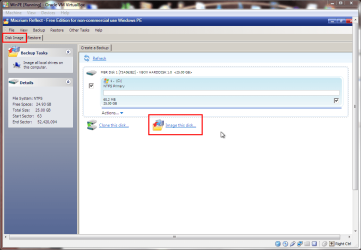
You can image using the WinPE disk. You just need to boot from it and select the Disk Image Tab. Then you can image any disk you like. This was booted into a VM for demo purposes.

screenshot235_2013-01-25.png
 

My Computer

Computer type
Laptop
Computer Manufacturer/Model Number
Hewlett-Packard/G62-107SA Notebook
OS
Microsoft Windows 7 Home Premium 64-bit Service Pack 1
CPU
Intel(R) Core(TM) i3 CPU M 330 @ 2.13GHz
Motherboard
Hewlett-Packard 1425
Memory
8 GB DDR3
Graphics Card(s)
Intel(R) HD Graphics
Sound Card
Realtek High Definition Audio
Monitor(s) Displays
Builtin
Screen Resolution
1366 x 768 x 32 bits (4294967296 colors) @ 60 Hz
Hard Drives
250 GB SATA Hard Disk Drive 7200 rpm
2TB Seagate GoFlex USB 2 Drive
1TB Iomega Prestige USB 2 Drive
1.5TB Iomega Prestige USB 2 Drive (Samsung)
2TB WD MyBook Live NAS.
Mouse
Logitech Anywhere MX
Internet Speed
152 Mbs download 10 Mbs upload
Antivirus
Norton 360
Browser
Chrome
Thanks for the reply KADO.So even though i do NOT have Macrium installed,booting from the WinPE disc will allow me to image the Entire System AND Restore taken image?

İs that correct?
 

My Computer

OS
WİNDOWS 7 HOME PREMİUM X64
Yes it is.
 

My Computer

Computer type
Laptop
Computer Manufacturer/Model Number
Hewlett-Packard/G62-107SA Notebook
OS
Microsoft Windows 7 Home Premium 64-bit Service Pack 1
CPU
Intel(R) Core(TM) i3 CPU M 330 @ 2.13GHz
Motherboard
Hewlett-Packard 1425
Memory
8 GB DDR3
Graphics Card(s)
Intel(R) HD Graphics
Sound Card
Realtek High Definition Audio
Monitor(s) Displays
Builtin
Screen Resolution
1366 x 768 x 32 bits (4294967296 colors) @ 60 Hz
Hard Drives
250 GB SATA Hard Disk Drive 7200 rpm
2TB Seagate GoFlex USB 2 Drive
1TB Iomega Prestige USB 2 Drive
1.5TB Iomega Prestige USB 2 Drive (Samsung)
2TB WD MyBook Live NAS.
Mouse
Logitech Anywhere MX
Internet Speed
152 Mbs download 10 Mbs upload
Antivirus
Norton 360
Browser
Chrome
One last question if i may KADO.İs there anything at all i should be aware of,re this method? Any precautions that may need to be taken,during the restore perhaps?

Or will any changes be made to my system,i should know about?
 

My Computer

OS
WİNDOWS 7 HOME PREMİUM X64
I don't think so. I don't regularly use this method myself. I use the installed program for the backup and the WinPE disk for the restore. You would be wise to test the complete cycle of image and restore on a small test partition created for the purpose. This will make sure everything works as expected and you don't get any surprises when you need to do a restore for real.
 

My Computer

Computer type
Laptop
Computer Manufacturer/Model Number
Hewlett-Packard/G62-107SA Notebook
OS
Microsoft Windows 7 Home Premium 64-bit Service Pack 1
CPU
Intel(R) Core(TM) i3 CPU M 330 @ 2.13GHz
Motherboard
Hewlett-Packard 1425
Memory
8 GB DDR3
Graphics Card(s)
Intel(R) HD Graphics
Sound Card
Realtek High Definition Audio
Monitor(s) Displays
Builtin
Screen Resolution
1366 x 768 x 32 bits (4294967296 colors) @ 60 Hz
Hard Drives
250 GB SATA Hard Disk Drive 7200 rpm
2TB Seagate GoFlex USB 2 Drive
1TB Iomega Prestige USB 2 Drive
1.5TB Iomega Prestige USB 2 Drive (Samsung)
2TB WD MyBook Live NAS.
Mouse
Logitech Anywhere MX
Internet Speed
152 Mbs download 10 Mbs upload
Antivirus
Norton 360
Browser
Chrome
Thank you very much indeed for your time and effort.
Much appreciated!
 

My Computer

OS
WİNDOWS 7 HOME PREMİUM X64
You are welcome. Post back if you have any further questions
 

My Computer

Computer type
Laptop
Computer Manufacturer/Model Number
Hewlett-Packard/G62-107SA Notebook
OS
Microsoft Windows 7 Home Premium 64-bit Service Pack 1
CPU
Intel(R) Core(TM) i3 CPU M 330 @ 2.13GHz
Motherboard
Hewlett-Packard 1425
Memory
8 GB DDR3
Graphics Card(s)
Intel(R) HD Graphics
Sound Card
Realtek High Definition Audio
Monitor(s) Displays
Builtin
Screen Resolution
1366 x 768 x 32 bits (4294967296 colors) @ 60 Hz
Hard Drives
250 GB SATA Hard Disk Drive 7200 rpm
2TB Seagate GoFlex USB 2 Drive
1TB Iomega Prestige USB 2 Drive
1.5TB Iomega Prestige USB 2 Drive (Samsung)
2TB WD MyBook Live NAS.
Mouse
Logitech Anywhere MX
Internet Speed
152 Mbs download 10 Mbs upload
Antivirus
Norton 360
Browser
Chrome
You are welcome. Post back if you have any further questions


Hi KADO,

İ booted from the WinPE disc and created an image and stored it on what i thought was an ext.hard drive H: Everything went smoothly.

After it was done,i rebooted back into Windows.Search as i may,i couldnt find the image on said ext drive,so i rebooted back with the WinPE disc.

This time though after 'loading files' i got a BSOD (The very first one on this 1 year old laptop)
İ rebooted with the WinPE and this time NO BSOD.

However when i searched for the taken image i found it under DRİVE HİTACHİ....which is my internal hdd,on a Folder:İ:\

i verified the image and it was successful.
İ'm wondering though:Why can i NOT find the image on my system,UNLESS i boot with the WinPE.

İs that the way it should be ?

And should i be worried about the BSOD ?

i remember when reading here at the forum,of someone else having had the same experience ( the BSOD)

What do you think please.

Thank you.:)
 

My Computer

OS
WİNDOWS 7 HOME PREMİUM X64
I don't think I can be much help with the BSOD as I've never come across one with Macrium.

One thing to be careful of when booting from the CD is that the drive letters may not be the same as in Windows. I suspect that this may have happened here. You should be able to see the image file in Windows so again I'm not sure what is happening.
 

My Computer

Computer type
Laptop
Computer Manufacturer/Model Number
Hewlett-Packard/G62-107SA Notebook
OS
Microsoft Windows 7 Home Premium 64-bit Service Pack 1
CPU
Intel(R) Core(TM) i3 CPU M 330 @ 2.13GHz
Motherboard
Hewlett-Packard 1425
Memory
8 GB DDR3
Graphics Card(s)
Intel(R) HD Graphics
Sound Card
Realtek High Definition Audio
Monitor(s) Displays
Builtin
Screen Resolution
1366 x 768 x 32 bits (4294967296 colors) @ 60 Hz
Hard Drives
250 GB SATA Hard Disk Drive 7200 rpm
2TB Seagate GoFlex USB 2 Drive
1TB Iomega Prestige USB 2 Drive
1.5TB Iomega Prestige USB 2 Drive (Samsung)
2TB WD MyBook Live NAS.
Mouse
Logitech Anywhere MX
Internet Speed
152 Mbs download 10 Mbs upload
Antivirus
Norton 360
Browser
Chrome
I don't think I can be much help with the BSOD as I've never come across one with Macrium.

One thing to be careful of when booting from the CD is that the drive letters may not be the same as in Windows


OUCH that's what i think happened,the image was stored elsewhere,NOT on my ext.hd
Wish i had known this before.

Can anyone else be of any help here ?

Thanks
 

My Computer

OS
WİNDOWS 7 HOME PREMİUM X64
İ decided not to continue with this,so no further help is needeed.

Thanks
 

My Computer

OS
WİNDOWS 7 HOME PREMİUM X64
Back
Top