
So first off I should say I'm not good with computers, I get around them but when it comes to technical stuff like what I'm about to show I'm a 0.
Second I should also say that I'm not English and my computer language is not in English, but I follow and look for answers in this forum everytime I need help with my computer, and I really didn't find a good site/forum in my language that can help me so I hope we can work it out somehow.
I have no idea what might have started this problems I don't remenber installing anything diferent or downloading anything before this problems started, what I first realised is that I can't save files, of any type I want to take pictures and post them in here to show my exact problem, but when I go into something like Paint, Notepad, or even crop tool (might be badly translated) and I do something and I click Save, or Save as, nothing happens it just sits there, the program doesn't stop responding and I can still edit the file, but it won't let me save.
Second thing, is as I said my computer is not in English it's in Portuguese so the Recycle Bin should be Reciclagem but instead it says Recycle Bin, and when I open my Start Up menu, the names on the right side, like Computer should say Computador but they say Computer, same for everything else.
But what I noticed is that everything else is in the correct language, like when I right click on the taskbar on the bottom of the screen all the menus show in Portuguese.
The other thing is I can't right click in my Desktop I can select and move files around but I can't right click, and when I try to move a file to a folder or even to the Recycle Bin it won't let, it shows the blue arrow but no text next to it just a blank space and when I drop it nothing happens.
Other thing is the menu when I right click on files or folders, some things are missing and there are blank spaces, things like Delete or Properties are gonne they just don't show at all, and yet again the top Option "open" should be "Abrir" but it says "open" and it doesn't even have a Capital "O" same thing for other options like "runas" it doesn't even say "run as administrator" it says "runas", not only it's in the wrong language it also is in a weird way.
Last I notice when I open "Computer" or any other folder for that fact the top bar, that should let you change the size of the icons and that sort of things doesn't appear to me, it's just a blank bar.
Also just before I posted this I found a program that allows me to takes pictures and actually saving them, so I'll post some pictures with the problems I described.
And I have no idea where to put this since I don't know what is really causing any of this.
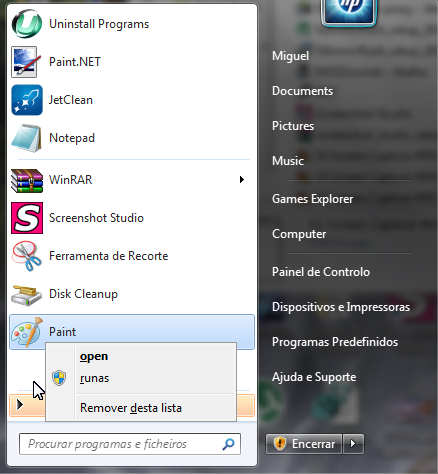
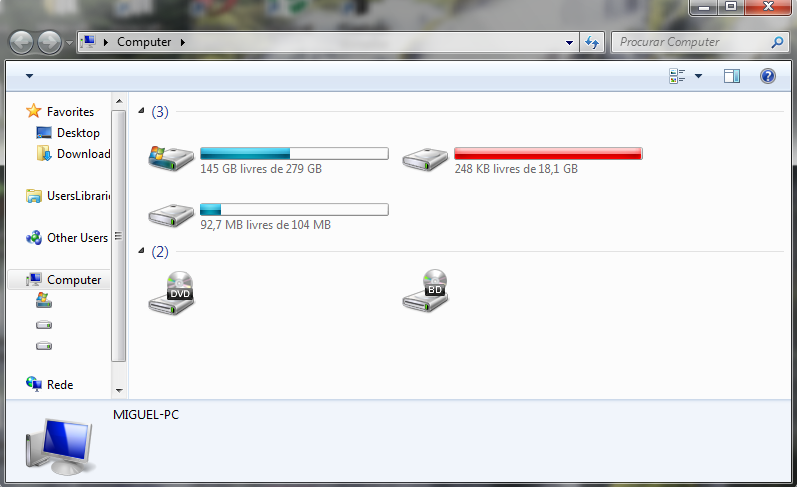

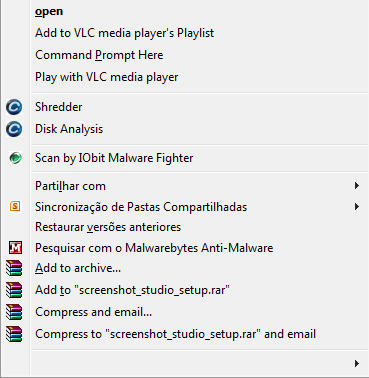
I'm also getting a error when I start my computer so I'll restart it right now and edit this post in 5 minutes with the mensage.
This:

I should translate:
"A program in execution in this computer is trying to show a mensage
The program might need information or permission to conclude a task.
Why is this happening?
-> See mensage
-> Ask later
^Hide program details
One or more programs or devices are asking for atention.
Title: Setup language pack
From: C:\Windows\SYSTEM32\ntdll.dll
Received: Today, 16th of June 2012, 19:39:50
This problem occurs when a program is not totaly compatible with Windows.
Contact the manufacturers of the program or device to obtain more information"
I really think this is related with everything else, I actually looked up ntdll.dll and saw that I might have a registry problem, so I ran several diferent RegCleaners and nothing changed, so I found myself with no clue of what to do next.
Hopefully this is enough for someone to figure what might be wrong.
Thanks for reading and helping, sorry for the extremely long text...
Second I should also say that I'm not English and my computer language is not in English, but I follow and look for answers in this forum everytime I need help with my computer, and I really didn't find a good site/forum in my language that can help me so I hope we can work it out somehow.
I have no idea what might have started this problems I don't remenber installing anything diferent or downloading anything before this problems started, what I first realised is that I can't save files, of any type I want to take pictures and post them in here to show my exact problem, but when I go into something like Paint, Notepad, or even crop tool (might be badly translated) and I do something and I click Save, or Save as, nothing happens it just sits there, the program doesn't stop responding and I can still edit the file, but it won't let me save.
Second thing, is as I said my computer is not in English it's in Portuguese so the Recycle Bin should be Reciclagem but instead it says Recycle Bin, and when I open my Start Up menu, the names on the right side, like Computer should say Computador but they say Computer, same for everything else.
But what I noticed is that everything else is in the correct language, like when I right click on the taskbar on the bottom of the screen all the menus show in Portuguese.
The other thing is I can't right click in my Desktop I can select and move files around but I can't right click, and when I try to move a file to a folder or even to the Recycle Bin it won't let, it shows the blue arrow but no text next to it just a blank space and when I drop it nothing happens.
Other thing is the menu when I right click on files or folders, some things are missing and there are blank spaces, things like Delete or Properties are gonne they just don't show at all, and yet again the top Option "open" should be "Abrir" but it says "open" and it doesn't even have a Capital "O" same thing for other options like "runas" it doesn't even say "run as administrator" it says "runas", not only it's in the wrong language it also is in a weird way.
Last I notice when I open "Computer" or any other folder for that fact the top bar, that should let you change the size of the icons and that sort of things doesn't appear to me, it's just a blank bar.
Also just before I posted this I found a program that allows me to takes pictures and actually saving them, so I'll post some pictures with the problems I described.
And I have no idea where to put this since I don't know what is really causing any of this.
I'm also getting a error when I start my computer so I'll restart it right now and edit this post in 5 minutes with the mensage.
This:
I should translate:
"A program in execution in this computer is trying to show a mensage
The program might need information or permission to conclude a task.
Why is this happening?
-> See mensage
-> Ask later
^Hide program details
One or more programs or devices are asking for atention.
Title: Setup language pack
From: C:\Windows\SYSTEM32\ntdll.dll
Received: Today, 16th of June 2012, 19:39:50
This problem occurs when a program is not totaly compatible with Windows.
Contact the manufacturers of the program or device to obtain more information"
I really think this is related with everything else, I actually looked up ntdll.dll and saw that I might have a registry problem, so I ran several diferent RegCleaners and nothing changed, so I found myself with no clue of what to do next.
Hopefully this is enough for someone to figure what might be wrong.
Thanks for reading and helping, sorry for the extremely long text...
Last edited:
My Computer
At a glance
Windows 7 Home Premium
- OS
- Windows 7 Home Premium


