Make Fingerprint the default way to login

newtowin7

New member
Local time
12:51 AM
Messages
2
I just upgraded my lenovo T61p to Windows 7 Enterprise. It was using Vista business before. When i was on vista and i started or locked the laptop i was able to just swipe my finger on the fingerprint and it would log me on or unlock the laptop. I have set up the biometrics on in windows 7 but when i start or lock the computer it defaults to push Alt+Ctrl+Delete. If i push Alt+Ctrl+Delete it then give me the option of how to login (type in password, fingerprint, or guest).

How can i make it skip the Alt+Ctrl+Delete part and default to just give me option to scan my fingerprint or enter username like it worked in Vista?

Thanks for the help

Carlos
 

My Computer My Computer

Computer Manufacturer/Model Number
IBM Lenovo T61p
OS
Windows 7 Enterprise
Have u installed fingerprint software? The option to set are in the software.
 

My Computer My Computer

Computer Manufacturer/Model Number
Lenovo ThinkPad T60
OS
Windows 7 Ultimate 64Bit
CPU
GenuineIntel Intel(R) Core(TM) DuoCore T2400 @ 1.83GHz
Motherboard
Intel(R) 82801G (ICH7 Family)
Memory
2.00 GB
Graphics Card(s)
Mobile Intel(R) 945 Express Chipset
Sound Card
SoundMAX Integrated Digital HD Audio
Monitor(s) Displays
ThinkPad Display
Screen Resolution
1400x1050
Hard Drives
100Gb SATA
Keyboard
Standard Keyboard
Mouse
HID-compliant Mouse
Internet Speed
Cable Broadband - 54Mbps
Other Info
Intel(R) PRO/1000 PL Network Connection
11a/b/g Wireless LAN Mini PCI Express Adapter
I used the Windows 7 BioMetric Device to can my fingerprints and it is allowing me to login using my fingers. What i need to know is how to make Win 7 Skip the making me press Alt+Ctl+Delete before it will let me scan my finger.
 

My Computer My Computer

Computer Manufacturer/Model Number
IBM Lenovo T61p
OS
Windows 7 Enterprise
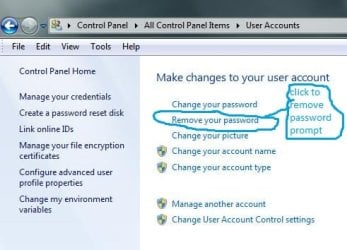
Would removing/deleting password option on the account do it?
 

My Computer My Computer

Computer Manufacturer/Model Number
Lenovo ThinkPad T60
OS
Windows 7 Ultimate 64Bit
CPU
GenuineIntel Intel(R) Core(TM) DuoCore T2400 @ 1.83GHz
Motherboard
Intel(R) 82801G (ICH7 Family)
Memory
2.00 GB
Graphics Card(s)
Mobile Intel(R) 945 Express Chipset
Sound Card
SoundMAX Integrated Digital HD Audio
Monitor(s) Displays
ThinkPad Display
Screen Resolution
1400x1050
Hard Drives
100Gb SATA
Keyboard
Standard Keyboard
Mouse
HID-compliant Mouse
Internet Speed
Cable Broadband - 54Mbps
Other Info
Intel(R) PRO/1000 PL Network Connection
11a/b/g Wireless LAN Mini PCI Express Adapter
newtowin7,

Generally, responses to a thread are answers, but I have a question. I know nothing about these scanners, but your question made me curious, so I did a little searching on eBay and Google, and found a multitude of scanners available for as little as $10 to more than I could ever spend.

I know that if it were a government or business with high security documents to protect, price would be no object, but for someone that simply wants the convenience of a scanner vs typing passwords, what is the least price required to purchase a good scanner? For me, it would seem to be reliability that would be most important, as that I doubt that I will ever have anybody trying to hack my computer anyway. Of course, it would be easier for them to cut a finger off the user than cracking a good password, but I really have no worries about that.
 

My Computer My Computer

Computer Manufacturer/Model Number
DIY
OS
W7x64 Pro, SuSe 12.1/** W7 x64 Pro, XP MCE
CPU
Phenom II 1090T w/Noctua NH-D14 /**4400+ X2 w/CM Hyper TX 3
Motherboard
ASRock 890FX Deluxe 4/**A8N-SLI
Memory
2 x 2GB Patriot PGS34g1600LLKA/**4x1GB Corsair VS
Graphics Card(s)
EVGA GTX460 SC/**EVGA 8800GTS
Sound Card
Asus Xonar D2X/**Xonar D1
Monitor(s) Displays
Acer X233H, Dell E152FPc /**LG M237-WD
Screen Resolution
1920x1080 & 1024x768/**1980x1080
Hard Drives
WDC 2TB, 1.5TB, 1TB, 500GB,Seagate 500GB , Maxtor 80GB /**500GB Seagate & WDC 1TB Black
PSU
CM RS600 w/ APC BX1000G/**Antec 500 TP w/ APC BX1000
Case
HAF922/**Antec 1040IIB
Cooling
3x200mm, 1x140 and 1x120mm/**5x80mm fans
Keyboard
Logitech Media USB/**Saitek Eclipse
Mouse
Cordless Trackman Wheel/**Ditto
Internet Speed
3.3Mbps
Other Info
SB 560 5.1 w/ Sennheiser RS140/**Creative T20 speakers, Dvico FusionHDTV7 Gold RT, Cisco E3000, HP 5510V AIO, Linksys E3000, Belkin F5U237 hub and **F5D8055 adapter
(** = 2nd rig)
Just a suggestion.

Start Menu > Control Panel > System and Security > Administrative Tools > Local Security Policy > Then on the left under 'Local Policies' double click Security Options > Scroll down to 'Interactive logon: Do not require Ctrl Alt Del' double click that > select disabled.

Might be worth a shot
 

My Computer My Computer

Computer Manufacturer/Model Number
Dell Vostro 1000
OS
Windows 7 Ultimate x86
CPU
AMD Sempron 3600+
Graphics Card(s)
ATI Radeon Xpress 1150
Monitor(s) Displays
Generic PnP Monitor
Screen Resolution
1200 x 800
Hard Drives
WD Scorpio Blue 500 GB (WD5000BEVT)
Mouse
Logitech V320 Cordless Optical Mouse
This is what i meant, by password removal.
Noname.jpg
 

My Computer My Computer

Computer Manufacturer/Model Number
Lenovo ThinkPad T60
OS
Windows 7 Ultimate 64Bit
CPU
GenuineIntel Intel(R) Core(TM) DuoCore T2400 @ 1.83GHz
Motherboard
Intel(R) 82801G (ICH7 Family)
Memory
2.00 GB
Graphics Card(s)
Mobile Intel(R) 945 Express Chipset
Sound Card
SoundMAX Integrated Digital HD Audio
Monitor(s) Displays
ThinkPad Display
Screen Resolution
1400x1050
Hard Drives
100Gb SATA
Keyboard
Standard Keyboard
Mouse
HID-compliant Mouse
Internet Speed
Cable Broadband - 54Mbps
Other Info
Intel(R) PRO/1000 PL Network Connection
11a/b/g Wireless LAN Mini PCI Express Adapter

My Computer My Computer

Computer type
PC/Desktop
Computer Manufacturer/Model Number
Dell OP7010
OS
Windows 7 Enterprise (x64); Windows Server 2008 R2 (x64)
Memory
16GB
Monitor(s) Displays
4 Dell 24" LCD
Screen Resolution
1280x1024
Keyboard
Dell
Mouse
Dell Optical
Internet Speed
40meg
I am reviving this thread.
I have installed the software and fingerprint login works fine.
But when I lock my login, I get my usual windows login and below other credentials. I click on other credentials and now the screen shows both my fingerprint and windows login. I click on the fingerprint login and swipe my finger and voila it works.

Now, I need the windows login to go off and show only my fingerprint login. Is this possible. I am using the Authentec TrueSuite on Acer laptop.
 

My Computer My Computer

Computer Manufacturer/Model Number
MacBook Pro
OS
Lion
CPU
i5
Memory
4GB
Graphics Card(s)
Intel
Screen Resolution
1200x800
Hard Drives
Seagate FreeAgent GO 250GB Ext. HDD
Hey,

You could try this article which I found useful during setup: Enable Logon Using Biometric Fingerprint Reader in Windows 7 x86 & x64

Hope it helps,
Mike


I just upgraded my lenovo T61p to Windows 7 Enterprise. It was using Vista business before. When i was on vista and i started or locked the laptop i was able to just swipe my finger on the fingerprint and it would log me on or unlock the laptop. I have set up the biometrics on in windows 7 but when i start or lock the computer it defaults to push Alt+Ctrl+Delete. If i push Alt+Ctrl+Delete it then give me the option of how to login (type in password, fingerprint, or guest).

How can i make it skip the Alt+Ctrl+Delete part and default to just give me option to scan my fingerprint or enter username like it worked in Vista?

Thanks for the help

Carlos
 

My Computer My Computer

OS
win 7
I am reviving this thread.
I have installed the software and fingerprint login works fine.
But when I lock my login, I get my usual windows login and below other credentials. I click on other credentials and now the screen shows both my fingerprint and windows login. I click on the fingerprint login and swipe my finger and voila it works.

Now, I need the windows login to go off and show only my fingerprint login. Is this possible. I am using the Authentec TrueSuite on Acer laptop.
I was having this issue too, but it turns out the screen is just unclear.

They don't tell you, but you don't actually have to click "Other Credentials" and select the fingerprint login. When your usual windows login image is there, you can just swipe your finger and you'll login.
 

My Computer My Computer

OS
Windows 7
Thanks all. But I managed to get to the fingerprint logon after a restart and a fresh install of the driver I downloaded elsewhere.
 

My Computer My Computer

Computer Manufacturer/Model Number
MacBook Pro
OS
Lion
CPU
i5
Memory
4GB
Graphics Card(s)
Intel
Screen Resolution
1200x800
Hard Drives
Seagate FreeAgent GO 250GB Ext. HDD
Simple

For a while I was under the impression that you first had the make the selection first before using the Fingerscaner but even that the screen shows you the choice of typing the password or selecting Finger scan or at times it does not even show you the Fingerscan selection, which logically would require you to manually select one of the two, simply slide your finger with out making the selection and it will be accepted.
 

My Computer My Computer

OS
Windows 7
I've always wondered what happens if you burn your fingertip at work or home and nearly erase the print.
 

My Computer My Computer

OS
Win7 HP 64bit
Thanks all. But I managed to get to the fingerprint logon after a rest

Hi Ch@N,

Could you please let me also know in detail. How did you manage to pull it off. I am having same trouble.

Thanks
 

My Computer My Computer

OS
windows7 pro 64bit
Be careful..don't cut your finger
 

My Computer My Computer

Computer Manufacturer/Model Number
Scorpion Technology
OS
Windows 7 64 bit Home Premium
CPU
Intel Core Quad i7 870(2.93 Ghz /8MB /Quad Core
Motherboard
Gigabyte GA-P55- USB3 Intel
Memory
Kingston 4 GB Kit (2x2GB) PC-10600 (1333MHz) DDR3
Graphics Card(s)
Gainward Geforce GTS-450 (930Mhz), 1GB GDDDR5 (4000Mhz)
Sound Card
Onboard 7.1 Channel
Screen Resolution
1440x900
Hard Drives
1TB Santa111 64MB Cache 7200 RPM
PSU
Antec 750W
I've been using the fingerprint scanner on my HP and after 4 months the number of swipes to get a positive read increased a lot. I now find it easier and faster to type password. It is a cool feature when it works the first time.
 

My Computer My Computer

Computer type
PC/Desktop
Computer Manufacturer/Model Number
A blend of brains, brawn and dumb luck.
OS
Windows 7 Ultimate 64
CPU
i7 3770k OC'd 4.6 @ 1.17v, also FX 8120 & i5 miniITX
Motherboard
MSI P67A-GD80 b3
Memory
32 gb G.Skill Sniper DDR3 10-12-12-31 @ 2133
Graphics Card(s)
XFX Radeon 7870 2GB DDR5
Sound Card
Sound Blaster Z Series Card
Monitor(s) Displays
(2) LG LED 23" 1920 x 1080 2ms Monitors via mini d-port
Screen Resolution
1680 X 1050 p
Hard Drives
Samsung 256 gb 830 SSD sata III
(1) 1 tb WD Black
(2) 1 tb Hitachi deskmates/sata II
(2) 1 tb WD green/sata II
(2) 3 tb Seagate Barracuda
(1) 120 gb OCZ Vertex SS
(1) Drobo 5N w/5 Seagate 3tb
PSU
EVGA modular 1000G2 80% gold rating & APC 1200 RS
Case
CoolerMaster Storm Styker
Cooling
7 case fans 140mm & 120mm, NZXT Kraken X60
Keyboard
(2) Logitech Illuminated Keyboards (1) usb (1) wireless
Mouse
Logitech G700 & T-BC21 - nano nx for the laptop
Internet Speed
Basic 120mbps down
Antivirus
Trend Micro Titanium Max Security & Malwarebytes Premium
Browser
Chrome and IE 10
Other Info
5 Noctua case fans + 3 Noctua in p/p on NZXT cooler
Integrated hot swap drive bays for 2.5" Drives
(2) Lite-on dvd/cd/Blu Ray optical 22X
Integrated fan controller and led on/off
HP Officejet Pro 8630 all-n-one
Hot-swappable 3.5" hard drive bay
Netgear Nighthawk router
Asus USB 3 & sata 6 PCIe card
Vantec IDE to sata adptr./Ultra sata adptr
Lenovo L420 i5 lappy with m sata
Drobo 5N advanced NAS
I've been using the fingerprint scanner on my HP and after 4 months the number of swipes to get a positive read increased a lot. I now find it easier and faster to type password. It is a cool feature when it works the first time.

I think you should try to clean it off sometime too...
Never used a fingerprint scanner to login into Windows... it seems too risky imo.
 

My Computer My Computer

Computer type
PC/Desktop
Computer Manufacturer/Model Number
Custom build
OS
Windows 10 Professional 64-bit
CPU
Ryzen 9 5900X
Motherboard
Gigabyte X570 Aorus Master
Memory
G.Skill 3600Mhz CL16 16GB × 4
Graphics Card(s)
EVGA GeForce RTX 3070 Ti FTW3 Ultra Gaming
Sound Card
On-board
Monitor(s) Displays
Dell Alienware AW3418DW
Screen Resolution
3440x1440
Hard Drives
1×Sabrent Rocket 4 Plus 2TB nvme SSD (System, internal)
2x4TB Western Digital Blue (Internal)
1x4TB HDST 7200RPM (Internal)
PSU
Seasonic Focus Plus 850W Platinum
Case
Corsair 680X
Cooling
Stock fans + 3× Corsair QL120, Corsair H100i Platinum
Keyboard
Logitech K350
Mouse
Logitech M510
Internet Speed
120Mbits dl - 20Mbits up
Antivirus
ESET NOD32 Antivirus
Browser
Firefox (latest version)
Other Info
Headphones : Audio-Technica ATH-M50x
Scanner : Canon Canoscan LiDE 220 + Plustek OptiBook 4800
Could be a build up of oil but the scanner looks spotless but I'll try cleaning with a moist q-tip and then dry side.
 

My Computer My Computer

Computer type
PC/Desktop
Computer Manufacturer/Model Number
A blend of brains, brawn and dumb luck.
OS
Windows 7 Ultimate 64
CPU
i7 3770k OC'd 4.6 @ 1.17v, also FX 8120 & i5 miniITX
Motherboard
MSI P67A-GD80 b3
Memory
32 gb G.Skill Sniper DDR3 10-12-12-31 @ 2133
Graphics Card(s)
XFX Radeon 7870 2GB DDR5
Sound Card
Sound Blaster Z Series Card
Monitor(s) Displays
(2) LG LED 23" 1920 x 1080 2ms Monitors via mini d-port
Screen Resolution
1680 X 1050 p
Hard Drives
Samsung 256 gb 830 SSD sata III
(1) 1 tb WD Black
(2) 1 tb Hitachi deskmates/sata II
(2) 1 tb WD green/sata II
(2) 3 tb Seagate Barracuda
(1) 120 gb OCZ Vertex SS
(1) Drobo 5N w/5 Seagate 3tb
PSU
EVGA modular 1000G2 80% gold rating & APC 1200 RS
Case
CoolerMaster Storm Styker
Cooling
7 case fans 140mm & 120mm, NZXT Kraken X60
Keyboard
(2) Logitech Illuminated Keyboards (1) usb (1) wireless
Mouse
Logitech G700 & T-BC21 - nano nx for the laptop
Internet Speed
Basic 120mbps down
Antivirus
Trend Micro Titanium Max Security & Malwarebytes Premium
Browser
Chrome and IE 10
Other Info
5 Noctua case fans + 3 Noctua in p/p on NZXT cooler
Integrated hot swap drive bays for 2.5" Drives
(2) Lite-on dvd/cd/Blu Ray optical 22X
Integrated fan controller and led on/off
HP Officejet Pro 8630 all-n-one
Hot-swappable 3.5" hard drive bay
Netgear Nighthawk router
Asus USB 3 & sata 6 PCIe card
Vantec IDE to sata adptr./Ultra sata adptr
Lenovo L420 i5 lappy with m sata
Drobo 5N advanced NAS
Back
Top