
Solved Make Windows wait to open programs on HDD?

charkzilla20

New member
Member
Local time
7:51 AM
Messages
78
Hey everyone :)

I had a thought. I use a ssd as my c drive, and a 1tb WD black drive for other programs and media and stuff. I often want to launch 2 programs at once (like Photoshop/Lightroom) that are on the HDD, but this makes the hard drive have to try and read 2 places at once and it slows down the launches. It also makes the disk make a lot of working noise (no bad noises, just normal noises). I assume this is because the head has to be moving back and forth quickly. I can launch PS and LR individually in under a few seconds for each, but at the same time, it can take up to 30 seconds longer.
Is there a way I could make windows load one program and then the next after the first is done loading (even though launching them at the same time)?

That would be great. thanks :)
 

My Computer

Computer type
PC/Desktop
Computer Manufacturer/Model Number
I made her myself :)
OS
Windows 7 Professional
CPU
Intel i5-4670k
Motherboard
Asus Z87-Pro
Memory
G.SKILL Ripjaws X Series 16GB 1600mhz (F3-1600C9D-16GXM)
Graphics Card(s)
EVGA GTX770 SC ACX 2gb
Monitor(s) Displays
Acer H236HLbid 23" ips 5ms GTG
Screen Resolution
1080p
Hard Drives
-128gb Samsung 840 Pro (C drive with OS)
-1tb WD Black 7200rpm 64mb WD1002FAEX (music, programs, files, etc.)
-120gb Samsung 840 evo (games)
PSU
SeaSonic M12II 750watt
Case
Coolermaster HAF 922 all black, usb 3.0
Cooling
CPU: CM hyper 212 evo with push-pull Cougar Vortex fans
Keyboard
CM Storm QuickFire TK (brown switch mechanical)
Mouse
perixx mx-2000
Internet Speed
21Mb/s down, 2Mb/s up (on a good day)
Antivirus
Malwarebytes and Microsoft Security Essentials
Browser
Chrome
Other Info
Fans on case: front 200mm in, top 200mm out, x2 side 120mm in (cougar vortex), rear 120mm out

I've never seen my cpu go above 40c and my card above 60c even with intense games or benchmarks
I don't overclock anything, as I rely on this machine too much for other things to risk it getting fried.
What's the over-riding reason you aren't installing applications on the SSD?

If I wanted Windows to "load one program and then the next after the first is done loading", I wouldn't launch them at the same time, but that's just my possibly silly idea.
 

My Computer

Computer type
PC/Desktop
Computer Manufacturer/Model Number
Ignatz Special; 4 speed manual gearbox; factory air conditioning; one of one
OS
Windows 7 Home Premium SP1, 64-bit
CPU
Intel Skylake i5-6600K, not overclocked
Motherboard
AsRock Z170M Extreme 4, micro ATX
Memory
8 GB HyperX DDR4-2666 (2 x 4 GB)
Graphics Card(s)
none; graphics are integrated on CPU
Sound Card
onboard: Realtek ALC1150; external: USB Behringer UF0-202
Monitor(s) Displays
Dell S2340M 23 inch IPS
Screen Resolution
1600 x 900
Hard Drives
System: Crucial MX100 series SSD, 128 GB;
Data: Samsung Spinpoint 103SJ, 1 TB;
Backup: WD Caviar Green WD30EZRX-00D8PB0, 3 TB
PSU
Rosewill SilentNight 500 watt fanless, semi-modular
Case
Antec Solo II
Cooling
Noctua NH-U12S; Noctua F12 intake, Noctua S12A exhaust
Keyboard
Microsoft 200 6JH-00001 USB
Mouse
Dell or Microsoft optical wired; USB
Antivirus
Microsoft Security Essentials and Malwarebytes Premium
Browser
Pale Moon
Other Info
All fans PWM; speeds at idle: CPU circa 500 rpm; intake circa 600 rpm; exhaust circa 600 rpm; CPU temps 27 idle and 47 C load in a warm room (27 C/81 F) when running Intel Extreme Tuning Utility stress test.
What's the over-riding reason you aren't installing applications on the SSD?

If I wanted Windows to "load one program and then the next after the first is done loading", I wouldn't launch them at the same time, but that's just my possibly silly idea.

It's a 128GB Samsung 840 Pro. I prefer to keep the drive without unnecessary writes, so I've been reluctant to install programs on it that cache huge files (like photoshop, i know i can specify it to cache elsewhere, but i don't trust it).
I had a capacity problem for a while, i found out the hibernation file, page file, indexing, and unnecessary system restore was taking up about 30 gigs. Adjusting those gave me back that space, so now it's 51GB free.
I'd like to put photoshop and lightroom on the ssd, but that would require a re-installing, and i don't know if my extensive settings/plugins will transfer, or if photoshop's/lightroom's secret caching will be tamable.

Sure, i'll just do it slowly :/. it's just me nit-picking.

I just enjoy logging in after a 10-second boot and opening all the programs in my taskbar that i use. but i end up listening to the hard drive spazzing trying to open 6-10 programs on it at once.
 

My Computer

Computer type
PC/Desktop
Computer Manufacturer/Model Number
I made her myself :)
OS
Windows 7 Professional
CPU
Intel i5-4670k
Motherboard
Asus Z87-Pro
Memory
G.SKILL Ripjaws X Series 16GB 1600mhz (F3-1600C9D-16GXM)
Graphics Card(s)
EVGA GTX770 SC ACX 2gb
Monitor(s) Displays
Acer H236HLbid 23" ips 5ms GTG
Screen Resolution
1080p
Hard Drives
-128gb Samsung 840 Pro (C drive with OS)
-1tb WD Black 7200rpm 64mb WD1002FAEX (music, programs, files, etc.)
-120gb Samsung 840 evo (games)
PSU
SeaSonic M12II 750watt
Case
Coolermaster HAF 922 all black, usb 3.0
Cooling
CPU: CM hyper 212 evo with push-pull Cougar Vortex fans
Keyboard
CM Storm QuickFire TK (brown switch mechanical)
Mouse
perixx mx-2000
Internet Speed
21Mb/s down, 2Mb/s up (on a good day)
Antivirus
Malwarebytes and Microsoft Security Essentials
Browser
Chrome
Other Info
Fans on case: front 200mm in, top 200mm out, x2 side 120mm in (cougar vortex), rear 120mm out

I've never seen my cpu go above 40c and my card above 60c even with intense games or benchmarks
I don't overclock anything, as I rely on this machine too much for other things to risk it getting fried.
Well, the recent consensus re writes to an SSD suggests that the nervousness about it is way overdone unless you are in a very, very rare situation for a home user (e.g. not running a corporate database). You can Google for SSD torture testing to find out how long they actually last.

I figure SSDs are tools like any other and I don't want to be unable to benefit from the SSDs primary advantage: speed. Excessive writes/"wearing it out" is way way down the list of most likely reasons for SSD failures as far as I can tell.

But I'd understand if you didn't want to change your mind.
 

My Computer

Computer type
PC/Desktop
Computer Manufacturer/Model Number
Ignatz Special; 4 speed manual gearbox; factory air conditioning; one of one
OS
Windows 7 Home Premium SP1, 64-bit
CPU
Intel Skylake i5-6600K, not overclocked
Motherboard
AsRock Z170M Extreme 4, micro ATX
Memory
8 GB HyperX DDR4-2666 (2 x 4 GB)
Graphics Card(s)
none; graphics are integrated on CPU
Sound Card
onboard: Realtek ALC1150; external: USB Behringer UF0-202
Monitor(s) Displays
Dell S2340M 23 inch IPS
Screen Resolution
1600 x 900
Hard Drives
System: Crucial MX100 series SSD, 128 GB;
Data: Samsung Spinpoint 103SJ, 1 TB;
Backup: WD Caviar Green WD30EZRX-00D8PB0, 3 TB
PSU
Rosewill SilentNight 500 watt fanless, semi-modular
Case
Antec Solo II
Cooling
Noctua NH-U12S; Noctua F12 intake, Noctua S12A exhaust
Keyboard
Microsoft 200 6JH-00001 USB
Mouse
Dell or Microsoft optical wired; USB
Antivirus
Microsoft Security Essentials and Malwarebytes Premium
Browser
Pale Moon
Other Info
All fans PWM; speeds at idle: CPU circa 500 rpm; intake circa 600 rpm; exhaust circa 600 rpm; CPU temps 27 idle and 47 C load in a warm room (27 C/81 F) when running Intel Extreme Tuning Utility stress test.
Well, the recent consensus re writes to an SSD suggests that the nervousness about it is way overdone unless you are in a very, very rare situation for a home user (e.g. not running a corporate database). You can Google for SSD torture testing to find out how long they actually last.

I figure SSDs are tools like any other and I don't want to be unable to benefit from the SSDs primary advantage: speed. Excessive writes/"wearing it out" is way way down the list of most likely reasons for SSD failures as far as I can tell.

But I'd understand if you didn't want to change your mind.

I've seen the results of those torture tests. It seems like at worst, my ssd could handle being written fully every day for at least 10 years.
I've been aware of this, but my other concern was seeing the capacity of the drive fluctuate by 5-15 gigs over the course of months even without installing or storing anything on it myself. I was worried I'd run out of space. Now i'm good though with the background windows file storing under control.

...soooo does photoshop have a settings file i could back-up/restore to if i change the installation to the ssd?
 

My Computer

Computer type
PC/Desktop
Computer Manufacturer/Model Number
I made her myself :)
OS
Windows 7 Professional
CPU
Intel i5-4670k
Motherboard
Asus Z87-Pro
Memory
G.SKILL Ripjaws X Series 16GB 1600mhz (F3-1600C9D-16GXM)
Graphics Card(s)
EVGA GTX770 SC ACX 2gb
Monitor(s) Displays
Acer H236HLbid 23" ips 5ms GTG
Screen Resolution
1080p
Hard Drives
-128gb Samsung 840 Pro (C drive with OS)
-1tb WD Black 7200rpm 64mb WD1002FAEX (music, programs, files, etc.)
-120gb Samsung 840 evo (games)
PSU
SeaSonic M12II 750watt
Case
Coolermaster HAF 922 all black, usb 3.0
Cooling
CPU: CM hyper 212 evo with push-pull Cougar Vortex fans
Keyboard
CM Storm QuickFire TK (brown switch mechanical)
Mouse
perixx mx-2000
Internet Speed
21Mb/s down, 2Mb/s up (on a good day)
Antivirus
Malwarebytes and Microsoft Security Essentials
Browser
Chrome
Other Info
Fans on case: front 200mm in, top 200mm out, x2 side 120mm in (cougar vortex), rear 120mm out

I've never seen my cpu go above 40c and my card above 60c even with intense games or benchmarks
I don't overclock anything, as I rely on this machine too much for other things to risk it getting fried.
I use Photoshop, but am not highly skilled with it and don't know if its settings can be backed up at all. I pretty much use defaults and don't do anything intensive or generate large files.

Used space on an SSD can move around for various reasons. You can use something like TreeSize Free to find out what folders are using the most space. And I'd use both Windows Disk Cleanup and CCleaner to maintain the disc and keep unnecessary files beaten down as much as possible.

I've never personally had occupied space move around by 5 GB in a month---maybe 2 or 3 at most. Could be Photoshop or Lightroom files for all I know.

I don't often add new programs, but my C partition has crept up from 30 occupied to 38 occupied in 3 years. I'd guess that's mostly due to Windows updates.
 

My Computer

Computer type
PC/Desktop
Computer Manufacturer/Model Number
Ignatz Special; 4 speed manual gearbox; factory air conditioning; one of one
OS
Windows 7 Home Premium SP1, 64-bit
CPU
Intel Skylake i5-6600K, not overclocked
Motherboard
AsRock Z170M Extreme 4, micro ATX
Memory
8 GB HyperX DDR4-2666 (2 x 4 GB)
Graphics Card(s)
none; graphics are integrated on CPU
Sound Card
onboard: Realtek ALC1150; external: USB Behringer UF0-202
Monitor(s) Displays
Dell S2340M 23 inch IPS
Screen Resolution
1600 x 900
Hard Drives
System: Crucial MX100 series SSD, 128 GB;
Data: Samsung Spinpoint 103SJ, 1 TB;
Backup: WD Caviar Green WD30EZRX-00D8PB0, 3 TB
PSU
Rosewill SilentNight 500 watt fanless, semi-modular
Case
Antec Solo II
Cooling
Noctua NH-U12S; Noctua F12 intake, Noctua S12A exhaust
Keyboard
Microsoft 200 6JH-00001 USB
Mouse
Dell or Microsoft optical wired; USB
Antivirus
Microsoft Security Essentials and Malwarebytes Premium
Browser
Pale Moon
Other Info
All fans PWM; speeds at idle: CPU circa 500 rpm; intake circa 600 rpm; exhaust circa 600 rpm; CPU temps 27 idle and 47 C load in a warm room (27 C/81 F) when running Intel Extreme Tuning Utility stress test.
My favorite thing these days is Symbolic Links :p

Charkzilla, it should be real easy for you to test it. The tutorial is http://www.sevenforums.com/tutorials/278262-mklink-create-use-links-windows.html

- Copy/paste the photoshop folder(say, D:\Photoshop) to SSD (C:\Folder\Photoshop).
- Rename the folder left on HDD to something else (Photoshop_bak)
- open cmd
- mklink /d D:\Photoshop C:\Folder\Photoshop

The OS will think the Photoshop folder is still on D. And everything should work.
 

My Computer

Computer type
PC/Desktop
Computer Manufacturer/Model Number
Custom Build
OS
Windows 7 Ultimate x64 SP1
CPU
AMD Phenom 2 1090T
Motherboard
Gigabyte GA-890FXA-UD5
Memory
2x8GB Kingston HyperX Fury Black 1600Mhz Unganged
Graphics Card(s)
MSI GTX 970 Gaming 4G
Sound Card
Realtek On-Board HD 7.1 Audio / Logitech G35
Monitor(s) Displays
3xAcer GD245HQ
Screen Resolution
1920x1080
Hard Drives
Samsung 850 Pro 512GB SSD - OS /
WD Caviar Black SATA 3 - 1 TBx2 - Dynamic RAID 0 /
WD Caviar Green SATA 2 - 640GBx2 - Dynamic RAID 0 /
WD Caviar Green SATA 2 - 640GB - Internal Backup /
Seagate Barracude SATA 3 - 3TB - External Backup/ Sync
PSU
HighPower 1000W
Case
Cooler Master HAF 932
Cooling
Noctua NH-D14
Keyboard
Logitech G19
Mouse
Logitech G500
Internet Speed
100/4 Mbit Cable (100GB quota)
Antivirus
ZoneAlarm Extreme Security / MBAM Pro / MBAE Free / SAS Free
Browser
IE 11 - Firefox - Chrome
Other Info
Logitech F710/ G27/ G940/ Z5500 // TrackIR 5 // Nvidia 3D Surround Vision
My favorite thing these days is Symbolic Links :p

Charkzilla, it should be real easy for you to test it. The tutorial is http://www.sevenforums.com/tutorials/278262-mklink-create-use-links-windows.html

- Copy/paste the photoshop folder(say, D:\Photoshop) to SSD (C:\Folder\Photoshop).
- Rename the folder left on HDD to something else (Photoshop_bak)
- open cmd
- mklink /d D:\Photoshop C:\Folder\Photoshop

The OS will think the Photoshop folder is still on D. And everything should work.


Ok i tried this, and it seems to be working :)
i keep the caching and catalog and library files on the HDD, and put the program folders "Adobe Photoshop CC 2014" and the lightroom one the c drive.
But in doing the command prompt part, it said the syntax was incorrect. I removed the spaces in the name of the folder and it worked. There's a shortcut without spaces, and the original one the HDD now. Is that normal?
 

My Computer

Computer type
PC/Desktop
Computer Manufacturer/Model Number
I made her myself :)
OS
Windows 7 Professional
CPU
Intel i5-4670k
Motherboard
Asus Z87-Pro
Memory
G.SKILL Ripjaws X Series 16GB 1600mhz (F3-1600C9D-16GXM)
Graphics Card(s)
EVGA GTX770 SC ACX 2gb
Monitor(s) Displays
Acer H236HLbid 23" ips 5ms GTG
Screen Resolution
1080p
Hard Drives
-128gb Samsung 840 Pro (C drive with OS)
-1tb WD Black 7200rpm 64mb WD1002FAEX (music, programs, files, etc.)
-120gb Samsung 840 evo (games)
PSU
SeaSonic M12II 750watt
Case
Coolermaster HAF 922 all black, usb 3.0
Cooling
CPU: CM hyper 212 evo with push-pull Cougar Vortex fans
Keyboard
CM Storm QuickFire TK (brown switch mechanical)
Mouse
perixx mx-2000
Internet Speed
21Mb/s down, 2Mb/s up (on a good day)
Antivirus
Malwarebytes and Microsoft Security Essentials
Browser
Chrome
Other Info
Fans on case: front 200mm in, top 200mm out, x2 side 120mm in (cougar vortex), rear 120mm out

I've never seen my cpu go above 40c and my card above 60c even with intense games or benchmarks
I don't overclock anything, as I rely on this machine too much for other things to risk it getting fried.
If there are spaces then you need ", command looks like this to work:

mklink /d "D:\Photoshop Folder" "C:\Folder\Photoshop folder"
 

My Computer

Computer type
PC/Desktop
Computer Manufacturer/Model Number
Custom Build
OS
Windows 7 Ultimate x64 SP1
CPU
AMD Phenom 2 1090T
Motherboard
Gigabyte GA-890FXA-UD5
Memory
2x8GB Kingston HyperX Fury Black 1600Mhz Unganged
Graphics Card(s)
MSI GTX 970 Gaming 4G
Sound Card
Realtek On-Board HD 7.1 Audio / Logitech G35
Monitor(s) Displays
3xAcer GD245HQ
Screen Resolution
1920x1080
Hard Drives
Samsung 850 Pro 512GB SSD - OS /
WD Caviar Black SATA 3 - 1 TBx2 - Dynamic RAID 0 /
WD Caviar Green SATA 2 - 640GBx2 - Dynamic RAID 0 /
WD Caviar Green SATA 2 - 640GB - Internal Backup /
Seagate Barracude SATA 3 - 3TB - External Backup/ Sync
PSU
HighPower 1000W
Case
Cooler Master HAF 932
Cooling
Noctua NH-D14
Keyboard
Logitech G19
Mouse
Logitech G500
Internet Speed
100/4 Mbit Cable (100GB quota)
Antivirus
ZoneAlarm Extreme Security / MBAM Pro / MBAE Free / SAS Free
Browser
IE 11 - Firefox - Chrome
Other Info
Logitech F710/ G27/ G940/ Z5500 // TrackIR 5 // Nvidia 3D Surround Vision

Attachments

  • linking.PNG
    linking.PNG
    3.3 KB · Views: 4

My Computer

Computer type
PC/Desktop
Computer Manufacturer/Model Number
I made her myself :)
OS
Windows 7 Professional
CPU
Intel i5-4670k
Motherboard
Asus Z87-Pro
Memory
G.SKILL Ripjaws X Series 16GB 1600mhz (F3-1600C9D-16GXM)
Graphics Card(s)
EVGA GTX770 SC ACX 2gb
Monitor(s) Displays
Acer H236HLbid 23" ips 5ms GTG
Screen Resolution
1080p
Hard Drives
-128gb Samsung 840 Pro (C drive with OS)
-1tb WD Black 7200rpm 64mb WD1002FAEX (music, programs, files, etc.)
-120gb Samsung 840 evo (games)
PSU
SeaSonic M12II 750watt
Case
Coolermaster HAF 922 all black, usb 3.0
Cooling
CPU: CM hyper 212 evo with push-pull Cougar Vortex fans
Keyboard
CM Storm QuickFire TK (brown switch mechanical)
Mouse
perixx mx-2000
Internet Speed
21Mb/s down, 2Mb/s up (on a good day)
Antivirus
Malwarebytes and Microsoft Security Essentials
Browser
Chrome
Other Info
Fans on case: front 200mm in, top 200mm out, x2 side 120mm in (cougar vortex), rear 120mm out

I've never seen my cpu go above 40c and my card above 60c even with intense games or benchmarks
I don't overclock anything, as I rely on this machine too much for other things to risk it getting fried.
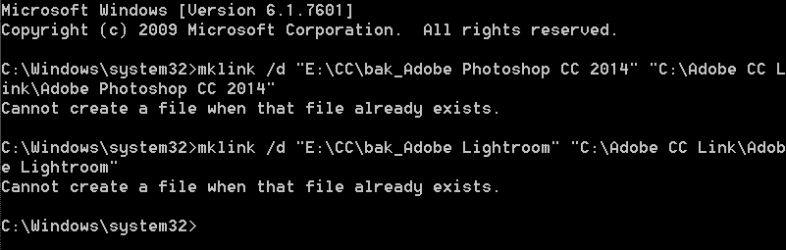
Cmd says the link is already there when it isn't.
I deleted the Photoshop folder to restart. Now windows doesn't recognize photoshop as a program to open files with. I'll reinstall Photoshop. I'll back up all my settings and configuration. I'll reinstall it on the c drive. This linking thing is a real headache.
 

My Computer

Computer type
PC/Desktop
Computer Manufacturer/Model Number
I made her myself :)
OS
Windows 7 Professional
CPU
Intel i5-4670k
Motherboard
Asus Z87-Pro
Memory
G.SKILL Ripjaws X Series 16GB 1600mhz (F3-1600C9D-16GXM)
Graphics Card(s)
EVGA GTX770 SC ACX 2gb
Monitor(s) Displays
Acer H236HLbid 23" ips 5ms GTG
Screen Resolution
1080p
Hard Drives
-128gb Samsung 840 Pro (C drive with OS)
-1tb WD Black 7200rpm 64mb WD1002FAEX (music, programs, files, etc.)
-120gb Samsung 840 evo (games)
PSU
SeaSonic M12II 750watt
Case
Coolermaster HAF 922 all black, usb 3.0
Cooling
CPU: CM hyper 212 evo with push-pull Cougar Vortex fans
Keyboard
CM Storm QuickFire TK (brown switch mechanical)
Mouse
perixx mx-2000
Internet Speed
21Mb/s down, 2Mb/s up (on a good day)
Antivirus
Malwarebytes and Microsoft Security Essentials
Browser
Chrome
Other Info
Fans on case: front 200mm in, top 200mm out, x2 side 120mm in (cougar vortex), rear 120mm out

I've never seen my cpu go above 40c and my card above 60c even with intense games or benchmarks
I don't overclock anything, as I rely on this machine too much for other things to risk it getting fried.
Deleting the photohop folder was not the right move, that's not the links fault. :o

It was a misunderstanding, I didn't ask to use the space version. But for future reference.

Say you had:
E:\CC\Adobe Folder - Original location

You wan't it on:
C:\Adobe Folder

Cut "Adobe folder" on E:\CC, and paste in C:\

then run the command:
mklink /d "C:\Adobe Folder" "E:\CC\Adobe Folder"

Sorry for the confusion
 

My Computer

Computer type
PC/Desktop
Computer Manufacturer/Model Number
Custom Build
OS
Windows 7 Ultimate x64 SP1
CPU
AMD Phenom 2 1090T
Motherboard
Gigabyte GA-890FXA-UD5
Memory
2x8GB Kingston HyperX Fury Black 1600Mhz Unganged
Graphics Card(s)
MSI GTX 970 Gaming 4G
Sound Card
Realtek On-Board HD 7.1 Audio / Logitech G35
Monitor(s) Displays
3xAcer GD245HQ
Screen Resolution
1920x1080
Hard Drives
Samsung 850 Pro 512GB SSD - OS /
WD Caviar Black SATA 3 - 1 TBx2 - Dynamic RAID 0 /
WD Caviar Green SATA 2 - 640GBx2 - Dynamic RAID 0 /
WD Caviar Green SATA 2 - 640GB - Internal Backup /
Seagate Barracude SATA 3 - 3TB - External Backup/ Sync
PSU
HighPower 1000W
Case
Cooler Master HAF 932
Cooling
Noctua NH-D14
Keyboard
Logitech G19
Mouse
Logitech G500
Internet Speed
100/4 Mbit Cable (100GB quota)
Antivirus
ZoneAlarm Extreme Security / MBAM Pro / MBAE Free / SAS Free
Browser
IE 11 - Firefox - Chrome
Other Info
Logitech F710/ G27/ G940/ Z5500 // TrackIR 5 // Nvidia 3D Surround Vision
Back
Top