Making bootable DVD

Thanks whs.

When I install Windows 7 on partition E, will it be detected as System partition then? (above Q in brief)
 

My Computer

Computer Manufacturer/Model Number
TOSHIBA EQUIUM A200 (X86-based PC AT/AT COMPATIBLE)
OS
Windows 7 Ultimate x86
CPU
Intel(R) Pentium(R) Dual CPU T2310 @ 1.46GHz
Motherboard
Intel Corporation SANTA ROSA CRB
Memory
2GB
Graphics Card(s)
Mobile Intel(R) 965 Express Chipset Family
Screen Resolution
1280 * 800 Pixels
Hard Drives
ST9120822AS ATA Device (IDE)
There is no knows issues installing from a USB drive. I have done it myself several times with no issues.

Your question depends on the data you want to save. You can always install on top of your current installation, and your data will be backed up to Windows.old
I am sorry, but do you mean you did it with just copying & pasting ISO file to USB stick?
 

My Computer

Computer Manufacturer/Model Number
TOSHIBA EQUIUM A200 (X86-based PC AT/AT COMPATIBLE)
OS
Windows 7 Ultimate x86
CPU
Intel(R) Pentium(R) Dual CPU T2310 @ 1.46GHz
Motherboard
Intel Corporation SANTA ROSA CRB
Memory
2GB
Graphics Card(s)
Mobile Intel(R) 965 Express Chipset Family
Screen Resolution
1280 * 800 Pixels
Hard Drives
ST9120822AS ATA Device (IDE)
Whatever partition you install to will be detected as C when you boot to it. If you have any problems, run a Startup Repair, found in the Repair My Computer screen on the installation DVD/USB drive.
 

My Computer

Computer Manufacturer/Model Number
Custom
OS
Windows 7 Professional x64
CPU
Intel i7 2600K OC'd @ 4620 MHz
Motherboard
Asus P8Z68-V Pro
Memory
16GB GSkill Sniper 2133 Mhz (4x4GB)
Graphics Card(s)
EVGA GeForce GTX 480 SuperClocked+
Sound Card
Realtek High Definition Audio
Monitor(s) Displays
2x Acer S273HLbmii 27"
Screen Resolution
2 x 1920x1080
Hard Drives
64GB Crucial M4 SSD

Storage: Hitachi 1TB 5400RPM, Samsung 1.5TB 5400RPM
PSU
Corsair HW Series 750w (modular)
Case
Cooler Master HAF 932 Advanced Blue Edition
Cooling
CM Hyper 212+ CPU cooler, 3x 230mm + 1x 140mm case fans
Keyboard
Logitech MK320 (wireless)
Mouse
Logitech MK320 (wireless)
Internet Speed
30 Mb/s : 2 Mb/s
Whatever partition you install to will be detected as C when you boot to it. If you have any problems, run a Startup Repair, found in the Repair My Computer screen on the installation DVD/USB drive.

What happens to the partition which already is named C? It's changed, or?
 

My Computer

Computer Manufacturer/Model Number
TOSHIBA EQUIUM A200 (X86-based PC AT/AT COMPATIBLE)
OS
Windows 7 Ultimate x86
CPU
Intel(R) Pentium(R) Dual CPU T2310 @ 1.46GHz
Motherboard
Intel Corporation SANTA ROSA CRB
Memory
2GB
Graphics Card(s)
Mobile Intel(R) 965 Express Chipset Family
Screen Resolution
1280 * 800 Pixels
Hard Drives
ST9120822AS ATA Device (IDE)
It will be changed to D: or something.
 

My Computer

Computer Manufacturer/Model Number
Custom
OS
Windows 7 Professional x64
CPU
Intel i7 2600K OC'd @ 4620 MHz
Motherboard
Asus P8Z68-V Pro
Memory
16GB GSkill Sniper 2133 Mhz (4x4GB)
Graphics Card(s)
EVGA GeForce GTX 480 SuperClocked+
Sound Card
Realtek High Definition Audio
Monitor(s) Displays
2x Acer S273HLbmii 27"
Screen Resolution
2 x 1920x1080
Hard Drives
64GB Crucial M4 SSD

Storage: Hitachi 1TB 5400RPM, Samsung 1.5TB 5400RPM
PSU
Corsair HW Series 750w (modular)
Case
Cooler Master HAF 932 Advanced Blue Edition
Cooling
CM Hyper 212+ CPU cooler, 3x 230mm + 1x 140mm case fans
Keyboard
Logitech MK320 (wireless)
Mouse
Logitech MK320 (wireless)
Internet Speed
30 Mb/s : 2 Mb/s
That'll do. Thank you, Jonathan.
 

My Computer

Computer Manufacturer/Model Number
TOSHIBA EQUIUM A200 (X86-based PC AT/AT COMPATIBLE)
OS
Windows 7 Ultimate x86
CPU
Intel(R) Pentium(R) Dual CPU T2310 @ 1.46GHz
Motherboard
Intel Corporation SANTA ROSA CRB
Memory
2GB
Graphics Card(s)
Mobile Intel(R) 965 Express Chipset Family
Screen Resolution
1280 * 800 Pixels
Hard Drives
ST9120822AS ATA Device (IDE)

My Computer

Computer Manufacturer/Model Number
Custom
OS
Windows 7 Professional x64
CPU
Intel i7 2600K OC'd @ 4620 MHz
Motherboard
Asus P8Z68-V Pro
Memory
16GB GSkill Sniper 2133 Mhz (4x4GB)
Graphics Card(s)
EVGA GeForce GTX 480 SuperClocked+
Sound Card
Realtek High Definition Audio
Monitor(s) Displays
2x Acer S273HLbmii 27"
Screen Resolution
2 x 1920x1080
Hard Drives
64GB Crucial M4 SSD

Storage: Hitachi 1TB 5400RPM, Samsung 1.5TB 5400RPM
PSU
Corsair HW Series 750w (modular)
Case
Cooler Master HAF 932 Advanced Blue Edition
Cooling
CM Hyper 212+ CPU cooler, 3x 230mm + 1x 140mm case fans
Keyboard
Logitech MK320 (wireless)
Mouse
Logitech MK320 (wireless)
Internet Speed
30 Mb/s : 2 Mb/s
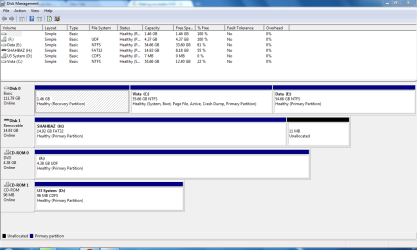
Can you post back a screenshot of your full Disk Management Drive map? http://www.sevenforums.com/tutorials/9733-how-post-screenshot-seven-forums.html

You say you want to install to E: drive after moving data to your C: system drive but you never say what OS is on C: or E: now.

Please tell us what OS's you have and where, and what OS's you would like to have and where you want them. Then we can advise you the exact steps.
 
Can you post back a screenshot of your full Disk Management Drive map? http://www.sevenforums.com/tutorials/9733-how-post-screenshot-seven-forums.html

You say you want to install to E: drive after moving data to your C: system drive but you never say what OS is on C: or E: now.

Please tell us what OS's you have and where, and what OS's you would like to have and where you want them. Then we can advise you the exact steps.
Hm, okay. Thank you for taking the time to reply..

So,
Current OS is Windows 7 on 'C'
I want to do do new Windows 7 but on E drive (then I'll format the current C since there are few system files which can't be deleted; mainly from when I Upgraded from Vista to 7)

Here is the Disk Management screeshot:
Capture DM.PNG

I'll be waiting for your reply now. Thanks.
 

My Computer

Computer Manufacturer/Model Number
TOSHIBA EQUIUM A200 (X86-based PC AT/AT COMPATIBLE)
OS
Windows 7 Ultimate x86
CPU
Intel(R) Pentium(R) Dual CPU T2310 @ 1.46GHz
Motherboard
Intel Corporation SANTA ROSA CRB
Memory
2GB
Graphics Card(s)
Mobile Intel(R) 965 Express Chipset Family
Screen Resolution
1280 * 800 Pixels
Hard Drives
ST9120822AS ATA Device (IDE)
It would be better to install Win7 to C: drive in the preferred lower address. Can you move your data to E: drive instead?

Then either boot the Win7 installer to Custom install, using Drive Tools to format C: then install there,

Or if you can't get a bootable installer, run Setup in current Win7 installation from your flash stick or data partition and direct the install to C: drive.
 
  • Like
Reactions: BAZ
I did burn the ISO file to DVD earlier. I can use that, right?

Let me please confirm the steps I should be taking:
- Restart laptop with DVD in
- Press F2 when it just shuts down
- In the Boot tab on that black screen choose the option of where to boot from to be DVD?
- In the Windows Setup choose C to be installed on (and it'll be formatted automatically?)

Thank you very much for your help.
 
Last edited:

My Computer

Computer Manufacturer/Model Number
TOSHIBA EQUIUM A200 (X86-based PC AT/AT COMPATIBLE)
OS
Windows 7 Ultimate x86
CPU
Intel(R) Pentium(R) Dual CPU T2310 @ 1.46GHz
Motherboard
Intel Corporation SANTA ROSA CRB
Memory
2GB
Graphics Card(s)
Mobile Intel(R) 965 Express Chipset Family
Screen Resolution
1280 * 800 Pixels
Hard Drives
ST9120822AS ATA Device (IDE)

My Computer

Computer Manufacturer/Model Number
Dell Vostro 1000
OS
Windows 7 Ultimate x86
CPU
AMD Sempron 3600+
Graphics Card(s)
ATI Radeon Xpress 1150
Monitor(s) Displays
Generic PnP Monitor
Screen Resolution
1200 x 800
Hard Drives
WD Scorpio Blue 500 GB (WD5000BEVT)
Mouse
Logitech V320 Cordless Optical Mouse
- In the Windows Setup choose C to be installed on (and it'll be formatted automatically?)

It will not format automatically. Make sure you know what you're doing. If you have anything on that partition that you want to keep then don't format. If you are ok with cleaning that partition completely then here are the steps:

http://www.sevenforums.com/tutorials/1649-clean-install-windows-7-a.html
Okay, I'll be careful.
Thanks for the link; it helped.
 

My Computer

Computer Manufacturer/Model Number
TOSHIBA EQUIUM A200 (X86-based PC AT/AT COMPATIBLE)
OS
Windows 7 Ultimate x86
CPU
Intel(R) Pentium(R) Dual CPU T2310 @ 1.46GHz
Motherboard
Intel Corporation SANTA ROSA CRB
Memory
2GB
Graphics Card(s)
Mobile Intel(R) 965 Express Chipset Family
Screen Resolution
1280 * 800 Pixels
Hard Drives
ST9120822AS ATA Device (IDE)
Okay, I'll be careful.
Thanks for the link; it helped.

You're welcome
 

My Computer

Computer Manufacturer/Model Number
Dell Vostro 1000
OS
Windows 7 Ultimate x86
CPU
AMD Sempron 3600+
Graphics Card(s)
ATI Radeon Xpress 1150
Monitor(s) Displays
Generic PnP Monitor
Screen Resolution
1200 x 800
Hard Drives
WD Scorpio Blue 500 GB (WD5000BEVT)
Mouse
Logitech V320 Cordless Optical Mouse
I did burn the ISO file to DVD earlier. I can use that, right?

Let me please confirm the steps I should be taking:
- Restart laptop with DVD in
- Press F2 when it just shuts down
- In the Boot tab on that black screen choose the option of where to boot from to be DVD?
- In the Windows Setup choose C to be installed on (and it'll be formatted automatically?)

Thank you very much for your help.

The steps in this tutorial are a bit different that you describe above. Just follow them carefully to set your DVD drive to boot first in BIOS: Boot from CD - How to Boot your Computer from a Bootable CD or DVD - Boot to CD

Then carefully follow the steps in the tutorial redsox linked to Custom install, using Drive Tools to format the C: partition before install: Clean Install Windows 7

You'll be fine.
 
OHH I am in trouble now..

While installation my laptop got turned off, I think. I was away and I am not so sure, but before I had to the steps where it says extracting Windows files etc.

When I came back and turned it on, there's only black screen and white cursor on the left top flashing. Hard drive light is not flashing. Windows DVD is in the drive, there is no response to it.

PLEASE help me... what should I do? :(
 

My Computer

Computer Manufacturer/Model Number
TOSHIBA EQUIUM A200 (X86-based PC AT/AT COMPATIBLE)
OS
Windows 7 Ultimate x86
CPU
Intel(R) Pentium(R) Dual CPU T2310 @ 1.46GHz
Motherboard
Intel Corporation SANTA ROSA CRB
Memory
2GB
Graphics Card(s)
Mobile Intel(R) 965 Express Chipset Family
Screen Resolution
1280 * 800 Pixels
Hard Drives
ST9120822AS ATA Device (IDE)
Can I just add to the above post, I had formatted drive C before installation.
 

My Computer

Computer Manufacturer/Model Number
TOSHIBA EQUIUM A200 (X86-based PC AT/AT COMPATIBLE)
OS
Windows 7 Ultimate x86
CPU
Intel(R) Pentium(R) Dual CPU T2310 @ 1.46GHz
Motherboard
Intel Corporation SANTA ROSA CRB
Memory
2GB
Graphics Card(s)
Mobile Intel(R) 965 Express Chipset Family
Screen Resolution
1280 * 800 Pixels
Hard Drives
ST9120822AS ATA Device (IDE)
Start installation all over, do not turn notebook off.
 

My Computer

OS
ME/XP/Vista/Win7

My Computer

Computer Manufacturer/Model Number
TOSHIBA EQUIUM A200 (X86-based PC AT/AT COMPATIBLE)
OS
Windows 7 Ultimate x86
CPU
Intel(R) Pentium(R) Dual CPU T2310 @ 1.46GHz
Motherboard
Intel Corporation SANTA ROSA CRB
Memory
2GB
Graphics Card(s)
Mobile Intel(R) 965 Express Chipset Family
Screen Resolution
1280 * 800 Pixels
Hard Drives
ST9120822AS ATA Device (IDE)
Back
Top