Making my Win7 really fast

I use MSE with the Windows Firewall behind a router, I also have the paid version of MalwareBytes running in real-time, they all work very well together, plus I'm running the IE9 beta and according to Secunia PSI that is a secure browser.
You may be slowing your computer down with two on-demand scanners running at once. MSE and Malwarebytes are somewhat redundant, as they both scan and search for malware. However, no anti-malware app catches 100%, which is why you want one as a real-time scanner and one as an on-demand scanner, which is why people run MSE and the free version of Malwarebytes. You could have saved yourself some cash.
 

My Computer My Computer

OS
Windows 7 Ultimate x64 SP1
CPU
Intel Core i7-2600
Motherboard
Gigabyte GA-P67A-UD3P-B3
Memory
12 GB Patriot Extreme DDR3-1333
Graphics Card(s)
Nvidia GTX 470
Monitor(s) Displays
Dell UltraSharp 2209WA
Hard Drives
OCZ Agility3 240 GB, WD5001AALS, WD7501AALS
PSU
OCZ ModStream 700W
Case
CoolerMaster HAF 912 Advanced
Cooling
CoolerMaster Hyper 212 Plus
No firewall will speed up anything, especially online performance.

9c934957.jpg


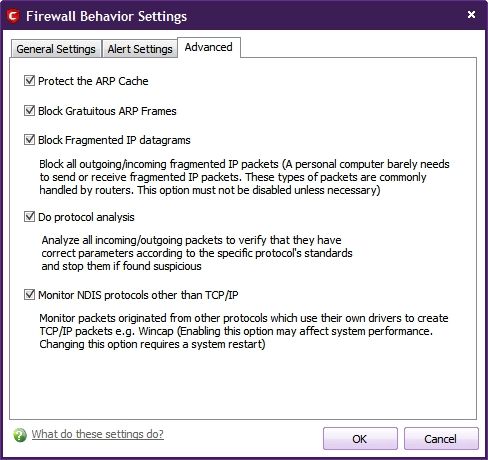
You're right, a Firewall can't speed up internet communications up but the Comodo Firewall offers many security features that other Firewalls don't have and it doesn't slow things down which is especially significant to users that don't have access to a hardware Firewall or all of the millions of people who use laptops away from home.

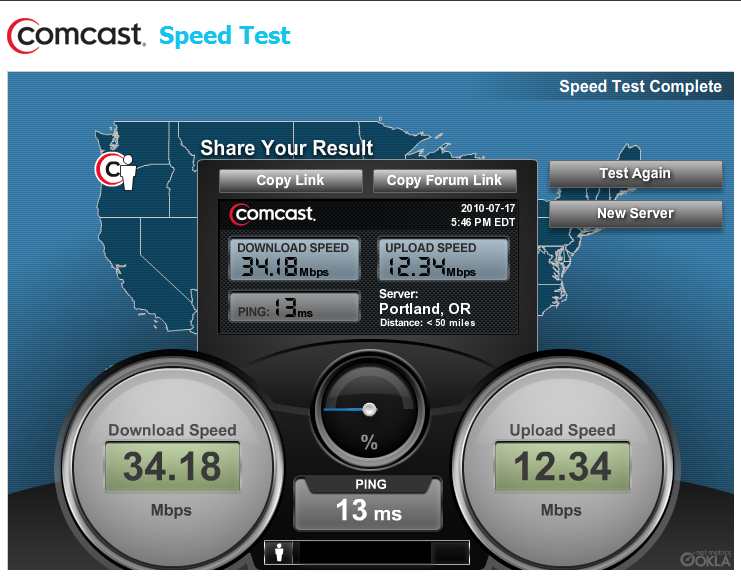
Firewalls can really slow things down though. I have a Linksys Hardware Firewall with SPI that slows my internet download speed from 34 Mbps to 12 Mbps, but not so with the Comodo Firewall...

35b272db.png


~Maxx~
.
da59fa57.png
 

My Computer My Computer

Computer Manufacturer/Model Number
HP HPE 270f
OS
Windows 7 x64 Home Premium
CPU
Intel Core i7 930 @ 2.8 Ghz Socket 1366 LGA
Motherboard
Pegatron Truckee v1.04E41
Memory
8 GB 1366 Mhz DDR3 (PC3-10700) RAM
Graphics Card(s)
ATI Radeon 5770 1 GB DDR5 RAM
Sound Card
Realtech High Definition
Monitor(s) Displays
32" Sony Bravia
Screen Resolution
1366 X 768
Hard Drives
Intel 25nm 120 GB Series 320 SSD HD Tune- 265 MBps Read/ 130 MBps Write

LaCie 1TB + 1TB RAID 0 eSATA Drive HD Tune- 160 MBps Read/ 90 MBps Write
Keyboard
Logitech Illuminated
Mouse
Logitech MX Revolution
Internet Speed
36.4 Mbps Maximum on a 37 Mbps Motorola SB501 Modem
I have a Linksys Hardware Firewall with SPI that slows my internet download speed from 34 Mbps to 12 Mbps, but not so with the Comodo Firewall...
Then you have a poorly misconfigured or failing router. I've done plenty of speed tests with my Comcast service, and my in-laws FIOS service, and can find no differences between them with or without the hardware firewall in place. They use a Linksys router, and I am using a NetGear one. There isn't any difference between the two.

As for the laptop users who travel away from home, yes, they loose the protection of their hardware firewall, but that's why Windows includes one as well...and now one that monitors traffic in both directions.

See link: How to Enable Windows 7 Firewall Outbound Protection

So there becomes very little need....on a VERY little amount of computers to run anything more than what's already included. 99.9% of all users or more have no need for anything more than what Windows 7 Firewall does already.
 

My Computer My Computer

OS
Windows 7 Ultimate x64 SP1
CPU
Intel Core i7-2600
Motherboard
Gigabyte GA-P67A-UD3P-B3
Memory
12 GB Patriot Extreme DDR3-1333
Graphics Card(s)
Nvidia GTX 470
Monitor(s) Displays
Dell UltraSharp 2209WA
Hard Drives
OCZ Agility3 240 GB, WD5001AALS, WD7501AALS
PSU
OCZ ModStream 700W
Case
CoolerMaster HAF 912 Advanced
Cooling
CoolerMaster Hyper 212 Plus
I use MSE with the Windows Firewall behind a router, I also have the paid version of MalwareBytes running in real-time, they all work very well together, plus I'm running the IE9 beta and according to Secunia PSI that is a secure browser.
You may be slowing your computer down with two on-demand scanners running at once. MSE and Malwarebytes are somewhat redundant, as they both scan and search for malware. However, no anti-malware app catches 100%, which is why you want one as a real-time scanner and one as an on-demand scanner, which is why people run MSE and the free version of Malwarebytes. You could have saved yourself some cash.
I probably could have saved some cash but at least I've helped to give a little bit towards the team who develop the program, the program is very well thought of as is SuperAntiSpyware which I have on an XP machine, I bought that one as well, it runs alongside the free version of Avast and the inbuilt Firewall.
 

My Computer My Computer

Computer type
PC/Desktop
Computer Manufacturer/Model Number
Acer Aspire XC-704 x64 bit/ Asus K55A Notebook PC/HP Envy x360 Convertible 15-bq0xx
OS
Windows 10 64bit/Windows 10 64bit/Windows 10 64bit
CPU
Intel Pentium J3710 @ 60GHz/Intel B820,1.7GHz/AMD A9 Radeon
Motherboard
Acer Aspire XC-704 (SOCKET 0)/Asus/HP 8312 (Socket FP4)
Memory
8.00GB DDR3 @ 1599MHz/8GB 2 x 4GB DDR3/8.00GB Dual-Channel
Graphics Card(s)
Intel HD Graphics/Intel/512MB ATI AMD Radeon R5 Graphics (HP
Sound Card
Realtek High Definition Audio/Onboard/AMD High Definition Au
Monitor(s) Displays
Acer LCD K222HQL /Asus 15.6/Generic PnP Monitor (1920x1080@6
Screen Resolution
1920x1080@59Hz/1366 x 768/1920x1080@60Hz
Hard Drives
1863GBWesternn Digital WDC/Asus/119GB SanDisk SD8SN8U-128G-1006 (SSD)
931GB Hitachi HGST HTS721010A9E630 (SATA)
Keyboard
Microsoft Natural Ergonomic Keyboard 4000 (UK)/Inbuilt/Inbui
Mouse
Microsoft Optical Wheel Mouse/Same plus Touchpad/Same + Pad
Internet Speed
Infinity 2 up to 76 Mbps
Antivirus
MSE/MSE/MSE and all 3 have MalwareBytes Premium
Browser
Edge, Firefox/Edge, Firefox/Edge, Firefox, Chrome
Other Info
Seagate Expansion 500GB External Desktop Drive
Seagate Expansion Portable Drives 500GB and 1TB
Epson XP-332 Wireless Printer
I'm definitely not against helping the developers out of some great software. My comments were regarding the slowdown you'll likely see all the time, or during disk-intensive tasks due to having two resident scanners running at the same time. That's always been a big no-no.
 

My Computer My Computer

OS
Windows 7 Ultimate x64 SP1
CPU
Intel Core i7-2600
Motherboard
Gigabyte GA-P67A-UD3P-B3
Memory
12 GB Patriot Extreme DDR3-1333
Graphics Card(s)
Nvidia GTX 470
Monitor(s) Displays
Dell UltraSharp 2209WA
Hard Drives
OCZ Agility3 240 GB, WD5001AALS, WD7501AALS
PSU
OCZ ModStream 700W
Case
CoolerMaster HAF 912 Advanced
Cooling
CoolerMaster Hyper 212 Plus
Then you have a poorly misconfigured or failing router. 99.9% of all users or more have no need for anything more than what Windows 7 Firewall does already.

73b00b71.gif


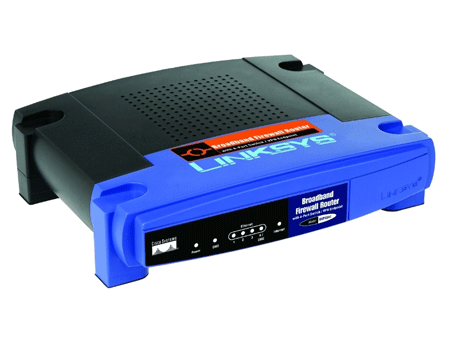
I bought the NIB Linksys BEFSX41 hardware firewall router specifically because it had an SPI Mode and it was configured properly and works perfectly fine with internet download speeds well over 30 Mbps except when SPI is engaged and then like I mentioned the maximum download speed drops to 12 Mbps with the exact same configuration. As a result I run it without SPI engaged and Comodo Firewall Pro in full Stealth Mode at its highest security configuration and it has passed an array of Leak Tests proving the true level of security which it provides.

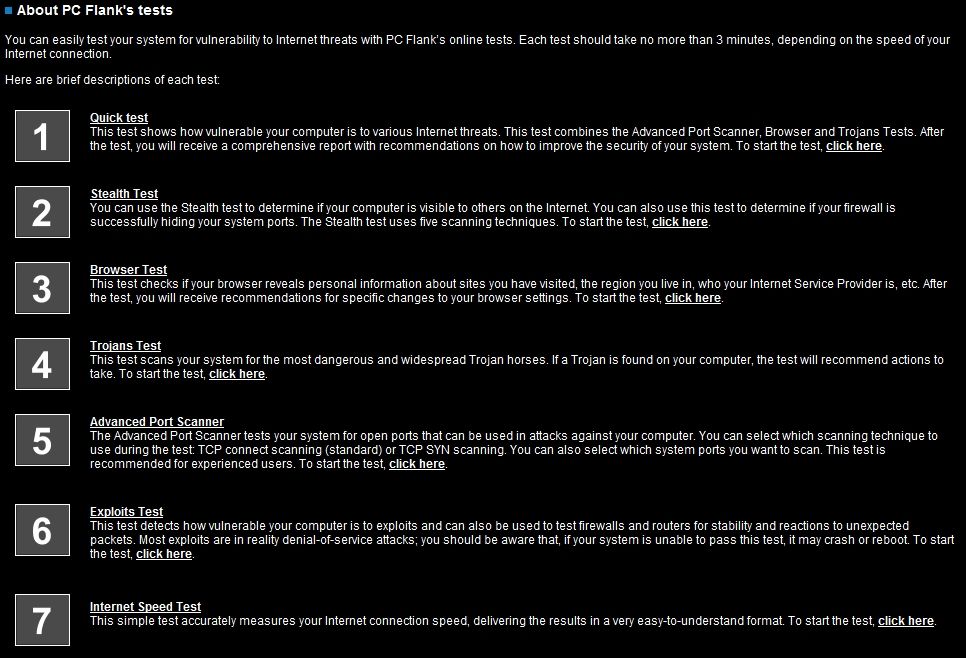
Concerning your statement that "99.9% of all users or more have no need for anything more than what Windows 7 Firewall does already" perhaps you could do as is customary over at Wilders Security Forums and run the standard PC Flank Leak Tests on your configuration of Windows 7 Firewall to prove the validity of your assertion.

7087f8ed.jpg


~Maxx~
.
da59fa57.png
 

My Computer My Computer

Computer Manufacturer/Model Number
HP HPE 270f
OS
Windows 7 x64 Home Premium
CPU
Intel Core i7 930 @ 2.8 Ghz Socket 1366 LGA
Motherboard
Pegatron Truckee v1.04E41
Memory
8 GB 1366 Mhz DDR3 (PC3-10700) RAM
Graphics Card(s)
ATI Radeon 5770 1 GB DDR5 RAM
Sound Card
Realtech High Definition
Monitor(s) Displays
32" Sony Bravia
Screen Resolution
1366 X 768
Hard Drives
Intel 25nm 120 GB Series 320 SSD HD Tune- 265 MBps Read/ 130 MBps Write

LaCie 1TB + 1TB RAID 0 eSATA Drive HD Tune- 160 MBps Read/ 90 MBps Write
Keyboard
Logitech Illuminated
Mouse
Logitech MX Revolution
Internet Speed
36.4 Mbps Maximum on a 37 Mbps Motorola SB501 Modem
im using pro and it is enough for me. In ultima there is many features that i dont need so no need to bother with ultimne.
 

My Computer My Computer

OS
All
Concerning your statement that "99.9% of all users or more have no need for anything more than what Windows 7 Firewall does already" perhaps you could do as is customary over at Wilders Security Forums and run the standard PC Flank Leak Tests on your configuration of Windows 7 Firewall to prove the validity of your assertion.
I'll stand by my claims without a test I'm all for security, but I'm also all for not wearing a tin foil hat as well. Considering the amount of users who wouldn't know what a firewall is, I'll stick with my 99.9% comment.

Too many people automatically assume that all traffic going through is bad. As mentioned above...if my printer app wants to report back on my average usage, it is welcome too. I don't need yet another app running in the background to do the job of what is already present.

Besides, maybe it's the IT Manager in me talking, but if it is good enough for the corporate world, it is more than good enough for home systems.

If you want that kind of granular information, be my guest...it is your system. I don't have the time or the desire to check all of that, so as long as I'm well protected, I can move on to other things. But please don't act like all of us running the Windows firewall are making a mistake.
 

My Computer My Computer

OS
Windows 7 Ultimate x64 SP1
CPU
Intel Core i7-2600
Motherboard
Gigabyte GA-P67A-UD3P-B3
Memory
12 GB Patriot Extreme DDR3-1333
Graphics Card(s)
Nvidia GTX 470
Monitor(s) Displays
Dell UltraSharp 2209WA
Hard Drives
OCZ Agility3 240 GB, WD5001AALS, WD7501AALS
PSU
OCZ ModStream 700W
Case
CoolerMaster HAF 912 Advanced
Cooling
CoolerMaster Hyper 212 Plus
With regards to the default Windows firewall, or a commercial 3rd party firewall and which is far superior....so much of this has to do with the risks that the end-user is subjecting themselves to based on their computing habits.

I believe the built-in Windows firewall suffices for most people. With that said, there are still a ton of machines which get compromised. However, I think this is more to do with the end user willing to do something stupid and risk their internal security. And as we have learned, you cannot stop stupid.

I generally recommend that people run MSE, a router based NAT firewall and the built-in Windows firewall. In the event that I know this person is dead set on pirating software, torrenting movies and porn and the like...then I will always recommend that they step up their level of protection as they are putting themselves into risky situations.
 

My Computer My Computer

Computer Manufacturer/Model Number
Self-Built in July 2009
OS
Windows 7 Ultimate x64
CPU
Intel Q9550 2.83Ghz OC'd to 3.40Ghz
Motherboard
Gigabyte GA-EP45-UD3R rev. 1.1, F12 BIOS
Memory
8GB G.Skill PI DDR2-800, 4-4-4-12 timings
Graphics Card(s)
EVGA 1280MB Nvidia GeForce GTX570
Sound Card
Realtek ALC899A 8 channel onboard audio
Monitor(s) Displays
23" Acer x233H
Screen Resolution
1920x1080
Hard Drives
Intel X25-M 80GB Gen 2 SSD
Western Digital 1TB Caviar Black, 32MB cache. WD1001FALS
PSU
Corsair 620HX modular
Case
Antec P182
Cooling
stock
Keyboard
ABS M1 Mechanical
Mouse
Logitech G9 Laser Mouse
Internet Speed
15/2 cable modem
Other Info
Windows and Linux enthusiast. Logitech G35 Headset.
I generally recommend that people run MSE, a router based NAT firewall and the built-in Windows firewall.
That's exactly how I set up and recommend all of the systems I "support". Add in Malwarebytes as an on-demand scanner, and I haven't had to deal with malware removal in quite some time. If that can protect my click-happy father-in-law, it can protect anyone.
 

My Computer My Computer

OS
Windows 7 Ultimate x64 SP1
CPU
Intel Core i7-2600
Motherboard
Gigabyte GA-P67A-UD3P-B3
Memory
12 GB Patriot Extreme DDR3-1333
Graphics Card(s)
Nvidia GTX 470
Monitor(s) Displays
Dell UltraSharp 2209WA
Hard Drives
OCZ Agility3 240 GB, WD5001AALS, WD7501AALS
PSU
OCZ ModStream 700W
Case
CoolerMaster HAF 912 Advanced
Cooling
CoolerMaster Hyper 212 Plus
I'm definitely not against helping the developers out of some great software. My comments were regarding the slowdown you'll likely see all the time, or during disk-intensive tasks due to having two resident scanners running at the same time. That's always been a big no-no.
Can't say I see any significant slowdown and don't forget one is an anti-virus program that also does some malware catching, the other is primarily an antispy/malware program.;)
 

My Computer My Computer

Computer type
PC/Desktop
Computer Manufacturer/Model Number
Acer Aspire XC-704 x64 bit/ Asus K55A Notebook PC/HP Envy x360 Convertible 15-bq0xx
OS
Windows 10 64bit/Windows 10 64bit/Windows 10 64bit
CPU
Intel Pentium J3710 @ 60GHz/Intel B820,1.7GHz/AMD A9 Radeon
Motherboard
Acer Aspire XC-704 (SOCKET 0)/Asus/HP 8312 (Socket FP4)
Memory
8.00GB DDR3 @ 1599MHz/8GB 2 x 4GB DDR3/8.00GB Dual-Channel
Graphics Card(s)
Intel HD Graphics/Intel/512MB ATI AMD Radeon R5 Graphics (HP
Sound Card
Realtek High Definition Audio/Onboard/AMD High Definition Au
Monitor(s) Displays
Acer LCD K222HQL /Asus 15.6/Generic PnP Monitor (1920x1080@6
Screen Resolution
1920x1080@59Hz/1366 x 768/1920x1080@60Hz
Hard Drives
1863GBWesternn Digital WDC/Asus/119GB SanDisk SD8SN8U-128G-1006 (SSD)
931GB Hitachi HGST HTS721010A9E630 (SATA)
Keyboard
Microsoft Natural Ergonomic Keyboard 4000 (UK)/Inbuilt/Inbui
Mouse
Microsoft Optical Wheel Mouse/Same plus Touchpad/Same + Pad
Internet Speed
Infinity 2 up to 76 Mbps
Antivirus
MSE/MSE/MSE and all 3 have MalwareBytes Premium
Browser
Edge, Firefox/Edge, Firefox/Edge, Firefox, Chrome
Other Info
Seagate Expansion 500GB External Desktop Drive
Seagate Expansion Portable Drives 500GB and 1TB
Epson XP-332 Wireless Printer
"Please don't act like all of us running the Windows firewall are making a mistake." All I am saying is that if you subject Windows Firewall to any of the reputable Leak Tests which are used to evaluate Firewall performance you will learn the truth about how well protected your computer currently really is.

The value of having top notch software Firewall protection is not a concern for many entry level Win 7 users, but for those more advanced users who can appreciate the value of knowing exactly how well their software Firewall is protecting them from common exploits like Rootkit Installations, Invasions, Injections, InfoSends, Impersonations and Hijacking then a Leak Test will let them know exactly how well thier current software Firewall protection stands up to these exploits...

1. RootkitInstallation: MissingDriverLoad
2. RootkitInstallation: LoadAndCallImage
3. RootkitInstallation: DriverSupersede
4. RootkitInstallation: ChangeDrvPath
5. Invasion: Runner
6. Invasion: RawDisk
7. Invasion: PhysicalMemory
8. Invasion: FileDrop
9. Invasion: DebugControl
10. Injection: SetWinEventHook
11. Injection: SetWindowsHookEx
12. Injection: SetThreadContext
13. Injection: Services
14. Injection: ProcessInject
15. Injection: KnownDlls
16. Injection: DupHandles
17. Injection: CreateRemoteThread
18. Injection: APC dll injection
19. Injection: AdvancedProcessTermination
20. InfoSend: ICMP Test
21. InfoSend: DNS Test
22. Impersonation: OLE automation
23. Impersonation: ExplorerAsParent
24. Impersonation: DDE
25. Impersonation: Coat
26. Impersonation: BITS
27. Hijacking: WinlogonNotify
28. Hijacking: Userinit
29. Hijacking: UIHost
30. Hijacking: SupersedeServiceDll
31. Hijacking: StartupPrograms
32. Hijacking: ChangeDebuggerPath
33. Hijacking: AppinitDlls
34. Hijacking: ActiveDesktop

Its not for computer novices to be concerned with advanced level software Firewall protection but rather for those who have more advanced skill level and want to know the truth about how well their software Firewall is currently protecting their computer running a set of Leak Tests can reveal precisely what vulnerabilities need to be addressed in order to improve their current level of protection.

~Maxx~
.

da59fa57.png
 

My Computer My Computer

Computer Manufacturer/Model Number
HP HPE 270f
OS
Windows 7 x64 Home Premium
CPU
Intel Core i7 930 @ 2.8 Ghz Socket 1366 LGA
Motherboard
Pegatron Truckee v1.04E41
Memory
8 GB 1366 Mhz DDR3 (PC3-10700) RAM
Graphics Card(s)
ATI Radeon 5770 1 GB DDR5 RAM
Sound Card
Realtech High Definition
Monitor(s) Displays
32" Sony Bravia
Screen Resolution
1366 X 768
Hard Drives
Intel 25nm 120 GB Series 320 SSD HD Tune- 265 MBps Read/ 130 MBps Write

LaCie 1TB + 1TB RAID 0 eSATA Drive HD Tune- 160 MBps Read/ 90 MBps Write
Keyboard
Logitech Illuminated
Mouse
Logitech MX Revolution
Internet Speed
36.4 Mbps Maximum on a 37 Mbps Motorola SB501 Modem
Hey Maxx the last time we spoke elaborately about Comodo firewall & HIPS feature...but then i got busy & couldn't get in touch with you on that topic...Hey buddy how r u??? Ok Maxx i got the Comodo firewall only & didn't activated the AV part since i got MSE & its working fine...so just give the steps for HIPS so i can get that straight since i'm irritated with UAC pop-up for the most common & daily apps. like CCleaner,CoreTemp etc...:geek:
 

My Computer My Computer

Computer Manufacturer/Model Number
Acer Aspire 4530
OS
windows 7 Ultimate x86
CPU
AMD Athlon x2 QL60 1900Mhz 1 MB L2 cache
Motherboard
Acer Grasmoor
Memory
2GB DDR2
Graphics Card(s)
nVidia GeForce 9100M G
Sound Card
Onboard
Monitor(s) Displays
14.1"
Screen Resolution
1280*800
Hard Drives
160 GB
PSU
Onboard
Case
Onboard
Cooling
Onboard
Keyboard
Standard laptop keyboard
Mouse
Touchpad & external iball usb mouse
Internet Speed
its slower then SNAIL
Turn down UAC in Control Panel>User Accounts. You don't have to install a bloatware Firewall. Use the Win7 Firewall.
 
You don't have to install a bloatware Firewall. Use the Win7 Firewall.

424eb598.jpg


I agree! According to Task Manager the Comodo Firewall Pro and top rated Proactive Defense+ HIPS runs for 5.2 MB RAM on my Win 7 computer. Do you know the RAM allocation of the Windows 7 Firewall for comparison?

~Maxx~
.
da59fa57.png
 

My Computer My Computer

Computer Manufacturer/Model Number
HP HPE 270f
OS
Windows 7 x64 Home Premium
CPU
Intel Core i7 930 @ 2.8 Ghz Socket 1366 LGA
Motherboard
Pegatron Truckee v1.04E41
Memory
8 GB 1366 Mhz DDR3 (PC3-10700) RAM
Graphics Card(s)
ATI Radeon 5770 1 GB DDR5 RAM
Sound Card
Realtech High Definition
Monitor(s) Displays
32" Sony Bravia
Screen Resolution
1366 X 768
Hard Drives
Intel 25nm 120 GB Series 320 SSD HD Tune- 265 MBps Read/ 130 MBps Write

LaCie 1TB + 1TB RAID 0 eSATA Drive HD Tune- 160 MBps Read/ 90 MBps Write
Keyboard
Logitech Illuminated
Mouse
Logitech MX Revolution
Internet Speed
36.4 Mbps Maximum on a 37 Mbps Motorola SB501 Modem
Ok Maxx i got the Comodo firewall only & didn't activated the AV part since i got MSE & its working fine...so just give the steps for HIPS so i can get that straight since i'm irritated with UAC pop-up for the most common & daily apps. like CCleaner,CoreTemp etc...:geek:

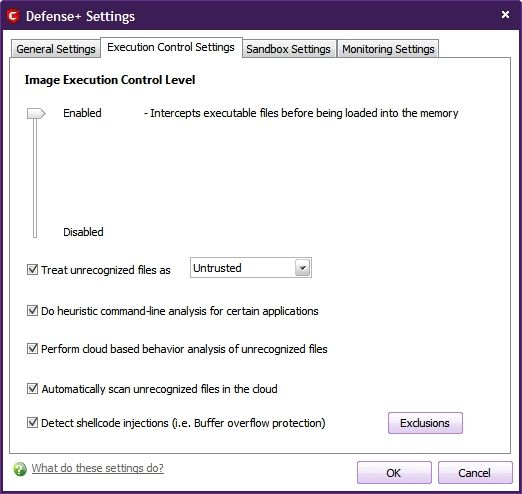
Using MSE with the lightweight Comodo Firewall Pro sounds like a great idea! Just make sure that the Firewall is set to Custom Policy Mode so that all programs must ask your permission to go to the internet. You may be surprised at how many Windows and 3rd party programs make a habit of phoning home often!

8dcc1c0a.jpg


9adb0be9.jpg


42b99832.jpg


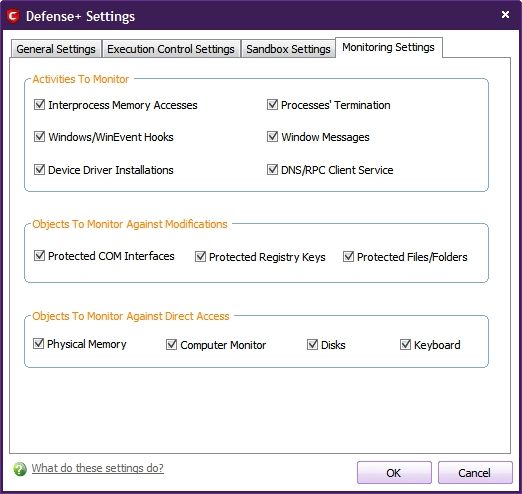
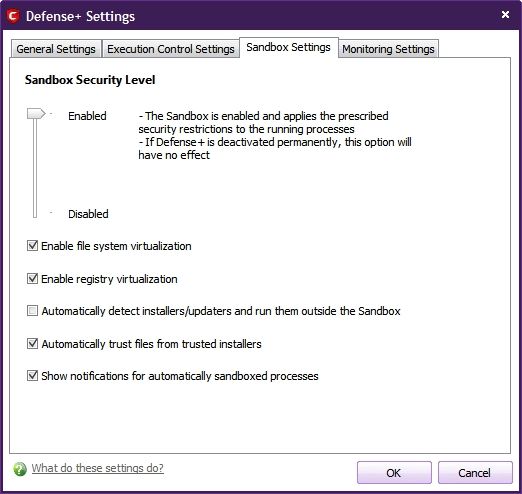
With these settings for the Matousec Proactive Defense 148 part Security Challenge's #1 rated Firewall+HIPS software the Comodo Proactive Defense + will not only protect your computer from letting any .exe run without your express permission, but it will permanently remember your decision and never ask again thus quelling the persistant nag of Windows UAC.

As a bonus the completely free of charge Comodo Firewall Pro, Proactive Defense+ and Auto Sandboxing Feature when configured properly will get a perfect score against any and all of the 34 exploits I listed above which is 3X better than Windows Firewall usually does when leak tested. While it is true that you may never have to deal with all of those potential exploits that seek to take control of your computer and mine it for personal data its nice to know that you have the protection onboard that has a proven ability to successfully defend your computer against those threats.

~Maxx~
.
da59fa57.png
 

My Computer My Computer

Computer Manufacturer/Model Number
HP HPE 270f
OS
Windows 7 x64 Home Premium
CPU
Intel Core i7 930 @ 2.8 Ghz Socket 1366 LGA
Motherboard
Pegatron Truckee v1.04E41
Memory
8 GB 1366 Mhz DDR3 (PC3-10700) RAM
Graphics Card(s)
ATI Radeon 5770 1 GB DDR5 RAM
Sound Card
Realtech High Definition
Monitor(s) Displays
32" Sony Bravia
Screen Resolution
1366 X 768
Hard Drives
Intel 25nm 120 GB Series 320 SSD HD Tune- 265 MBps Read/ 130 MBps Write

LaCie 1TB + 1TB RAID 0 eSATA Drive HD Tune- 160 MBps Read/ 90 MBps Write
Keyboard
Logitech Illuminated
Mouse
Logitech MX Revolution
Internet Speed
36.4 Mbps Maximum on a 37 Mbps Motorola SB501 Modem
Ok i've done the same...i don't need to add any programs to "Trusted files"...???i got the Comodo 5.0.162636.1135 i hope that's the Pro version??? Yeah you are right with the perfect settings my computer has always been 100% safe & secured, guaranteed when with Comodo firewall (i'm not commenting on other AV/Firewall or criticizing them as well)...Thnx Maxx :geek:
 

My Computer My Computer

Computer Manufacturer/Model Number
Acer Aspire 4530
OS
windows 7 Ultimate x86
CPU
AMD Athlon x2 QL60 1900Mhz 1 MB L2 cache
Motherboard
Acer Grasmoor
Memory
2GB DDR2
Graphics Card(s)
nVidia GeForce 9100M G
Sound Card
Onboard
Monitor(s) Displays
14.1"
Screen Resolution
1280*800
Hard Drives
160 GB
PSU
Onboard
Case
Onboard
Cooling
Onboard
Keyboard
Standard laptop keyboard
Mouse
Touchpad & external iball usb mouse
Internet Speed
its slower then SNAIL
Hahahaha Greg my friend Comodo firewall is a very good firewall & my personal experience has been good since when i was using WinXP S2/3...so prefer sticking my nose with same...:D...with HIPS on i guess don't really have to turn UAC off....but Thnx Greg my friend for the info...:geek:
 

My Computer My Computer

Computer Manufacturer/Model Number
Acer Aspire 4530
OS
windows 7 Ultimate x86
CPU
AMD Athlon x2 QL60 1900Mhz 1 MB L2 cache
Motherboard
Acer Grasmoor
Memory
2GB DDR2
Graphics Card(s)
nVidia GeForce 9100M G
Sound Card
Onboard
Monitor(s) Displays
14.1"
Screen Resolution
1280*800
Hard Drives
160 GB
PSU
Onboard
Case
Onboard
Cooling
Onboard
Keyboard
Standard laptop keyboard
Mouse
Touchpad & external iball usb mouse
Internet Speed
its slower then SNAIL
Hahahaha Greg my friend Comodo firewall is a very good firewall & my personal experience has been good.

Please don't make light of Greg's recommending the Windows 7 Firewall because it does do an adequate job and most people are not going to want to put the time and effort into running Comodo although the developers have worked very hard to simplify its use making Comodo 2011 (v5) the smoothest running and pop-up free version I have run to date.

~Maxx~
.
da59fa57.png
 

My Computer My Computer

Computer Manufacturer/Model Number
HP HPE 270f
OS
Windows 7 x64 Home Premium
CPU
Intel Core i7 930 @ 2.8 Ghz Socket 1366 LGA
Motherboard
Pegatron Truckee v1.04E41
Memory
8 GB 1366 Mhz DDR3 (PC3-10700) RAM
Graphics Card(s)
ATI Radeon 5770 1 GB DDR5 RAM
Sound Card
Realtech High Definition
Monitor(s) Displays
32" Sony Bravia
Screen Resolution
1366 X 768
Hard Drives
Intel 25nm 120 GB Series 320 SSD HD Tune- 265 MBps Read/ 130 MBps Write

LaCie 1TB + 1TB RAID 0 eSATA Drive HD Tune- 160 MBps Read/ 90 MBps Write
Keyboard
Logitech Illuminated
Mouse
Logitech MX Revolution
Internet Speed
36.4 Mbps Maximum on a 37 Mbps Motorola SB501 Modem
Maxx i wasn't actually taking Greg's recommendation light i agree & don't deny that Windows firewall isn't effective but it just that i'm not Ok/satisfied/don't wanna use it...whatever 1 can say, i love Comodo firewall as mentioned in above post...Greg is one of my friend who'll be all Guns blowing at my post which i love because i want some1 to find a mistake in me because only then can i improve...in two of my tutorials that i recently came up with he's the 1 guy who kept telling me what's wrong & what's need to be done...my new Guru badge is dedicated to him & Shawn the Admin....bcz they helped me to come up with those 2 tutorials...
Not 2 mention you guyzzz as well who are always there helping me out...sharing knowledge...
:geek:
 

My Computer My Computer

Computer Manufacturer/Model Number
Acer Aspire 4530
OS
windows 7 Ultimate x86
CPU
AMD Athlon x2 QL60 1900Mhz 1 MB L2 cache
Motherboard
Acer Grasmoor
Memory
2GB DDR2
Graphics Card(s)
nVidia GeForce 9100M G
Sound Card
Onboard
Monitor(s) Displays
14.1"
Screen Resolution
1280*800
Hard Drives
160 GB
PSU
Onboard
Case
Onboard
Cooling
Onboard
Keyboard
Standard laptop keyboard
Mouse
Touchpad & external iball usb mouse
Internet Speed
its slower then SNAIL
Back
Top