Making my Win7 really fast

Users who have a reason to use Comodo Firewall - such as to monitor all inbound or outbound traffic closely as related earlier - or any program, shouldn't feel any need to defend themselves.

My blunt comments about MSE being perfectly optimized to work with the Win7 Firewall are for the average consumer who might think that paying something is better than free, or old solutions need to be migrated to Win7 in order to gain the same hard-won performance they got in XP/Vista.

I get into even more trouble with tweakers, who (like me) were so proud of service edits and optimizations to get XP or bloated-pre-SP1 Vista running fast that they don't want to give them up, even though beta testers can testerfy that one-by-one tweaks became totally unnecessary.

Almost every day here we have a couple of strange cases without solution where suddenly OP admits they have this or that tweaking program in the mix. And unless every little tweak has a restore point, the solution is to clean reinstall and stop tweaking except for making normal system settings.
 
Users who have a reason to use Comodo Firewall - such as to monitor all inbound or outbound traffic closely as related earlier - or any program, shouldn't feel any need to defend themselves.

You're right Greg, taking precautions to protect your computer's security does not need to be defended. I don't use the Comodo Firewall to monitor massive amounts of traffic I use it to detect and perminently prevent programs from taking information from my computer and 'phoning home' with it most of which are Windows programs which have been instructed to call Redmond every time they are used which communications the Windows Firewall will never alert the owner of the computer to.

~Maxx~
.
da59fa57.png
 

My Computer My Computer

Computer Manufacturer/Model Number
HP HPE 270f
OS
Windows 7 x64 Home Premium
CPU
Intel Core i7 930 @ 2.8 Ghz Socket 1366 LGA
Motherboard
Pegatron Truckee v1.04E41
Memory
8 GB 1366 Mhz DDR3 (PC3-10700) RAM
Graphics Card(s)
ATI Radeon 5770 1 GB DDR5 RAM
Sound Card
Realtech High Definition
Monitor(s) Displays
32" Sony Bravia
Screen Resolution
1366 X 768
Hard Drives
Intel 25nm 120 GB Series 320 SSD HD Tune- 265 MBps Read/ 130 MBps Write

LaCie 1TB + 1TB RAID 0 eSATA Drive HD Tune- 160 MBps Read/ 90 MBps Write
Keyboard
Logitech Illuminated
Mouse
Logitech MX Revolution
Internet Speed
36.4 Mbps Maximum on a 37 Mbps Motorola SB501 Modem
I'll clarify a few of my comments. First, I'm not saying that anyone installing Comodo is making a mistake. I'm just saying the vast number of people don't care or aren't aware of such apps, and many of us who do possess those skills still don't feel it is needed. I used to always recommend an extra firewall..for years...until I started looking into what the apps were phoning home for. The trusted ones, which is all I ever install outside of a VM, typically are phoning home to check for updates. I prefer that. I don't like your insinuation that only unskilled users don't need an extra firewall, but I don't need to turn this into a flamefest. You can set the Windows Firewall to monitor traffic in both directions, at the same level any other app can or is able to. So even if a person wanted that kind of detail, they can still achieve it with the built-in app. Also keep in mind, I wouldn't be taking this stance with any previous version of Windows. Part of my reason for moving away from 3rd party firewall apps is that the built-in one is actually good enough...finally.
Can't say I see any significant slowdown and don't forget one is an anti-virus program that also does some malware catching, the other is primarily an antispy/malware program.;)
Consider yourself very lucky then, because I can load up two of those apps and see a decrease in disk performance. I end up seeing this a lot, due to family members thinking they need to install something they purchased, rather than ask me what the little green castle icon is on their systems.

One other point that needs to be addressed is your last comment. It isn't valid anymore to say one is a virus scanner and the other is spyware. The cloudy line between the two has pretty much been erased, and that's why it is all referred to as malware now. Both of those apps scan and detect most of the same malware, making them extremely redundant, which is why it is never recommended to run more than one real-time scanner at a time, moreso now than ever, since they all are considered malware scanners.
 

My Computer My Computer

OS
Windows 7 Ultimate x64 SP1
CPU
Intel Core i7-2600
Motherboard
Gigabyte GA-P67A-UD3P-B3
Memory
12 GB Patriot Extreme DDR3-1333
Graphics Card(s)
Nvidia GTX 470
Monitor(s) Displays
Dell UltraSharp 2209WA
Hard Drives
OCZ Agility3 240 GB, WD5001AALS, WD7501AALS
PSU
OCZ ModStream 700W
Case
CoolerMaster HAF 912 Advanced
Cooling
CoolerMaster Hyper 212 Plus
I'm just saying the vast number of people don't care or aren't aware of such apps, and many of us who do possess those skills still don't feel it is needed. Part of my reason for moving away from 3rd party firewall apps is that the built-in one is actually good enough...finally.

6f6efd29.jpg


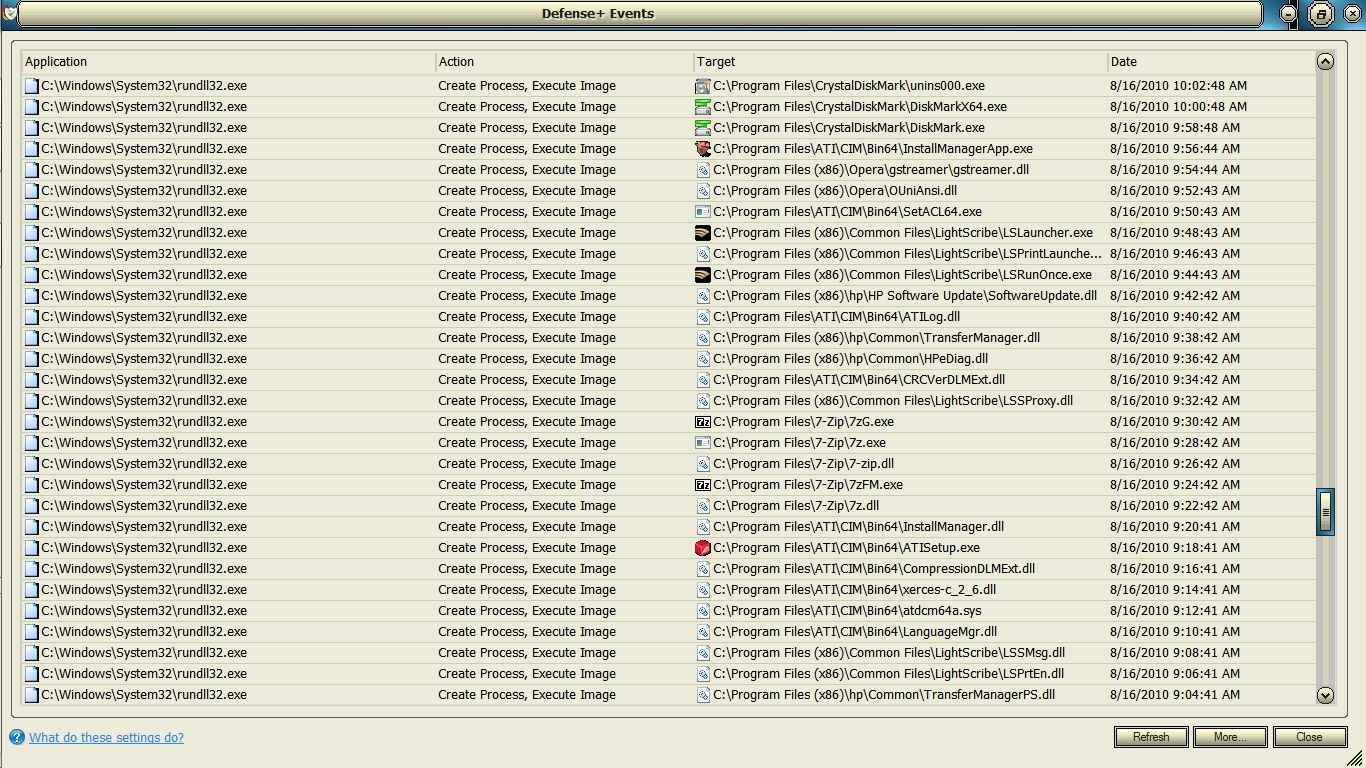
If the Windows 7 Firewall is good enough for you then fine, but please realize that it is programmed not to report events like the Windows\System32\rundll.exe information gathering shown above which continued on for another 2 hours which 3 hour information gathering sessions are pre-programmed into Windows 7 for the first time, but unbiased 3rd party Firewall + HIPS software like Comodo will report these activities to the user.

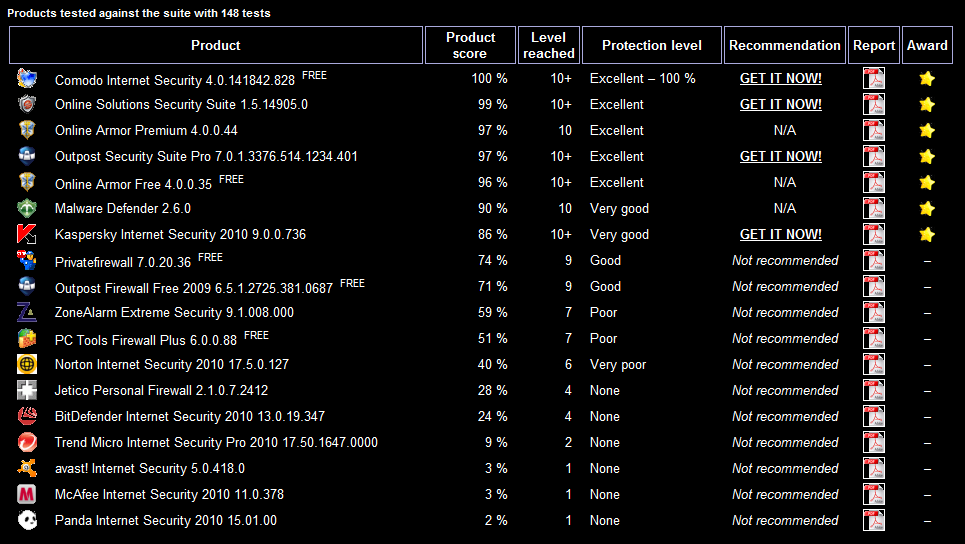
And if only being able to deal with 1 out of 3 of the exploits on a Leak Test is up to your highest standard of computer security then by all means continue using the Windows 7 Firewall and avoid highrt functioning Firewalls llike Comodo at all cost because its capability of scoring 100% on Leak Tests is far beyond your computer security needs and as we all know excessive computer security capability is clearly not needed in a day and age when an estimated 40,000 new exploits are released into the wild each day.

aad6e8a2.png


According to the Matousec Proactive Security Challenge here's another 148 reasons to avoid Comodo Firewall and Proactive Defense+ and its top rated protection which you clearly do not have any use for.

~Maxx~
.
da59fa57.png
 

My Computer My Computer

Computer Manufacturer/Model Number
HP HPE 270f
OS
Windows 7 x64 Home Premium
CPU
Intel Core i7 930 @ 2.8 Ghz Socket 1366 LGA
Motherboard
Pegatron Truckee v1.04E41
Memory
8 GB 1366 Mhz DDR3 (PC3-10700) RAM
Graphics Card(s)
ATI Radeon 5770 1 GB DDR5 RAM
Sound Card
Realtech High Definition
Monitor(s) Displays
32" Sony Bravia
Screen Resolution
1366 X 768
Hard Drives
Intel 25nm 120 GB Series 320 SSD HD Tune- 265 MBps Read/ 130 MBps Write

LaCie 1TB + 1TB RAID 0 eSATA Drive HD Tune- 160 MBps Read/ 90 MBps Write
Keyboard
Logitech Illuminated
Mouse
Logitech MX Revolution
Internet Speed
36.4 Mbps Maximum on a 37 Mbps Motorola SB501 Modem
I'm just not that paranoid...it has nothing to do with skill level, so you can stop your assumptions right there. My biggest fear is what is on the outside trying to get in. I have a hardware, NAT-enabled firewall protecting me from that, along with MSE and Malwarebyte. I also use my head, follow good computing habits, and don't do anything stupid with my online time. That's plenty good enough for me, and for just about everyone else. There's nothing to be afraid of, in terms of the trusted software that I installed, wanting to phone home occasionally. I do not wear a tin foil hat, nor do I peak out my front door at night, wondering if the CIA is watching. If you choose to take things to that granular, paranoid level, go for it...but for the love of god, drop the holier-than-thou attitude about it.

Maybe this will be a better explanation:

I drive a 2005 325xi. In order for me to drive and enjoy the car, I need to know the safety ratings, fuel efficiency, what kind of gas it uses, horsepower, torque, and most importantly, how it feels and handles when I park my butt in the drivers seat and step on the gas pedal.

I do not need to know the manufactuer part number for my pistons, and the country of origin from my seatbelt latches. That's a level of granularity that some might want, but very few, and not most and not me either. I don't need to know that information to be safe in my car. To the gear heads who care about those things...that's great! But there's no reason for them to tell me I should know that..or tell me I'm wrong for not knowing that info.
 

My Computer My Computer

OS
Windows 7 Ultimate x64 SP1
CPU
Intel Core i7-2600
Motherboard
Gigabyte GA-P67A-UD3P-B3
Memory
12 GB Patriot Extreme DDR3-1333
Graphics Card(s)
Nvidia GTX 470
Monitor(s) Displays
Dell UltraSharp 2209WA
Hard Drives
OCZ Agility3 240 GB, WD5001AALS, WD7501AALS
PSU
OCZ ModStream 700W
Case
CoolerMaster HAF 912 Advanced
Cooling
CoolerMaster Hyper 212 Plus
I'm just not that paranoid. My biggest fear is what is on the outside trying to get in. I have a hardware, NAT-enabled firewall protecting me from that, along with MSE and Malwarebyte. I also use my head, follow good computing habits, and don't do anything stupid with my online time.

So by calling the over 1,000,000 new responsible computer security conscious people who start using the world's #1 best testing computer security obtainable each month 'paranoid' are you somehow trying to credibly dismiss the fact that Windows 7 Firewall misses 2 out of 3 exploits in a wildly respected Leak Test as being 'good enough' computer security? Try running that up the flagpole over at Wilders Security Forums and see what people who specialize in computer security and testing think about your opinion.

Please illuminate us as to exactly how much security is 'too much computer security' in an online environment where there are an estimated 40,000 new zero-day exploits released into the wild each and every day almost all of which are as yet undefined by any Antivirus program many of which are drive-by downloads from banners on legitimate trusted sites which even the most experienced careful operator is unaware of and are only detected by behavior based software like a HIPS or a Behavior Blocker both of which Comodo has expertly tested and top rated versions of plus Automatic Sandboxing which isolates any unknown code that tries to run.

I have a NAT-enabled hardware Firewall also and another one of the reasons I run Comodo is that I'm aware of how easily a NAT router can be hacked and its password stolen in seconds flat by even a novice hacker.

If my computer hadn't been infected before while using Windows Firewall I would have never gone in search of a multi-layered computer security solution so that my computer would hopefully never be infected again. So if you consider my wanting my computer to remain completely Malware-free where Windows Firewall failed me as 'paranoia' then fine. I consider learning from my mistakes my version of good computing habits so please forgive me for trying to warn others before its too late for them. BTW my computer has remained 100% Malware-free since I started using the multi-layered default deny features in Comodo nearly 2 years ago.

~Maxx~
.
da59fa57.png
 
Last edited:

My Computer My Computer

Computer Manufacturer/Model Number
HP HPE 270f
OS
Windows 7 x64 Home Premium
CPU
Intel Core i7 930 @ 2.8 Ghz Socket 1366 LGA
Motherboard
Pegatron Truckee v1.04E41
Memory
8 GB 1366 Mhz DDR3 (PC3-10700) RAM
Graphics Card(s)
ATI Radeon 5770 1 GB DDR5 RAM
Sound Card
Realtech High Definition
Monitor(s) Displays
32" Sony Bravia
Screen Resolution
1366 X 768
Hard Drives
Intel 25nm 120 GB Series 320 SSD HD Tune- 265 MBps Read/ 130 MBps Write

LaCie 1TB + 1TB RAID 0 eSATA Drive HD Tune- 160 MBps Read/ 90 MBps Write
Keyboard
Logitech Illuminated
Mouse
Logitech MX Revolution
Internet Speed
36.4 Mbps Maximum on a 37 Mbps Motorola SB501 Modem
Okay... You two... New Thread.

What you two are discussing is pretty much a subject for a new thread and everyone can put their merits with regards to it there.
 

My Computer My Computer

Computer Manufacturer/Model Number
Alienware Area 51 Desktop and Dell Inspirion 17R (N7010)
OS
Windows 7 Ultimate x64 and Home Premium x64
CPU
Intel i7 960 (3.2 GHz Quad Core)
Motherboard
Alienware Intel based X58
Memory
12 Gigs (Triple Channel)
Graphics Card(s)
Alienware OEM nVidia GTX 560 Ti (1.25 Gig)
Sound Card
Creative Labs X-Fi Titanium
Monitor(s) Displays
Samsung PX2370 LED 23" Monitor
Screen Resolution
1920x1080
Hard Drives
2 320 Gig SATA in Raid 1 Configuration (System/App)
1 1 Tera SATA (Games)
1 1 Tera SATA (Data/Music/Videos)
PSU
750 Watt Power Supply
Case
Alienware Area 51 Desktop
Cooling
Liquid Cooled
Keyboard
Logitech G510
Mouse
Microsoft Trackball Explorer
Internet Speed
Cable
Keiichi25- Another whole thread? I would think that at this point the people who value having a free top notch state of the art multi-layered default\deny computer security for their Win 7 computer would be convinced of its value and the rest would just stick with what they have and at least they would know what their options are if the Windows Firewall fails them as it has in so many professionally performed and well published computer security Leak Tests against well known exploits that potentially effect everyone.

Having easy to run advanced level computer security is like having a comprehensive insurance policy in that you hope that a tragedy won't happen that will cause you to rely upon it, but if the time comes that tragedy does strike no matter how unlikely the occurrence it will save you from ruin.

~Maxx~
.
da59fa57.png
 

My Computer My Computer

Computer Manufacturer/Model Number
HP HPE 270f
OS
Windows 7 x64 Home Premium
CPU
Intel Core i7 930 @ 2.8 Ghz Socket 1366 LGA
Motherboard
Pegatron Truckee v1.04E41
Memory
8 GB 1366 Mhz DDR3 (PC3-10700) RAM
Graphics Card(s)
ATI Radeon 5770 1 GB DDR5 RAM
Sound Card
Realtech High Definition
Monitor(s) Displays
32" Sony Bravia
Screen Resolution
1366 X 768
Hard Drives
Intel 25nm 120 GB Series 320 SSD HD Tune- 265 MBps Read/ 130 MBps Write

LaCie 1TB + 1TB RAID 0 eSATA Drive HD Tune- 160 MBps Read/ 90 MBps Write
Keyboard
Logitech Illuminated
Mouse
Logitech MX Revolution
Internet Speed
36.4 Mbps Maximum on a 37 Mbps Motorola SB501 Modem
It became less about convincing and more about defending what you believe about how things should be. Which kind of derails from what originally this post was about looking at ways to making Win 7 faster.

Both you and Deacon are arguing what you believe for system security, again, that can be discussed in another thread on the merits and consequences of your sides and others can pipe in on that there. For now, the whole point brought up here is the consideration with regards to speed, not the merits of a specific firewall solution.
 

My Computer My Computer

Computer Manufacturer/Model Number
Alienware Area 51 Desktop and Dell Inspirion 17R (N7010)
OS
Windows 7 Ultimate x64 and Home Premium x64
CPU
Intel i7 960 (3.2 GHz Quad Core)
Motherboard
Alienware Intel based X58
Memory
12 Gigs (Triple Channel)
Graphics Card(s)
Alienware OEM nVidia GTX 560 Ti (1.25 Gig)
Sound Card
Creative Labs X-Fi Titanium
Monitor(s) Displays
Samsung PX2370 LED 23" Monitor
Screen Resolution
1920x1080
Hard Drives
2 320 Gig SATA in Raid 1 Configuration (System/App)
1 1 Tera SATA (Games)
1 1 Tera SATA (Data/Music/Videos)
PSU
750 Watt Power Supply
Case
Alienware Area 51 Desktop
Cooling
Liquid Cooled
Keyboard
Logitech G510
Mouse
Microsoft Trackball Explorer
Internet Speed
Cable
For now, the whole point brought up here is the consideration with regards to speed, not the merits of a specific firewall solution.

424eb598.jpg


As I pointed out earlier in the thread the Comodo Firewall is lightning fast and only consumes 5.2 MB of RAM on my computer while it renders top rated computer security. Do you know what the RAM allocation for Windows 7 Firewall is for a direct comparison of which of these software Firewalls uses the least amount of system resources and has the least drag on Win 7 performance?

~Maxx~
.
da59fa57.png
 

My Computer My Computer

Computer Manufacturer/Model Number
HP HPE 270f
OS
Windows 7 x64 Home Premium
CPU
Intel Core i7 930 @ 2.8 Ghz Socket 1366 LGA
Motherboard
Pegatron Truckee v1.04E41
Memory
8 GB 1366 Mhz DDR3 (PC3-10700) RAM
Graphics Card(s)
ATI Radeon 5770 1 GB DDR5 RAM
Sound Card
Realtech High Definition
Monitor(s) Displays
32" Sony Bravia
Screen Resolution
1366 X 768
Hard Drives
Intel 25nm 120 GB Series 320 SSD HD Tune- 265 MBps Read/ 130 MBps Write

LaCie 1TB + 1TB RAID 0 eSATA Drive HD Tune- 160 MBps Read/ 90 MBps Write
Keyboard
Logitech Illuminated
Mouse
Logitech MX Revolution
Internet Speed
36.4 Mbps Maximum on a 37 Mbps Motorola SB501 Modem
BTW my computer has remained 100% Malware-free since I started using the multi-layered default deny features in Comodo nearly 2 years ago.
I've been malware free for over 12 years now. Does this mean I win? Why would you even bother telling me something like that...as if that would be proof you are right? My wife has kept her HP laptop malware free for three years....does that mean she knows more than you? I'm not getting how or why that was relevant to this discussion. The fact that I've kept my machines malware free for a longer amount of time means nothing.

As for the performance, yes, I agree, we are derailing the point of the thread. But, if you recall, you were the one who first staed that a firewall sped up your connection speed...than backed off it when I question it. That, along with your quoted comment here, casts a shadow on credibility that you may have had before. You've been on a crusade to push your viewpoint on the rest of us, despite what several people have posted.

I said what I had to say on the subject, and it will be the last comment back and forth on this, as we've already wasted several pages going 'round in circles, all off the original topic.
 

My Computer My Computer

OS
Windows 7 Ultimate x64 SP1
CPU
Intel Core i7-2600
Motherboard
Gigabyte GA-P67A-UD3P-B3
Memory
12 GB Patriot Extreme DDR3-1333
Graphics Card(s)
Nvidia GTX 470
Monitor(s) Displays
Dell UltraSharp 2209WA
Hard Drives
OCZ Agility3 240 GB, WD5001AALS, WD7501AALS
PSU
OCZ ModStream 700W
Case
CoolerMaster HAF 912 Advanced
Cooling
CoolerMaster Hyper 212 Plus
As for the performance, yes, I agree, we are derailing the point of the thread. But, if you recall, you were the one who first staed that a firewall sped up your connection speed...than backed off it when I question it.

Once again you resort to distortions of the truth because you have no actual proof that the Windows 7 Firewall is lighter and runs faster than the Comodo Firewall which only uses 5.2 MB of RAM according to Windows Task Manager. Can you provide documentation as to the RAM allocation of the Windows 7 Firewall? These are the Task Manager RAM allocations for the Comodo Firewall and Proactive Defense+ on my Win 7 x64 desktop computer...

424eb598.jpg


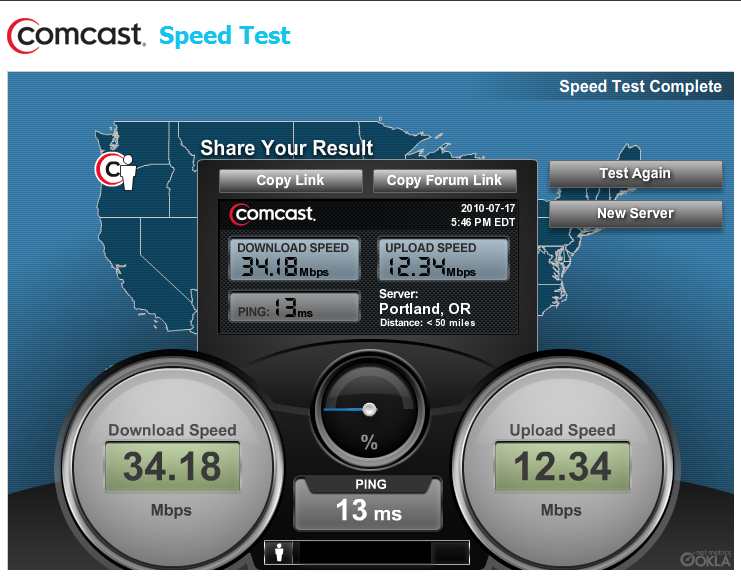
This is the statement I made earlier in the thread...

Contrary to a slow down extremely light Comodo Firewall enabled faster performance across the board including good online performance which as a photographer who is continually processing and uploading photos to the internet is very much appreciated...

35b272db.png

I was referring to the much faster desktop performance I noticed after uninstalling the bloated 300 MB 2009 Norton and turning off Windows Firewall and then installing Comodo which provided the "good online performance" which the graphic depicts which statement made no claims as to previous bandwidth and thus can not be misconstrued as a claim to increase in bandwidth, but rather that the Comodo Firewall did not impede Internet bandwidth as the Linksys SPI hardware Firewall that I mentioned which dragged the bandwidth down to 12 Mbps as I mentioned in yet another post.

So continuing with the subject of enhanced computer performance, yes the AV Suite on a computer can have a profound effect on a computer's performance because it is one of the main software components and replacing it with a lighter application that consumes many times less system resources can speed up computer operations because it has much less of a constant drag on resources especially on resource challenged computers.

In my case I replaced a $50/year 300 MB security program that let Malware through with what eventually evolved into 5.2 MB Firewall + HIPS security program with Automatic Sandboxing which employs File System and Registry Virtualization along with Cloud Based can of all unrecognized file, Cloud Based Behavior Analysis, Heuristic Command Line Analysis and Shell Code Injection Detection...all for the low low price of absolutely FREE.

In conclusion even despite the enhanced protection my computer is more responsive and performs much faster now with the lighter software in place as it would if you replaced any 300 MB program that continually consumes system resources with software that only consumes 5.2 MB.

~Maxx~
.
da59fa57.png
 

My Computer My Computer

Computer Manufacturer/Model Number
HP HPE 270f
OS
Windows 7 x64 Home Premium
CPU
Intel Core i7 930 @ 2.8 Ghz Socket 1366 LGA
Motherboard
Pegatron Truckee v1.04E41
Memory
8 GB 1366 Mhz DDR3 (PC3-10700) RAM
Graphics Card(s)
ATI Radeon 5770 1 GB DDR5 RAM
Sound Card
Realtech High Definition
Monitor(s) Displays
32" Sony Bravia
Screen Resolution
1366 X 768
Hard Drives
Intel 25nm 120 GB Series 320 SSD HD Tune- 265 MBps Read/ 130 MBps Write

LaCie 1TB + 1TB RAID 0 eSATA Drive HD Tune- 160 MBps Read/ 90 MBps Write
Keyboard
Logitech Illuminated
Mouse
Logitech MX Revolution
Internet Speed
36.4 Mbps Maximum on a 37 Mbps Motorola SB501 Modem
Dear Readers of this Thread; As we used to say back in the day..."Different strokes for different Folks" and when it comes to computer security software there is certainly a wide variety of options.

Please understand that my computer security preferences are based on having to recover from a Malware infection that occurred using the OEM computer security software that my HP computer came with and I completely understand how those who have never had to face that nightmare may not fully understand the mindset of those who have recovered and subsequently armed themselves to the teeth with the latest State of the Art computer security software in an effort to prevent future Malware infections.

If you are completely satisfied and comfortable with the Windows 7 Firewall and the capabilities of the computer security software you are now using like the Frostman is then that's just fine please just remember that there are others of us and possibly some of you who are trying to learn from our own mistakes and prevent an ugly Malware infection from reoccurring as it did when we were using basic OEM security and telling others of the solutions we have found which can also speed a computer up in the process in hopes that...

A wise man learns from his own mistakes, but an even wiser man learns from the mistakes of others.

~Maxx~
.
da59fa57.png
 

My Computer My Computer

Computer Manufacturer/Model Number
HP HPE 270f
OS
Windows 7 x64 Home Premium
CPU
Intel Core i7 930 @ 2.8 Ghz Socket 1366 LGA
Motherboard
Pegatron Truckee v1.04E41
Memory
8 GB 1366 Mhz DDR3 (PC3-10700) RAM
Graphics Card(s)
ATI Radeon 5770 1 GB DDR5 RAM
Sound Card
Realtech High Definition
Monitor(s) Displays
32" Sony Bravia
Screen Resolution
1366 X 768
Hard Drives
Intel 25nm 120 GB Series 320 SSD HD Tune- 265 MBps Read/ 130 MBps Write

LaCie 1TB + 1TB RAID 0 eSATA Drive HD Tune- 160 MBps Read/ 90 MBps Write
Keyboard
Logitech Illuminated
Mouse
Logitech MX Revolution
Internet Speed
36.4 Mbps Maximum on a 37 Mbps Motorola SB501 Modem
What was the AV or suite on your factory OEM that allowed the infection?

Most of us here advise users to ditch those as quickly as they can Revo them out to install MSE/Avast with Win7 firewall.

I have yet to hear of serious malware getting past those.
 
Greg- The Malware infection experience I described was on my HP Vista laptop which came pre-loaded with Norton and I learned the hard way about how inept it was.

A few months ago when I got my HP HPE 270f Win 7 x64 desktop computer it also came pre-installed with the Norton AV Suite and the first thing I did was to install Revo Uninstaller Pro x64 and remove Norton and all its 1,400+ Regisrty keys and values.

I know that you are a proponent of MSE/Avast with Win7 firewall which many other people on the Forum also speak well of, but as I said earlier I've been bitten before by Malware and because of that experience I prefer to run the most high tech, State of the Art, world's best testing computer security software I have been able to find which is the ultra-lightweight Comodo Firewall which must have some merit otherwise Brink would not have made a sticky post calling Windows 7 Forums Members attention to the Comodo Firewall's latest version update.

I also run my browser in the virtual space of Sandboxie which put any Antivirus I used to run out of business because the virtual space the browser runs in on the HDD is overwritten with the Schneier Algorithm in the Eraser software daily and several on demand traditional and cloud Malware and Spyware scanners including in addition to Virus Total and Comodo's Cloud Behavior Blocker are used to verify that the computer is completely and constantly clean.

From reading your many very intelligent responses to Member's computer problems you seem to be very astute when it comes to computer operation and functioning and I was wondering if you might possibly know what the computer resource allocations of the Windows 7 Firewall is in that I can not find it located either in Windows Task Manager or Sysinternal's Process Explorer.

~Maxx~
.
da59fa57.png
 

My Computer My Computer

Computer Manufacturer/Model Number
HP HPE 270f
OS
Windows 7 x64 Home Premium
CPU
Intel Core i7 930 @ 2.8 Ghz Socket 1366 LGA
Motherboard
Pegatron Truckee v1.04E41
Memory
8 GB 1366 Mhz DDR3 (PC3-10700) RAM
Graphics Card(s)
ATI Radeon 5770 1 GB DDR5 RAM
Sound Card
Realtech High Definition
Monitor(s) Displays
32" Sony Bravia
Screen Resolution
1366 X 768
Hard Drives
Intel 25nm 120 GB Series 320 SSD HD Tune- 265 MBps Read/ 130 MBps Write

LaCie 1TB + 1TB RAID 0 eSATA Drive HD Tune- 160 MBps Read/ 90 MBps Write
Keyboard
Logitech Illuminated
Mouse
Logitech MX Revolution
Internet Speed
36.4 Mbps Maximum on a 37 Mbps Motorola SB501 Modem
Sorry Maxx I really don't get that micro into the Firewalls. It's just that I turned off the Windows Firewall in the past in XP and Vista and ran my hardware firewall to keep from being slowed down.

Realizing during beta that the Win7 was getting lighter and lighter, I used its Firewall then turned off my router firewall and gained back some speed.

The tables had been turned, and I no longer look back.
 
Greg- I also have a great appreciation for light high performance software, but having become accustomed to using a light and fast Firewall that I have set to alert me every time a program that has not already been pre-approved wants to call up to the Internet to transmit information home I have learned that almost every time a program is installed it wants to report the information it has gathered back to its programmer which is something that I was totally unaware of when I was using the Windows Firewall.

There are also quite a number of Windows programs including System32\rundll32.exe and Explorer.exe that call up frequently to the Internet which I thought was quite innocent until Comodo Defense + recorded System32\rundll32.exe making a 3 hour long information gathering tour taking a leisurely 2 minutes to create the process and execute the image of each .exe and .dll for its pre-programmed routine report to Redmond.

I consider a 3 hour long information gathering session a very serious breach of my computer's security especially when the Windows 7 Firewall is programmed to ignore it and keep the owner of the computer in the dark and unaware of this extensive information gathering. I don't know about you, but I am not a big fan of spyware, MS spyware or any other brand that takes intimate information about the functioning of my computer and broadcasts it back over the Internet to whoever programmed the software. Here's the first hour of the event...

6f6efd29.jpg


I really like Win 7 and its my favorite of any other Windows or MAC OS that I have run, but I can not abide a Firewall that is programmed to be compliant with the unauthorized gathering and dissemination of information from my computer and I know that I am not the only one who holds this basic definition of computer security. This is why I will continue to use the Firewall that called my attention to this blatant violation of my computer's security and my own personal privacy.

Having a lightning fast software Firewall is great, but if it compromises outbound computer security then it becomes less desirable than an equally fast software Firewall that only lets out what information the user allows to be let out.

BTW- Did you ever find the system resource consumption specs on the Windows 7 Firewall?

~Maxx~
.
da59fa57.png
 
Last edited:

My Computer My Computer

Computer Manufacturer/Model Number
HP HPE 270f
OS
Windows 7 x64 Home Premium
CPU
Intel Core i7 930 @ 2.8 Ghz Socket 1366 LGA
Motherboard
Pegatron Truckee v1.04E41
Memory
8 GB 1366 Mhz DDR3 (PC3-10700) RAM
Graphics Card(s)
ATI Radeon 5770 1 GB DDR5 RAM
Sound Card
Realtech High Definition
Monitor(s) Displays
32" Sony Bravia
Screen Resolution
1366 X 768
Hard Drives
Intel 25nm 120 GB Series 320 SSD HD Tune- 265 MBps Read/ 130 MBps Write

LaCie 1TB + 1TB RAID 0 eSATA Drive HD Tune- 160 MBps Read/ 90 MBps Write
Keyboard
Logitech Illuminated
Mouse
Logitech MX Revolution
Internet Speed
36.4 Mbps Maximum on a 37 Mbps Motorola SB501 Modem
I have no interest in system resource use specs for the Windows firewall as if they were excessive I would still have it turned off and still be using my hardware firewall.

Again, Win7 scans your computer at all times to provide the latest updates including drivers from Win7's vast driverstore. It will also solve and cue problem reports without sending them first, which is highly valuable for troubleshooting. I have had several issues that had their fixes handed to me before or while I troubleshot them.

I am an install obsessive who applies my obsession to help others. If you are that security obsessed it would be well-directed to helping in the Security forum here where you can trace others' firewall logs as well. You could get some traction with your ideas and knowledge instead of spinning your wheels.
 
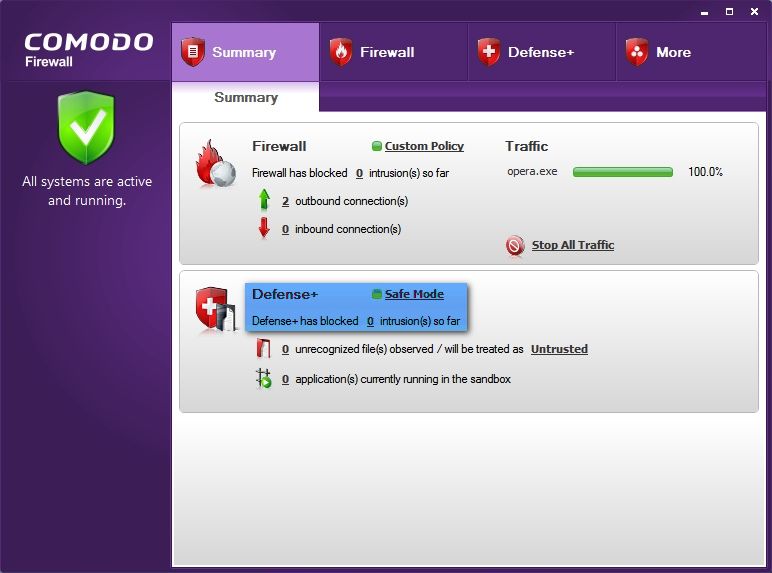
Greg- With all due respect toward you considering your breadth and depth of knowledge concerning all things Win 7 and all the very valuable help and insight you have freely given here on the Windows 7 Forum to so many from which I also have derived much deeper understanding of how Win 7 works the screenshot of the initial portion of the 3 hour long information gathering sessions which have no relation to Windows Update scans or problem reports was linked to directly from the Comodo Firewall Main GUI which displays the number of these kinds of intrusions openly just like it would for any other form of spyware sending information up to the Internet. In the past I've used Windows Firewall and I realize that one would seem to be security obsessed to dig for documentation concerning this kind of this kind of activity, but with the Comodo v5.0 Firewall it is just 1 mouse click away...

62582e98.jpg


Sorry to have bothered all of you with this information, but the reason I mention it here is because this particular kind of pre-programmed highly detailed information gathering is new to Win 7 and did not exist in any previous Windows OS and I felt that the Membership should at least be aware of what is going on without the light and fast Windows 7 Firewall apprising them of it. See you in the System Security Forum...

~Maxx~.
da59fa57.png
 
Last edited:

My Computer My Computer

Computer Manufacturer/Model Number
HP HPE 270f
OS
Windows 7 x64 Home Premium
CPU
Intel Core i7 930 @ 2.8 Ghz Socket 1366 LGA
Motherboard
Pegatron Truckee v1.04E41
Memory
8 GB 1366 Mhz DDR3 (PC3-10700) RAM
Graphics Card(s)
ATI Radeon 5770 1 GB DDR5 RAM
Sound Card
Realtech High Definition
Monitor(s) Displays
32" Sony Bravia
Screen Resolution
1366 X 768
Hard Drives
Intel 25nm 120 GB Series 320 SSD HD Tune- 265 MBps Read/ 130 MBps Write

LaCie 1TB + 1TB RAID 0 eSATA Drive HD Tune- 160 MBps Read/ 90 MBps Write
Keyboard
Logitech Illuminated
Mouse
Logitech MX Revolution
Internet Speed
36.4 Mbps Maximum on a 37 Mbps Motorola SB501 Modem
Welcome BDani, :D

Pro & Ultimate are very similar. I have computers running both & they do most everything I want to do.

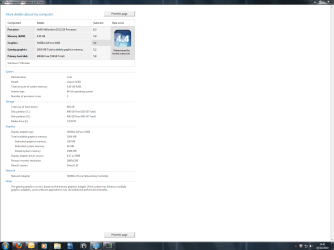
If you fill in your computer specs, it will help us to analyze your hardware for improvements. ;)

Hi i'm running windows 7 X64 ultimate could you maybe advise on how i could maybe make my system any faster or better if possible?

thanks
 

Attachments

  • SnapShot_105714.png
    SnapShot_105714.png
    54.7 KB · Views: 8

My Computer My Computer

Computer Manufacturer/Model Number
ACER ASPIRE AX1301 DESKTOP
OS
WINDOWS 7 ULTIMATE X64
CPU
AMD ATHLON II X2 215 DUAL CORE PROCESSOR
Motherboard
ACER WMCP78M (SOCKET AM2)
Memory
4GB DDR2
Graphics Card(s)
NVIDIA GEFORCE 9200 INTERGRATED
Sound Card
NVIDIA HIGH DEF AUDIO
Monitor(s) Displays
X223W - ACER
Screen Resolution
1680X1050
Hard Drives
HDD 1TB DDR2

ODD DVD SUPER MULTI DRIVE
Keyboard
MICROSOFT INTELI PRO COMFORT
Mouse
MICROSOFT INTELI PRO
Internet Speed
16.9MB
Back
Top