Solved Malwarebytes Pro and User Account Control.

Brandon138

New member
Member
Local time
1:24 AM
Messages
67
Hello all.

I just purchased malwarebytes pro because I was impressed with the program and I wanted the real time protection the professional version offers. However, I have a question, this might be absolutely nothing but I need to know; when I click on the malwarebytes icon, the User Account Control prompt comes up asking if I want to allow the program to make changes to my computer, will this effect the programs ability to provide me with real time protection? In other words, if malware was being added to my PC, would malwarebytes not be able to stop it real time because the account control would not allow in to make changes? I want malwarebytes to have complete control to keep my computer safe, is there anything I need to do?

Brandon
 

My Computer

Computer Manufacturer/Model Number
Toshibua Satellite Pro s850 series
OS
Windows 7 Home Premium 64bit.
There is no need to do anything, it will intercept and prevent installation of known Malware and also prevent you from viewing known web sites.

The only real problem (and it is a problem) is that Malwarebytes real time scanner conflicts with a majority of paid for av programs. I used to use the Pro version but it does not work well with Bitdefender 2013 and made my PC unstable. If you start to get random crashes, system hangs etc you can guarantee that this is the problem and you have 2 alternatives. You can either keep M/ware pro or keep your paid for av software (I don't know what you use). To get round this, well known, problem many users keep Pro and run MSE instead of other av software.

Andy
 

My Computer

Computer type
PC/Desktop
Computer Manufacturer/Model Number
Titan 8900i Plasma MK II built by Overclockersuk
OS
Windows 7 Home Premium 64bit
CPU
Intel Core i5 3570K @ 3.40GHz
Motherboard
Gigabyte Z77-D3H (Intel Core i5-3570K CPU @ 3.40ghz
Memory
16.0 GB Dual-Channel DDR3 @ 762MHz (11-11-11-28)
Graphics Card(s)
NVIDIA GeForce GTX 670
Sound Card
ASUS Xonar DG
Monitor(s) Displays
Acer P246H
Screen Resolution
1920x1080@60Hz
Hard Drives
112GB INTEL SSDSC2CT120A3 ATA Device (SSD)
932GB Seagate ST1000DM003-1CH162 ATA Device (SATA)
1TB Seagate external HDD.
PSU
Corsair GS 600w PSU
Case
Antec 302 Three Hundred Two Ultimate Gaming Case
Cooling
Alpenfohn K2 Mount Doom CPU Cooler
Keyboard
Microsoft Sidewinder X4
Mouse
Anker 8000dpi gaming mouse
Internet Speed
12mb
Antivirus
Bitdefender Internet Security 2014
Browser
Chrome and IE11
Other Info
Malwarebytes, ADWCleaner, CCleaner, SUPERAntispyware Pro, Revo Uninstaller Pro

Adobe Photoshop CS6/Lightroom 5.3/NIK Software/Keyword Perfect
What anti virus do you use Brandon138?
I have read a few places that Bitdefender doesn't get along with Malwarebytes Anti Malware.
I have also read in many places that Malwarebytes Anti Malware gets along with most major branded anti malware.

You can also right click on the Malwarebytes Anti Malware icon in the taskbar and make sure (Start with Windows) is checked.

All Windows is saying is that Windows has notice that something is trying to get into Malwarebytes Anti Malware and asking for your permission to allow it.
Windows doesn't know it is you who are trying to get into it.
 

My Computer

Computer type
PC/Desktop
Computer Manufacturer/Model Number
Home made Desktop
OS
Windows 10 Pro. 64/ version 1709 Windows 7 Pro/64
CPU
Intel i7-6800K @ 4.3
Motherboard
ASUS X-99 Deluxe II
Memory
Corsair Platinum 16 gig @2400
Graphics Card(s)
EVGA GTX 1070 OC
Monitor(s) Displays
Asus 27" LED LCD/VE278Q
Screen Resolution
1920-1080 or 1280-720 HDMI
Hard Drives
INTEL SSD 730-240 Gb Sata 3.0/
PSU
EVGA Platium 1200W
Case
Phanteks Luxe Tempered Glass 8 fans/ one radiator
Cooling
XSPC/ Water Cooled CPU
Keyboard
Das 4 Professional
Mouse
Logitech M705/MX Anywhere 2-S
Internet Speed
100 mbits
Antivirus
Microsoft Security Essentials/ Malwarebytes Premium 3.0/ SAS
Browser
I.E. 11 default/Firefox/ ISP Time Warner Cable/Spectrum
Other Info
LG BluRay Burner/
Sound system-KLipsch-THX/
Icy Dock ssd Hot Swap bays.
I use Avast free, it has worked out great for me. I used to use Norton 360, but that was a mess and everything conflicts with that. I have no problem with malwarebytes and my anti virus, I am not worried about any conflict there, avast seems to be fine with the real time protection that malwarebytes provides, at least so far.

I have malwarebytes checked to start with windows and in my task manager it shows that malwarebytes is always an active process. I was simply wondering if windows user account controls could in some way affect malwarebytes doing its duty. I take it from what you two gentlemen have stated, that is not something to worry about then?
 

My Computer

Computer Manufacturer/Model Number
Toshibua Satellite Pro s850 series
OS
Windows 7 Home Premium 64bit.
To give possibly a more clear example of what I mean, for example:

When I click on avast, it just opens normal, does not ask for permission.
When I click on itunes, it just opens normal, does not ask for permission.

When I click on malwarebytes pro, it asks for permission. I was wondering if that could affect it doing its duty, like would it not be able to remove the malware, if I did not give it permission too, due to the user account control.

I know this is probably a silly question, but do you see what I'm saying?
 

My Computer

Computer Manufacturer/Model Number
Toshibua Satellite Pro s850 series
OS
Windows 7 Home Premium 64bit.
Yes I do understand what you are saying. I will look into it.

It really isn't anything to worry about as long as you have Malwarebytes Anti Malware start with Windows.

Malwarebytes Anti Malware and Avast work well together for many.
 

My Computer

Computer type
PC/Desktop
Computer Manufacturer/Model Number
Home made Desktop
OS
Windows 10 Pro. 64/ version 1709 Windows 7 Pro/64
CPU
Intel i7-6800K @ 4.3
Motherboard
ASUS X-99 Deluxe II
Memory
Corsair Platinum 16 gig @2400
Graphics Card(s)
EVGA GTX 1070 OC
Monitor(s) Displays
Asus 27" LED LCD/VE278Q
Screen Resolution
1920-1080 or 1280-720 HDMI
Hard Drives
INTEL SSD 730-240 Gb Sata 3.0/
PSU
EVGA Platium 1200W
Case
Phanteks Luxe Tempered Glass 8 fans/ one radiator
Cooling
XSPC/ Water Cooled CPU
Keyboard
Das 4 Professional
Mouse
Logitech M705/MX Anywhere 2-S
Internet Speed
100 mbits
Antivirus
Microsoft Security Essentials/ Malwarebytes Premium 3.0/ SAS
Browser
I.E. 11 default/Firefox/ ISP Time Warner Cable/Spectrum
Other Info
LG BluRay Burner/
Sound system-KLipsch-THX/
Icy Dock ssd Hot Swap bays.
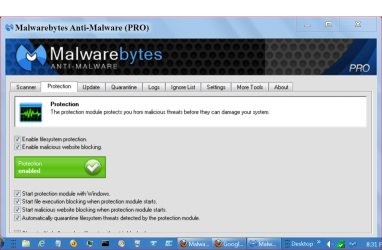
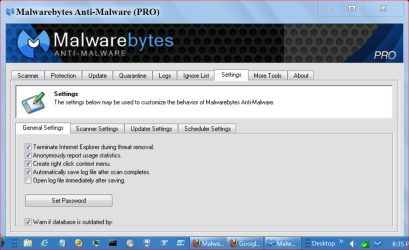
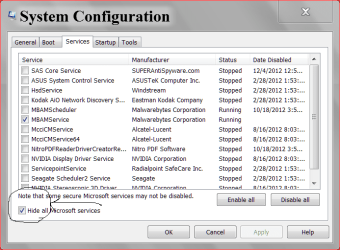
Are you settings like mine.

MBAM.PNG
MBAM 2.PNG

services msconfig.PNG
 

My Computer

Computer type
PC/Desktop
Computer Manufacturer/Model Number
Home made Desktop
OS
Windows 10 Pro. 64/ version 1709 Windows 7 Pro/64
CPU
Intel i7-6800K @ 4.3
Motherboard
ASUS X-99 Deluxe II
Memory
Corsair Platinum 16 gig @2400
Graphics Card(s)
EVGA GTX 1070 OC
Monitor(s) Displays
Asus 27" LED LCD/VE278Q
Screen Resolution
1920-1080 or 1280-720 HDMI
Hard Drives
INTEL SSD 730-240 Gb Sata 3.0/
PSU
EVGA Platium 1200W
Case
Phanteks Luxe Tempered Glass 8 fans/ one radiator
Cooling
XSPC/ Water Cooled CPU
Keyboard
Das 4 Professional
Mouse
Logitech M705/MX Anywhere 2-S
Internet Speed
100 mbits
Antivirus
Microsoft Security Essentials/ Malwarebytes Premium 3.0/ SAS
Browser
I.E. 11 default/Firefox/ ISP Time Warner Cable/Spectrum
Other Info
LG BluRay Burner/
Sound system-KLipsch-THX/
Icy Dock ssd Hot Swap bays.

My Computer

Computer Manufacturer/Model Number
Toshibua Satellite Pro s850 series
OS
Windows 7 Home Premium 64bit.
The prompt is normal and I get it also. I run MB Pro realtime with NIS 2012 with no conflicts.

Jim :cool:
 

My Computer

Computer type
PC/Desktop
Computer Manufacturer/Model Number
Home Built
OS
Windows 8.1 Pro w/Media Center 64bit, Windows 7 HP 64bit
CPU
Phenom II X6 1100T
Motherboard
ASUS M5A99X EVO
Memory
Crucial Balistic 8gb DDR3-1866 CL9
Graphics Card(s)
MSI R6850 Cyclone IGD5 PE
Sound Card
On Board
Monitor(s) Displays
ASUS VE258Q 25" LED with DVI-HDMI-DisplayPort
Screen Resolution
1920 x 1080
Hard Drives
Two WD Cavier Black 2TB Sata III, WD My Book Essential 2TB USB 3.0
PSU
Seasonic X650 80 Plus GOLD Modular
Case
Corsair 400R
Cooling
Antec Kuhler H2O 620, Two 120mm and four 140mm
Keyboard
Logitech K120
Mouse
Logitech Marble Mouse USB, Logitech Precision Game Pad
Internet Speed
15MB
Antivirus
Norton IS 2013, Malwarebytes Pro Beta 2
Browser
IE-11, FF-27
Other Info
APC UPS ES 750, Netgear WNR3500L Gigabit & Wireless N Router with SamKnows Test Program, Motorola SB6120 Gigabit Cable Modem. Brother HL-2170W Laser Printer, Epson V300 Scanner
No it doesn't because I have my User Account Control are set all the way down to don't notify. (not recommended)
I was looking for a way to not have to do this in this fashion but have been unable to find a way.

If the notice jumping up and asking permission doesn't bother you I would just leave it alone.
You could try right ticking on Malwarebytes Anti Malware and select run as administrator. I have one account only on my computer so their is some options I can't try.

I don't know what else to tell you. It's nothing to worry about.
 

My Computer

Computer type
PC/Desktop
Computer Manufacturer/Model Number
Home made Desktop
OS
Windows 10 Pro. 64/ version 1709 Windows 7 Pro/64
CPU
Intel i7-6800K @ 4.3
Motherboard
ASUS X-99 Deluxe II
Memory
Corsair Platinum 16 gig @2400
Graphics Card(s)
EVGA GTX 1070 OC
Monitor(s) Displays
Asus 27" LED LCD/VE278Q
Screen Resolution
1920-1080 or 1280-720 HDMI
Hard Drives
INTEL SSD 730-240 Gb Sata 3.0/
PSU
EVGA Platium 1200W
Case
Phanteks Luxe Tempered Glass 8 fans/ one radiator
Cooling
XSPC/ Water Cooled CPU
Keyboard
Das 4 Professional
Mouse
Logitech M705/MX Anywhere 2-S
Internet Speed
100 mbits
Antivirus
Microsoft Security Essentials/ Malwarebytes Premium 3.0/ SAS
Browser
I.E. 11 default/Firefox/ ISP Time Warner Cable/Spectrum
Other Info
LG BluRay Burner/
Sound system-KLipsch-THX/
Icy Dock ssd Hot Swap bays.
No it doesn't because I have my User Account Control are set all the way down to don't notify. (not recommended)
I was looking for a way to not have to do this in this fashion but have been unable to find a way.

If the notice jumping up and asking permission doesn't bother you I would just leave it alone.
You could try right ticking on Malwarebytes Anti Malware and select run as administrator. I have one account only on my computer so their is some options I can't try.

I don't know what else to tell you. It's nothing to worry about.

Good enough for me...It does not bother me that it pops up, was just making sure the real time protection still worked and it sounds like it works fine. Another friend of mine asked the same question to me the other day so I will mark this as solved. I appreciate all the attention you guys paid to my inquiry and feel safer now.

Just wanted to mention, I did get one email from someone that said I could modify my hosts file in order to manage this problem, apparently its rather easy to do, but i could with the motto; if its not broken, do not try to fix it.

Thanks again for all the help.

Brandon
 

My Computer

Computer Manufacturer/Model Number
Toshibua Satellite Pro s850 series
OS
Windows 7 Home Premium 64bit.
I personally wouldn't do a registry hack for such a small thing. Keep dropping by this thread because someone else might have a idea to help.
 

My Computer

Computer type
PC/Desktop
Computer Manufacturer/Model Number
Home made Desktop
OS
Windows 10 Pro. 64/ version 1709 Windows 7 Pro/64
CPU
Intel i7-6800K @ 4.3
Motherboard
ASUS X-99 Deluxe II
Memory
Corsair Platinum 16 gig @2400
Graphics Card(s)
EVGA GTX 1070 OC
Monitor(s) Displays
Asus 27" LED LCD/VE278Q
Screen Resolution
1920-1080 or 1280-720 HDMI
Hard Drives
INTEL SSD 730-240 Gb Sata 3.0/
PSU
EVGA Platium 1200W
Case
Phanteks Luxe Tempered Glass 8 fans/ one radiator
Cooling
XSPC/ Water Cooled CPU
Keyboard
Das 4 Professional
Mouse
Logitech M705/MX Anywhere 2-S
Internet Speed
100 mbits
Antivirus
Microsoft Security Essentials/ Malwarebytes Premium 3.0/ SAS
Browser
I.E. 11 default/Firefox/ ISP Time Warner Cable/Spectrum
Other Info
LG BluRay Burner/
Sound system-KLipsch-THX/
Icy Dock ssd Hot Swap bays.
Brandon138,

The hosts file is located here: C:\Windows\System32\drivers\etc\hosts
It is a text file that you can modify using Notepad, or any text editor.
You do not need a Registry hack to modify it.

Have never read any info on using the hosts file to modify UAC behavior...??
However, I'm no expert, and, who knows!?!? :geek:


On you specific issue...
Check if the mbamgui.exe file is set to: Run as an Administrator

Please navigate to the following folder, and open it:
C:\Program Files (x86)\Malwarebytes' Anti-Malware

Inside the folder, right-click on mbamgui.exe and select: Properties
Click on: Compatibility tab
Uncheck the box next to: Run this program as an Administrator
Click: Apply > OK

Restart your computer.

Do you still get a UAC prompt?
 

My Computer

Computer type
PC/Desktop
Computer Manufacturer/Model Number
An ol' eMachines
OS
Windows 7 Home Premium
Internet Speed
Fine for me...I'm retired!
The host file is for DNS translation and should not be messed with if you don't know what you are doing.

Jim :cool:
 

My Computer

Computer type
PC/Desktop
Computer Manufacturer/Model Number
Home Built
OS
Windows 8.1 Pro w/Media Center 64bit, Windows 7 HP 64bit
CPU
Phenom II X6 1100T
Motherboard
ASUS M5A99X EVO
Memory
Crucial Balistic 8gb DDR3-1866 CL9
Graphics Card(s)
MSI R6850 Cyclone IGD5 PE
Sound Card
On Board
Monitor(s) Displays
ASUS VE258Q 25" LED with DVI-HDMI-DisplayPort
Screen Resolution
1920 x 1080
Hard Drives
Two WD Cavier Black 2TB Sata III, WD My Book Essential 2TB USB 3.0
PSU
Seasonic X650 80 Plus GOLD Modular
Case
Corsair 400R
Cooling
Antec Kuhler H2O 620, Two 120mm and four 140mm
Keyboard
Logitech K120
Mouse
Logitech Marble Mouse USB, Logitech Precision Game Pad
Internet Speed
15MB
Antivirus
Norton IS 2013, Malwarebytes Pro Beta 2
Browser
IE-11, FF-27
Other Info
APC UPS ES 750, Netgear WNR3500L Gigabit & Wireless N Router with SamKnows Test Program, Motorola SB6120 Gigabit Cable Modem. Brother HL-2170W Laser Printer, Epson V300 Scanner
Just to be clear, I am not planning on editing my host file, I was simply stating that I heard it could be done, I myself have no intention of messing with it. On another computer that was running Vista a couple years back, I did need to edit them in order to let a certain program run, it was easy to do, and everything went well. However, I DO NOT plan to do that again unless its totally called for and I'm walked through it by a Guru...lol
 

My Computer

Computer Manufacturer/Model Number
Toshibua Satellite Pro s850 series
OS
Windows 7 Home Premium 64bit.
Brandon138,

The hosts file is located here: C:\Windows\System32\drivers\etc\hosts
It is a text file that you can modify using Notepad, or any text editor.
You do not need a Registry hack to modify it.

Have never read any info on using the hosts file to modify UAC behavior...??
However, I'm no expert, and, who knows!?!? :geek:


On you specific issue...
Check if the mbamgui.exe file is set to: Run as an Administrator

Please navigate to the following folder, and open it:
C:\Program Files (x86)\Malwarebytes' Anti-Malware

Inside the folder, right-click on mbamgui.exe and select: Properties
Click on: Compatibility tab
Uncheck the box next to: Run this program as an Administrator
Click: Apply > OK

Restart your computer.

Do you still get a UAC prompt?


Hey Cotton,

I looked at the program mbamgui.exe and checked the compatibility tab, the box was unchecked in the first place and yes I still get the UAC prompt. Just for good measure I checked the box and restarted as well and still get the prompt. Like I said, I can live with the prompt, as look as it does not affect Malwarebytes doing its job.
 

My Computer

Computer Manufacturer/Model Number
Toshibua Satellite Pro s850 series
OS
Windows 7 Home Premium 64bit.
Back
Top