Manage - Add or Remove from Computer Context Menu

How to Add or Remove "Manage" from Computer Context Menu


   Information
This will show you how to add or remove the Manage item from the Computer context menu in the Start Menu, desktop icon, and Windows Explorer navigation pane in Windows 7 and Vista.

When Manage is selected, it runs the C:\Windows\System32\CompMgmtLauncher.exe file to open Computer Management.

   Note
Removing Manage from the Computer context menu in the Start Menu will not prevent Computer Management from being opened. It only removes it from this context menu.

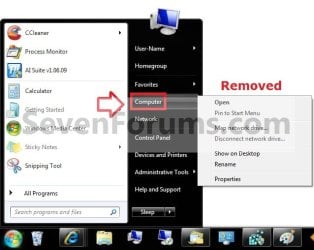
EXAMPLE: Computer Context Menu in Start Menu with Manage Added and Removed
Default.jpg

Removed.jpg

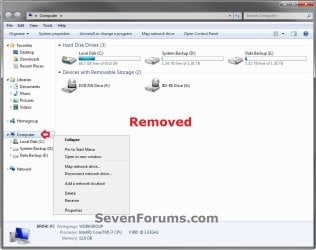
EXAMPLE: Computer Context Menu in Navigation Pane with Manage Added and Removed Explorer_Default.jpg
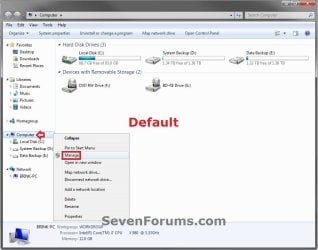
Explorer_removed.jpg


OPTION ONE

Using a REG File Download

1. To Add Manage to Computer Context Menu
NOTE: This is the default setting. A) Click on the Download button below to download the file below. Add_Computer_Manage_Context_Menu_Item.reg

Download


B) Go to step 3.
2. To Remove Manage from Computer Context Menu A) Click on the Download button below to download the file below. Remove_Computer_Manage_Context_Menu_Item.reg

Download


3. Save the .reg file to the desktop.

4. Right click on the downloaded .reg, and click on Merge.

5. Click on Run, Yes, Yes, and OK when prompted.

6. Log off and log on, or restart the computer to apply.

7. When finished, you can delete the downloaded .reg file if you like.


OPTION TWO

Through the Local Group Policy Editor

1. Open the all users, specific users or groups, or all users except administrators Local Group Policy Editor for how you want this policy applied.
2. In the left pane, click on to expand User Configuration, Administrative Templates, Windows Components, and Windows Explorer. (see screenshot below) GPEDIT-1.jpg
3. In the right pane, right click on Hides the Manage item on the Windows Explorer context menu and click on Edit. (see screenshot above)

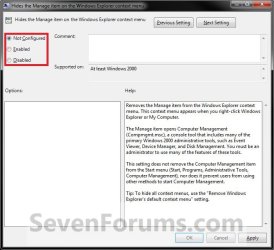
4. To Add Manage to Computer Context Menu A) Select (dot) either Not Configured or Disabled. (see screenshot below step 6)
NOTE: "Not Comfigured" is the default setting.
B) Go to step 6.
5. To Remove Manage from Computer Context Menu A) Select (dot) Enabled. (see screenshot below step 6)
6. Click on OK. (see screenshot below) GPEDIT-2.jpg
7. Close the Local Group Policy Editor window.
That's it,
Shawn


Attachments

Last edited:
Hi Shawn,I wonder if this reg fix can help me
I have the manage on my computer right click,the issue is when i right click it it does nothing
this is a fresh windows 7 home install with this issue.
if it's not corrrect could you please direct me what I can do to get this to open.
thanks for your time
Vagablonde
 

My Computer

Computer Manufacturer/Model Number
Dell Inspiron 570
OS
Windows 7 Professional 64 Bit Service Pk 1
CPU
AMD Athlon II X3 435 processor 2.90 GHz
Motherboard
Dell Inc ( Cant find any information other then this)
Memory
6.00 GB Type DDR3
Graphics Card(s)
Integrated ATI Radeon HD4200 Graphics
Sound Card
Realtek High Definition Audio
Monitor(s) Displays
Samsung SyncMaster on ATI Radeon HD 4200
Screen Resolution
1920x1032 pixels
Hard Drives
1TB Serial ATA 2 Hard Drive 7200RPM
Keyboard
Deck
Mouse
Logitech

My Computer

Computer type
PC/Desktop
Computer Manufacturer/Model Number
Self built custom
OS
64-bit Windows 11 Pro for Workstations
CPU
Intel i7-8700K OC'd to 5 GHz
Motherboard
ASUS ROG Maximus XI Formula Z390
Memory
64 GB (4x16GB) G.SKILL TridentZ RGB DDR4 3600 MHz
Graphics Card(s)
ASUS ROG-STRIX-GTX1080TI-O11G-GAMING
Sound Card
Integrated
Monitor(s) Displays
2 x Samsung Odyssey G7 27"
Screen Resolution
2560x1440
Hard Drives
1TB Samsung 990 PRO M.2,
4TB Samsung 990 PRO PRO M.2,
TerraMaster F8 SSD Plus NAS
PSU
Seasonic Prime Titanium 850W
Case
Thermaltake Core P3
Cooling
Corsair Hydro H115i
Keyboard
Logitech wireless K800
Mouse
Logitech MX Master 4
Internet Speed
2 Gb/s Download and 100 Mb/s Upload
Antivirus
Malwarebyte Anti-Malware Premium
Browser
Google Chrome
Other Info
Logitech Z625 speaker system,
Logitech BRIO 4K Pro webcam,
HP Color LaserJet Pro MFP M477fdn,
APC SMART-UPS RT 1000 XL - SURT1000XLI,
Galaxy S23 Plus phone
Shawn thanks for the quick reply,that was the other option I wondered about .
as they are reg fix I just wanted to be sure,thanks again.
 

My Computer

Computer Manufacturer/Model Number
Dell Inspiron 570
OS
Windows 7 Professional 64 Bit Service Pk 1
CPU
AMD Athlon II X3 435 processor 2.90 GHz
Motherboard
Dell Inc ( Cant find any information other then this)
Memory
6.00 GB Type DDR3
Graphics Card(s)
Integrated ATI Radeon HD4200 Graphics
Sound Card
Realtek High Definition Audio
Monitor(s) Displays
Samsung SyncMaster on ATI Radeon HD 4200
Screen Resolution
1920x1032 pixels
Hard Drives
1TB Serial ATA 2 Hard Drive 7200RPM
Keyboard
Deck
Mouse
Logitech
You're most welcome. :)
 

My Computer

Computer type
PC/Desktop
Computer Manufacturer/Model Number
Self built custom
OS
64-bit Windows 11 Pro for Workstations
CPU
Intel i7-8700K OC'd to 5 GHz
Motherboard
ASUS ROG Maximus XI Formula Z390
Memory
64 GB (4x16GB) G.SKILL TridentZ RGB DDR4 3600 MHz
Graphics Card(s)
ASUS ROG-STRIX-GTX1080TI-O11G-GAMING
Sound Card
Integrated
Monitor(s) Displays
2 x Samsung Odyssey G7 27"
Screen Resolution
2560x1440
Hard Drives
1TB Samsung 990 PRO M.2,
4TB Samsung 990 PRO PRO M.2,
TerraMaster F8 SSD Plus NAS
PSU
Seasonic Prime Titanium 850W
Case
Thermaltake Core P3
Cooling
Corsair Hydro H115i
Keyboard
Logitech wireless K800
Mouse
Logitech MX Master 4
Internet Speed
2 Gb/s Download and 100 Mb/s Upload
Antivirus
Malwarebyte Anti-Malware Premium
Browser
Google Chrome
Other Info
Logitech Z625 speaker system,
Logitech BRIO 4K Pro webcam,
HP Color LaserJet Pro MFP M477fdn,
APC SMART-UPS RT 1000 XL - SURT1000XLI,
Galaxy S23 Plus phone
Back
Top