Manage Firefox Cookies

Callender

New member
Guru
Gold Member
VIP
Local time
4:10 AM
Messages
4,776
Location
United Kingdom
A thread started in response to member Emmar's post here:

http://www.sevenforums.com/browsers...released-windows-post3224171.html#post3224171

So with the add ons mentioned you can:

Cookie Monster add on

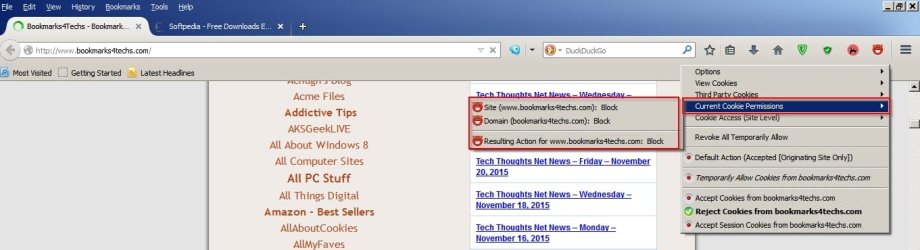
View your current cookie settings for any site you visit
CM1.jpg

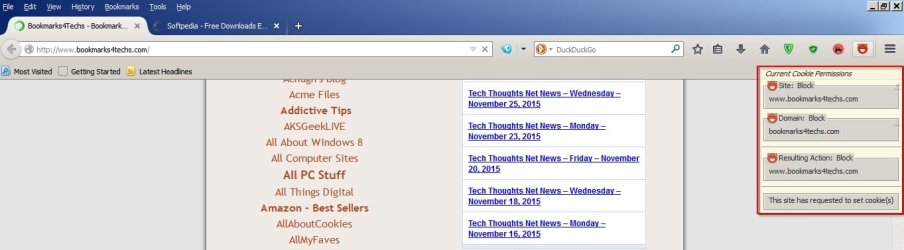
View and change cookie permissions
CM2.jpg

Manage third party cookie permissions per site
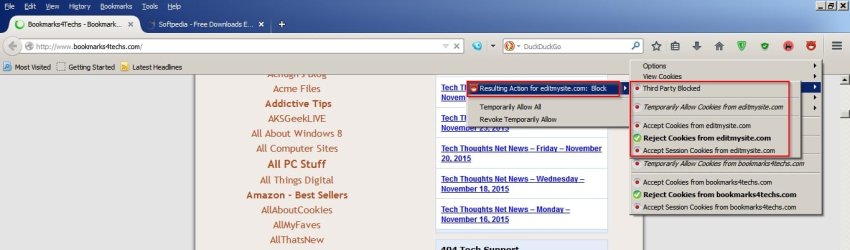
CM3.jpg

Set options to apply to both http and https
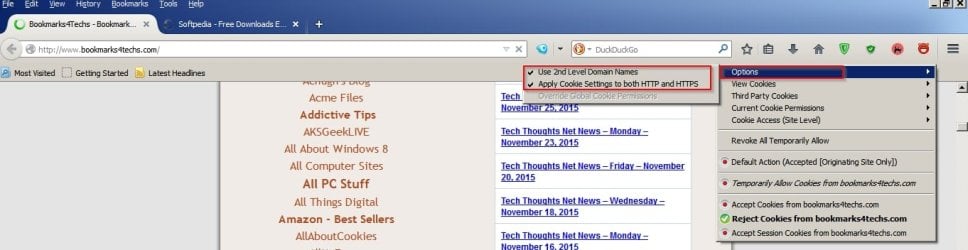
CM4.jpg

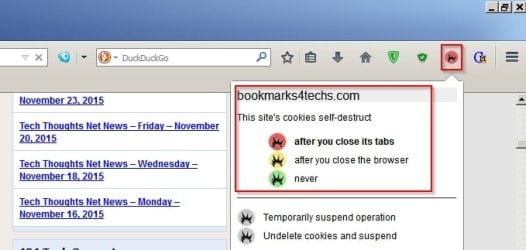
For Self Destructing Cookies add on

Choose when cookies are automatically deleted (for those cookies that have been allowed)
SDC.jpg

Seems pretty straightforward to me but if you have questions ask and I will try to help or else other members may have suggestions.
 

My Computer

Computer type
Laptop
Computer Manufacturer/Model Number
ASUS
OS
Microsoft Windows 7 Home Premium 64-bit 7601 Multiprocessor Free Service Pack 1
CPU
AMD C-60 APU with Radeon(tm) HD Graphics
Motherboard
ASUSTeK COMPUTER INC. X501U
Memory
4.00 GB
Graphics Card(s)
AMD Radeon HD 6290 Graphics
Sound Card
(1) AMD High Definition Audio Device (2) Realtek High Defi
Screen Resolution
1366 x 768 x 32 bits (4294967296 colors) @ 60 Hz
Hard Drives
Hitachi HTS545050A7E380 SATA Disk Device
Antivirus
Comodo CIS & FW, SecureAplus App Whitelisting, Threatfire
Browser
Cyberfox 64bit, Opera 64bit, Airfox
Other Info
Spy-The-Spy, HitmanPro.Alert, Norton Connect Safe, MJRegWatcher, BitDefender TrafficLight, Voodoo Shield, Zemana AntiMalware
I have looked into those instructions, but that does not help me. The way I understand blocking those cookies is for when you visit those sites. Am I right about that? I don't visit Bing's or Google's sites, but I have their cookies anyway.


I think I am just going to forget about the cookies. I am told they do no harm anyway. Blocking cookies like google.com and alawar.com is just a thing I have always been able to do with FF. For some reason they don't want us to do that anymore.
 

My Computer

Computer type
PC/Desktop
Computer Manufacturer/Model Number
HP
OS
W 7 Home Premium
Browser
IE and Firefox
Where are you seeing those cookies? In FF Cookie Manager?

The way I see it:

Block third party cookies always but accept first party cookies. You need first party cookies for some sites to work properly.

My personal choice: Remove cookies automatically once a tab is closed.
 

My Computer

Computer type
Laptop
Computer Manufacturer/Model Number
ASUS
OS
Microsoft Windows 7 Home Premium 64-bit 7601 Multiprocessor Free Service Pack 1
CPU
AMD C-60 APU with Radeon(tm) HD Graphics
Motherboard
ASUSTeK COMPUTER INC. X501U
Memory
4.00 GB
Graphics Card(s)
AMD Radeon HD 6290 Graphics
Sound Card
(1) AMD High Definition Audio Device (2) Realtek High Defi
Screen Resolution
1366 x 768 x 32 bits (4294967296 colors) @ 60 Hz
Hard Drives
Hitachi HTS545050A7E380 SATA Disk Device
Antivirus
Comodo CIS & FW, SecureAplus App Whitelisting, Threatfire
Browser
Cyberfox 64bit, Opera 64bit, Airfox
Other Info
Spy-The-Spy, HitmanPro.Alert, Norton Connect Safe, MJRegWatcher, BitDefender TrafficLight, Voodoo Shield, Zemana AntiMalware
Callendar, how do you remove cookies when you close a tab.

I use Ccleaner and in it you can view the cookies left on your PC. You can also save the cookies you need so you don't have to log in every time. CC does a lot more things than it did when I first started using it. It's a nice software.
 

My Computer

Computer type
PC/Desktop
Computer Manufacturer/Model Number
HP
OS
W 7 Home Premium
Browser
IE and Firefox

My Computer

Computer type
PC/Desktop
Computer Manufacturer/Model Number
Gateway DX4831-01e (Mid-Tower Desktop)
OS
Originally Win 7 Hm Prem x64 Ver 6.1.7600 Build 7601-SP1 | Upgraded to Windows 10 December 14, 2019
CPU
Intel i3 530 2.93GHz, 2933MHz 2 Cores 4 Logical Processors
Motherboard
Gateway H57M01 133 megahertz
Memory
6GB of 1,333MHz DDR3 SDRAM
Graphics Card(s)
32MB Intel Graphics Media Accelerator HD IGChip
Sound Card
Realtek High Definition Audio
Monitor(s) Displays
Gateway HX2000 20inch TFT active matrix TN
Screen Resolution
1600 x 900 x 59 hertz
Hard Drives
WDC WD10EADS-00M2B0 [HDD] (1000.20 GB) -- drive 0,
HL-DT-ST DVDRAM GH41N [CD-ROM dr]
Four card readers, and Four USB 2.0
PSU
300watts.
Case
Mid-Tower Desktop
Cooling
Stock from Gateway
Keyboard
Natural Ergonomic Keyboard 4000, see Other Info
Mouse
Orig. Gateway wore out now using Insignia USB wired optical
Internet Speed
Vz FIOS 10ms png 57.64Mbps down 65.53Mbps up Speedtest.org
Antivirus
Zamana Anti-logger with Anti-malware, MSE, Windows Firewall,
Browser
IE11.0.9600.19399-Upd ver11.0.135, Firefox 68.0.1 x64
Other Info
System Specs by Belarc.

BIOS: American Megatrends Inc. P01-A0 11/17/2009

Replaced the MS 'Natural' Standard PS/2 Enhanced 101-102 Keyboard with a new Natural Ergonomic Keyboard 4000 on August 1st 2014.

Canon Pixma MG3222 Printer.

Updated to IE11 on 12102015 | Fios Quantum Router g1100

Additional AV: SpywareBlaster, manual Mbam, SAS
Callendar, how do you remove cookies when you close a tab.


Callender may be referencing this Firefox add-on: Self-Destructing Cookies

Yes that's the one I use.

I use Ccleaner and in it you can view the cookies left on your PC.

That's where the confusion lies. You are viewing cookie detections using Ccleaner and some of those may not have been created when using Firefox. However you should be aware that Firefox connects to and sends data to Google by default so you can expect to see google cookies. See the old threads here:

http://www.sevenforums.com/browsers-mail/351579-firefox-33-startup-issue.html

http://www.sevenforums.com/browsers-mail/344502-firefox-sends-file-download-data-google.html
 

My Computer

Computer type
Laptop
Computer Manufacturer/Model Number
ASUS
OS
Microsoft Windows 7 Home Premium 64-bit 7601 Multiprocessor Free Service Pack 1
CPU
AMD C-60 APU with Radeon(tm) HD Graphics
Motherboard
ASUSTeK COMPUTER INC. X501U
Memory
4.00 GB
Graphics Card(s)
AMD Radeon HD 6290 Graphics
Sound Card
(1) AMD High Definition Audio Device (2) Realtek High Defi
Screen Resolution
1366 x 768 x 32 bits (4294967296 colors) @ 60 Hz
Hard Drives
Hitachi HTS545050A7E380 SATA Disk Device
Antivirus
Comodo CIS & FW, SecureAplus App Whitelisting, Threatfire
Browser
Cyberfox 64bit, Opera 64bit, Airfox
Other Info
Spy-The-Spy, HitmanPro.Alert, Norton Connect Safe, MJRegWatcher, BitDefender TrafficLight, Voodoo Shield, Zemana AntiMalware
I turn off every connection to sending data that I see and I am sure they still send data anyway. I have used FF for years and I was able to block google. Ghostery stops a lot of google stuff and I have always blocked google.com. Duckduckgo is my search engine and I don't use FF start up page.
 

My Computer

Computer type
PC/Desktop
Computer Manufacturer/Model Number
HP
OS
W 7 Home Premium
Browser
IE and Firefox
Suggestion:

Launch Firefox and browse a couple of websites. Find a file to download and download it. Leave Firefox running then open an Elevated Command Prompt

In the command prompt window type

netstat -ano

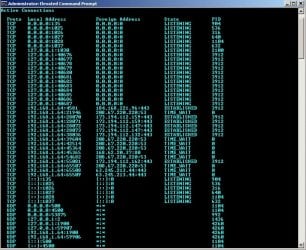
Take a screenshot (or a few screenshots if the results will not fit on one page) and post it. Also get the PID of Firefox from Task Manager and state the PID number.

Example: PID 3912

Administrator_ Elevated Command Prompt NETSTAT.jpg

Then we will see where it's connecting to.

In the above case PID
 

My Computer

Computer type
Laptop
Computer Manufacturer/Model Number
ASUS
OS
Microsoft Windows 7 Home Premium 64-bit 7601 Multiprocessor Free Service Pack 1
CPU
AMD C-60 APU with Radeon(tm) HD Graphics
Motherboard
ASUSTeK COMPUTER INC. X501U
Memory
4.00 GB
Graphics Card(s)
AMD Radeon HD 6290 Graphics
Sound Card
(1) AMD High Definition Audio Device (2) Realtek High Defi
Screen Resolution
1366 x 768 x 32 bits (4294967296 colors) @ 60 Hz
Hard Drives
Hitachi HTS545050A7E380 SATA Disk Device
Antivirus
Comodo CIS & FW, SecureAplus App Whitelisting, Threatfire
Browser
Cyberfox 64bit, Opera 64bit, Airfox
Other Info
Spy-The-Spy, HitmanPro.Alert, Norton Connect Safe, MJRegWatcher, BitDefender TrafficLight, Voodoo Shield, Zemana AntiMalware
Okay let's make this a little easier. Start Task Manager [CTRL+ALT+DEL]

Select View> Choose Columns and check PID

Launch Firefox and browse a few pages and download something.

Copy and paste this into an Elevated Command Prompt window:

netstat -ano >%USERPROFILE%\Desktop\\netstat.txt

Upload the file named netstat.txt that should appear on your desktop and attach it to your next post.

EDIT: Also state PID for Firefox.

Thanks.
 
Last edited:

My Computer

Computer type
Laptop
Computer Manufacturer/Model Number
ASUS
OS
Microsoft Windows 7 Home Premium 64-bit 7601 Multiprocessor Free Service Pack 1
CPU
AMD C-60 APU with Radeon(tm) HD Graphics
Motherboard
ASUSTeK COMPUTER INC. X501U
Memory
4.00 GB
Graphics Card(s)
AMD Radeon HD 6290 Graphics
Sound Card
(1) AMD High Definition Audio Device (2) Realtek High Defi
Screen Resolution
1366 x 768 x 32 bits (4294967296 colors) @ 60 Hz
Hard Drives
Hitachi HTS545050A7E380 SATA Disk Device
Antivirus
Comodo CIS & FW, SecureAplus App Whitelisting, Threatfire
Browser
Cyberfox 64bit, Opera 64bit, Airfox
Other Info
Spy-The-Spy, HitmanPro.Alert, Norton Connect Safe, MJRegWatcher, BitDefender TrafficLight, Voodoo Shield, Zemana AntiMalware
Back
Top