Designservice
New member
- Local time
- 12:09 PM
- Messages
- 4
I have two gmail accounts. Before Firefox 57.0.3, I had no troubles, everything worked, I could access them through the gmail "button" icon, or the word "gmail" up in the corner of the google page. The new Firefox "quantum", version 57, installed itself, and once I figured out where everything was, there was no problem. Then there was an update to 57.0.2, again, no problem.
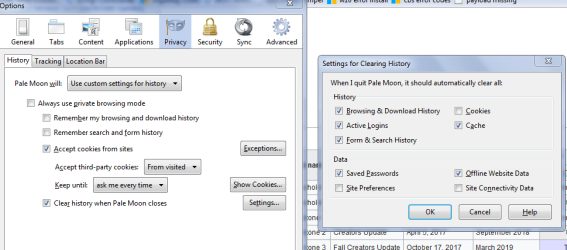
AS SOON AS the 57.0.3 update of the new Firefox was installed, the next time I opened Firefox, the gmail button icon changed to a "sign in" box. When I clicked the box, used my link, or clicked the "gmail", I got a notice that there were "problems with my cookie settings". Nothing in gmail would work, and my google "search suggestions" disappeared..
ODDLY, EVERY OTHER COOKIE in the computer seems to work fine. The ONLY cookie problem is with google.
I have a tablet computer using 8.1, and with that computer, there was no issue, it updated, it worked, no drama. Only the Win7 computer is a problem, but naturally it is the main one, and due to certain software, I cannot update it at present, until versions certified for 10 are released I do have another that still uses Vista, which I have not checked.
So the Win 7 box (a dell M6300 laptop used for 3D CAD and engineering analysis) remains a problem.
One suggested solution was clearing cookies. So I cleared the google cookie. That solved the problem, except that I had to log-in to each email account again. But, until I close Firefox, it all works the way it used to work, gmail, and all other google features work. As soon as I close firefox, that changes, and when next opened, I will have to clear the google cookie(s) again to make anything work.
The firefox forum suggested that I delete and reinstall Firefiox (typical IT style "wipe and reinstall" response). I grumbled a but I did that, including the recommendation to run windows disk cleanup a couple times.
That was not a solution. The problem has persisted through re-starts.
The Firefox forum folks gave up and sent me here, thinking that it is some sort of incompatibility with Win7. This seems unlikely, since I see no reason for such a thing to single out google to be hit. But stranger things have happened.
Any suggestions?
AS SOON AS the 57.0.3 update of the new Firefox was installed, the next time I opened Firefox, the gmail button icon changed to a "sign in" box. When I clicked the box, used my link, or clicked the "gmail", I got a notice that there were "problems with my cookie settings". Nothing in gmail would work, and my google "search suggestions" disappeared..
ODDLY, EVERY OTHER COOKIE in the computer seems to work fine. The ONLY cookie problem is with google.
I have a tablet computer using 8.1, and with that computer, there was no issue, it updated, it worked, no drama. Only the Win7 computer is a problem, but naturally it is the main one, and due to certain software, I cannot update it at present, until versions certified for 10 are released I do have another that still uses Vista, which I have not checked.
So the Win 7 box (a dell M6300 laptop used for 3D CAD and engineering analysis) remains a problem.
One suggested solution was clearing cookies. So I cleared the google cookie. That solved the problem, except that I had to log-in to each email account again. But, until I close Firefox, it all works the way it used to work, gmail, and all other google features work. As soon as I close firefox, that changes, and when next opened, I will have to clear the google cookie(s) again to make anything work.
The firefox forum suggested that I delete and reinstall Firefiox (typical IT style "wipe and reinstall" response). I grumbled a but I did that, including the recommendation to run windows disk cleanup a couple times.
That was not a solution. The problem has persisted through re-starts.
The Firefox forum folks gave up and sent me here, thinking that it is some sort of incompatibility with Win7. This seems unlikely, since I see no reason for such a thing to single out google to be hit. But stranger things have happened.
Any suggestions?
My Computer
- Computer type
- Laptop
- Computer Manufacturer/Model Number
- dell
- OS
- Win7 professional 64bit