Manage - Fix "File does not have a program associated"

How to Fix Manage "File does not have a program associated with it" Error

   Information
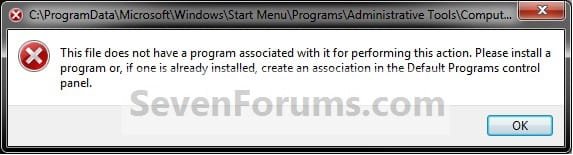
This will show you how to fix the This file does not have a program associated with it for performing this action error message you get when you click on the Manage context menu item for the Computer button in the Start Menu.
   Note
This is usually caused by trying to change the shortcut overlay arrow icon using the improper XP method of deleting the IsShortcut string value in the registry instead of using the proper Windows 7 method.

EXAMPLE: Error message
NOTE: When you right click on the Computer button in the Start Menu and click on Manage, you get this error:

"This file does not have a program associated with it for performing this action. Please install a program or, if one is already installed, create an association in the Default Programs control panel."
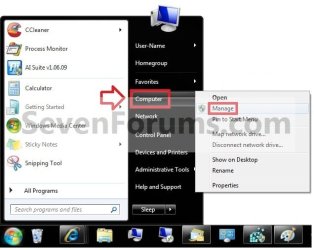
Start_Menu.jpg

Error.jpg


OPTION ONE

To Fix Using a REG File Download


1. Click on the Download button below to download the file below.
Fix_Manage_Error.reg

Download


2. Save the .reg file to the desktop.

3. Right click the downloaded .reg file on the Desktop and click on Merge.

4. Click on Run, Yes (UAC), Yes, and OK when prompted.

5. When done, you can delete the downloaded .reg file if you would like to.

   Tip
If your still get an error afterwards, then download and merge the lnk (LNK) option in the tutorial below to restore all of the default association for shortcuts (lnk), and try again.

http://www.sevenforums.com/tutorials/19449-default-file-type-associations-restore.html


OPTION TWO

To Manually Fix in Registry Editor


1. Open the Start Menu, and type regedit in the search box and press enter.

2. If prompted by UAC, then click on Yes (if administrator) or enter the administrator's password (if standard user).

3. In regedit, navigate to the location below.
HKEY_CLASSES_ROOT\lnkfile
4. In the right pane of lnkfile (LNKFILE), right click on a empty space and click on New and String Value. (see screenshot below)
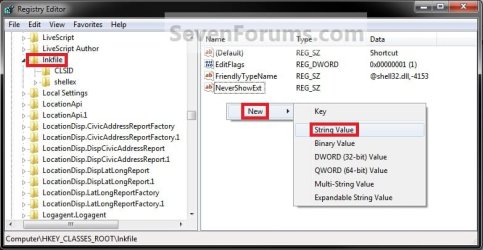
Reg2.jpg
5. Type in IsShortcut for the name and press enter. (see screenshot below)
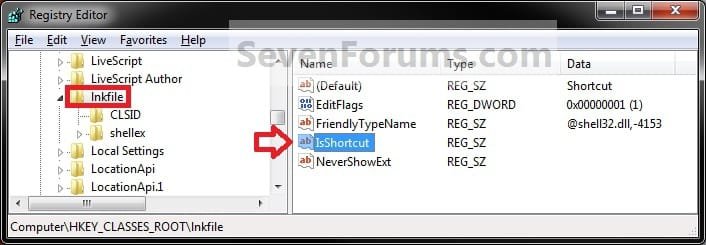
Reg1.jpg
6. In regedit, navigate to the location below.
Code:
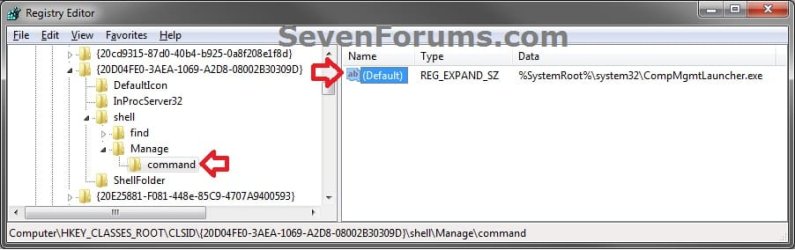
HKEY_CLASSES_ROOT\CLSID\{20D04FE0-3AEA-1069-A2D8-08002B30309D}\shell\Manage\command
Command-1.jpg
7. In the right pane of command, right click on a (Default) and click on Modify. (see screenshot above)

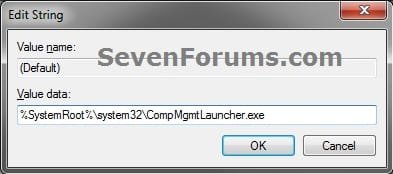
8. Type in the data below if it is not already there, and click on OK. (see screenshot below)
%SystemRoot%\system32\CompMgmtLauncher.exe
Command-2.jpg
9. Close regedit.

   Tip
If your still get an error afterwards, then download and merge the lnk (LNK) option in the tutorial below to restore all of the default association for shortcuts (lnk), and try again.

http://www.sevenforums.com/tutorials/19449-default-file-type-associations-restore.html


That's it,
Shawn


Attachments

Last edited:
Great Tutorial Shawn !!! This is something which happens in Windows 7 a lot !!!
 

My Computer

Computer Manufacturer/Model Number
Samsung NP550P5C-S02IN
OS
Windows 7 Ultimate - 64-bit | Windows 8 Pro - 64-bit
CPU
Intel® Core™ i7 Processor 3,610QM (2.30Hz, 6MB L3 Cach
Memory
8 GB
Graphics Card(s)
NVIDIA® GeForce® GT 650M 2GB Graphics, Optimus™ techno
Sound Card
SoundAlive™ JBL 3 Speakers (With sub-Woofer)
Monitor(s) Displays
39.62cm (15.6) SuperBright 300nit HD+ LED Display
Screen Resolution
1,600 x 900, Anti-Reflective
Hard Drives
1TB S-ATA II Hard Drive (5,400RPM)
I plead ignorance. When I go to the context menu for Computer and select manage, nothing happens, not even the error message. I went to the location of lnkfile in the registry, and it already shows that key there, but with no value given.

I'm not really sure what is supposed to happen when selecting Manage, so I don't know how deep I'm willing to dig for the "solution"
 

My Computer

Computer Manufacturer/Model Number
DIY
OS
W7x64 Pro, SuSe 12.1/** W7 x64 Pro, XP MCE
CPU
Phenom II 1090T w/Noctua NH-D14 /**4400+ X2 w/CM Hyper TX 3
Motherboard
ASRock 890FX Deluxe 4/**A8N-SLI
Memory
2 x 2GB Patriot PGS34g1600LLKA/**4x1GB Corsair VS
Graphics Card(s)
EVGA GTX460 SC/**EVGA 8800GTS
Sound Card
Asus Xonar D2X/**Xonar D1
Monitor(s) Displays
Acer X233H, Dell E152FPc /**LG M237-WD
Screen Resolution
1920x1080 & 1024x768/**1980x1080
Hard Drives
WDC 2TB, 1.5TB, 1TB, 500GB,Seagate 500GB , Maxtor 80GB /**500GB Seagate & WDC 1TB Black
PSU
CM RS600 w/ APC BX1000G/**Antec 500 TP w/ APC BX1000
Case
HAF922/**Antec 1040IIB
Cooling
3x200mm, 1x140 and 1x120mm/**5x80mm fans
Keyboard
Logitech Media USB/**Saitek Eclipse
Mouse
Cordless Trackman Wheel/**Ditto
Internet Speed
3.3Mbps
Other Info
SB 560 5.1 w/ Sennheiser RS140/**Creative T20 speakers, Dvico FusionHDTV7 Gold RT, Cisco E3000, HP 5510V AIO, Linksys E3000, Belkin F5U237 hub and **F5D8055 adapter
(** = 2nd rig)
I plead ignorance. When I go to the context menu for Computer and select manage, nothing happens, not even the error message. I went to the location of lnkfile in the registry, and it already shows that key there, but with no value given.

I'm not really sure what is supposed to happen when selecting Manage, so I don't know how deep I'm willing to dig for the "solution"

Hello !!

Download ShellExView (from nirsoft.net) and run it. It will scan the registry for all the shell extensions. Once the scan is over and the list is displayed, you need to spot the context menu handlers. Sort the results using "Type", so that the context menu handlers are displayed together.

The rule is to disable non-Microsoft context menu handlers *one-by-one* and verify if the problem is solved. If disabling one does not solve the problem, undo the disabled item and disable the next non-Microsoft handler. Do the same until the problem is solved and finally identify the culprit. Scroll right to see the Company Name column in ShellExView.

Hope this helps,
Captain
 

My Computer

Computer Manufacturer/Model Number
Samsung NP550P5C-S02IN
OS
Windows 7 Ultimate - 64-bit | Windows 8 Pro - 64-bit
CPU
Intel® Core™ i7 Processor 3,610QM (2.30Hz, 6MB L3 Cach
Memory
8 GB
Graphics Card(s)
NVIDIA® GeForce® GT 650M 2GB Graphics, Optimus™ techno
Sound Card
SoundAlive™ JBL 3 Speakers (With sub-Woofer)
Monitor(s) Displays
39.62cm (15.6) SuperBright 300nit HD+ LED Display
Screen Resolution
1,600 x 900, Anti-Reflective
Hard Drives
1TB S-ATA II Hard Drive (5,400RPM)
I plead ignorance. When I go to the context menu for Computer and select manage, nothing happens, not even the error message. I went to the location of lnkfile in the registry, and it already shows that key there, but with no value given.

I'm not really sure what is supposed to happen when selecting Manage, so I don't know how deep I'm willing to dig for the "solution"

Hello SM,

No problem at all. It's suppose to open Computer Management from the CompMgmtLauncher.exe file instead of compmgmt.msc file.


You might double check at the registry location below to make sure that you have the same default setting in the right pane of the screenshot below for this first before trying what Captain suggested to see if it may save you some time. If it doesn't help, then please do try what Captain suggested to see if it's a bad context menu entry instead.

I included a REG file download to restore these settings automatically if you like.

Code:
HKEY_CLASSES_ROOT\CLSID\{20D04FE0-3AEA-1069-A2D8-08002B30309D}\shell\Manage\command
Reg1.jpg
Hope this helps,
Shawn
 

Attachments

Last edited:

My Computer

Computer type
PC/Desktop
Computer Manufacturer/Model Number
Self built custom
OS
64-bit Windows 11 Pro for Workstations
CPU
Intel i7-8700K OC'd to 5 GHz
Motherboard
ASUS ROG Maximus XI Formula Z390
Memory
64 GB (4x16GB) G.SKILL TridentZ RGB DDR4 3600 MHz
Graphics Card(s)
ASUS ROG-STRIX-GTX1080TI-O11G-GAMING
Sound Card
Integrated
Monitor(s) Displays
2 x Samsung Odyssey G7 27"
Screen Resolution
2560x1440
Hard Drives
1TB Samsung 990 PRO M.2,
4TB Samsung 990 PRO PRO M.2,
TerraMaster F8 SSD Plus NAS
PSU
Seasonic Prime Titanium 850W
Case
Thermaltake Core P3
Cooling
Corsair Hydro H115i
Keyboard
Logitech wireless K800
Mouse
Logitech MX Master 4
Internet Speed
2 Gb/s Download and 100 Mb/s Upload
Antivirus
Malwarebyte Anti-Malware Premium
Browser
Google Chrome
Other Info
Logitech Z625 speaker system,
Logitech BRIO 4K Pro webcam,
HP Color LaserJet Pro MFP M477fdn,
APC SMART-UPS RT 1000 XL - SURT1000XLI,
Galaxy S23 Plus phone
thanks for the info....i had a program that kinda hijacked most of the file extension and was looking high and low for a fix....and thanks to Capt.Jack Sparrow the little program is v usful....i rebuild my index and that took care of the file extension problem

regards
 

My Computer

OS
windows 7 ultimate
Excellent tutorial, Shawn. I run into this a lot. There are many programs that change the associations.
 

My Computer

Computer Manufacturer/Model Number
Home built
OS
Windows 7 Ultimate 32 bit
CPU
Intel(R) Pentium(R) 4 CPU 3.00GHz
Motherboard
ASUS P4P800-VM Motherboard Chipset: Intel 865G + ICH5
Memory
2.50 GB RAM
Graphics Card(s)
NVIDIA GeForce 7600 GS
Sound Card
SoundMax Integrated Digital Audio (Chip)
Monitor(s) Displays
ViewSonic VX 1962 wm
Screen Resolution
1680 X 1050
Hard Drives
Seagate Barracuda 7200.10 80 GB
ST380215A ATA Device 18.6 GB
Western Digital "My Book" external hard drive 750 GB
Cooling
Fan based
Keyboard
Microsoft Comfort Curve Keyboard 2000 v10 USB
Mouse
Logitec optic USB
Internet Speed
3.01 Mb/s download 0.64 Mb/s upload
no merge option

when i right click on file i dont get a merge option what could i be doing wrong
 

My Computer

OS
windows 7
Hello Rodekyll, and welcome to Seven Forums.

Double check to make sure that the downloaded REG file has a .reg file extension. Some security programs may change it to .download instead.

If it does have a .reg file extension, then double check in Default Programs to make sure that the .reg file extension is set to have it's "Current Default" program set as Registry Editor (C:\Windows\regedit.exe). Afterwards, see if you may be able to merge the downloaded REG file.

Hope this helps,
Shawn
 

My Computer

Computer type
PC/Desktop
Computer Manufacturer/Model Number
Self built custom
OS
64-bit Windows 11 Pro for Workstations
CPU
Intel i7-8700K OC'd to 5 GHz
Motherboard
ASUS ROG Maximus XI Formula Z390
Memory
64 GB (4x16GB) G.SKILL TridentZ RGB DDR4 3600 MHz
Graphics Card(s)
ASUS ROG-STRIX-GTX1080TI-O11G-GAMING
Sound Card
Integrated
Monitor(s) Displays
2 x Samsung Odyssey G7 27"
Screen Resolution
2560x1440
Hard Drives
1TB Samsung 990 PRO M.2,
4TB Samsung 990 PRO PRO M.2,
TerraMaster F8 SSD Plus NAS
PSU
Seasonic Prime Titanium 850W
Case
Thermaltake Core P3
Cooling
Corsair Hydro H115i
Keyboard
Logitech wireless K800
Mouse
Logitech MX Master 4
Internet Speed
2 Gb/s Download and 100 Mb/s Upload
Antivirus
Malwarebyte Anti-Malware Premium
Browser
Google Chrome
Other Info
Logitech Z625 speaker system,
Logitech BRIO 4K Pro webcam,
HP Color LaserJet Pro MFP M477fdn,
APC SMART-UPS RT 1000 XL - SURT1000XLI,
Galaxy S23 Plus phone

My Computer

Computer type
PC/Desktop
Computer Manufacturer/Model Number
Self built custom
OS
64-bit Windows 11 Pro for Workstations
CPU
Intel i7-8700K OC'd to 5 GHz
Motherboard
ASUS ROG Maximus XI Formula Z390
Memory
64 GB (4x16GB) G.SKILL TridentZ RGB DDR4 3600 MHz
Graphics Card(s)
ASUS ROG-STRIX-GTX1080TI-O11G-GAMING
Sound Card
Integrated
Monitor(s) Displays
2 x Samsung Odyssey G7 27"
Screen Resolution
2560x1440
Hard Drives
1TB Samsung 990 PRO M.2,
4TB Samsung 990 PRO PRO M.2,
TerraMaster F8 SSD Plus NAS
PSU
Seasonic Prime Titanium 850W
Case
Thermaltake Core P3
Cooling
Corsair Hydro H115i
Keyboard
Logitech wireless K800
Mouse
Logitech MX Master 4
Internet Speed
2 Gb/s Download and 100 Mb/s Upload
Antivirus
Malwarebyte Anti-Malware Premium
Browser
Google Chrome
Other Info
Logitech Z625 speaker system,
Logitech BRIO 4K Pro webcam,
HP Color LaserJet Pro MFP M477fdn,
APC SMART-UPS RT 1000 XL - SURT1000XLI,
Galaxy S23 Plus phone
Hello Rodekyll,

Double check in Default Programs to make sure that the .reg file extension has it's "Current Default" program set as Registry Editor (C:\Windows\regedit.exe). Afterwards, see if you are able to merge it.

Hope this helps,
Shawn
 

My Computer

Computer type
PC/Desktop
Computer Manufacturer/Model Number
Self built custom
OS
64-bit Windows 11 Pro for Workstations
CPU
Intel i7-8700K OC'd to 5 GHz
Motherboard
ASUS ROG Maximus XI Formula Z390
Memory
64 GB (4x16GB) G.SKILL TridentZ RGB DDR4 3600 MHz
Graphics Card(s)
ASUS ROG-STRIX-GTX1080TI-O11G-GAMING
Sound Card
Integrated
Monitor(s) Displays
2 x Samsung Odyssey G7 27"
Screen Resolution
2560x1440
Hard Drives
1TB Samsung 990 PRO M.2,
4TB Samsung 990 PRO PRO M.2,
TerraMaster F8 SSD Plus NAS
PSU
Seasonic Prime Titanium 850W
Case
Thermaltake Core P3
Cooling
Corsair Hydro H115i
Keyboard
Logitech wireless K800
Mouse
Logitech MX Master 4
Internet Speed
2 Gb/s Download and 100 Mb/s Upload
Antivirus
Malwarebyte Anti-Malware Premium
Browser
Google Chrome
Other Info
Logitech Z625 speaker system,
Logitech BRIO 4K Pro webcam,
HP Color LaserJet Pro MFP M477fdn,
APC SMART-UPS RT 1000 XL - SURT1000XLI,
Galaxy S23 Plus phone
I went and manually put in the IsShortcut and still nothing there is no .reg or .exe in the default and when I download all the file in the tutorial there is no option for merge there is also no .reg in the regedit
 

My Computer

OS
windows 7
The only options I get when i right click are the following open norton internet security, restore previous version cut copy create shortcut delete rename properties. This is very fustrating
 

My Computer

OS
windows 7
Rodekyll,

As a test, temporarly disable or uninstall Norton to see if you have this issue afterwards.

If you do not have an exe or reg entry in the registry, then you may be infected with a virus or some other malware. I would recommend scanning your computer with a good antivirus program, and a good anti-malware program like the free Malwarebytes.

Afterwards, see if doing a system restore at boot using a restore point dated before you had this issue may be able to fix this for you.
 

My Computer

Computer type
PC/Desktop
Computer Manufacturer/Model Number
Self built custom
OS
64-bit Windows 11 Pro for Workstations
CPU
Intel i7-8700K OC'd to 5 GHz
Motherboard
ASUS ROG Maximus XI Formula Z390
Memory
64 GB (4x16GB) G.SKILL TridentZ RGB DDR4 3600 MHz
Graphics Card(s)
ASUS ROG-STRIX-GTX1080TI-O11G-GAMING
Sound Card
Integrated
Monitor(s) Displays
2 x Samsung Odyssey G7 27"
Screen Resolution
2560x1440
Hard Drives
1TB Samsung 990 PRO M.2,
4TB Samsung 990 PRO PRO M.2,
TerraMaster F8 SSD Plus NAS
PSU
Seasonic Prime Titanium 850W
Case
Thermaltake Core P3
Cooling
Corsair Hydro H115i
Keyboard
Logitech wireless K800
Mouse
Logitech MX Master 4
Internet Speed
2 Gb/s Download and 100 Mb/s Upload
Antivirus
Malwarebyte Anti-Malware Premium
Browser
Google Chrome
Other Info
Logitech Z625 speaker system,
Logitech BRIO 4K Pro webcam,
HP Color LaserJet Pro MFP M477fdn,
APC SMART-UPS RT 1000 XL - SURT1000XLI,
Galaxy S23 Plus phone
It Works!

thanks for the tutorial.
It works for me. I've been looking for this fix for a looooong time! :thumbsup:

Thanks once again!
Henry
 

My Computer

Computer type
Laptop
Computer Manufacturer/Model Number
Samsung NP 535U
OS
Windows 8 (64bit)
CPU
AMD A6
Memory
8GB
Hard Drives
500GB
Antivirus
avast 8.0
You're most welcome Henry, and welcome back to Seven Forums. :)
 

My Computer

Computer type
PC/Desktop
Computer Manufacturer/Model Number
Self built custom
OS
64-bit Windows 11 Pro for Workstations
CPU
Intel i7-8700K OC'd to 5 GHz
Motherboard
ASUS ROG Maximus XI Formula Z390
Memory
64 GB (4x16GB) G.SKILL TridentZ RGB DDR4 3600 MHz
Graphics Card(s)
ASUS ROG-STRIX-GTX1080TI-O11G-GAMING
Sound Card
Integrated
Monitor(s) Displays
2 x Samsung Odyssey G7 27"
Screen Resolution
2560x1440
Hard Drives
1TB Samsung 990 PRO M.2,
4TB Samsung 990 PRO PRO M.2,
TerraMaster F8 SSD Plus NAS
PSU
Seasonic Prime Titanium 850W
Case
Thermaltake Core P3
Cooling
Corsair Hydro H115i
Keyboard
Logitech wireless K800
Mouse
Logitech MX Master 4
Internet Speed
2 Gb/s Download and 100 Mb/s Upload
Antivirus
Malwarebyte Anti-Malware Premium
Browser
Google Chrome
Other Info
Logitech Z625 speaker system,
Logitech BRIO 4K Pro webcam,
HP Color LaserJet Pro MFP M477fdn,
APC SMART-UPS RT 1000 XL - SURT1000XLI,
Galaxy S23 Plus phone
Hi :D
Here is another workaround :
Go to :
RUN\REGEDIT\[HKEY_CLASSES_ROOT\CLSID\{20D04FE0-3AEA-1069-A2D8-08002B30309D}\shell\Manage\command]
and modify the existing value in
mmc %SystemRoot%\system32\compmgmt.msc
Works at once , no need to reboot .
Best regards ,
Fanaudi .;)
 

My Computer

Computer type
PC/Desktop
Computer Manufacturer/Model Number
HP Pavilion H8
OS
Windows 7 Ultimate 64 bit
CPU
Intel 7 quadcore
Motherboard
Pegatron 2AB5
Memory
14 ram DDR3
Graphics Card(s)
ASUS gtx 650
Sound Card
Realtec HD
Monitor(s) Displays
HP x22Led
Screen Resolution
1440x900 ( max 1920 x 1080 )
Hard Drives
WDC 500 Gb Sata 3
Hitachi 2T sata 3
several external drives .
PSU
HP 450 W
Case
HP
Cooling
regular fans
Keyboard
Microsoft Azerty
Mouse
Microsoft wireless
Internet Speed
cable high speed
Antivirus
Windows Defender ,
Browser
IE 11
Other Info
Several malware and spy killers ( MalwareBytes , Spy Hunter 4 , Eset on line , Adware Removal Tool ).
Thank you Fanaudi. I have added this into the tutorial to cover this as a possible cause as well. :)
 
Last edited:

My Computer

Computer type
PC/Desktop
Computer Manufacturer/Model Number
Self built custom
OS
64-bit Windows 11 Pro for Workstations
CPU
Intel i7-8700K OC'd to 5 GHz
Motherboard
ASUS ROG Maximus XI Formula Z390
Memory
64 GB (4x16GB) G.SKILL TridentZ RGB DDR4 3600 MHz
Graphics Card(s)
ASUS ROG-STRIX-GTX1080TI-O11G-GAMING
Sound Card
Integrated
Monitor(s) Displays
2 x Samsung Odyssey G7 27"
Screen Resolution
2560x1440
Hard Drives
1TB Samsung 990 PRO M.2,
4TB Samsung 990 PRO PRO M.2,
TerraMaster F8 SSD Plus NAS
PSU
Seasonic Prime Titanium 850W
Case
Thermaltake Core P3
Cooling
Corsair Hydro H115i
Keyboard
Logitech wireless K800
Mouse
Logitech MX Master 4
Internet Speed
2 Gb/s Download and 100 Mb/s Upload
Antivirus
Malwarebyte Anti-Malware Premium
Browser
Google Chrome
Other Info
Logitech Z625 speaker system,
Logitech BRIO 4K Pro webcam,
HP Color LaserJet Pro MFP M477fdn,
APC SMART-UPS RT 1000 XL - SURT1000XLI,
Galaxy S23 Plus phone
Back
Top