
Mass Effect 2 Directx 10 problem

Anyway are you signed into your EA/Bioware account when playing?

not that i`m aware of, it doesnt ask me to sign into anything

Actually the game should be asking you to connect to the Cerberus Network. That's where you find out about updates and new DLC.
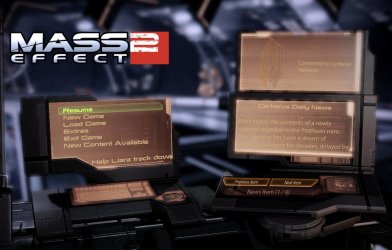
ME Network connection.JPG

Er never mind. If your game didn't come with a Cerberus code or you chose not to purchase one, then you wouldn't have it.
 

My Computer

Computer type
PC/Desktop
Computer Manufacturer/Model Number
Custom built by me.
OS
Windows 10 Pro
CPU
Intel Core i7-4770K (3.5Ghz)
Motherboard
Gigabyte G1 Sniper 5 (F10 Bios)
Memory
32 gig Corsair Dominator Platinum (4x8Gig)
Graphics Card(s)
Sapphire Tri-X R9 Fury
Sound Card
Soundblaster ZXR
Monitor(s) Displays
NEC PA242W 24" LCD Monitor
Screen Resolution
1920 x 1200
Hard Drives
Primary - Samsung 850 Pro (512gig), Samsung 840 Pro (256gig), 2TB WD Caviar Black.
PSU
EVGA Supernova 1000 G2
Case
Cooler Master HAF X
Cooling
Corsair H100i with Corsair Air Series SP120 Quiet Fans
Keyboard
Logitech Wireless Wave
Mouse
Logitech Performance MX
Internet Speed
High Speed Cable
Antivirus
Norton Security
Browser
IE11
Other Info
Memory Timings - 1866MHz @ 9-9-9-27-1T @ 1.5 volts
ahhhhh, it did come with a cerberus code, but when i try to connect it says "the connection timed out or was interrupted, try again later"
 

My Computer

OS
windows home premium x64
CPU
amd athlonx2 5600b 2.91Ghz
Memory
4 gb
Graphics Card(s)
nvidia geforce 8800gs
Unfortunately I don't have an answer right now. Maybe later.
 

My Computer

Computer type
PC/Desktop
Computer Manufacturer/Model Number
Custom built by me.
OS
Windows 10 Pro
CPU
Intel Core i7-4770K (3.5Ghz)
Motherboard
Gigabyte G1 Sniper 5 (F10 Bios)
Memory
32 gig Corsair Dominator Platinum (4x8Gig)
Graphics Card(s)
Sapphire Tri-X R9 Fury
Sound Card
Soundblaster ZXR
Monitor(s) Displays
NEC PA242W 24" LCD Monitor
Screen Resolution
1920 x 1200
Hard Drives
Primary - Samsung 850 Pro (512gig), Samsung 840 Pro (256gig), 2TB WD Caviar Black.
PSU
EVGA Supernova 1000 G2
Case
Cooler Master HAF X
Cooling
Corsair H100i with Corsair Air Series SP120 Quiet Fans
Keyboard
Logitech Wireless Wave
Mouse
Logitech Performance MX
Internet Speed
High Speed Cable
Antivirus
Norton Security
Browser
IE11
Other Info
Memory Timings - 1866MHz @ 9-9-9-27-1T @ 1.5 volts
no worries, appreciate any help at any time :-)
 

My Computer

OS
windows home premium x64
CPU
amd athlonx2 5600b 2.91Ghz
Memory
4 gb
Graphics Card(s)
nvidia geforce 8800gs

My Computer

Computer type
PC/Desktop
Computer Manufacturer/Model Number
Custom built by me.
OS
Windows 10 Pro
CPU
Intel Core i7-4770K (3.5Ghz)
Motherboard
Gigabyte G1 Sniper 5 (F10 Bios)
Memory
32 gig Corsair Dominator Platinum (4x8Gig)
Graphics Card(s)
Sapphire Tri-X R9 Fury
Sound Card
Soundblaster ZXR
Monitor(s) Displays
NEC PA242W 24" LCD Monitor
Screen Resolution
1920 x 1200
Hard Drives
Primary - Samsung 850 Pro (512gig), Samsung 840 Pro (256gig), 2TB WD Caviar Black.
PSU
EVGA Supernova 1000 G2
Case
Cooler Master HAF X
Cooling
Corsair H100i with Corsair Air Series SP120 Quiet Fans
Keyboard
Logitech Wireless Wave
Mouse
Logitech Performance MX
Internet Speed
High Speed Cable
Antivirus
Norton Security
Browser
IE11
Other Info
Memory Timings - 1866MHz @ 9-9-9-27-1T @ 1.5 volts
already patched up to the latest, have tried the dedicate internet option with no luck......not compitent enough to fiddle with me firewall, dont get me wrong i know my way around a pc but dont wanna fiddle
 

My Computer

OS
windows home premium x64
CPU
amd athlonx2 5600b 2.91Ghz
Memory
4 gb
Graphics Card(s)
nvidia geforce 8800gs
Well I don't have any other suggestions for your cerberus connection. As for the keyboard issues, that's a new one and I have no clue there either. Sorry.
 

My Computer

Computer type
PC/Desktop
Computer Manufacturer/Model Number
Custom built by me.
OS
Windows 10 Pro
CPU
Intel Core i7-4770K (3.5Ghz)
Motherboard
Gigabyte G1 Sniper 5 (F10 Bios)
Memory
32 gig Corsair Dominator Platinum (4x8Gig)
Graphics Card(s)
Sapphire Tri-X R9 Fury
Sound Card
Soundblaster ZXR
Monitor(s) Displays
NEC PA242W 24" LCD Monitor
Screen Resolution
1920 x 1200
Hard Drives
Primary - Samsung 850 Pro (512gig), Samsung 840 Pro (256gig), 2TB WD Caviar Black.
PSU
EVGA Supernova 1000 G2
Case
Cooler Master HAF X
Cooling
Corsair H100i with Corsair Air Series SP120 Quiet Fans
Keyboard
Logitech Wireless Wave
Mouse
Logitech Performance MX
Internet Speed
High Speed Cable
Antivirus
Norton Security
Browser
IE11
Other Info
Memory Timings - 1866MHz @ 9-9-9-27-1T @ 1.5 volts
Interesting, got a respomse from EA "Unfortunately the game is not tested on Windows 7 or 64 bit environment"
 

My Computer

OS
windows home premium x64
CPU
amd athlonx2 5600b 2.91Ghz
Memory
4 gb
Graphics Card(s)
nvidia geforce 8800gs
Interesting, got a respomse from EA "Unfortunately the game is not tested on Windows 7 or 64 bit environment"

That's the standard BS "we don't have a clue so we'll blame Microsoft" answer.

I guarantee they won't make that a public statement because they don't want to lose sales. I'll also bet you that if you called them and made the statement that you was thinking about getting the game but wasn't sure it would work on Windows 7, they would tell you its fine and that lots of people are playing the game on 7.

In short, they're being lazy about troubleshooting the game issue. And whoever told you the game didn't support Windows 7 should learn to read the system specs:
Minimum System Requirements


  • Windows XP, Vista, or 7
  • 1.8GHz Core 2 Duo Intel or equivalent AMD CPU
  • 1 GB RAM (XP) or 2 GB RAM (Vista, Windows 7)
  • NVIDIA GeForce 6800 or better with 256 MB of video memory (7300, 8100, 8200, 8300, 8400, and 9300 are below minimum system requirements)
  • ATI X1600 Pro or better with 256 MB of video memory (HD3200, and HD4350 are below minimum system requirements)
  • Shader Model 3.0 required
  • 100% DirectX compatible sound card and drivers
  • DirectX August 2008
Recommended System Requirements


  • Windows XP, Vista, or 7
  • 2.6+ GHz Core 2 Duo Intel or equivalent AMD CPU
  • 2 GB RAM
  • ATI Radeon HD 2900 XT, NVIDIA GeForce 8800 GT, or better recommended
  • 100% DirectX compatible sound card and drivers
  • DirectX August 2008

BioWare | Mass Effect | Information : FAQ

I would reply back to that response with the above link ;)
 

My Computer

Computer type
PC/Desktop
Computer Manufacturer/Model Number
Custom built by me.
OS
Windows 10 Pro
CPU
Intel Core i7-4770K (3.5Ghz)
Motherboard
Gigabyte G1 Sniper 5 (F10 Bios)
Memory
32 gig Corsair Dominator Platinum (4x8Gig)
Graphics Card(s)
Sapphire Tri-X R9 Fury
Sound Card
Soundblaster ZXR
Monitor(s) Displays
NEC PA242W 24" LCD Monitor
Screen Resolution
1920 x 1200
Hard Drives
Primary - Samsung 850 Pro (512gig), Samsung 840 Pro (256gig), 2TB WD Caviar Black.
PSU
EVGA Supernova 1000 G2
Case
Cooler Master HAF X
Cooling
Corsair H100i with Corsair Air Series SP120 Quiet Fans
Keyboard
Logitech Wireless Wave
Mouse
Logitech Performance MX
Internet Speed
High Speed Cable
Antivirus
Norton Security
Browser
IE11
Other Info
Memory Timings - 1866MHz @ 9-9-9-27-1T @ 1.5 volts
AHHH!!!
I recall having troubles with my Cerebus Code as well. It simply would not activate in game.

Granted, at the time it was at release day and all the servers were hammered but ...


Have you made a Bioware account?

The Cerebus Code etc does not need to be registered in game.
In fact, I had to do mine online, and then the game logged in just fine after that. (After logging into my account in game of course, and setting to auto log on)

Unfortunately I can not remember if it was under Register Games, or Redeem Promo Code.

I do recall I needed to register everything there though, then all in game worked fine.

Also after you do that, in the Registered Game Promototion will be extra DLCs and a few other goodies, all of which depends on what version and where you purchased your ME2 game.

https://social.bioware.com/login.php?return_url=/user_home.php


And yea, that a pretty lame way out of helping you. ME2 specifically states Win7 support.
I would almost be tempted to reply with, "Then why do you advertise the game supports Win7?"
 

My Computer

Computer Manufacturer/Model Number
Custom (Self Build)
OS
Windows 7 Home Premium 64bit
CPU
Intel Core i7 2700k
Motherboard
eVGA P67 SLI
Memory
8GB Mushkin Redline Ridgebacks @1866
Graphics Card(s)
EVGA GTX570 SC
Sound Card
XiFi Titanium HD
Monitor(s) Displays
LG W2453V
Screen Resolution
1920x1080
Hard Drives
Intel 320 80GB -- Intel X25-V 40GB --WD Black 1TB x2 -- WD Blue 640GB
PSU
Seasonic x750
Case
Corsair 600T SE White
Cooling
eVGA Superclocked CPU Cooler
Keyboard
Saitek Cyborg
Antivirus
Kaspersky
Browser
IE
Other Info
LG BD/DVD
i have replied with the link, i shall let you know the next excuse they come up with lol
 

My Computer

OS
windows home premium x64
CPU
amd athlonx2 5600b 2.91Ghz
Memory
4 gb
Graphics Card(s)
nvidia geforce 8800gs
AHHH!!!
I recall having troubles with my Cerebus Code as well. It simply would not activate in game.

Granted, at the time it was at release day and all the servers were hammered but ...


Have you made a Bioware account?

The Cerebus Code etc does not need to be registered in game.
In fact, I had to do mine online, and then the game logged in just fine after that. (After logging into my account in game of course, and setting to auto log on)

Wishmaster it is possible to play the game without a cerberus network connection since all it does it allow for "additional" content like DLC's

From the game's readme file....

Cerberus Network
----------------
Mass Effect 2 comes with an activation code for the Cerberus Network.
This feature allows players to gain access to additional bonus content
which is downloadable from the EA Store. In order to activate the Cerberus
Network, follow the main menu prompts and create (or use an existing) EA
Online account. Once this is complete, use the activation code included
with your copy of Mass Effect.
This code is designed for one-time-use only. If you have purchased a
pre-owned copy of the game, you may purchase a new activation code from the EA Store
.

My point is I don't think not having a cerberus connection is causing game issues.... unless EA "secretly" tied this to the game as a way of authentication :eek:

I would agree with you though and register the game and activate the cerberus network just to eliminate that possibility.

Something else as well.....

Game Known Issues
-----------------
Mass Effect 2 does not run optimally on a computer with a single core
CPU. We recommend that Mass Effect 2 PC is not played on a system
with a single core CPU.

solowka is your processor a single core processor?
 

My Computer

Computer type
PC/Desktop
Computer Manufacturer/Model Number
Custom built by me.
OS
Windows 10 Pro
CPU
Intel Core i7-4770K (3.5Ghz)
Motherboard
Gigabyte G1 Sniper 5 (F10 Bios)
Memory
32 gig Corsair Dominator Platinum (4x8Gig)
Graphics Card(s)
Sapphire Tri-X R9 Fury
Sound Card
Soundblaster ZXR
Monitor(s) Displays
NEC PA242W 24" LCD Monitor
Screen Resolution
1920 x 1200
Hard Drives
Primary - Samsung 850 Pro (512gig), Samsung 840 Pro (256gig), 2TB WD Caviar Black.
PSU
EVGA Supernova 1000 G2
Case
Cooler Master HAF X
Cooling
Corsair H100i with Corsair Air Series SP120 Quiet Fans
Keyboard
Logitech Wireless Wave
Mouse
Logitech Performance MX
Internet Speed
High Speed Cable
Antivirus
Norton Security
Browser
IE11
Other Info
Memory Timings - 1866MHz @ 9-9-9-27-1T @ 1.5 volts
Its an amd athlon x2 5600b 2.91Gh, and i managed to connect this mornig to the cerberus network, found me firewall had blocked the file attempting to connect. Anyhoo, game still doesnt work lol
 

My Computer

OS
windows home premium x64
CPU
amd athlonx2 5600b 2.91Ghz
Memory
4 gb
Graphics Card(s)
nvidia geforce 8800gs
Its an amd athlon x2 5600b 2.91Gh

I know nothing about AMD processors, so again, is it single or duo core? Sorry.

I'm "guessing" the x2 means duo, but that's a "presumption"
 

My Computer

Computer type
PC/Desktop
Computer Manufacturer/Model Number
Custom built by me.
OS
Windows 10 Pro
CPU
Intel Core i7-4770K (3.5Ghz)
Motherboard
Gigabyte G1 Sniper 5 (F10 Bios)
Memory
32 gig Corsair Dominator Platinum (4x8Gig)
Graphics Card(s)
Sapphire Tri-X R9 Fury
Sound Card
Soundblaster ZXR
Monitor(s) Displays
NEC PA242W 24" LCD Monitor
Screen Resolution
1920 x 1200
Hard Drives
Primary - Samsung 850 Pro (512gig), Samsung 840 Pro (256gig), 2TB WD Caviar Black.
PSU
EVGA Supernova 1000 G2
Case
Cooler Master HAF X
Cooling
Corsair H100i with Corsair Air Series SP120 Quiet Fans
Keyboard
Logitech Wireless Wave
Mouse
Logitech Performance MX
Internet Speed
High Speed Cable
Antivirus
Norton Security
Browser
IE11
Other Info
Memory Timings - 1866MHz @ 9-9-9-27-1T @ 1.5 volts
I know nothing about AMD processors, so again, is it single or duo core? Sorry.

I'm "guessing" the x2 means duo, but that's a "presumption"

sorry, yeah its a duel core
 

My Computer

OS
windows home premium x64
CPU
amd athlonx2 5600b 2.91Ghz
Memory
4 gb
Graphics Card(s)
nvidia geforce 8800gs
I may have misunderstood. True it isn't needed, but I thought was having trouble activating it.

I just recall being unable to within the game for whatever reason.
 

My Computer

Computer Manufacturer/Model Number
Custom (Self Build)
OS
Windows 7 Home Premium 64bit
CPU
Intel Core i7 2700k
Motherboard
eVGA P67 SLI
Memory
8GB Mushkin Redline Ridgebacks @1866
Graphics Card(s)
EVGA GTX570 SC
Sound Card
XiFi Titanium HD
Monitor(s) Displays
LG W2453V
Screen Resolution
1920x1080
Hard Drives
Intel 320 80GB -- Intel X25-V 40GB --WD Black 1TB x2 -- WD Blue 640GB
PSU
Seasonic x750
Case
Corsair 600T SE White
Cooling
eVGA Superclocked CPU Cooler
Keyboard
Saitek Cyborg
Antivirus
Kaspersky
Browser
IE
Other Info
LG BD/DVD
I may have misunderstood. True it isn't needed, but I thought was having trouble activating it.

I just recall being unable to within the game for whatever reason.

You didn't misunderstand. He was having trouble activating it. My statement was more of an FYI thing.

And to be honest, I was first under the impression you HAD to have it - thus my post here - http://www.sevenforums.com/gaming/136069-mass-effect-2-directx-10-problem-3.html#post1176040

Note the never mind at the bottom :o
 

My Computer

Computer type
PC/Desktop
Computer Manufacturer/Model Number
Custom built by me.
OS
Windows 10 Pro
CPU
Intel Core i7-4770K (3.5Ghz)
Motherboard
Gigabyte G1 Sniper 5 (F10 Bios)
Memory
32 gig Corsair Dominator Platinum (4x8Gig)
Graphics Card(s)
Sapphire Tri-X R9 Fury
Sound Card
Soundblaster ZXR
Monitor(s) Displays
NEC PA242W 24" LCD Monitor
Screen Resolution
1920 x 1200
Hard Drives
Primary - Samsung 850 Pro (512gig), Samsung 840 Pro (256gig), 2TB WD Caviar Black.
PSU
EVGA Supernova 1000 G2
Case
Cooler Master HAF X
Cooling
Corsair H100i with Corsair Air Series SP120 Quiet Fans
Keyboard
Logitech Wireless Wave
Mouse
Logitech Performance MX
Internet Speed
High Speed Cable
Antivirus
Norton Security
Browser
IE11
Other Info
Memory Timings - 1866MHz @ 9-9-9-27-1T @ 1.5 volts
This may or may not help, but I thought of something else because of another post.

Where is the game installed?

Some games have issues if installed to Program Files or Program Files (x86) since these are protected folders.


I've never really had issues with any Games, since I have started installing to a separate drive. Or anywhere else other than the Program Files folders.
I wonder if this may be the reason?

Im not even sure this would cause the OPs problems, perhaps not, but just a thought.
 

My Computer

Computer Manufacturer/Model Number
Custom (Self Build)
OS
Windows 7 Home Premium 64bit
CPU
Intel Core i7 2700k
Motherboard
eVGA P67 SLI
Memory
8GB Mushkin Redline Ridgebacks @1866
Graphics Card(s)
EVGA GTX570 SC
Sound Card
XiFi Titanium HD
Monitor(s) Displays
LG W2453V
Screen Resolution
1920x1080
Hard Drives
Intel 320 80GB -- Intel X25-V 40GB --WD Black 1TB x2 -- WD Blue 640GB
PSU
Seasonic x750
Case
Corsair 600T SE White
Cooling
eVGA Superclocked CPU Cooler
Keyboard
Saitek Cyborg
Antivirus
Kaspersky
Browser
IE
Other Info
LG BD/DVD
Worth a try.

I actually have all my games on a seperate drive that has it's own "Program Files (x86)" folder.

I did tell him to look through my Tips on Troubleshooting Game Issues. Under step#14

14Permissions – For various reasons Windows security features may limit permissions to folders or drives. If you’re having issues starting or saving games, check to make sure your user name is included in the "Security" tab and has full read/write permission for the game’s folder(s). Requires Admin rights! See Tutorial on Sharing and Permissions – If you don’t want/need to share the folder just do steps 1-7

Though this would mostly be applicable if he was using a different directory as under "C" he should have full permissions anyway, but you never know ;)
 

My Computer

Computer type
PC/Desktop
Computer Manufacturer/Model Number
Custom built by me.
OS
Windows 10 Pro
CPU
Intel Core i7-4770K (3.5Ghz)
Motherboard
Gigabyte G1 Sniper 5 (F10 Bios)
Memory
32 gig Corsair Dominator Platinum (4x8Gig)
Graphics Card(s)
Sapphire Tri-X R9 Fury
Sound Card
Soundblaster ZXR
Monitor(s) Displays
NEC PA242W 24" LCD Monitor
Screen Resolution
1920 x 1200
Hard Drives
Primary - Samsung 850 Pro (512gig), Samsung 840 Pro (256gig), 2TB WD Caviar Black.
PSU
EVGA Supernova 1000 G2
Case
Cooler Master HAF X
Cooling
Corsair H100i with Corsair Air Series SP120 Quiet Fans
Keyboard
Logitech Wireless Wave
Mouse
Logitech Performance MX
Internet Speed
High Speed Cable
Antivirus
Norton Security
Browser
IE11
Other Info
Memory Timings - 1866MHz @ 9-9-9-27-1T @ 1.5 volts
yeah, i have full permission to the folder, as i`m the only one who signs in, i saw no need to security check things, btw got a response from EA about the Win7 recommended OS, and they completely side stepped the issue lol

"Thank you for contacting Electronic Arts.

I can understand your concern and I do apologies for the difficulties that you are experiencing with the game. However, due to the nature of your issue, more time is required for investigation. I apologize for any prolonged delays this might cause, but please rest assured that we are trying to handle your issue in a timely manner. During this time, you may still update your incident with additional information that might help us resolve your issue without causing any additional delay. To update your incident click the link above that says, “To view or update your question from our support site, click here.”

We appreciate the opportunity to assist you and look forward to getting you back in the game! "
 

My Computer

OS
windows home premium x64
CPU
amd athlonx2 5600b 2.91Ghz
Memory
4 gb
Graphics Card(s)
nvidia geforce 8800gs
Back
Top